Creating Observables
This section explains methods that create Observables.
-
toObservable( )— convert an Iterable into an Observable -
from( )— convert an Iterable or a Future into an Observable -
just( )— convert an object into an Observable that emits that object -
create( )— create an Observable from scratch by means of a closure -
range( )— create an Observable that emits a range of sequential integers -
empty( )— create an Observable that emits nothing and then completes -
error( )— create an Observable that emits nothing and then signals an error -
never( )— create an Observable that emits nothing at all

You can convert an object that supports the Iterable<> interface into a Observable that emits each iterable item in the object, simply by passing the object into the toObservable( ) or from( ) methods, for example:
myObservable = Observable.toObservable(myIterable);or
myObservable = Observable.from(myIterable);You can also do this with arrays, for example:
myArray = [1, 2, 3, 4, 5];
myArrayObservable = Observable.toObservable(myArray);
or
myArrayObservable = Observable.from(myArray);This converts the sequence of values in the iterable object or array into a sequence of objects emitted, one at a time, by an Observable.
An empty iterable (or array) can be converted to an Observable in this way. The resulting Observable will invoke onCompleted() without first invoking onNext().
The from( ) method is also capable of transforming a Future into an Observable. (This is not true of from()'s cousin toObservable( ).)

To convert any object into a Observable that emits that object, pass that object into the just( ) method.
// Observable emits "some string" as a single item
def observableThatEmitsAString = Observable.just("some string");
// Observable emits the list [1, 2, 3, 4, 5] as a single item
def observableThatEmitsAList = Observable.just([1, 2, 3, 4, 5]);
This has some similarities to the toObservable( ) method, but note that if you pass an iterable to toObservable( ), it will convert an iterable object into a Observable that emits each of the items in the iterable, one at a time, while the just( ) method would convert the iterable into a Observable that emits the entire iterable as a single item.
If you pass nothing or null to just( ), the resulting Observable will not merely call onCompleted( ) without calling onNext( ). It will instead call onNext( null ) before calling onCompleted( ).

You can create an Observable from scratch, by using the create( ) method. You pass this method a closure that accepts as a parameter the Observer that is passed to a Observable’s subscribe( ) method. Write the closure you pass to create( ) so that it behaves as an Observable --- calling the passed-in Observer’s onNext( ), onError( ), and onCompleted( ) methods appropriately. For example:
def myObservable = Observable.create({ anObserver ->
  anObserver.onNext('One');
  anObserver.onNext('Two');
  anObserver.onNext('Three');
  anObserver.onNext('Four');
  anObserver.onCompleted();
})
NOTE: A well-formed Observable must call either the observer’s onCompleted( ) method exactly once or its onError( ) method exactly once, and must not thereafter call any of the observer’s other methods.

To create an Observable that emits a range of sequential integers, pass the starting integer and the number of integers to emit to the range( ) method.
// myObservable emits the integers 5, 6, and 7 before completing:
def myObservable = Observable.range(5, 3);-
empty( )creates an Observable that does not emit any objects but instead immediately calls the observer’sonCompleted( )closure.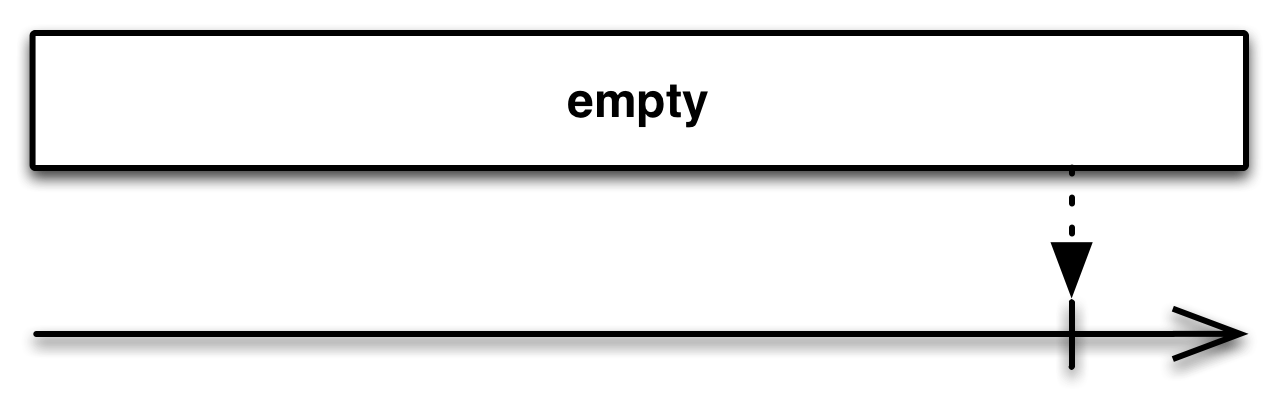
-
error( )creates an Observable that does not emit any objects but instead immediately calls the observer’sonError( )closure.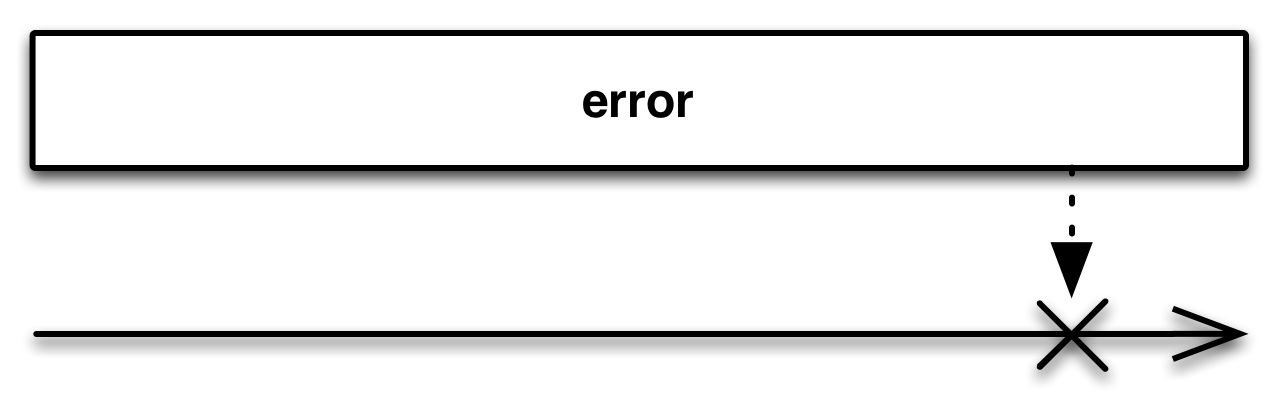
-
never( )creates an Observable that does not emit any objects, nor does it call either the observer’sonCompleted( )oronError( )closures.
myWriter.println("*** empty() ***");
Observable.empty().subscribe(
  [ onNext:{ myWriter.println(it); },
    onCompleted:{ myWriter.println("Sequence complete"); },
    onError:{ myWriter.println("Error encountered"); } ]
);

myWriter.println("*** error() ***");
Observable.error().subscribe(
  [ onNext:{ myWriter.println(it); },
    onCompleted:{ myWriter.println("Sequence complete"); },
    onError:{ myWriter.println("Error encountered"); } ]
);

myWriter.println("*** never() ***");
Observable.never().subscribe(
  [ onNext:{ myWriter.println(it); },
    onCompleted:{ myWriter.println("Sequence complete"); },
    onError:{ myWriter.println("Error encountered"); } ]
);
myWriter.println("*** END ***");
*** empty() ***
Sequence complete
*** error() ***
Error encountered
*** never() ***
*** END ***