VisionFieldSystem — is a modular and flexible field of view (FOV) system for Unity that combines visual cone rendering with target detection, taking obstacles into account. It supports various vision shapes and is fully configurable through the Inspector. Perfect for enemies, turrets, NPCs, guards, and any AI perception systems.
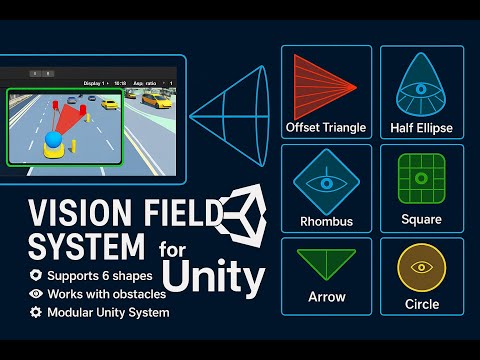

| Type | Mesh + Detector Pair | Preview |
|---|---|---|
| Circle | VisionFieldMesh + TargetFieldDetector |
 |
| Arrow | VisionArrowMesh + TargetArrowDetector |
 |
| Half Ellipse | VisionHalfEllipseMesh + TargetHalfEllipseDetector |
 |
| Triangle | VisionOffsetTriangleMesh + TargetOffsetTriangleDetector |
 |
| Square | VisionSquareMesh + TargetSquareDetector |
 |
| Rhombus | VisionRhombusMesh + TargetRhombusDetector |
 |
1.3.mp4
1.2.mp4
1.1.mp4
- 🧩 Visual FOV using procedural mesh
- 🎯 Raycast-based target detection with obstacle mask
- 🧪 Debug Gizmos for ray tracing and hit visualization
- 🛠️ Fully customizable parameters (width, height, segments, tilt, offset)
- 🎥 Runtime detection events:
OnTargetDetected,OnTargetLost - 🌗
RaycastOffsetto avoid surface clipping - ♻️ Clean modular architecture: easy to extend
- Add a Vision Mesh component (e.g.
VisionFieldMesh) to a GameObject. - Attach the corresponding Target Detector (e.g.
TargetFieldDetector). - Set required masks and dimensions in the inspector.
- Enable Is Show Debug to see rays and hit points in the Scene.
- Subscribe to target events:
🗂️ Project Structure
bash
Assets/
└── Code/
    ├── Cameras/
    ├── Editors/
    ├── Enemies/
    ├── Infrastructure/
    ├── Levels/
    ├── Players/
    ├── UI/
    ├── Utilities/
    ├── Weapon/
    └── VisionCone/
        ├── Detectors/
        ├── Factory/
        ├── Provider/
└── Visions/_detector.OnTargetDetected += enemy => Debug.Log($"🎯 Seen: {enemy.name}");
_detector.OnTargetLost += enemy => Debug.Log($"👀 Lost: {enemy.name}");- Unity 2021.3+
- URP or Built-in RP
- DOTween (optional, for demo animations)