| id | samples-microservices | |||||||||
|---|---|---|---|---|---|---|---|---|---|---|
| title | E-commerce Microservices | |||||||||
| sidebar_label | E-commerce Microservices | |||||||||
| description | The following sample microservices app shows how Keploy helps you test microservices applications. In the sample microservices app, we have 3 microservices:user service, product service, and order service, each with its own MySQL database, plus LocalStack SQS for messaging. | |||||||||
| tags |
|
|||||||||
| keyword |
|
import EnterpriseInstallReminder from '@site/src/components/EnterpriseInstallReminder'; import ProductTier from '@site/src/components/ProductTier';
import CollapsibleCode from '@site/src/components/CollapsibleCode';
This guide will walk you through testing an E-commerce microservices application with Keploy. The app contains three microservices:
- User Service
- Product Service
- Order Service
Each service uses its own MySQL database, and LocalStack SQS is used for messaging. Keploy will help you automatically generate test cases and mocks for these services.
First, clone the repository that contains the sample app:
git clone https://github.com/keploy/ecommerce_sample_app.git
cd ecommerce_sample_app
Note: You can view the architecture diagram of the application
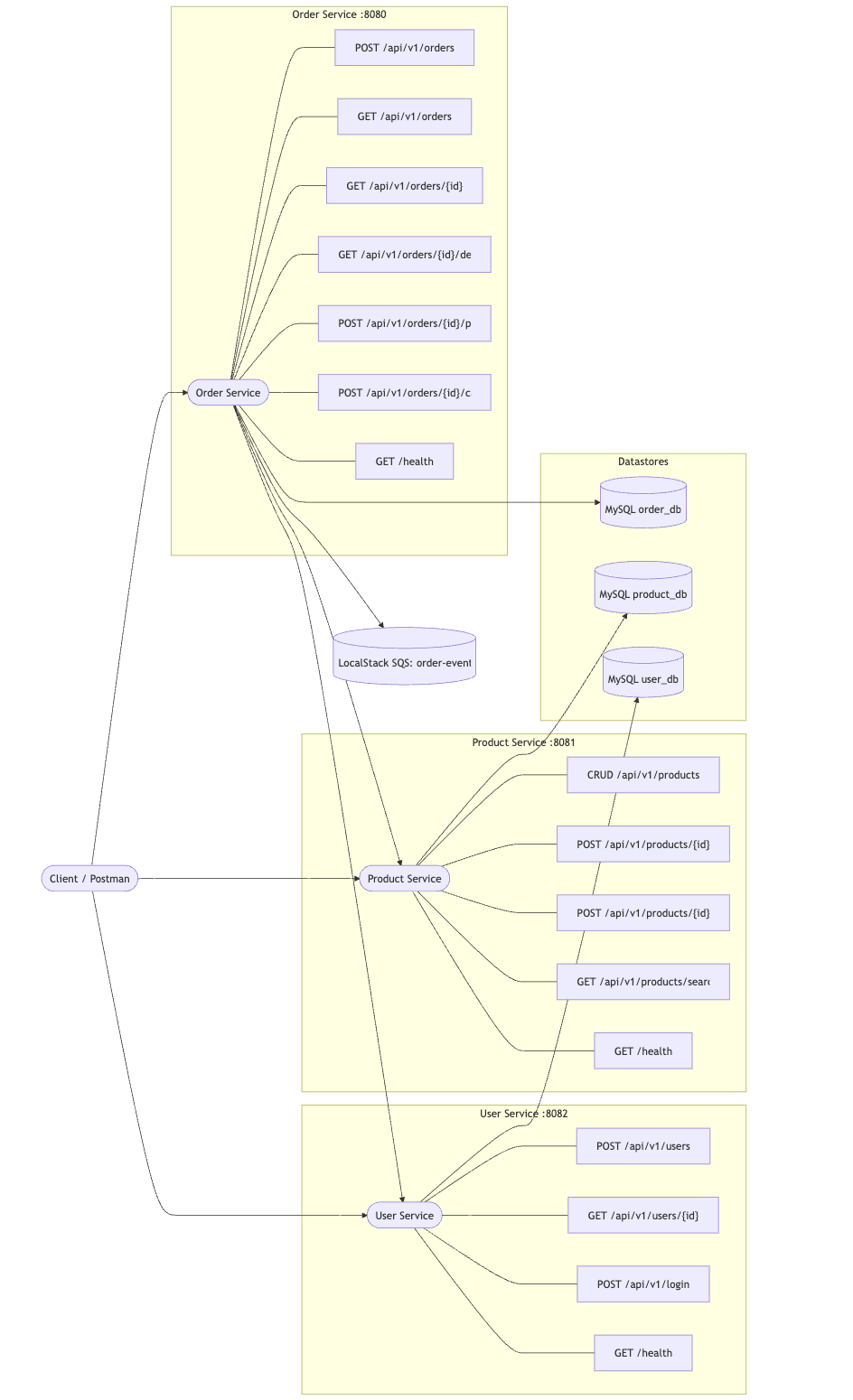
The app is set up with Docker Compose, making it easy to start all services together. Let’s begin with the Order Service.
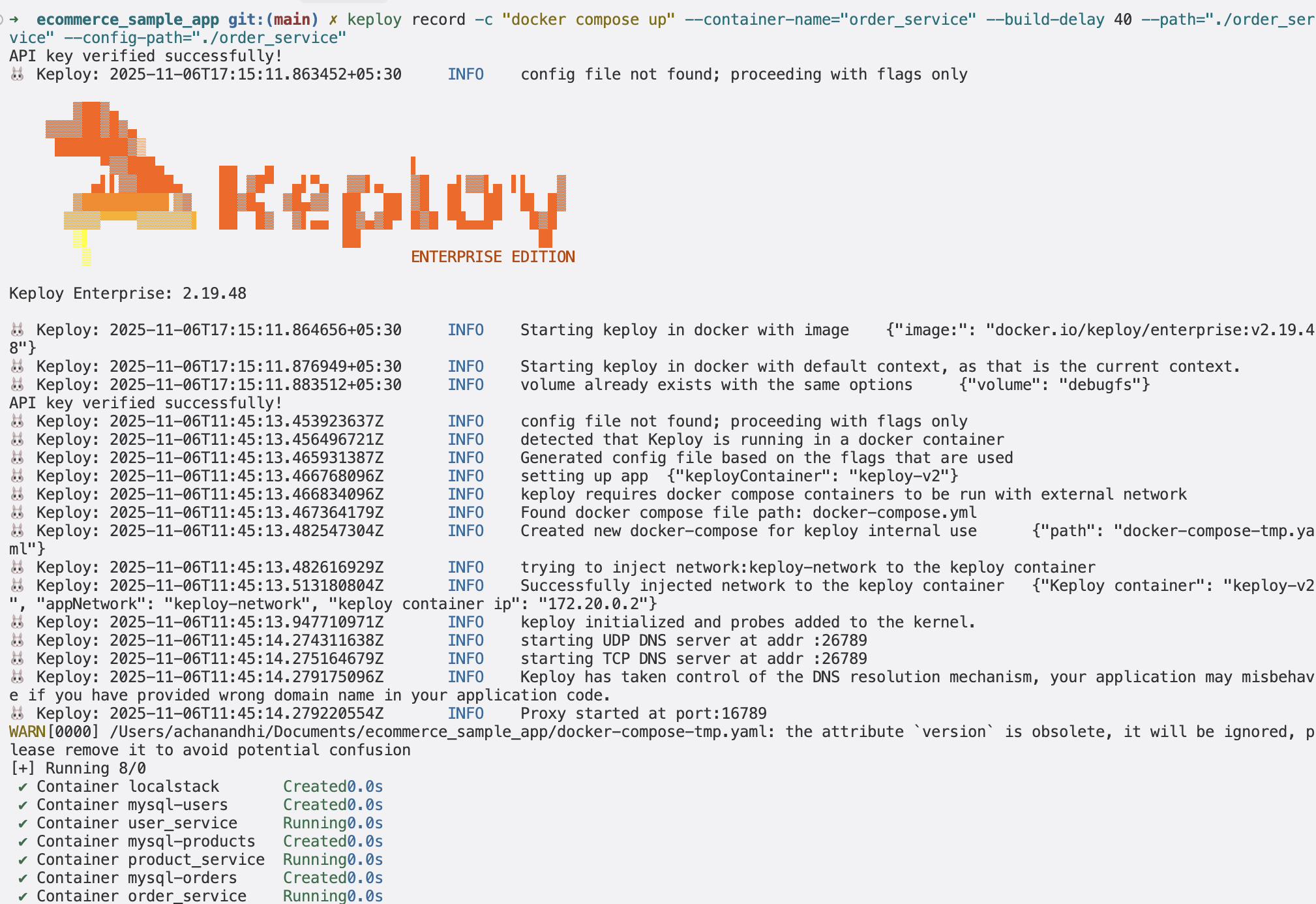
To start capturing API test cases, use the following command:
keploy record -c "docker compose up" --container-name="order_service" --build-delay 40 --path="./order_service" --config-path="./order_service"<img src="https://keploy-devrel.s3.us-west-2.amazonaws.com/keploy_record_microservices.png" alt="Sample Keploy Record Microservices" width="100%" style={{ borderRadius: '5px' }} />
Now the question arises how to make an API call? We’ve made it simple! You can just import the Postman collection and try sending an API call.
https://github.com/keploy/ecommerce_sample_app/tree/main/postman
(or)
<CollapsibleCode language="json" previewLines={10} code={` { "info": { "name": "E-commerce Full Stack (Gateway + Microservices)", "schema": "https://schema.getpostman.com/json/collection/v2.1.0/collection.json" }, "item": [ { "name": "API Gateway", "item": [ { "name": "Login (via user service path)", "request": { "method": "POST", "header": [ { "key": "Content-Type", "value": "application/json" } ], "url": { "raw": "{{gw_base}}/api/v1/login", "host": [ "{{gw_base}}" ], "path": [ "api", "v1", "login" ] }, "body": { "mode": "raw", "raw": "{\n "username": "{{username}}",\n "password": "p@ssw0rd"\n}" } }, "event": [ { "listen": "test", "script": { "exec": [ "var j={}; try{ j=pm.response.json(); }catch(e){}; if (j.token) pm.environment.set('jwt', j.token);", "pm.test('got token', function(){ pm.expect(!!pm.environment.get('jwt')).to.be.true; });" ], "type": "text/javascript" } } ] }, { "name": "Create address", "request": { "method": "POST", "header": [ { "key": "Content-Type", "value": "application/json" }, { "key": "Authorization", "value": "Bearer {{jwt}}" } ], "url": { "raw": "{{gw_base}}/api/v1/users/{{user_id}}/addresses", "host": [ "{{gw_base}}" ], "path": [ "api", "v1", "users", "{{user_id}}", "addresses" ] }, "body": { "mode": "raw", "raw": "{\n "line1": "1 Main St",\n "city": "NYC",\n "state": "NY",\n "postal_code": "10001",\n "country": "US",\n "phone": "+1-555-0000",\n "is_default": true\n}" } } }, { "name": "Delete user (via gateway)", "request": { "method": "DELETE", "header": [ { "key": "Authorization", "value": "Bearer {{jwt}}" } ], "url": { "raw": "{{gw_base}}/api/v1/users/{{user_id}}", "host": [ "{{gw_base}}" ], "path": [ "api", "v1", "users", "{{user_id}}" ] } } }, { "name": "Create order (shippingAddressId)", "request": { "method": "POST", "header": [ { "key": "Content-Type", "value": "application/json" }, { "key": "Idempotency-Key", "value": "{{idempotency_key}}" }, { "key": "Authorization", "value": "Bearer {{jwt}}" } ], "url": { "raw": "{{gw_base}}/api/v1/orders", "host": [ "{{gw_base}}" ], "path": [ "api", "v1", "orders" ] }, "body": { "mode": "raw", "raw": "{\n "userId": "{{user_id}}",\n "items": [ { "productId": "{{product_id}}", "quantity": 1 } ],\n "shippingAddressId": "{{address_id}}"\n}" } } }, { "name": "Get order details (enriched)", "request": { "method": "GET", "header": [ { "key": "Authorization", "value": "Bearer {{jwt}}" } ], "url": { "raw": "{{gw_base}}/api/v1/orders/{{order_id}}/details", "host": [ "{{gw_base}}" ], "path": [ "api", "v1", "orders", "{{order_id}}", "details" ] } } } ] }, { "name": "User Service", "item": [ { "name": "Login (get token)", "request": { "method": "POST", "header": [ { "key": "Content-Type", "value": "application/json" } ], "url": { "raw": "{{user_base}}/login", "host": [ "{{user_base}}" ], "path": [ "login" ] }, "body": { "mode": "raw", "raw": "{\n "username": "{{username}}",\n "password": "p@ssw0rd"\n}" } }, "event": [ { "listen": "test", "script": { "exec": [ "var j={}; try{ j=pm.response.json(); }catch(e){};", "if (j.token) pm.environment.set('jwt', j.token);", "pm.test('got token', function(){ pm.expect(!!pm.environment.get('jwt')).to.be.true; });" ], "type": "text/javascript" } } ] }, { "name": "Create user", "request": { "method": "POST", "header": [ { "key": "Content-Type", "value": "application/json" }, { "key": "Authorization", "value": "Bearer {{jwt}}" } ], "url": { "raw": "{{user_base}}/users", "host": [ "{{user_base}}" ], "path": [ "users" ] }, "body": { "mode": "raw", "raw": "{\n "username": "{{username}}",\n "email": "{{email}}",\n "password": "p@ssw0rd"\n}" } }, "event": [ { "listen": "test", "script": { "exec": [ "pm.test('user created', function(){", " pm.expect([200,201]).to.include(pm.response.code);", "});", "var json = {}; try { json = pm.response.json(); } catch(e){}", "if (json.id) { pm.environment.set('last_user_id', json.id); }" ], "type": "text/javascript" } } ] }, { "name": "Add address (default)", "request": { "method": "POST", "header": [ { "key": "Content-Type", "value": "application/json" }, { "key": "Authorization", "value": "Bearer {{jwt}}" } ], "url": { "raw": "{{user_base}}/users/{{last_user_id}}/addresses", "host": [ "{{user_base}}" ], "path": [ "users", "{{last_user_id}}", "addresses" ] }, "body": { "mode": "raw", "raw": "{\n "line1": "1 Main St",\n "city": "NYC",\n "state": "NY",\n "postal_code": "10001",\n "country": "US",\n "phone": "+1-555-0000",\n "is_default": true\n}" } }, "event": [ { "listen": "test", "script": { "exec": [ "pm.test('address created', function(){ pm.expect([200,201]).to.include(pm.response.code); });", "var j={}; try{ j=pm.response.json(); }catch(e){}; if (j.id){ pm.environment.set('last_address_id', j.id); }" ], "type": "text/javascript" } } ] }, { "name": "List addresses", "request": { "method": "GET", "header": [ { "key": "Authorization", "value": "Bearer {{jwt}}" } ], "url": { "raw": "{{user_base}}/users/{{last_user_id}}/addresses", "host": [ "{{user_base}}" ], "path": [ "users", "{{last_user_id}}", "addresses" ] } }, "event": [ { "listen": "test", "script": { "exec": [ "pm.test('addresses listed', function(){ pm.expect(pm.response.code).to.eql(200); });" ], "type": "text/javascript" } } ] }, { "name": "Get user", "request": { "method": "GET", "header": [ { "key": "Authorization", "value": "Bearer {{jwt}}" } ], "url": { "raw": "{{user_base}}/users/{{last_user_id}}", "host": [ "{{user_base}}" ], "path": [ "users", "{{last_user_id}}" ] } }, "event": [ { "listen": "test", "script": { "exec": [ "pm.test('user fetched', function(){ pm.expect(pm.response.code).to.eql(200); });" ], "type": "text/javascript" } } ] }, { "name": "Delete user", "request": { "method": "DELETE", "header": [ { "key": "Authorization", "value": "Bearer {{jwt}}" } ], "url": { "raw": "{{user_base}}/users/{{last_user_id}}", "host": [ "{{user_base}}" ], "path": [ "users", "{{last_user_id}}" ] } }, "event": [ { "listen": "test", "script": { "exec": [ "pm.test('deleted or not found', function(){ pm.expect([200,404]).to.include(pm.response.code); });" ], "type": "text/javascript" } } ] }, { "name": "Login", "request": { "method": "POST", "header": [ { "key": "Content-Type", "value": "application/json" } ], "url": { "raw": "{{user_base}}/login", "host": [ "{{user_base}}" ], "path": [ "login" ] }, "body": { "mode": "raw", "raw": "{\n "username": "{{username}}",\n "password": "p@ssw0rd"\n}" } }, "event": [ { "listen": "test", "script": { "exec": [ "pm.test('login ok', function(){ pm.expect(pm.response.code).to.eql(200); });" ], "type": "text/javascript" } } ] } ] }, { "name": "Product Service", "event": [ { "listen": "prerequest", "script": { "exec": [ "if (!pm.environment.get('laptop_id') || !pm.environment.get('mouse_id')) {", " // Fetch products once to seed IDs", " pm.sendRequest({ url: pm.environment.get('product_base') + '/products', method: 'GET' }, function(err, res) {", " if (!err) {", " var arr = res.json();", " if (arr && arr.length) {", " pm.environment.set('laptop_id', arr[0].id);", " if (arr.length > 1) pm.environment.set('mouse_id', arr[1].id);", " }", " }", " });", "}" ], "type": "text/javascript" } } ], "item": [ { "name": "List products", "request": { "method": "GET", "header": [ { "key": "Authorization", "value": "Bearer {{jwt}}" } ], "url": { "raw": "{{product_base}}/products", "host": [ "{{product_base}}" ], "path": [ "products" ] } } }, { "name": "Get product (laptop)", "request": { "method": "GET", "header": [ { "key": "Authorization", "value": "Bearer {{jwt}}" } ], "url": { "raw": "{{product_base}}/products/{{laptop_id}}", "host": [ "{{product_base}}" ], "path": [ "products", "{{laptop_id}}" ] } } }, { "name": "Reserve laptop", "request": { "method": "POST", "header": [ { "key": "Content-Type", "value": "application/json" }, { "key": "Authorization", "value": "Bearer {{jwt}}" } ], "url": { "raw": "{{product_base}}/products/{{laptop_id}}/reserve", "host": [ "{{product_base}}" ], "path": [ "products", "{{laptop_id}}", "reserve" ] }, "body": { "mode": "raw", "raw": "{\n "quantity": 1\n}" } } }, { "name": "Release laptop", "request": { "method": "POST", "header": [ { "key": "Content-Type", "value": "application/json" }, { "key": "Authorization", "value": "Bearer {{jwt}}" } ], "url": { "raw": "{{product_base}}/products/{{laptop_id}}/release", "host": [ "{{product_base}}" ], "path": [ "products", "{{laptop_id}}", "release" ] }, "body": { "mode": "raw", "raw": "{\n "quantity": 1\n}" } } } ] }, { "name": "Order Service", "item": [ { "name": "Create order (laptop x1)", "request": { "method": "POST", "header": [ { "key": "Content-Type", "value": "application/json" }, { "key": "Idempotency-Key", "value": "{{idempotency_key}}" }, { "key": "Authorization", "value": "Bearer {{jwt}}" } ], "url": { "raw": "{{order_base}}/orders", "host": [ "{{order_base}}" ], "path": [ "orders" ] }, "body": { "mode": "raw", "raw": "{\n "userId": "{{last_user_id}}",\n "items": [ { "productId": "{{laptop_id}}", "quantity": 1 } ],\n "shippingAddressId": "{{last_address_id}}"\n}" } }, "event": [ { "listen": "prerequest", "script": { "exec": [ "if (!pm.environment.get('idempotency_key')) { pm.environment.set('idempotency_key', pm.variables.replaceIn('{{$guid}}')); }" ], "type": "text/javascript" } }, { "listen": "test", "script": { "exec": [ "pm.test('order created', function(){ pm.expect([200,201]).to.include(pm.response.code); });", "var j={}; try{ j=pm.response.json(); }catch(e){}; if (j.id){ pm.environment.set('last_order_id', j.id); }" ], "type": "text/javascript" } } ] }, { "name": "Create order (fallback default addr)", "request": { "method": "POST", "header": [ { "key": "Content-Type", "value": "application/json" }, { "key": "Idempotency-Key", "value": "{{idempotency_key}}" }, { "key": "Authorization", "value": "Bearer {{jwt}}" } ], "url": { "raw": "{{order_base}}/orders", "host": [ "{{order_base}}" ], "path": [ "orders" ] }, "body": { "mode": "raw", "raw": "{\n "userId": "{{last_user_id}}",\n "items": [ { "productId": "{{mouse_id}}", "quantity": 1 } ]\n}" } }, "event": [ { "listen": "prerequest", "script": { "exec": [ "pm.environment.set('idempotency_key', pm.variables.replaceIn('{{$guid}}'));" ], "type": "text/javascript" } }, { "listen": "test", "script": { "exec": [ "pm.test('order created', function(){ pm.expect([200,201]).to.include(pm.response.code); });" ], "type": "text/javascript" } } ] }, { "name": "List my orders", "request": { "method": "GET", "header": [ { "key": "Authorization", "value": "Bearer {{jwt}}" } ], "url": { "raw": "{{order_base}}/orders?userId={{last_user_id}}&limit=5", "host": [ "{{order_base}}" ], "path": [ "orders" ], "query": [ { "key": "userId", "value": "{{last_user_id}}" }, { "key": "limit", "value": "5" } ] } }, "event": [ { "listen": "test", "script": { "exec": [ "pm.test('listed', function(){ pm.expect(pm.response.code).to.eql(200); });" ], "type": "text/javascript" } } ] }, { "name": "Get order", "request": { "method": "GET", "header": [ { "key": "Authorization", "value": "Bearer {{jwt}}" } ], "url": { "raw": "{{order_base}}/orders/{{last_order_id}}", "host": [ "{{order_base}}" ], "path": [ "orders", "{{last_order_id}}" ] } }, "event": [ { "listen": "test", "script": { "exec": [ "pm.test('got order', function(){ pm.expect(pm.response.code).to.eql(200); });" ], "type": "text/javascript" } } ] }, { "name": "Get order details (enriched)", "request": { "method": "GET", "header": [ { "key": "Authorization", "value": "Bearer {{jwt}}" } ], "url": { "raw": "{{order_base}}/orders/{{last_order_id}}/details", "host": [ "{{order_base}}" ], "path": [ "orders", "{{last_order_id}}", "details" ] } }, "event": [ { "listen": "test", "script": { "exec": [ "pm.test('got details', function(){ pm.expect(pm.response.code).to.eql(200); });" ], "type": "text/javascript" } } ] }, { "name": "Pay order", "request": { "method": "POST", "header": [ { "key": "Authorization", "value": "Bearer {{jwt}}" } ], "url": { "raw": "{{order_base}}/orders/{{last_order_id}}/pay", "host": [ "{{order_base}}" ], "path": [ "orders", "{{last_order_id}}", "pay" ] } }, "event": [ { "listen": "test", "script": { "exec": [ "pm.test('paid or already paid', function(){ pm.expect([200].concat([200])).to.include(pm.response.code); });" ], "type": "text/javascript" } } ] }, { "name": "Cancel order (expect 409 if paid)", "request": { "method": "POST", "header": [ { "key": "Authorization", "value": "Bearer {{jwt}}" } ], "url": { "raw": "{{order_base}}/orders/{{last_order_id}}/cancel", "host": [ "{{order_base}}" ], "path": [ "orders", "{{last_order_id}}", "cancel" ] } }, "event": [ { "listen": "test", "script": { "exec": [ "pm.test('cancel response code', function(){ pm.expect([200,409,404]).to.include(pm.response.code); });" ], "type": "text/javascript" } } ] }, { "name": "Create order idempotent (mouse x2)", "request": { "method": "POST", "header": [ { "key": "Content-Type", "value": "application/json" }, { "key": "Idempotency-Key", "value": "{{idempotency_key}}" }, { "key": "Authorization", "value": "Bearer {{jwt}}" } ], "url": { "raw": "{{order_base}}/orders", "host": [ "{{order_base}}" ], "path": [ "orders" ] }, "body": { "mode": "raw", "raw": "{\n "userId": "{{last_user_id}}",\n "items": [ { "productId": "{{mouse_id}}", "quantity": 2 } ]\n}" } }, "event": [ { "listen": "prerequest", "script": { "exec": [ "if (!pm.environment.get('idempotency_key')) { pm.environment.set('idempotency_key', pm.variables.replaceIn('{{$guid}}')); }" ], "type": "text/javascript" } }, { "listen": "test", "script": { "exec": [ "pm.test('order created idempotently', function(){ pm.expect([200,201]).to.include(pm.response.code); });" ], "type": "text/javascript" } } ] } ] } ], "variable": [ { "key": "gw_base", "value": "http://localhost:8083" }, { "key": "username", "value": "alice" }, { "key": "email", "value": "alice@example.com" }, { "key": "user_base", "value": "http://localhost:8082/api/v1" }, { "key": "product_base", "value": "http://localhost:8081/api/v1" }, { "key": "order_base", "value": "http://localhost:8080/api/v1" }, { "key": "jwt", "value": "" }, { "key": "last_user_id", "value": "" }, { "key": "laptop_id", "value": "" }, { "key": "mouse_id", "value": "" }, { "key": "idempotency_key", "value": "" } ] }
...
` }
/>
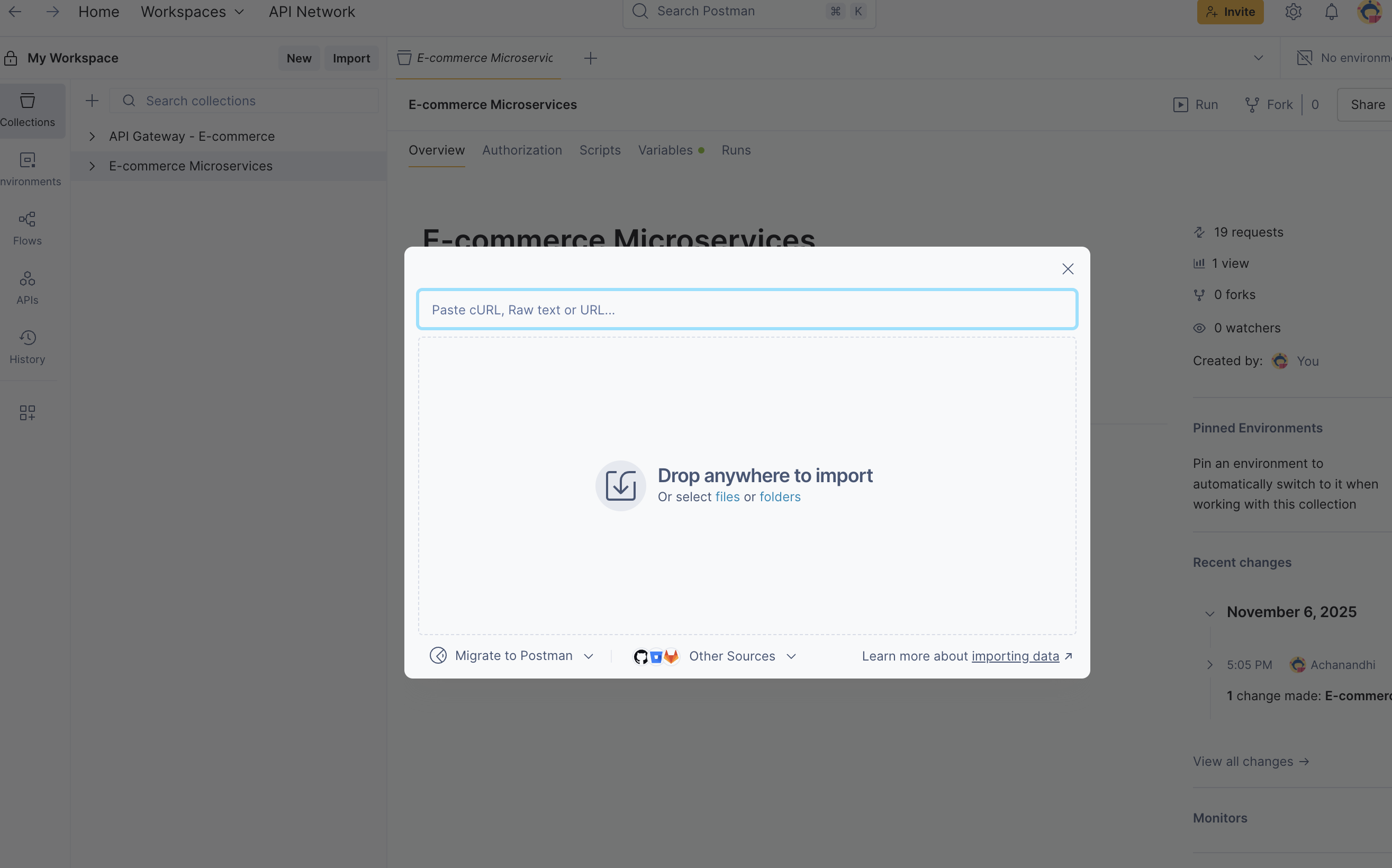
Step 1: If you’ve already downloaded the collection, upload it.
<img src="https://keploy-devrel.s3.us-west-2.amazonaws.com/microservices_postman_1.png" alt="Sample Keploy Record Microservices" width="100%" style={{ borderRadius: '5px' }} />
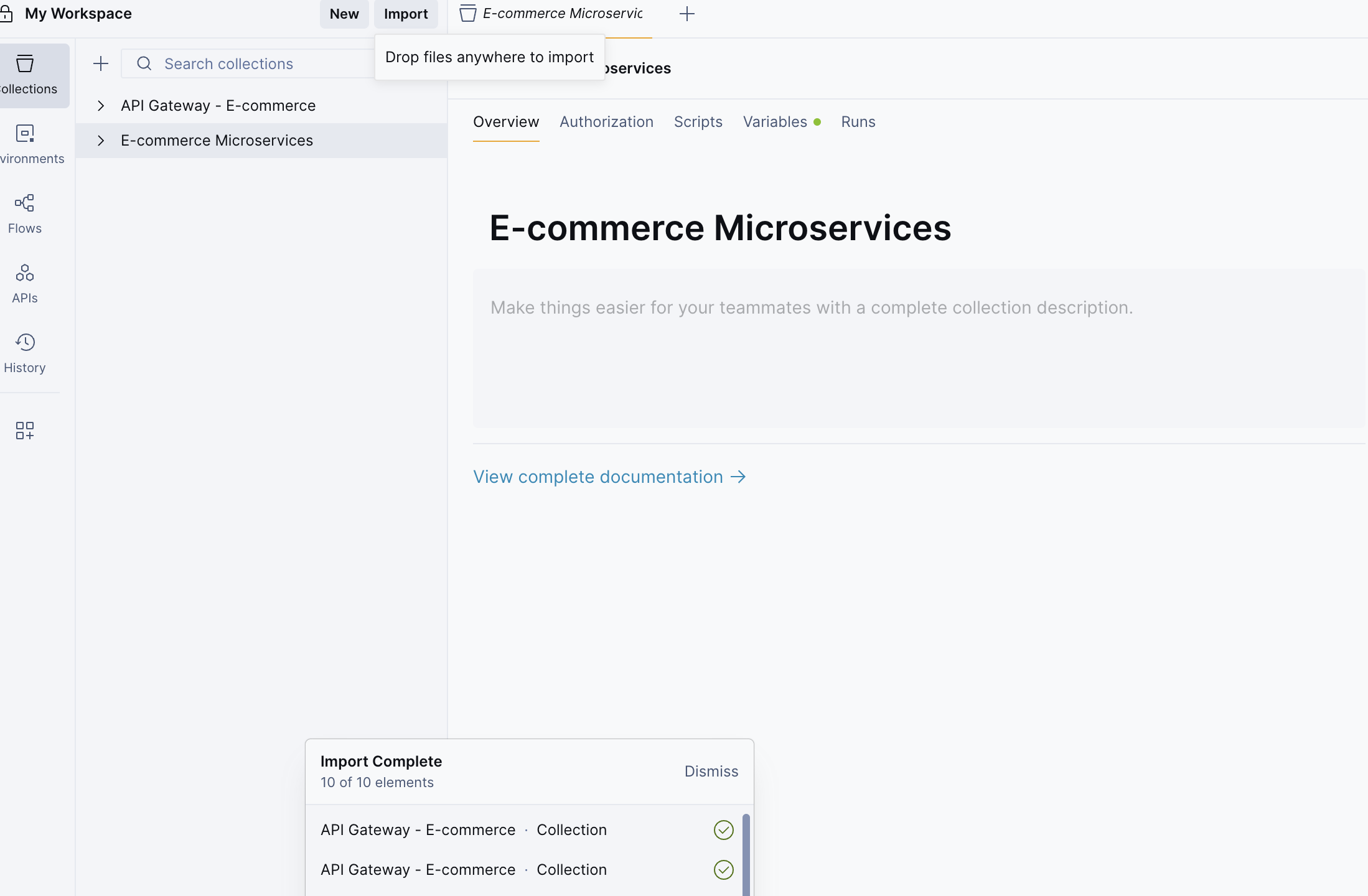
Step 2: After the upload is complete, you will see the Ecommerce Microservices collection in the left panel. Open the collection to continue.
<img src="https://keploy-devrel.s3.us-west-2.amazonaws.com/microservices_postman_2.png" alt="Sample Keploy Record Microservices" width="100%" style={{ borderRadius: '5px' }} />
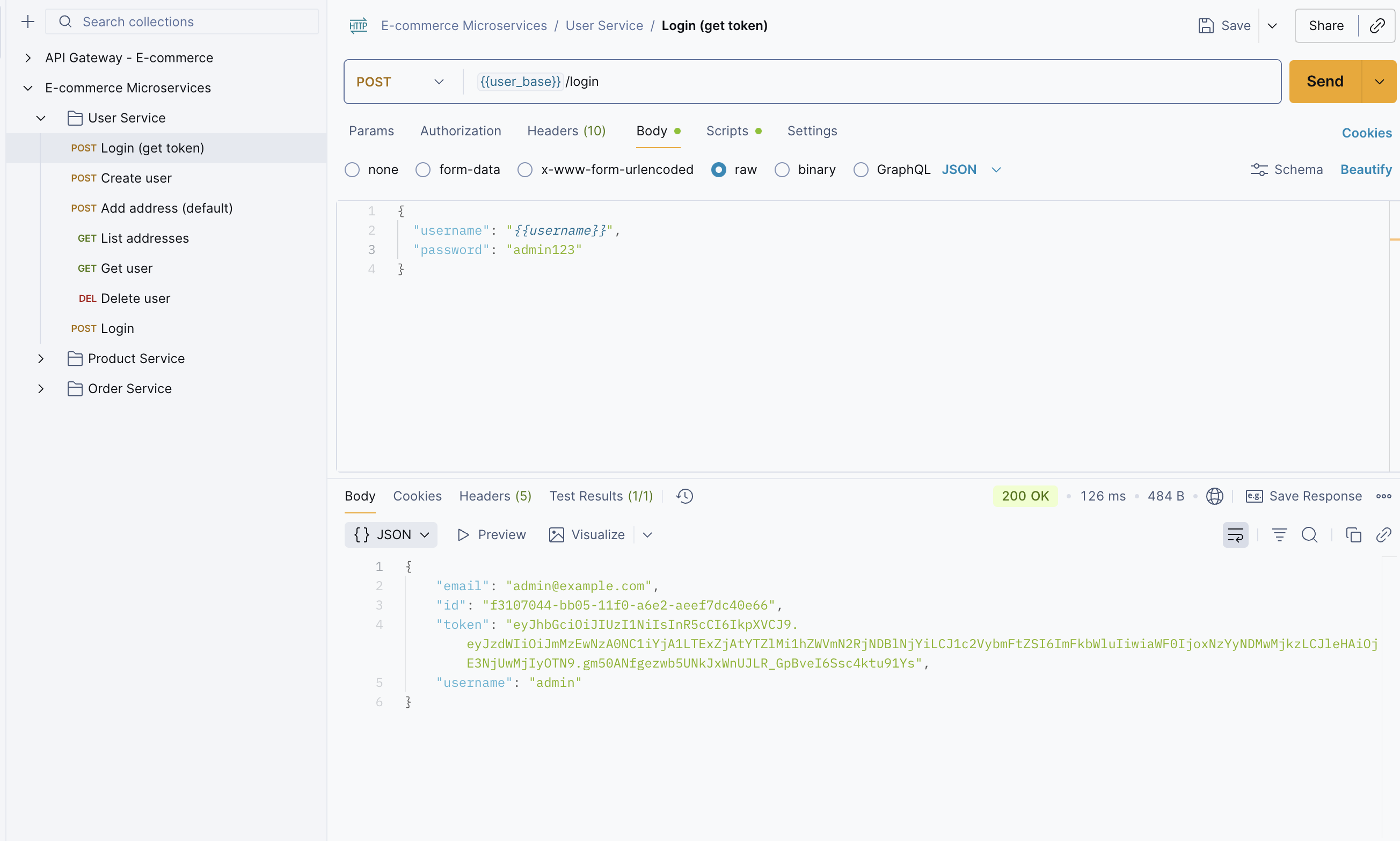
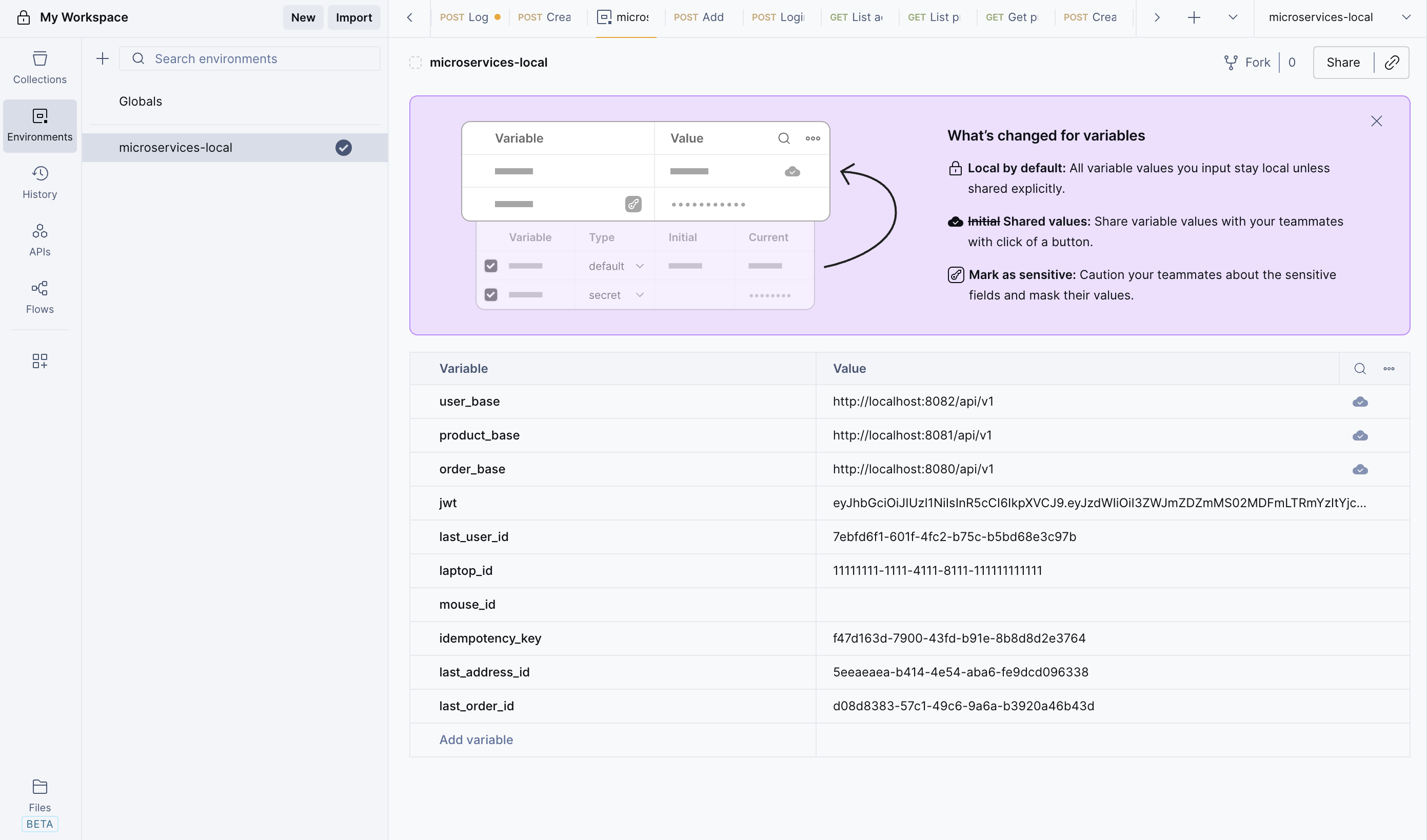
Step 3: Before sending any requests, ensure you have generated a JWT token. Click on User Service. Use the Login API and enter the following credentials: Username: admin and Password: admin123. After a successful login, you will receive a JWT token. Copy the token and paste it into your Environment settings.
<img src="https://keploy-devrel.s3.us-west-2.amazonaws.com/microservices_postman_3.png" alt="Sample Keploy Record Microservices" width="100%" style={{ borderRadius: '5px' }} />
<img src="https://keploy-devrel.s3.us-west-2.amazonaws.com/keploy-jwt-microservices.png" alt="Sample Keploy Record Microservices" width="100%" style={{ borderRadius: '5px' }} />
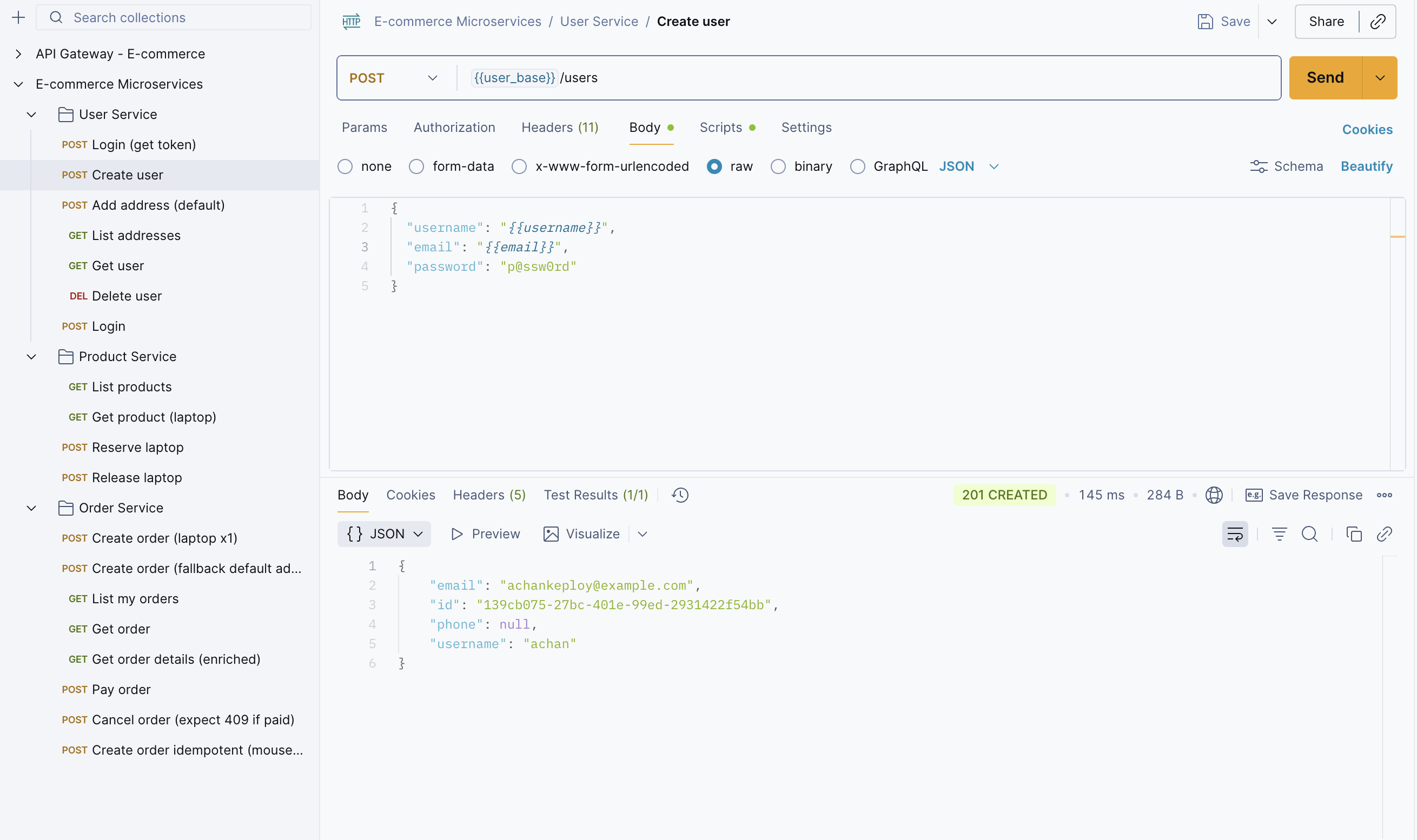
Step 4: We need to create a user before placing an order. So, create a user using the Create User API.
<img src="https://keploy-devrel.s3.us-west-2.amazonaws.com/microservices_postman_4.png" alt="Sample Keploy Record Microservices" width="100%" style={{ borderRadius: '5px' }} />
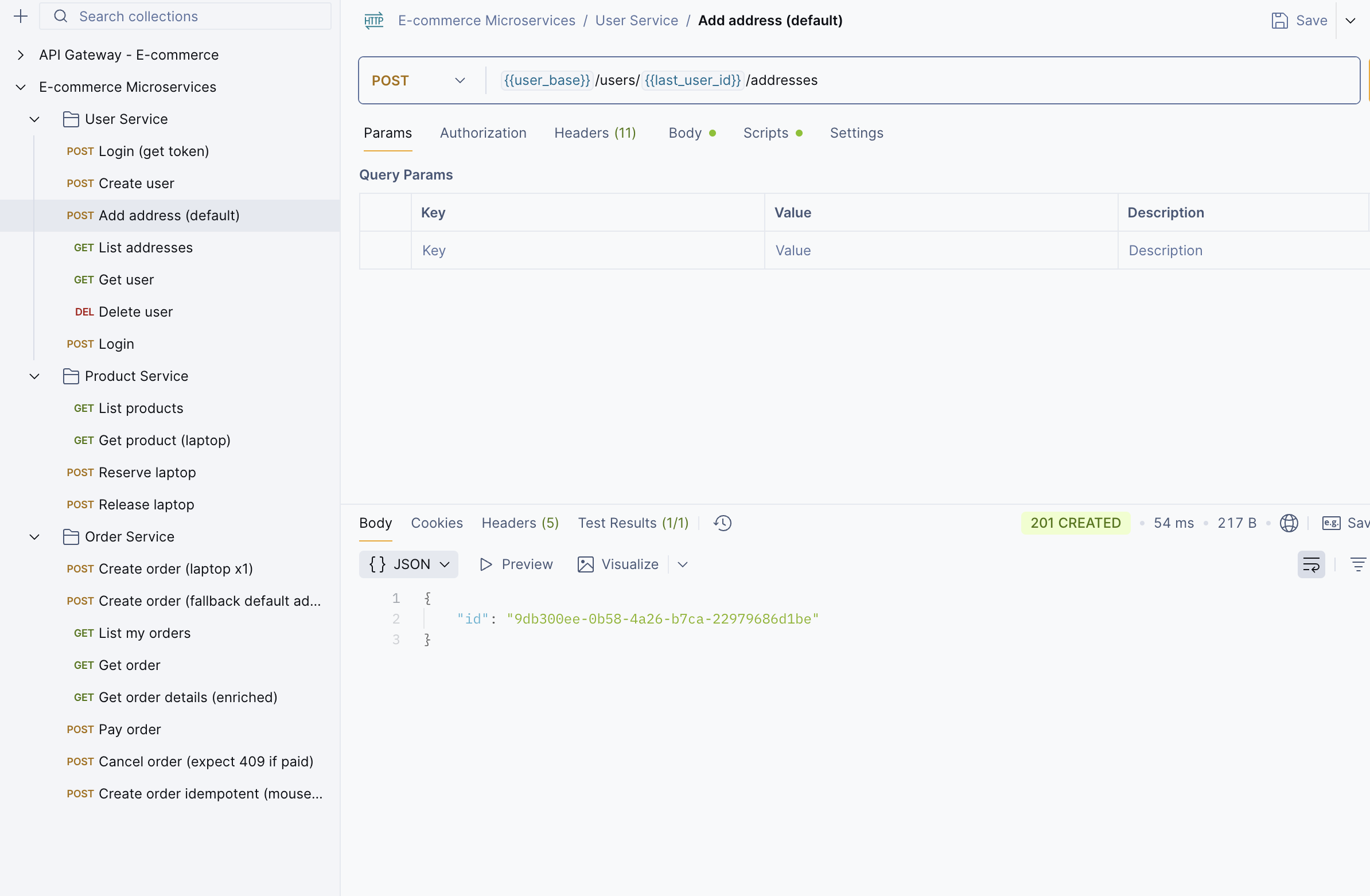
Step 5: Then, create an address for the user.
<img src="https://keploy-devrel.s3.us-west-2.amazonaws.com/microservices_postman_5.png" alt="Sample Keploy Record Microservices" width="100%" style={{ borderRadius: '5px' }} />
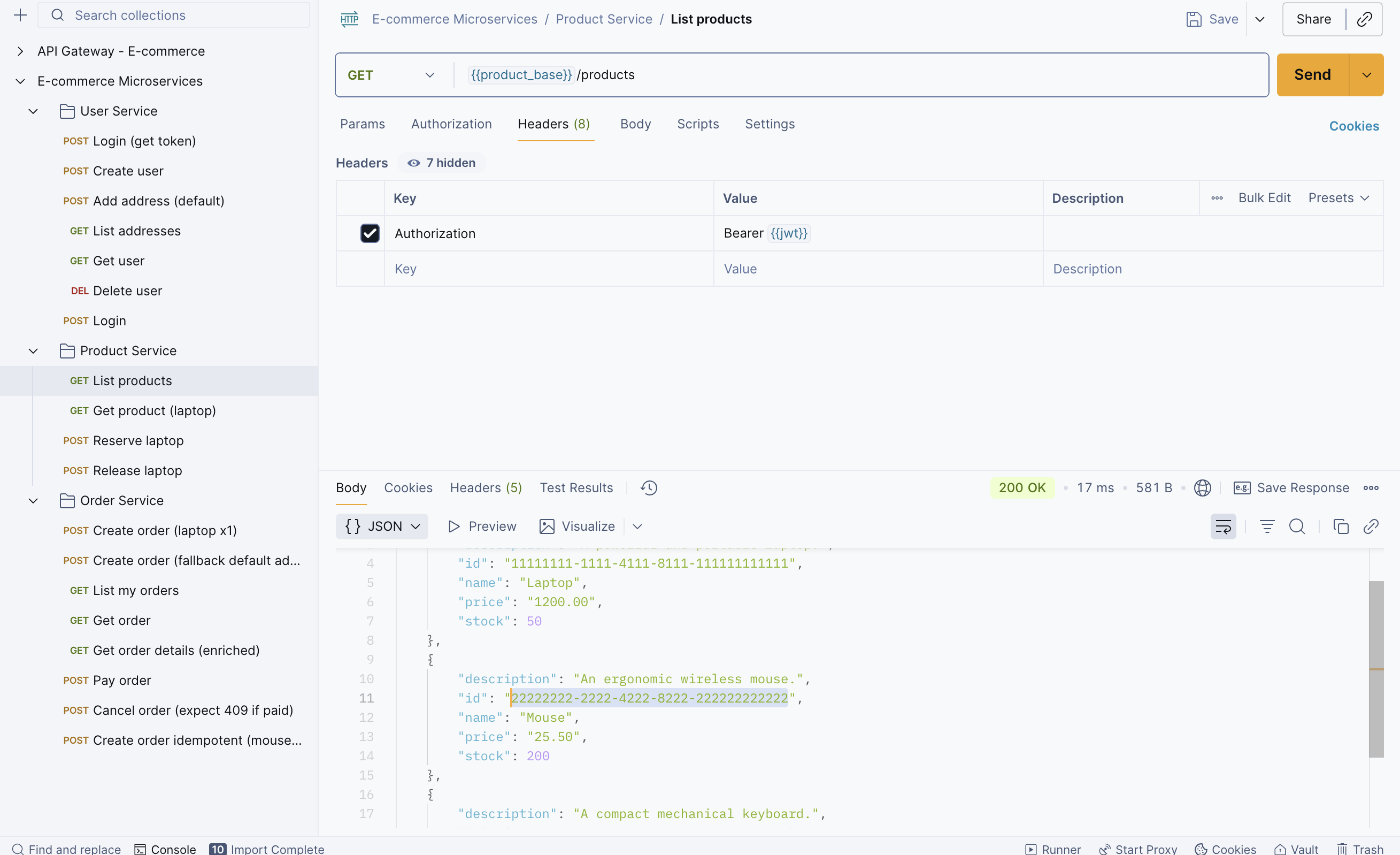
Step 6: Once you’re done creating the user details, let’s fetch the product details. This will be helpful when placing an order.
<img src="https://keploy-devrel.s3.us-west-2.amazonaws.com/microservices_postman_6.png" alt="Sample Keploy Record Microservices" width="100%" style={{ borderRadius: '5px' }} />
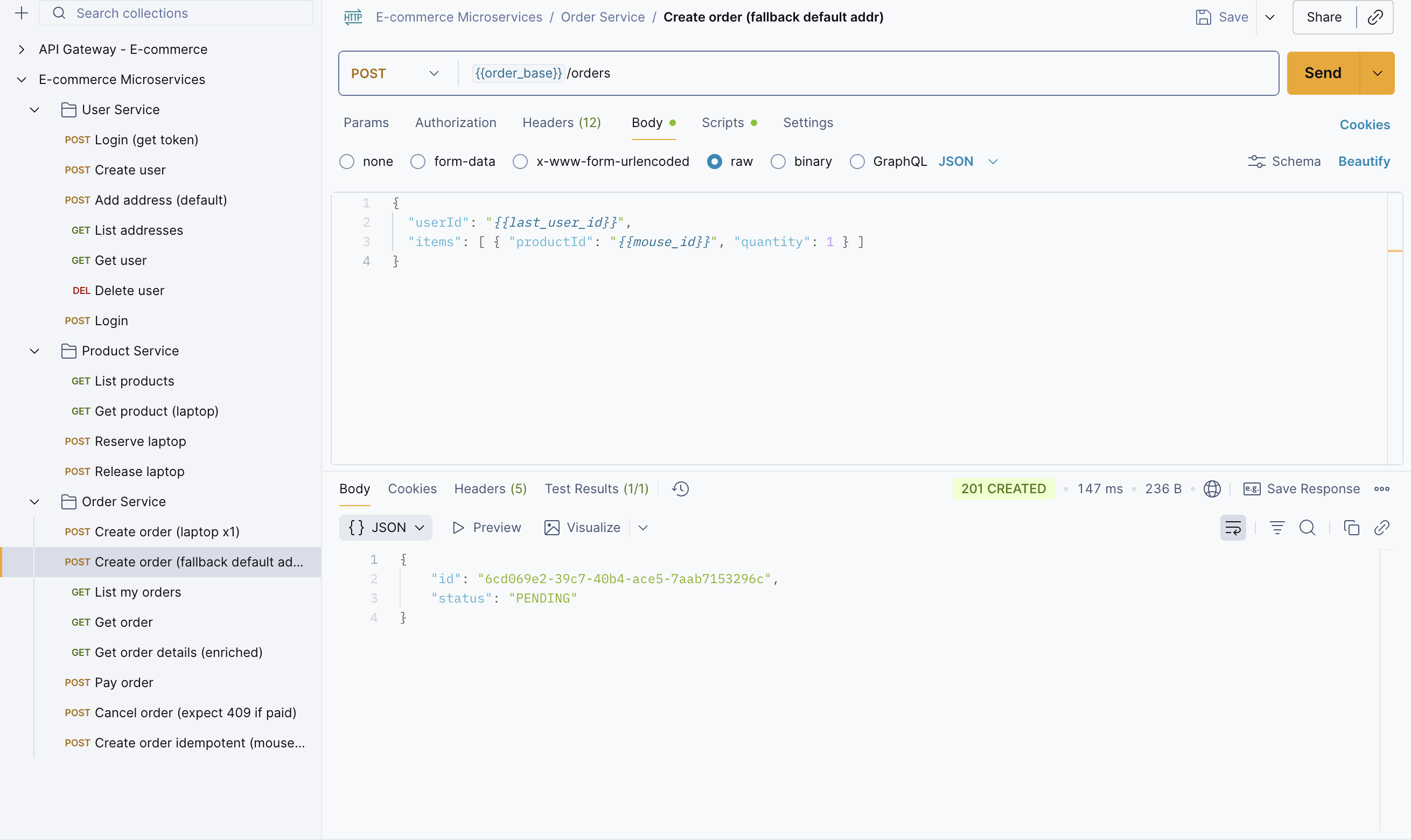
Step 7: Create an order, but before that, copy the mouse_id to place the order.
<img src="https://keploy-devrel.s3.us-west-2.amazonaws.com/microservices_postman_7.png" alt="Sample Keploy Record Microservices" width="100%" style={{ borderRadius: '5px' }} />
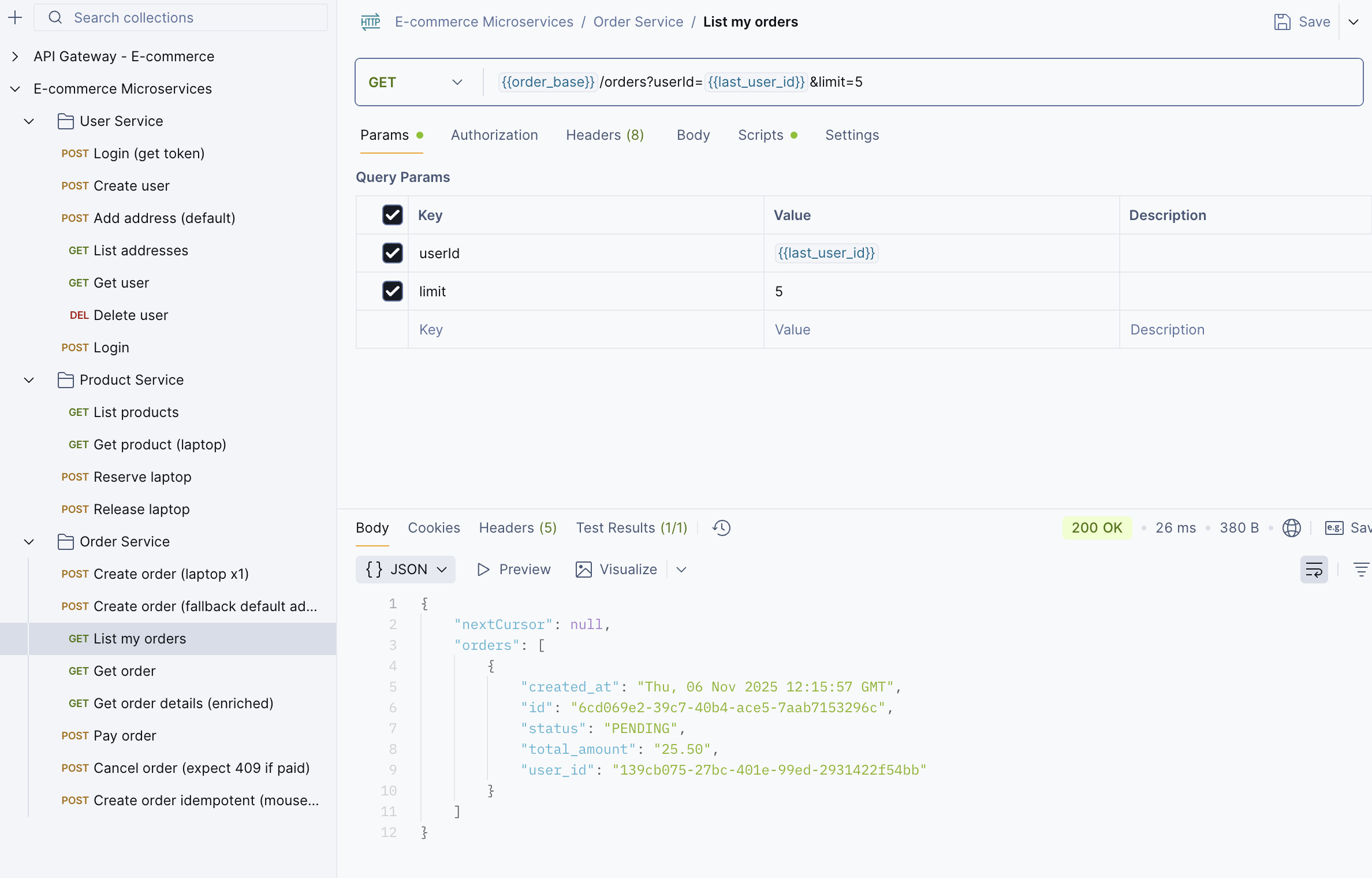
Step 8: You can verify it using the List Order API.
<img src="https://keploy-devrel.s3.us-west-2.amazonaws.com/microservices_postman_8.png" alt="Sample Keploy Record Microservices" width="100%" style={{ borderRadius: '5px' }} />
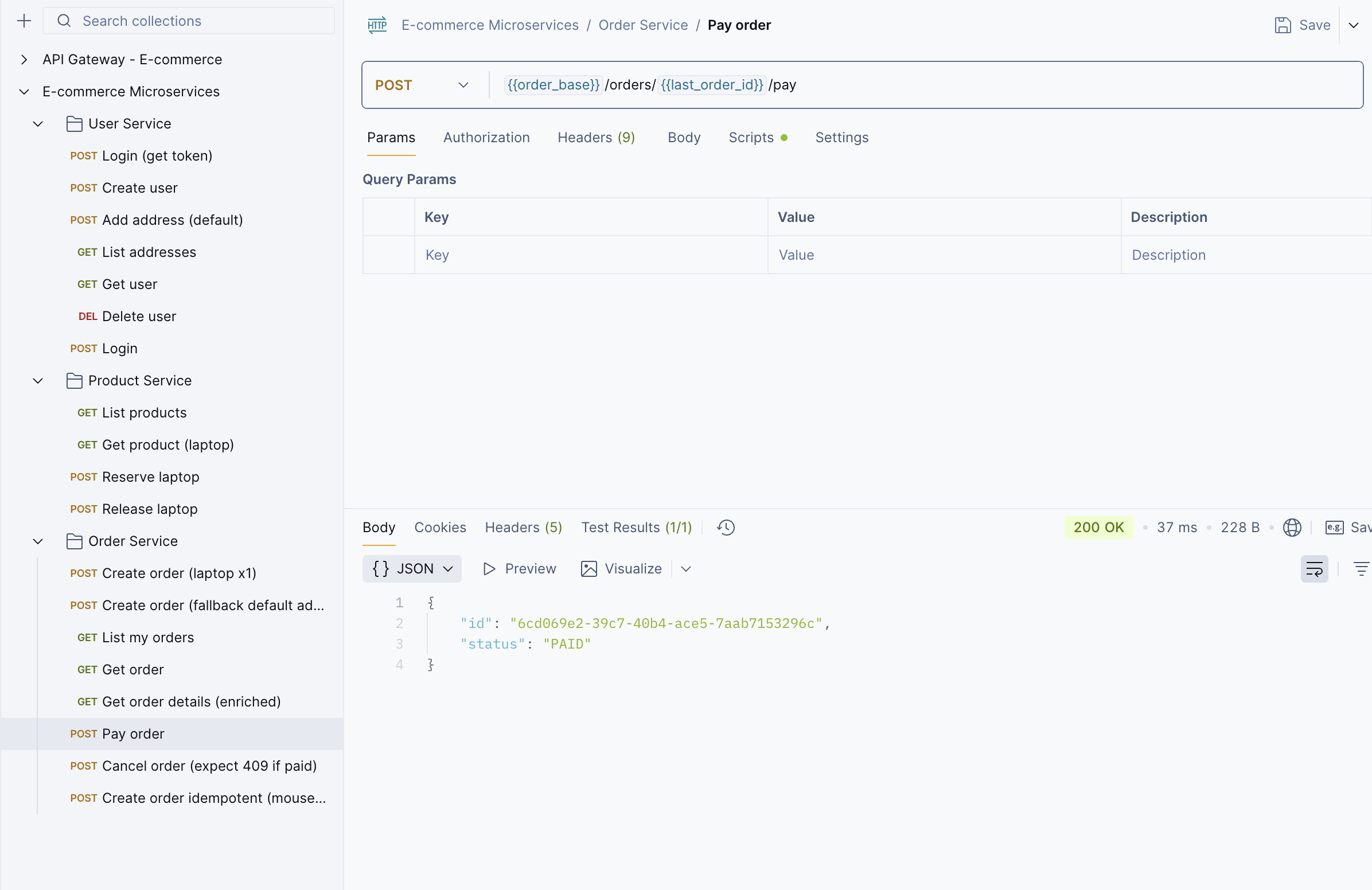
Step 9: Once you’ve created an order, use the Payment API to pay for the order.
<img src="https://keploy-devrel.s3.us-west-2.amazonaws.com/microservices_postman_9.png" alt="Sample Keploy Record Microservices" width="100%" style={{ borderRadius: '5px' }} />
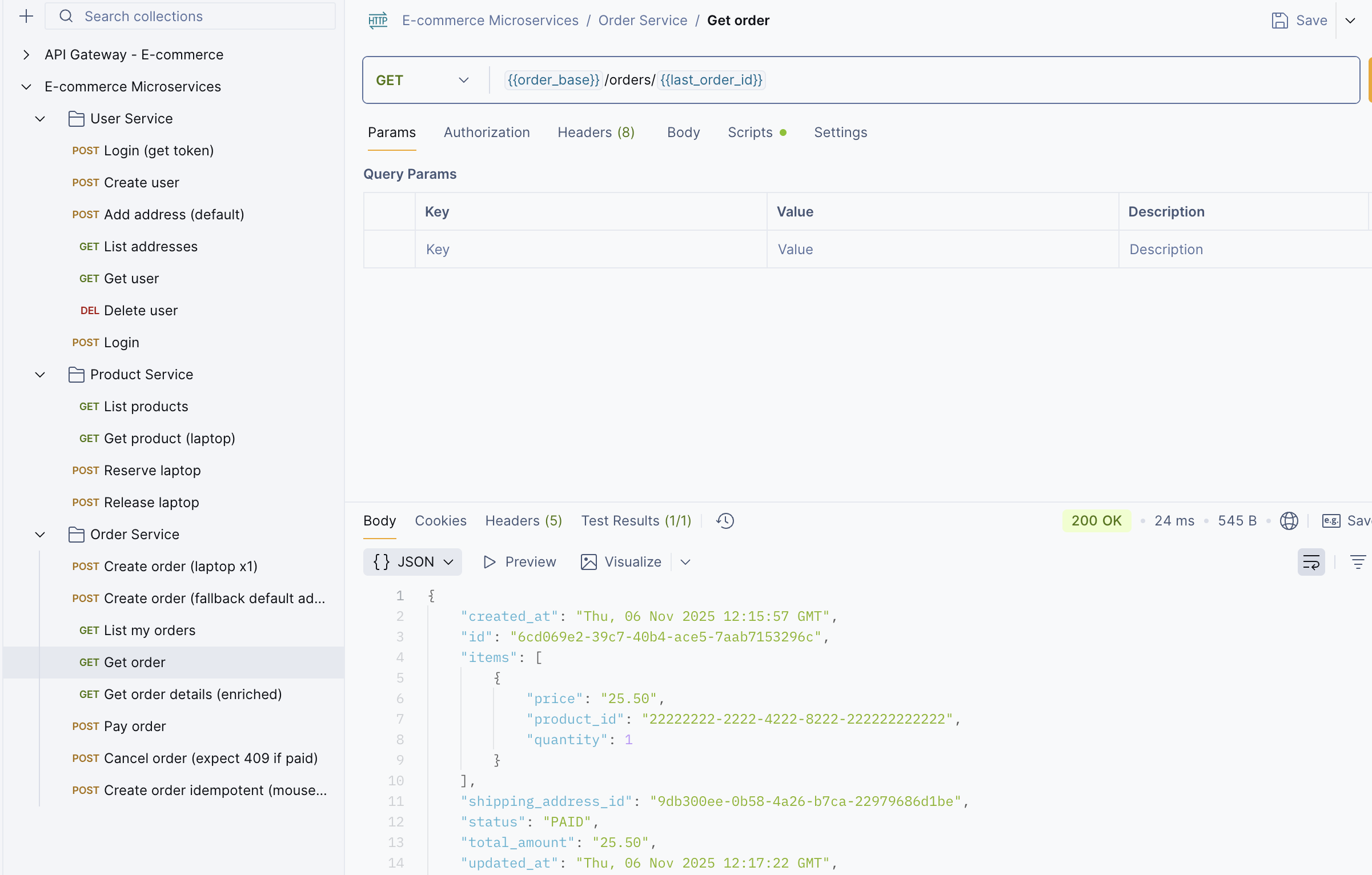
Step 10: You can use the Get Order API to check the status of your order.
<img src="https://keploy-devrel.s3.us-west-2.amazonaws.com/microservices_postman_10.png" alt="Sample Keploy Record Microservices" width="100%" style={{ borderRadius: '5px' }} />
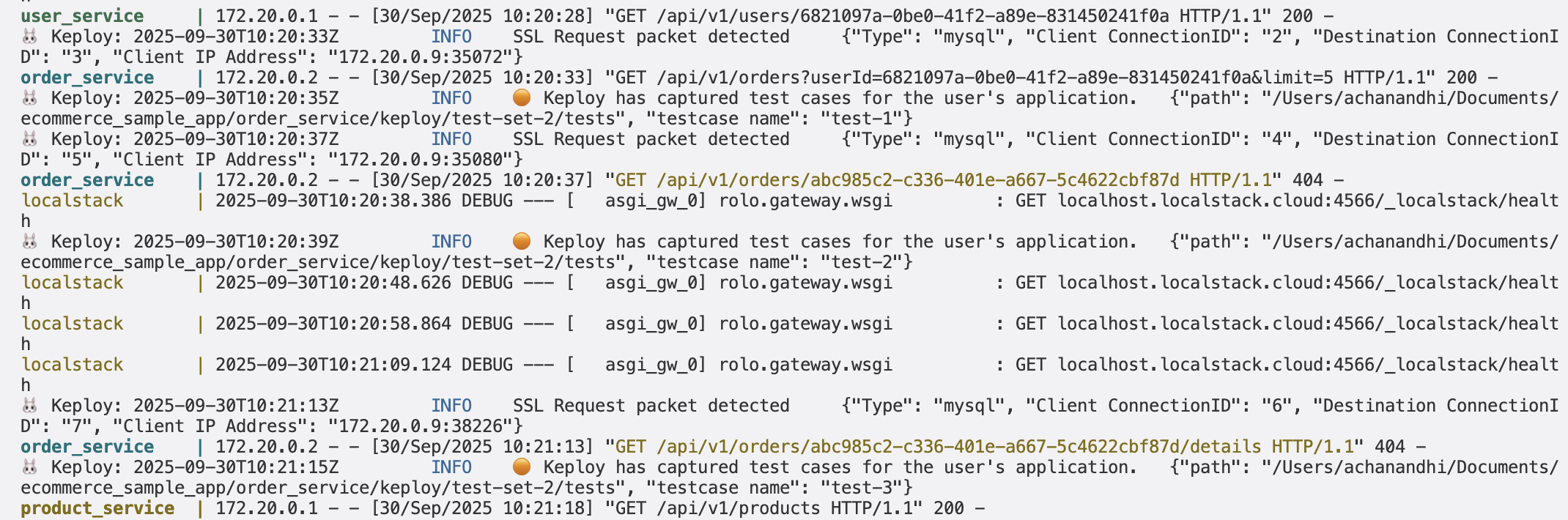
Note: You can see that Keploy only captures the network calls related to the order service. It can’t capture other network calls because we are recording only for the order service.
<img src="https://keploy-devrel.s3.us-west-2.amazonaws.com/keploy-capture-test-updated.png" alt="Sample Keploy Record microservices" width="100%" style={{ borderRadius: '5px' }} />
And once you are done, you can stop the recording and give yourself a pat on the back! With that simple spell, you've conjured up a test case with a mock! Explore the keploy directory and you'll discover your handiwork in tests directory and mocks.yml.
# Generated by Keploy (2.10.9)
version: api.keploy.io/v1beta1
kind: Http
name: test-1
spec:
  metadata: {}
  req:
    method: POST
    proto_major: 1
    proto_minor: 1
    url: http://localhost:8080/api/v1/orders
    header:
      Accept: "*/*"
      Accept-Encoding: gzip, deflate, br
      Authorization: Bearer eyJhbGciOiJIUzI1NiIsInR5cCI6IkpXVCJ9.eyJzdWIiOiJiMTNjNWJhZS04OTc5LTExZjAtOGM0Ny1iNmM3ZmQwZmY2MmQiLCJ1c2VybmFtZSI6ImFkbWluIiwiaWF0IjoxNzU2OTg0ODQxLCJleHAiOjE3NTk1NzY4NDF9.1OVaOL09j10oB7ahwOKu4mi-ZgnI8ha72MhhaUzKAnE
      Connection: keep-alive
      Content-Length: "141"
      Content-Type: application/json
      Host: localhost:8080
      Idempotency-Key: 904a1d88-707b-4c14-b7d6-9bd9accea3e7
      Postman-Token: ede87575-325e-42f6-83e5-5cd55a9dca7e
      User-Agent: PostmanRuntime/7.45.0
    body: |-
      {
        "userId": "afdc272e-d748-4108-a701-59802b93ea29",
        "items": [ { "productId": "11111111-1111-4111-8111-111111111111", "quantity": 1 } ]
      }
    timestamp: 2025-09-04T11:30:48.75326438Z
  resp:
    status_code: 201
    header:
      Content-Length: "65"
      Content-Type: application/json
      Date: Thu, 04 Sep 2025 11:30:48 GMT
      Server: Werkzeug/3.1.3 Python/3.11.13
    body: |
      {"id":"44b0885e-e6e7-4e27-8ffe-97d87791b0b1","status":"PENDING"}
    status_message: Created
    proto_major: 0
    proto_minor: 0
    timestamp: 2025-09-04T11:30:50.896837215Z
  objects: []
  assertions:
    noise:
      header.Date: []
  created: 1756985450
This is how the mocks.yml looks like:
# Generated by Keploy (2.10.9)
version: api.keploy.io/v1beta1
kind: MySQL
name: mock-0
spec:
  metadata:
    connID: "0"
    requestOperation: HandshakeV10
    responseOperation: OK
    type: config
  requests:
    - header:
        header:
          payload_length: 32
          sequence_id: 1
        packet_type: SSLRequest
      message:
        capability_flags: 431991437
        max_packet_size: 1073741824
        character_set: 255
        filler:
          [0, 0, 0, 0, 0, 0, 0, 0, 0, 0, 0, 0, 0, 0, 0, 0, 0, 0, 0, 0, 0, 0, 0]
    - header:
        header:
          payload_length: 301
          sequence_id: 2
        packet_type: HandshakeResponse41
      message:
        capability_flags: 431991437
        max_packet_size: 1073741824
        character_set: 255
        filler:
          [0, 0, 0, 0, 0, 0, 0, 0, 0, 0, 0, 0, 0, 0, 0, 0, 0, 0, 0, 0, 0, 0, 0]
        username: user
        auth_response:
          [
            209,
            97,
            143,
            83,
            102,
            55,
            162,
            43,
            183,
            166,
            61,
            254,
            156,
            7,
            42,
            33,
            137,
            77,
            61,
            133,
            242,
            40,
            130,
            251,
            227,
            181,
            38,
            254,
            127,
            21,
            114,
            230,
          ]
        database: order_db
        auth_plugin_name: caching_sha2_password
        connection_attributes:
          _client_name: libmysql
          _client_version: 9.0.0
          _connector_license: GPL-2.0
          _connector_name: mysql-connector-python
          _connector_version: 9.0.0
          _os: Linux
          _pid: "1090"
          _platform: aarch64
          _source_host: 44b86cee3ae3
        zstdcompressionlevel: 0
    - header:
        header:
          payload_length: 9
          sequence_id: 4
        packet_type: plain_password
      message: cGFzc3dvcmQA
  responses:
    - header:
        header:
          payload_length: 74
          sequence_id: 0
        packet_type: HandshakeV10
      message:
        protocol_version: 10
        server_version: 8.0.43
        connection_id: 9
        auth_plugin_data:
          [
            116,
            65,
            114,
            34,
            83,
            28,
            115,
            61,
            126,
            49,
            53,
            28,
            111,
            34,
            76,
            37,
            91,
            73,
            114,
            88,
            0,
          ]
        filler: 0
        capability_flags: 3758096383
        character_set: 255
        status_flags: 2
        auth_plugin_name: caching_sha2_password
    - header:
        header:
          payload_length: 2
          sequence_id: 3
        packet_type: AuthMoreData
      message:
        status_tag: 1
        data: PerformFullAuthentication
    - header:
        header:
          payload_length: 20
          sequence_id: 5
        packet_type: OK
      message:
        header: 0
        affected_rows: 0
        last_insert_id: 0
        status_flags: 16386
        warnings: 0
        info: "\0\v\x01\t\border_db"
  created: 1756985266
  reqtimestampmock: 2025-09-04T11:27:46.15043888Z
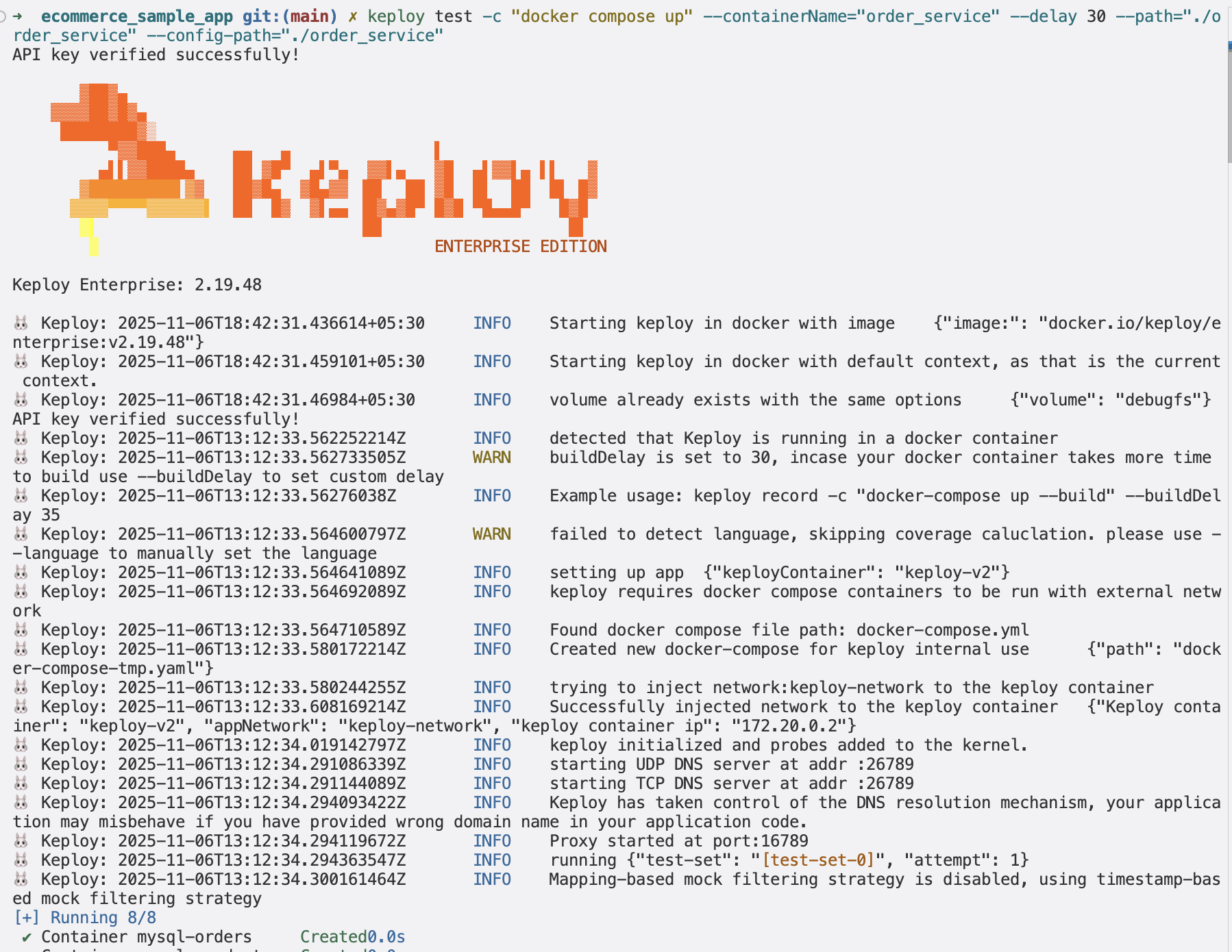
restimestampmock: 2025-09-04T11:27:46.162389255ZNow, let’s run the tests that were automatically generated by Keploy. Use this command:
keploy test -c "docker compose up" --containerName="order_service" --delay 30 --path="./order_service" --config-path="./order_service"<img src="https://keploy-devrel.s3.us-west-2.amazonaws.com/microservices_postman_test.png" alt="Sample Keploy Record microservices" width="100%" style={{ borderRadius: '5px' }} />
The --delay flag gives the app a short pause (in seconds) before running the tests. After the tests finish, you can inspect the results and tweak the test data in the mocks.yml or test-x.yml files.
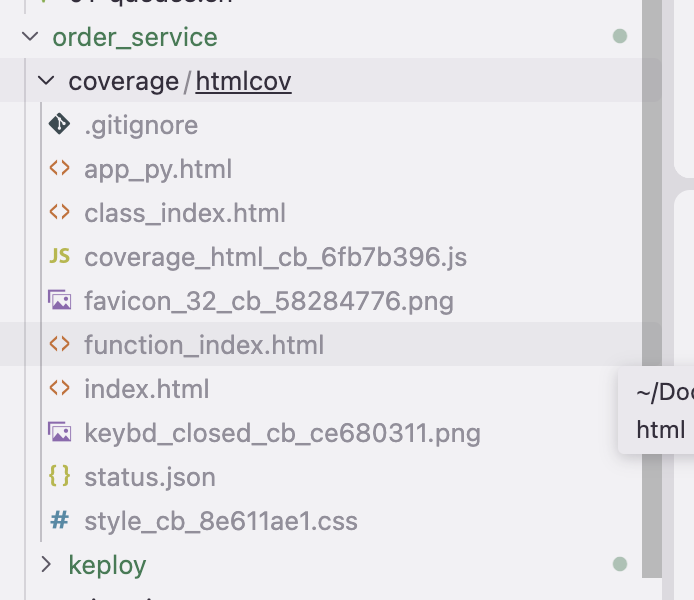
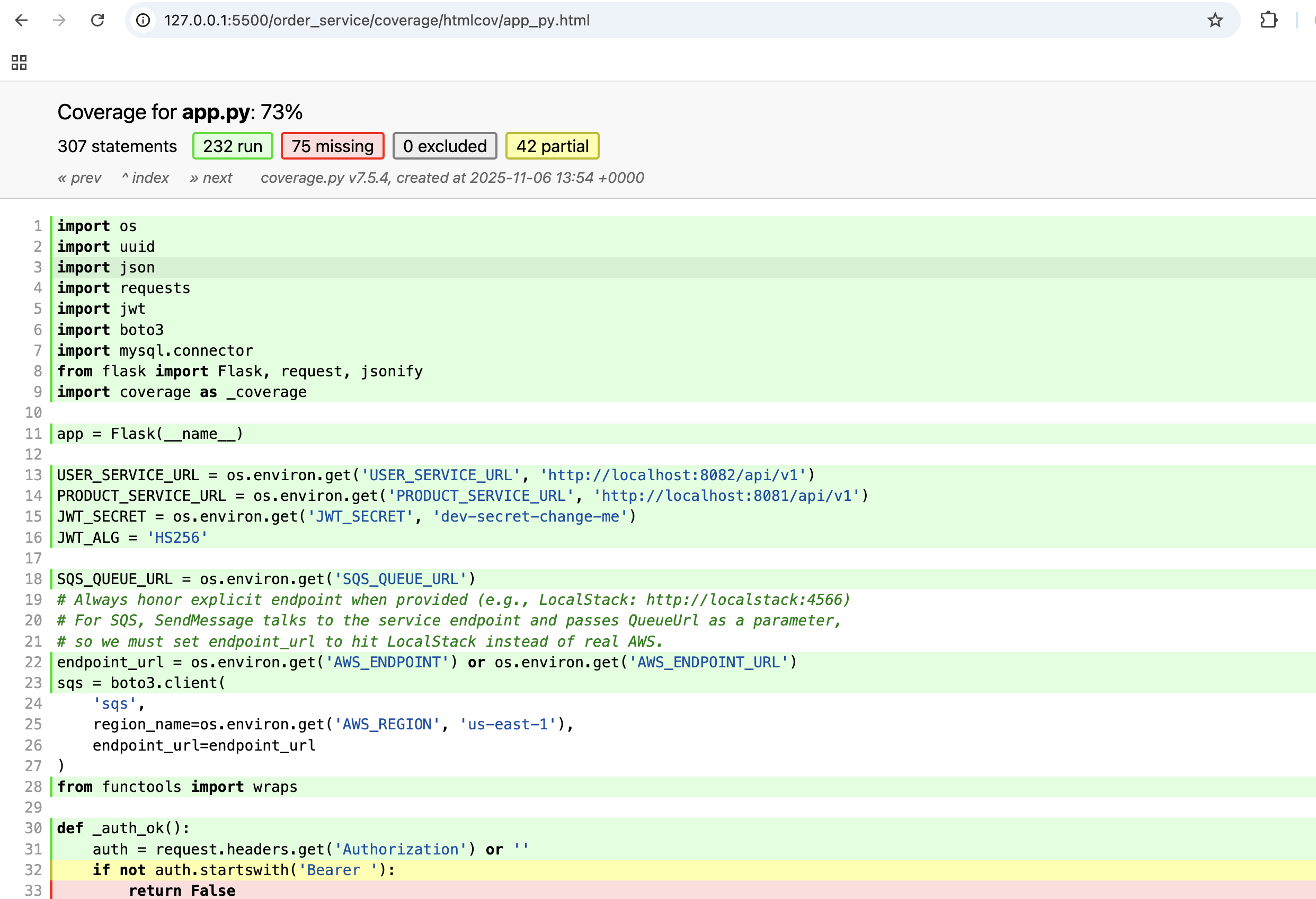
Keploy also helps you track test coverage for your app.
The coverage files will be generated automatically by Keploy. You can find those files in the coverage directory.Click on any one of the HTML files to see the test coverage.
<img src="https://keploy-devrel.s3.us-west-2.amazonaws.com/microservices_coverage_files.png" alt="Sample Keploy test coverage" width="100%" style={{ borderRadius: '5px' }} />
Let's see the overall coverage report:
<img src="https://keploy-devrel.s3.us-west-2.amazonaws.com/microservices_overall_coverage.png" alt="Sample Keploy test coverage" width="100%" style={{ borderRadius: '5px' }} />
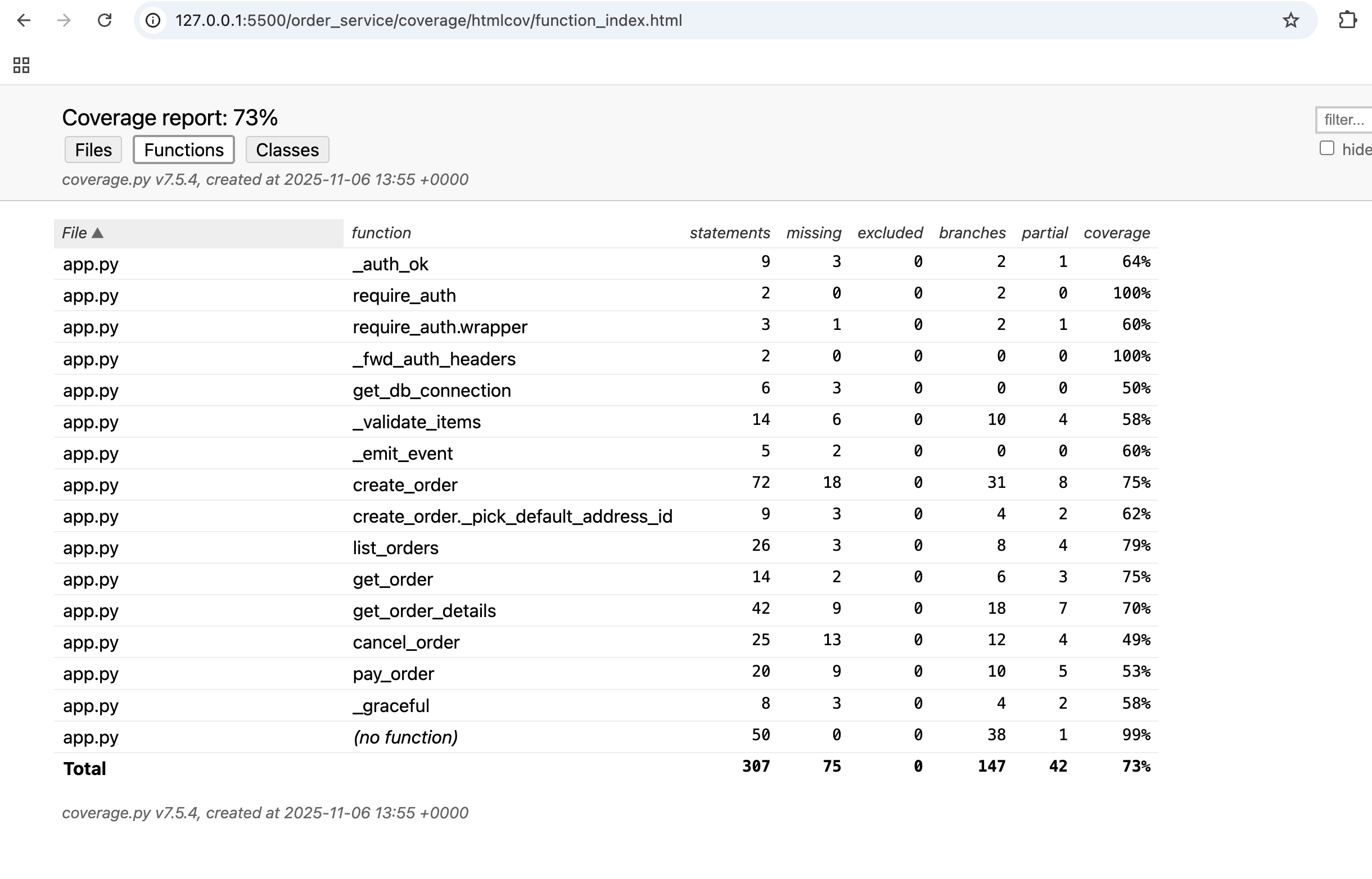
Let's see the overall coverage report by functions:
<img src="https://keploy-devrel.s3.us-west-2.amazonaws.com/microservices_function_coverage.png" alt="Sample Keploy test coverage" width="100%" style={{ borderRadius: '5px' }} />
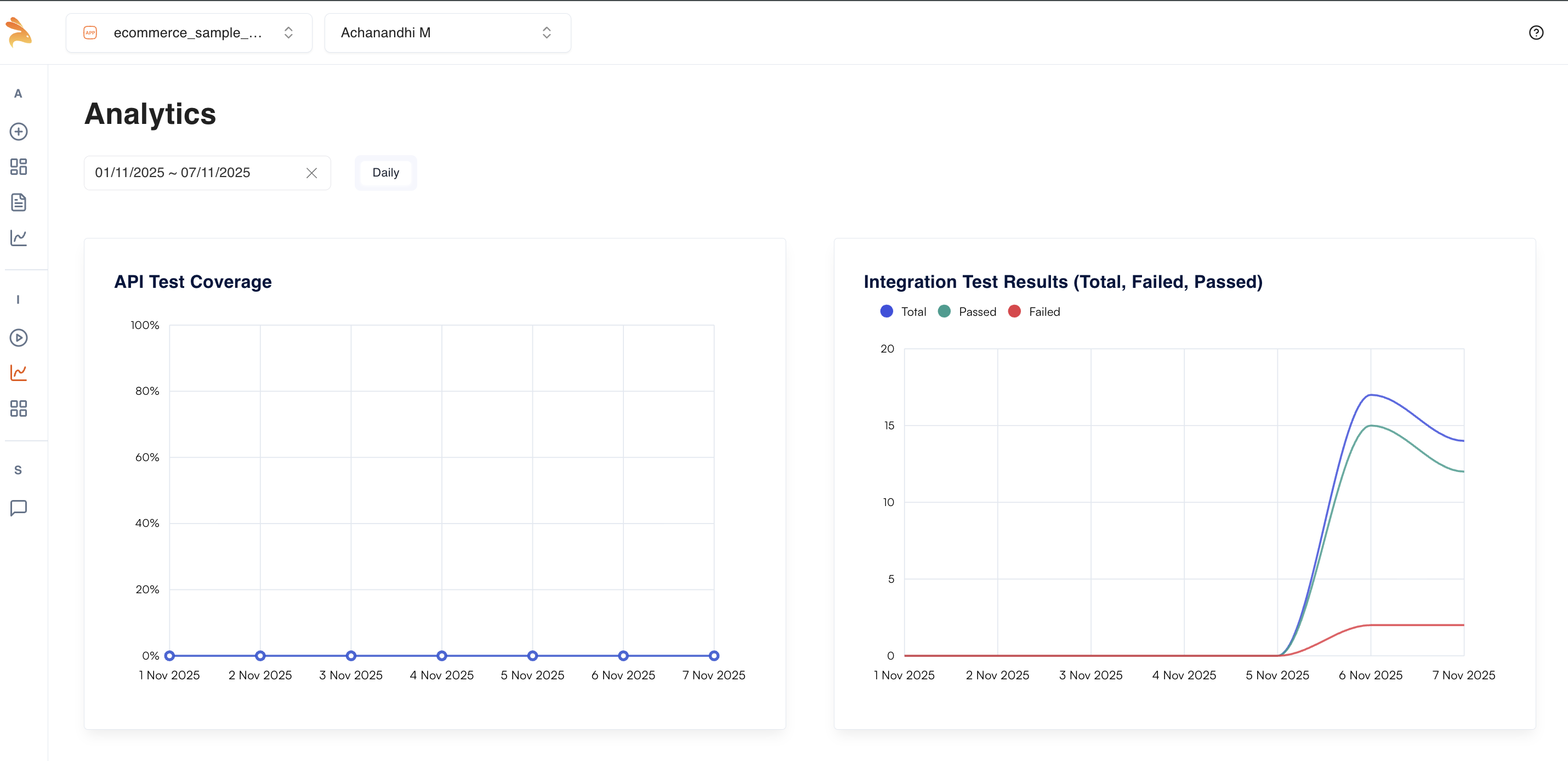
Once you’ve got the coverage, let’s check the test reports in the Keploy Dashboard.
<img src="https://keploy-devrel.s3.us-west-2.amazonaws.com/microservices_dashboard_ecommerce.png" alt="Sample Keploy test coverage" width="100%" style={{ borderRadius: '5px' }} />
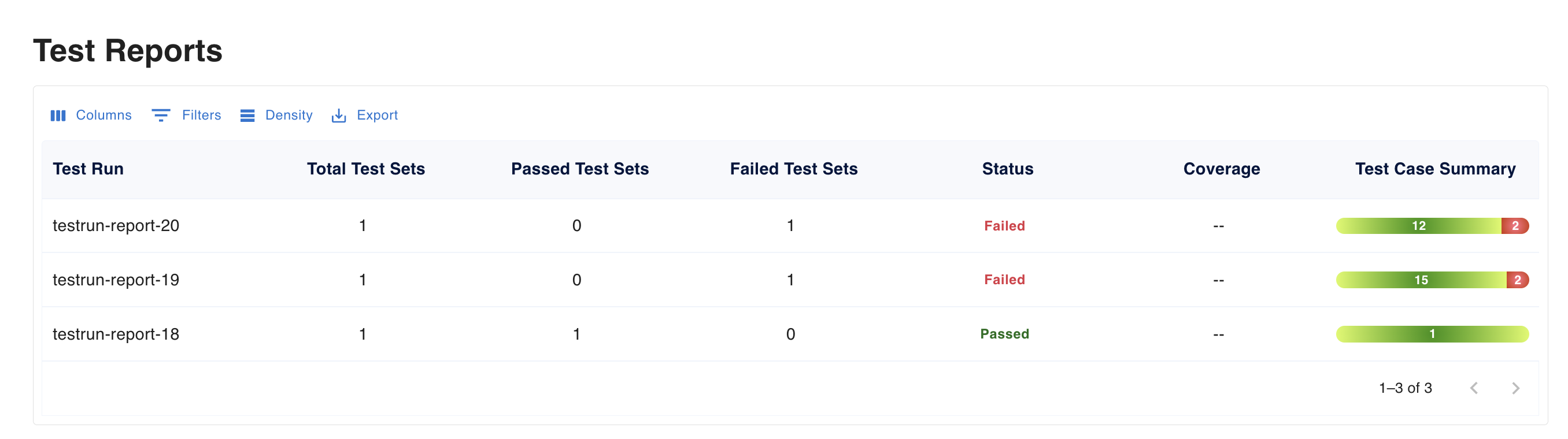
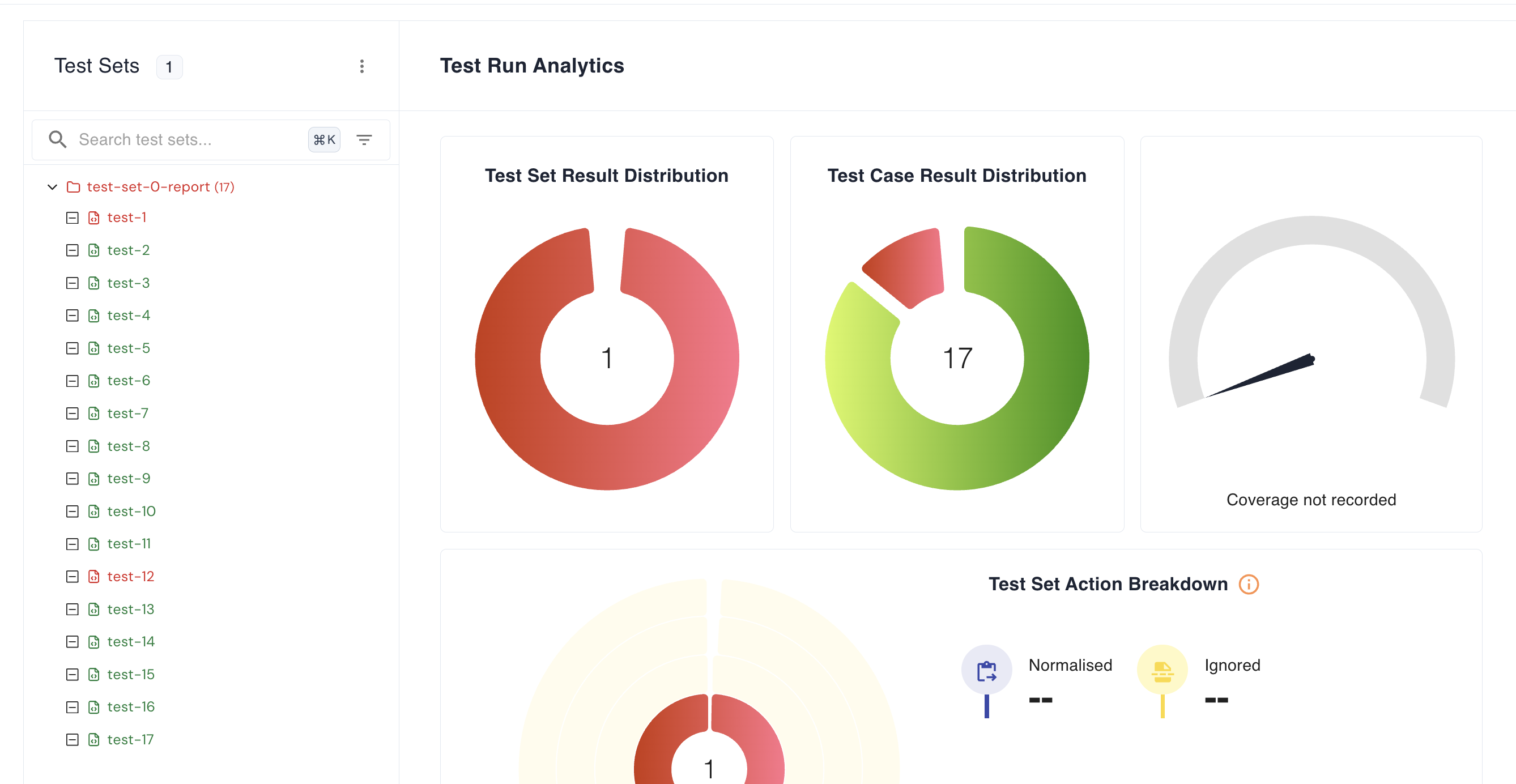
Let’s take a look at the Test Reports section.
<img src="https://keploy-devrel.s3.us-west-2.amazonaws.com/microservices_ecommerce_test_report.png" alt="Sample Keploy test coverage" width="100%" style={{ borderRadius: '5px' }} />
Now, let’s go to the individual Test Report section and review the output.
<img src="https://keploy-devrel.s3.us-west-2.amazonaws.com/microservices_ecommerce_test_run_report.png" alt="Sample Keploy test coverage" width="100%" style={{ borderRadius: '5px' }} />
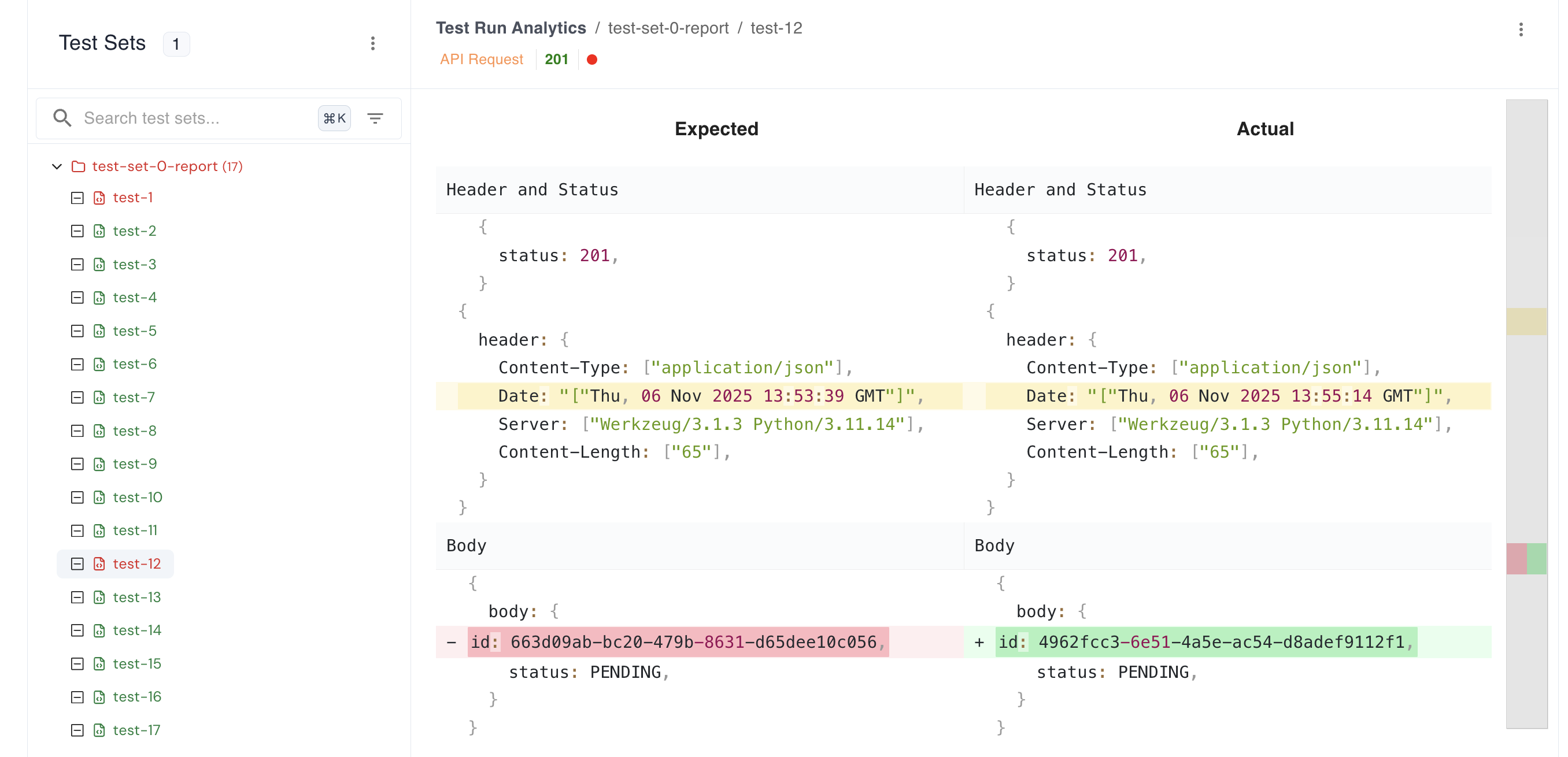
Two tests have failed — let’s check why they failed.
<img src="https://keploy-devrel.s3.us-west-2.amazonaws.com/microservices_test_run_individual.png" alt="Sample Keploy test coverage" width="100%" style={{ borderRadius: '5px' }} />
From the dashboard, you can see the diff that explains why it failed.
Note: We have just tested only one microservice (Order Service). You can use the same command to test other microservices by changing the name and config path.
This section will walk you through testing an E-commerce microservices application using Keploy API Testing.
We’ll use the Keploy Chrome extension to generate and run API tests — no coding or manual setup required.
Use the following link to install the Chrome Extension
Note: This extension works only on the Chrome browser. Make sure you’re using Chrome to try it out.
Also, please verify that the Keploy Chrome Extension is installed and running.
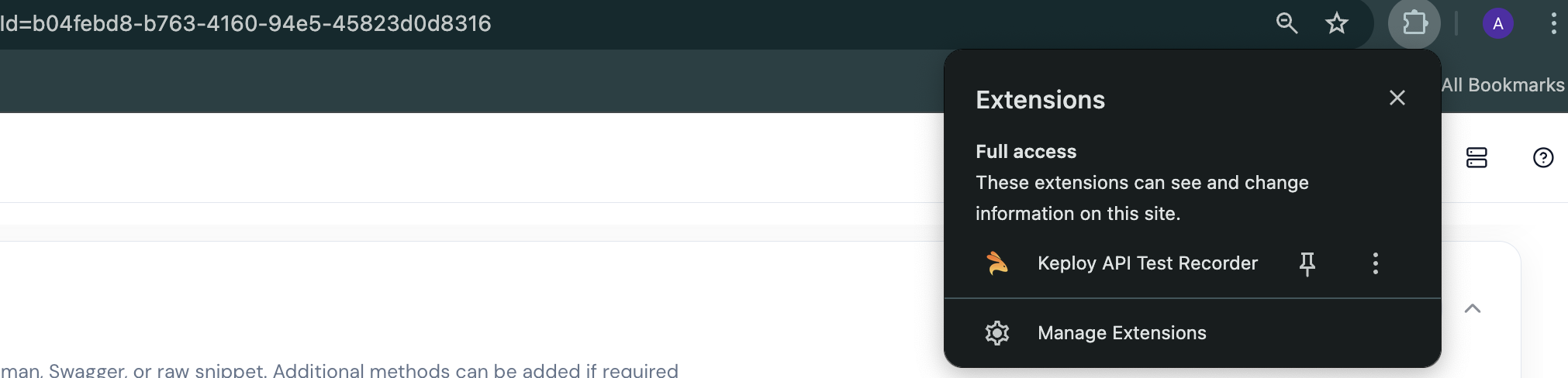
Once done, Go to Keploy Enterprise UI to try out Keploy API Testing. Once you sign in, you’ll see a dashboard like this:
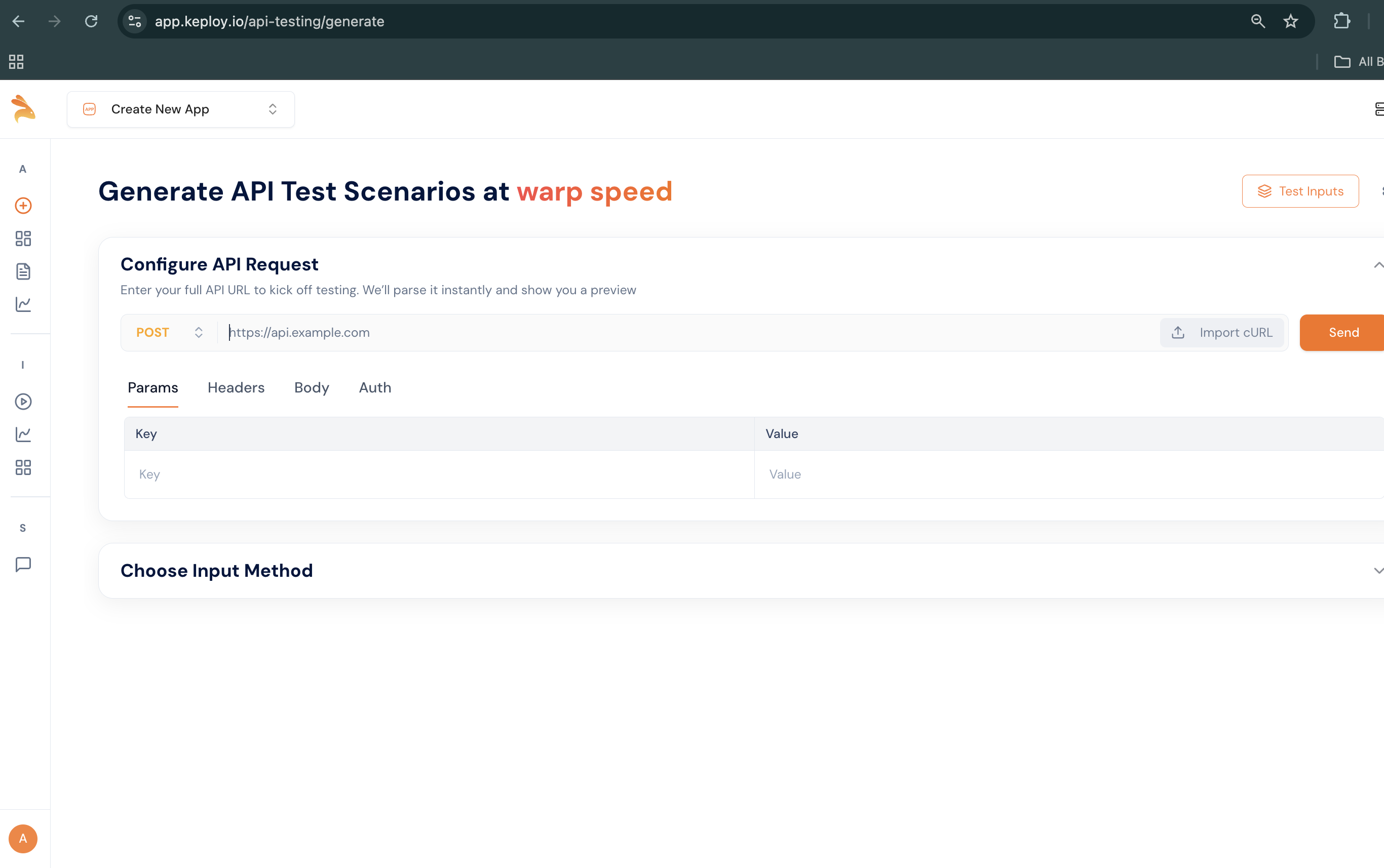
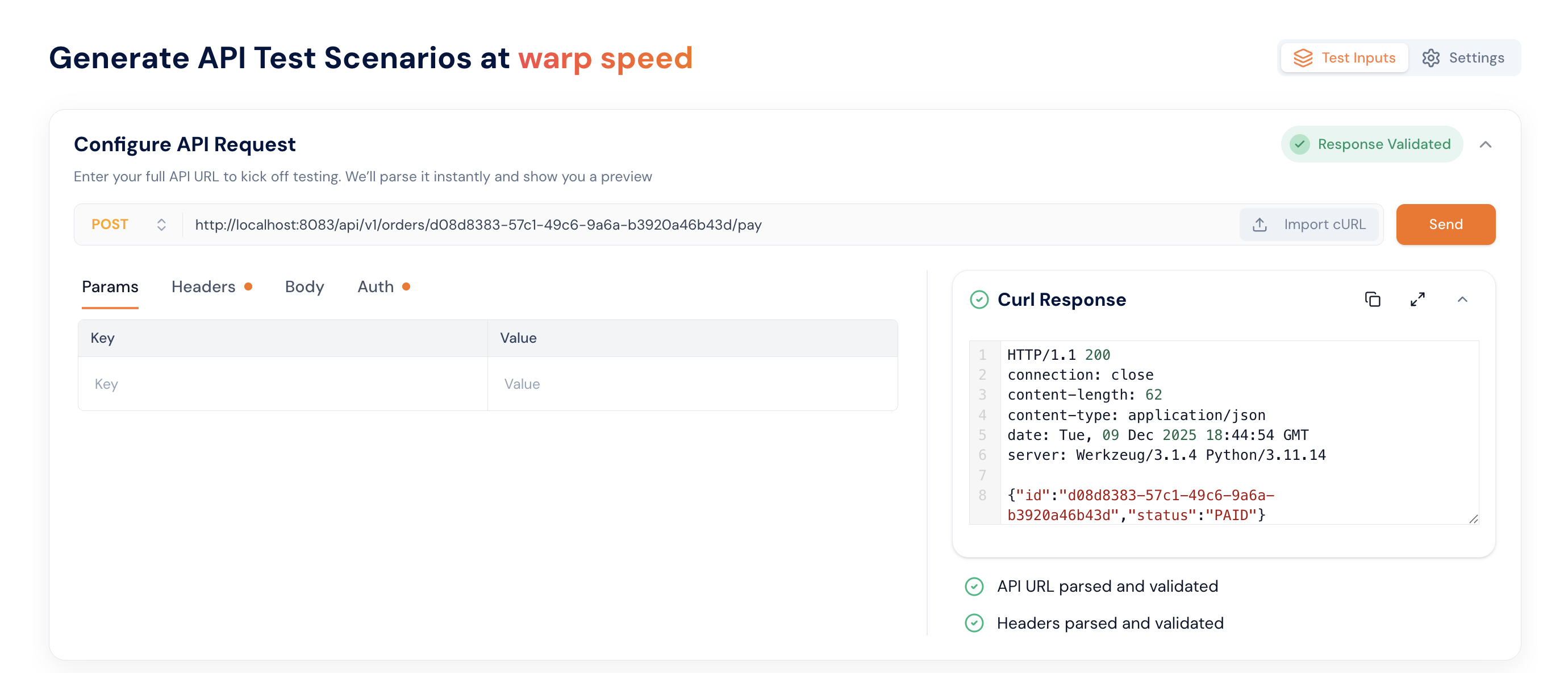
After reaching this step, provide your application URL and the working cURL commands. If the e-commerce application isn’t already running, start it using docker compose up.
Step 1: Let's provide the curl command in the import curl section
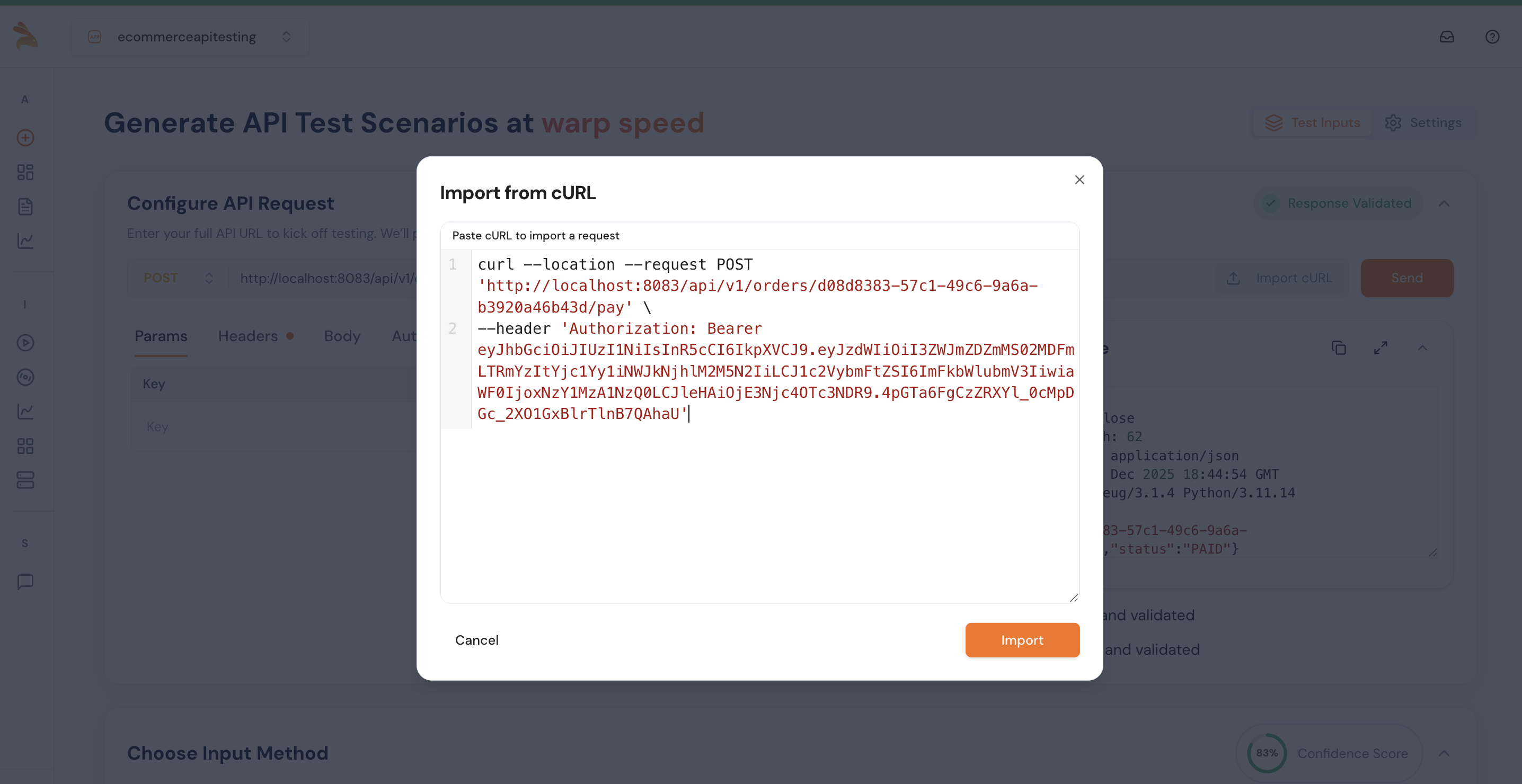
Use the following cURL command to import:
curl --location --request POST 'http://localhost:8083/api/v1/orders/d08d8383-57c1-49c6-9a6a-b3920a46b43d/pay' \
--header 'Authorization: Bearer eyJhbGciOiJIUzI1NiIsInR5cCI6IkpXVCJ9.eyJzdWIiOiI3ZWJmZDZmMS02MDFmLTRmYzItYjc1Yy1iNWJkNjhlM2M5N2IiLCJ1c2VybmFtZSI6ImFkbWlubmV3IiwiaWF0IjoxNzY1MzA1NzQ0LCJleHAiOjE3Njc4OTc3NDR9.4pGTa6FgCzZRXYl_0cMpDGc_2XO1GxBlrTlnB7QAhaU'
Step 2: Once you provide the input, you will see a response. This means we are able to reach your application and are now ready to generate tests. We’re just performing a validation before generating the test cases.
Step 3: Next, it’s time to provide the input — such as cURL commands, Postman collections, or an OpenAPI schema. Remember, the more input or content you provide, the better your test cases will be. For this demo, we’ll use Postman collections and cURL commands.
Copy this postman collection
<CollapsibleCode language="json" previewLines={10} code={` { "info": { "name": "E-commerce Full Stack (Gateway + Microservices)", "schema": "https://schema.getpostman.com/json/collection/v2.1.0/collection.json" }, "item": [ { "name": "API Gateway", "item": [ { "name": "Login (via user service path)", "request": { "method": "POST", "header": [ { "key": "Content-Type", "value": "application/json" } ], "url": { "raw": "{{gw_base}}/api/v1/login", "host": [ "{{gw_base}}" ], "path": [ "api", "v1", "login" ] }, "body": { "mode": "raw", "raw": "{\n "username": "{{username}}",\n "password": "p@ssw0rd"\n}" } }, "event": [ { "listen": "test", "script": { "exec": [ "var j={}; try{ j=pm.response.json(); }catch(e){}; if (j.token) pm.environment.set('jwt', j.token);", "pm.test('got token', function(){ pm.expect(!!pm.environment.get('jwt')).to.be.true; });" ], "type": "text/javascript" } } ] }, { "name": "Create address", "request": { "method": "POST", "header": [ { "key": "Content-Type", "value": "application/json" }, { "key": "Authorization", "value": "Bearer {{jwt}}" } ], "url": { "raw": "{{gw_base}}/api/v1/users/{{user_id}}/addresses", "host": [ "{{gw_base}}" ], "path": [ "api", "v1", "users", "{{user_id}}", "addresses" ] }, "body": { "mode": "raw", "raw": "{\n "line1": "1 Main St",\n "city": "NYC",\n "state": "NY",\n "postal_code": "10001",\n "country": "US",\n "phone": "+1-555-0000",\n "is_default": true\n}" } } }, { "name": "Delete user (via gateway)", "request": { "method": "DELETE", "header": [ { "key": "Authorization", "value": "Bearer {{jwt}}" } ], "url": { "raw": "{{gw_base}}/api/v1/users/{{user_id}}", "host": [ "{{gw_base}}" ], "path": [ "api", "v1", "users", "{{user_id}}" ] } } }, { "name": "Create order (shippingAddressId)", "request": { "method": "POST", "header": [ { "key": "Content-Type", "value": "application/json" }, { "key": "Idempotency-Key", "value": "{{idempotency_key}}" }, { "key": "Authorization", "value": "Bearer {{jwt}}" } ], "url": { "raw": "{{gw_base}}/api/v1/orders", "host": [ "{{gw_base}}" ], "path": [ "api", "v1", "orders" ] }, "body": { "mode": "raw", "raw": "{\n "userId": "{{user_id}}",\n "items": [ { "productId": "{{product_id}}", "quantity": 1 } ],\n "shippingAddressId": "{{address_id}}"\n}" } } }, { "name": "Get order details (enriched)", "request": { "method": "GET", "header": [ { "key": "Authorization", "value": "Bearer {{jwt}}" } ], "url": { "raw": "{{gw_base}}/api/v1/orders/{{order_id}}/details", "host": [ "{{gw_base}}" ], "path": [ "api", "v1", "orders", "{{order_id}}", "details" ] } } } ] }, { "name": "User Service", "item": [ { "name": "Login (get token)", "request": { "method": "POST", "header": [ { "key": "Content-Type", "value": "application/json" } ], "url": { "raw": "{{user_base}}/login", "host": [ "{{user_base}}" ], "path": [ "login" ] }, "body": { "mode": "raw", "raw": "{\n "username": "{{username}}",\n "password": "p@ssw0rd"\n}" } }, "event": [ { "listen": "test", "script": { "exec": [ "var j={}; try{ j=pm.response.json(); }catch(e){};", "if (j.token) pm.environment.set('jwt', j.token);", "pm.test('got token', function(){ pm.expect(!!pm.environment.get('jwt')).to.be.true; });" ], "type": "text/javascript" } } ] }, { "name": "Create user", "request": { "method": "POST", "header": [ { "key": "Content-Type", "value": "application/json" }, { "key": "Authorization", "value": "Bearer {{jwt}}" } ], "url": { "raw": "{{user_base}}/users", "host": [ "{{user_base}}" ], "path": [ "users" ] }, "body": { "mode": "raw", "raw": "{\n "username": "{{username}}",\n "email": "{{email}}",\n "password": "p@ssw0rd"\n}" } }, "event": [ { "listen": "test", "script": { "exec": [ "pm.test('user created', function(){", " pm.expect([200,201]).to.include(pm.response.code);", "});", "var json = {}; try { json = pm.response.json(); } catch(e){}", "if (json.id) { pm.environment.set('last_user_id', json.id); }" ], "type": "text/javascript" } } ] }, { "name": "Add address (default)", "request": { "method": "POST", "header": [ { "key": "Content-Type", "value": "application/json" }, { "key": "Authorization", "value": "Bearer {{jwt}}" } ], "url": { "raw": "{{user_base}}/users/{{last_user_id}}/addresses", "host": [ "{{user_base}}" ], "path": [ "users", "{{last_user_id}}", "addresses" ] }, "body": { "mode": "raw", "raw": "{\n "line1": "1 Main St",\n "city": "NYC",\n "state": "NY",\n "postal_code": "10001",\n "country": "US",\n "phone": "+1-555-0000",\n "is_default": true\n}" } }, "event": [ { "listen": "test", "script": { "exec": [ "pm.test('address created', function(){ pm.expect([200,201]).to.include(pm.response.code); });", "var j={}; try{ j=pm.response.json(); }catch(e){}; if (j.id){ pm.environment.set('last_address_id', j.id); }" ], "type": "text/javascript" } } ] }, { "name": "List addresses", "request": { "method": "GET", "header": [ { "key": "Authorization", "value": "Bearer {{jwt}}" } ], "url": { "raw": "{{user_base}}/users/{{last_user_id}}/addresses", "host": [ "{{user_base}}" ], "path": [ "users", "{{last_user_id}}", "addresses" ] } }, "event": [ { "listen": "test", "script": { "exec": [ "pm.test('addresses listed', function(){ pm.expect(pm.response.code).to.eql(200); });" ], "type": "text/javascript" } } ] }, { "name": "Get user", "request": { "method": "GET", "header": [ { "key": "Authorization", "value": "Bearer {{jwt}}" } ], "url": { "raw": "{{user_base}}/users/{{last_user_id}}", "host": [ "{{user_base}}" ], "path": [ "users", "{{last_user_id}}" ] } }, "event": [ { "listen": "test", "script": { "exec": [ "pm.test('user fetched', function(){ pm.expect(pm.response.code).to.eql(200); });" ], "type": "text/javascript" } } ] }, { "name": "Delete user", "request": { "method": "DELETE", "header": [ { "key": "Authorization", "value": "Bearer {{jwt}}" } ], "url": { "raw": "{{user_base}}/users/{{last_user_id}}", "host": [ "{{user_base}}" ], "path": [ "users", "{{last_user_id}}" ] } }, "event": [ { "listen": "test", "script": { "exec": [ "pm.test('deleted or not found', function(){ pm.expect([200,404]).to.include(pm.response.code); });" ], "type": "text/javascript" } } ] }, { "name": "Login", "request": { "method": "POST", "header": [ { "key": "Content-Type", "value": "application/json" } ], "url": { "raw": "{{user_base}}/login", "host": [ "{{user_base}}" ], "path": [ "login" ] }, "body": { "mode": "raw", "raw": "{\n "username": "{{username}}",\n "password": "p@ssw0rd"\n}" } }, "event": [ { "listen": "test", "script": { "exec": [ "pm.test('login ok', function(){ pm.expect(pm.response.code).to.eql(200); });" ], "type": "text/javascript" } } ] } ] }, { "name": "Product Service", "event": [ { "listen": "prerequest", "script": { "exec": [ "if (!pm.environment.get('laptop_id') || !pm.environment.get('mouse_id')) {", " // Fetch products once to seed IDs", " pm.sendRequest({ url: pm.environment.get('product_base') + '/products', method: 'GET' }, function(err, res) {", " if (!err) {", " var arr = res.json();", " if (arr && arr.length) {", " pm.environment.set('laptop_id', arr[0].id);", " if (arr.length > 1) pm.environment.set('mouse_id', arr[1].id);", " }", " }", " });", "}" ], "type": "text/javascript" } } ], "item": [ { "name": "List products", "request": { "method": "GET", "header": [ { "key": "Authorization", "value": "Bearer {{jwt}}" } ], "url": { "raw": "{{product_base}}/products", "host": [ "{{product_base}}" ], "path": [ "products" ] } } }, { "name": "Get product (laptop)", "request": { "method": "GET", "header": [ { "key": "Authorization", "value": "Bearer {{jwt}}" } ], "url": { "raw": "{{product_base}}/products/{{laptop_id}}", "host": [ "{{product_base}}" ], "path": [ "products", "{{laptop_id}}" ] } } }, { "name": "Reserve laptop", "request": { "method": "POST", "header": [ { "key": "Content-Type", "value": "application/json" }, { "key": "Authorization", "value": "Bearer {{jwt}}" } ], "url": { "raw": "{{product_base}}/products/{{laptop_id}}/reserve", "host": [ "{{product_base}}" ], "path": [ "products", "{{laptop_id}}", "reserve" ] }, "body": { "mode": "raw", "raw": "{\n "quantity": 1\n}" } } }, { "name": "Release laptop", "request": { "method": "POST", "header": [ { "key": "Content-Type", "value": "application/json" }, { "key": "Authorization", "value": "Bearer {{jwt}}" } ], "url": { "raw": "{{product_base}}/products/{{laptop_id}}/release", "host": [ "{{product_base}}" ], "path": [ "products", "{{laptop_id}}", "release" ] }, "body": { "mode": "raw", "raw": "{\n "quantity": 1\n}" } } } ] }, { "name": "Order Service", "item": [ { "name": "Create order (laptop x1)", "request": { "method": "POST", "header": [ { "key": "Content-Type", "value": "application/json" }, { "key": "Idempotency-Key", "value": "{{idempotency_key}}" }, { "key": "Authorization", "value": "Bearer {{jwt}}" } ], "url": { "raw": "{{order_base}}/orders", "host": [ "{{order_base}}" ], "path": [ "orders" ] }, "body": { "mode": "raw", "raw": "{\n "userId": "{{last_user_id}}",\n "items": [ { "productId": "{{laptop_id}}", "quantity": 1 } ],\n "shippingAddressId": "{{last_address_id}}"\n}" } }, "event": [ { "listen": "prerequest", "script": { "exec": [ "if (!pm.environment.get('idempotency_key')) { pm.environment.set('idempotency_key', pm.variables.replaceIn('{{$guid}}')); }" ], "type": "text/javascript" } }, { "listen": "test", "script": { "exec": [ "pm.test('order created', function(){ pm.expect([200,201]).to.include(pm.response.code); });", "var j={}; try{ j=pm.response.json(); }catch(e){}; if (j.id){ pm.environment.set('last_order_id', j.id); }" ], "type": "text/javascript" } } ] }, { "name": "Create order (fallback default addr)", "request": { "method": "POST", "header": [ { "key": "Content-Type", "value": "application/json" }, { "key": "Idempotency-Key", "value": "{{idempotency_key}}" }, { "key": "Authorization", "value": "Bearer {{jwt}}" } ], "url": { "raw": "{{order_base}}/orders", "host": [ "{{order_base}}" ], "path": [ "orders" ] }, "body": { "mode": "raw", "raw": "{\n "userId": "{{last_user_id}}",\n "items": [ { "productId": "{{mouse_id}}", "quantity": 1 } ]\n}" } }, "event": [ { "listen": "prerequest", "script": { "exec": [ "pm.environment.set('idempotency_key', pm.variables.replaceIn('{{$guid}}'));" ], "type": "text/javascript" } }, { "listen": "test", "script": { "exec": [ "pm.test('order created', function(){ pm.expect([200,201]).to.include(pm.response.code); });" ], "type": "text/javascript" } } ] }, { "name": "List my orders", "request": { "method": "GET", "header": [ { "key": "Authorization", "value": "Bearer {{jwt}}" } ], "url": { "raw": "{{order_base}}/orders?userId={{last_user_id}}&limit=5", "host": [ "{{order_base}}" ], "path": [ "orders" ], "query": [ { "key": "userId", "value": "{{last_user_id}}" }, { "key": "limit", "value": "5" } ] } }, "event": [ { "listen": "test", "script": { "exec": [ "pm.test('listed', function(){ pm.expect(pm.response.code).to.eql(200); });" ], "type": "text/javascript" } } ] }, { "name": "Get order", "request": { "method": "GET", "header": [ { "key": "Authorization", "value": "Bearer {{jwt}}" } ], "url": { "raw": "{{order_base}}/orders/{{last_order_id}}", "host": [ "{{order_base}}" ], "path": [ "orders", "{{last_order_id}}" ] } }, "event": [ { "listen": "test", "script": { "exec": [ "pm.test('got order', function(){ pm.expect(pm.response.code).to.eql(200); });" ], "type": "text/javascript" } } ] }, { "name": "Get order details (enriched)", "request": { "method": "GET", "header": [ { "key": "Authorization", "value": "Bearer {{jwt}}" } ], "url": { "raw": "{{order_base}}/orders/{{last_order_id}}/details", "host": [ "{{order_base}}" ], "path": [ "orders", "{{last_order_id}}", "details" ] } }, "event": [ { "listen": "test", "script": { "exec": [ "pm.test('got details', function(){ pm.expect(pm.response.code).to.eql(200); });" ], "type": "text/javascript" } } ] }, { "name": "Pay order", "request": { "method": "POST", "header": [ { "key": "Authorization", "value": "Bearer {{jwt}}" } ], "url": { "raw": "{{order_base}}/orders/{{last_order_id}}/pay", "host": [ "{{order_base}}" ], "path": [ "orders", "{{last_order_id}}", "pay" ] } }, "event": [ { "listen": "test", "script": { "exec": [ "pm.test('paid or already paid', function(){ pm.expect([200].concat([200])).to.include(pm.response.code); });" ], "type": "text/javascript" } } ] }, { "name": "Cancel order (expect 409 if paid)", "request": { "method": "POST", "header": [ { "key": "Authorization", "value": "Bearer {{jwt}}" } ], "url": { "raw": "{{order_base}}/orders/{{last_order_id}}/cancel", "host": [ "{{order_base}}" ], "path": [ "orders", "{{last_order_id}}", "cancel" ] } }, "event": [ { "listen": "test", "script": { "exec": [ "pm.test('cancel response code', function(){ pm.expect([200,409,404]).to.include(pm.response.code); });" ], "type": "text/javascript" } } ] }, { "name": "Create order idempotent (mouse x2)", "request": { "method": "POST", "header": [ { "key": "Content-Type", "value": "application/json" }, { "key": "Idempotency-Key", "value": "{{idempotency_key}}" }, { "key": "Authorization", "value": "Bearer {{jwt}}" } ], "url": { "raw": "{{order_base}}/orders", "host": [ "{{order_base}}" ], "path": [ "orders" ] }, "body": { "mode": "raw", "raw": "{\n "userId": "{{last_user_id}}",\n "items": [ { "productId": "{{mouse_id}}", "quantity": 2 } ]\n}" } }, "event": [ { "listen": "prerequest", "script": { "exec": [ "if (!pm.environment.get('idempotency_key')) { pm.environment.set('idempotency_key', pm.variables.replaceIn('{{$guid}}')); }" ], "type": "text/javascript" } }, { "listen": "test", "script": { "exec": [ "pm.test('order created idempotently', function(){ pm.expect([200,201]).to.include(pm.response.code); });" ], "type": "text/javascript" } } ] } ] } ], "variable": [ { "key": "gw_base", "value": "http://localhost:8083" }, { "key": "username", "value": "alice" }, { "key": "email", "value": "alice@example.com" }, { "key": "user_base", "value": "http://localhost:8082/api/v1" }, { "key": "product_base", "value": "http://localhost:8081/api/v1" }, { "key": "order_base", "value": "http://localhost:8080/api/v1" }, { "key": "jwt", "value": "" }, { "key": "last_user_id", "value": "" }, { "key": "laptop_id", "value": "" }, { "key": "mouse_id", "value": "" }, { "key": "idempotency_key", "value": "" } ] }
...
` }
/>
Paste the collections in the postman collections section.
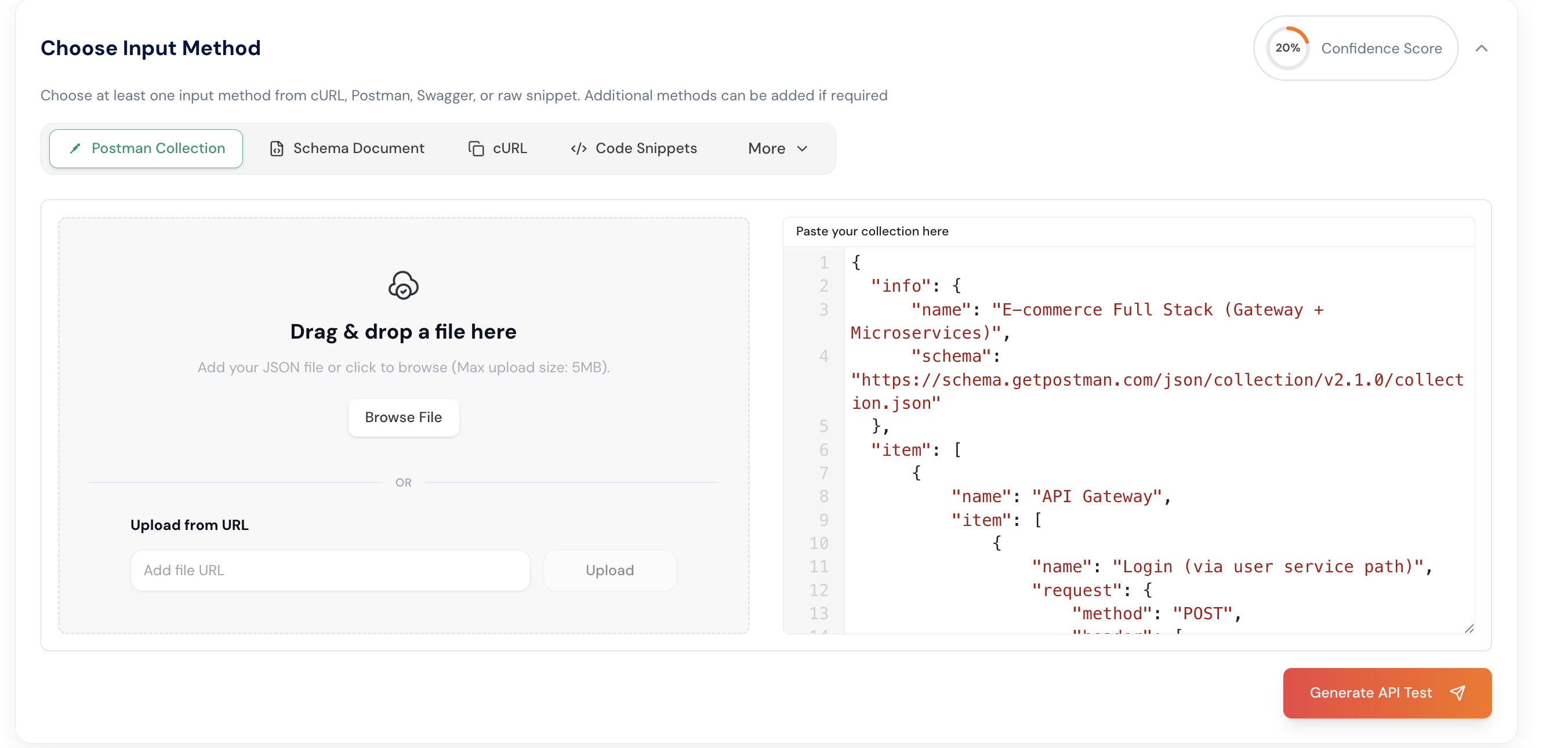
Also copy the curl commands:
<CollapsibleCode language="curl" previewLines={10} code={`
curl --request POST
--url http://localhost:8080/api/v1/orders
--header 'Connection: keep-alive'
--header 'Idempotency-Key: f0f86385-1d98-438c-b5a0-2b70385a4f8e'
--header 'User-Agent: PostmanRuntime/7.49.1'
--header 'Postman-Token: 24ef30da-b00d-46d6-ba1b-93578987e51a'
--header 'Authorization: Bearer eyJhbGciOiJIUzI1NiIsInR5cCI6IkpXVCJ9.eyJzdWIiOiJmMzEwNzA0NC1iYjA1LTExZjAtYTZlMi1hZWVmN2RjNDBlNjYiLCJ1c2VybmFtZSI6ImFkbWluIiwiaWF0IjoxNzYyNTAwNzMzLCJleHAiOjE3NjUwOTI3MzN9.pZejD-sAGDMXW9cgGYnS9ReqG-TXFFFnyQZeMMY*2cQ'
--header 'Accept: */_'
--header 'Cache-Control: no-cache'
--header 'Host: localhost:8080'
--header 'Content-Type: application/json'
--header 'Accept-Encoding: gzip, deflate, br'
--data '{
"userId": "6b6c9d87-92b0-4007-87ce-6356699648a8",
"items": [
{
"productId": "11111111-1111-4111-8111-111111111111",
"quantity": 1
}
],
"shippingAddressId": "4aba342f-e7dd-4f05-b0db-6f28cf75dd34"
}'
curl --request GET
--url http://localhost:8080/api/v1/orders/%7B%7Blast*order_id%7D%7D
--header 'Accept-Encoding: gzip, deflate, br'
--header 'Connection: keep-alive'
--header 'Authorization: Bearer eyJhbGciOiJIUzI1NiIsInR5cCI6IkpXVCJ9.eyJzdWIiOiJmMzEwNzA0NC1iYjA1LTExZjAtYTZlMi1hZWVmN2RjNDBlNjYiLCJ1c2VybmFtZSI6ImFkbWluIiwiaWF0IjoxNzYyNTAwNzMzLCJleHAiOjE3NjUwOTI3MzN9.pZejD-sAGDMXW9cgGYnS9ReqG-TXFFFnyQZeMMY_2cQ'
--header 'User-Agent: PostmanRuntime/7.49.1'
--header 'Accept: */_'
--header 'Cache-Control: no-cache'
--header 'Postman-Token: 6109e22b-dfb5-4394-b74e-5d0e8ce5466e'
--header 'Host: localhost:8080'
curl --request GET
--url http://localhost:8080/api/v1/orders/%7B%7Blast*order_id%7D%7D
--header 'User-Agent: PostmanRuntime/7.49.1'
--header 'Accept: */_'
--header 'Cache-Control: no-cache'
--header 'Postman-Token: 0f9a2f3e-6248-404a-adbf-74fcb9c68ff7'
--header 'Host: localhost:8080'
--header 'Accept-Encoding: gzip, deflate, br'
--header 'Connection: keep-alive'
--header 'Authorization: Bearer eyJhbGciOiJIUzI1NiIsInR5cCI6IkpXVCJ9.eyJzdWIiOiJmMzEwNzA0NC1iYjA1LTExZjAtYTZlMi1hZWVmN2RjNDBlNjYiLCJ1c2VybmFtZSI6ImFkbWluIiwiaWF0IjoxNzYyNTAwNzMzLCJleHAiOjE3NjUwOTI3MzN9.pZejD-sAGDMXW9cgGYnS9ReqG-TXFFFnyQZeMMY_2cQ'
curl --request GET
--url http://localhost:8080/api/v1/orders/%7B%7Blast*order_id%7D%7D/details
--header 'Authorization: Bearer eyJhbGciOiJIUzI1NiIsInR5cCI6IkpXVCJ9.eyJzdWIiOiJmMzEwNzA0NC1iYjA1LTExZjAtYTZlMi1hZWVmN2RjNDBlNjYiLCJ1c2VybmFtZSI6ImFkbWluIiwiaWF0IjoxNzYyNTAwNzMzLCJleHAiOjE3NjUwOTI3MzN9.pZejD-sAGDMXW9cgGYnS9ReqG-TXFFFnyQZeMMY_2cQ'
--header 'User-Agent: PostmanRuntime/7.49.1'
--header 'Accept: */_'
--header 'Cache-Control: no-cache'
--header 'Postman-Token: 3b8a7f27-4ada-4486-b27c-845d6a874763'
--header 'Host: localhost:8080'
--header 'Accept-Encoding: gzip, deflate, br'
--header 'Connection: keep-alive'
curl --request POST
--url http://localhost:8080/api/v1/orders/%7B%7Blast*order_id%7D%7D/cancel
--header 'Accept: */_'
--header 'Postman-Token: 9743c0e3-7b2b-4909-818d-6fe73311bc24'
--header 'Accept-Encoding: gzip, deflate, br'
--header 'Authorization: Bearer eyJhbGciOiJIUzI1NiIsInR5cCI6IkpXVCJ9.eyJzdWIiOiJmMzEwNzA0NC1iYjA1LTExZjAtYTZlMi1hZWVmN2RjNDBlNjYiLCJ1c2VybmFtZSI6ImFkbWluIiwiaWF0IjoxNzYyNTAwNzMzLCJleHAiOjE3NjUwOTI3MzN9.pZejD-sAGDMXW9cgGYnS9ReqG-TXFFFnyQZeMMY_2cQ'
--header 'Host: localhost:8080'
--header 'Connection: keep-alive'
--header 'User-Agent: PostmanRuntime/7.49.1'
--header 'Cache-Control: no-cache'
curl --request POST
--url http://localhost:8080/api/v1/orders
--header 'Host: localhost:8080'
--header 'Accept-Encoding: gzip, deflate, br'
--header 'Accept: /'
--header 'User-Agent: PostmanRuntime/7.49.1'
--header 'Content-Type: application/json'
--header 'Postman-Token: d494c3c8-8c24-437f-8ed7-f0d1527bf989'
--header 'Idempotency-Key: 2fb62e17-8ace-4528-ab51-0e7cf025237a'
--header 'Connection: keep-alive'
--header 'Authorization: Bearer eyJhbGciOiJIUzI1NiIsInR5cCI6IkpXVCJ9.eyJzdWIiOiJmMzEwNzA0NC1iYjA1LTExZjAtYTZlMi1hZWVmN2RjNDBlNjYiLCJ1c2VybmFtZSI6ImFkbWluIiwiaWF0IjoxNzYyNTAwNzMzLCJleHAiOjE3NjUwOTI3MzN9.pZejD-sAGDMXW9cgGYnS9ReqG-TXFFFnyQZeMMY_2cQ'
--header 'Cache-Control: no-cache'
--data '{
"userId": "6b6c9d87-92b0-4007-87ce-6356699648a8",
"items": [
{
"productId": "11111111-1111-4111-8111-111111111111",
"quantity": 1
}
],
"shippingAddressId": "4aba342f-e7dd-4f05-b0db-6f28cf75dd34"
}'
curl --request POST
--url http://localhost:8080/api/v1/orders/%7B%7Blast*order_id%7D%7D/pay
--header 'Authorization: Bearer eyJhbGciOiJIUzI1NiIsInR5cCI6IkpXVCJ9.eyJzdWIiOiJmMzEwNzA0NC1iYjA1LTExZjAtYTZlMi1hZWVmN2RjNDBlNjYiLCJ1c2VybmFtZSI6ImFkbWluIiwiaWF0IjoxNzYyNTAwNzMzLCJleHAiOjE3NjUwOTI3MzN9.pZejD-sAGDMXW9cgGYnS9ReqG-TXFFFnyQZeMMY_2cQ'
--header 'Accept: */_'
--header 'Postman-Token: 1925ffdf-3aa4-41a3-8b5a-9a7a56c96932'
--header 'Accept-Encoding: gzip, deflate, br'
--header 'Connection: keep-alive'
--header 'Host: localhost:8080'
--header 'User-Agent: PostmanRuntime/7.49.1'
--header 'Cache-Control: no-cache'
curl --request GET
--url 'http://localhost:8080/api/v1/orders?userId=6b6c9d87-92b0-4007-87ce-6356699648a8'
--header 'Authorization: Bearer eyJhbGciOiJIUzI1NiIsInR5cCI6IkpXVCJ9.eyJzdWIiOiJmMzEwNzA0NC1iYjA1LTExZjAtYTZlMi1hZWVmN2RjNDBlNjYiLCJ1c2VybmFtZSI6ImFkbWluIiwiaWF0IjoxNzYyNTAwNzMzLCJleHAiOjE3NjUwOTI3MzN9.pZejD-sAGDMXW9cgGYnS9ReqG-TXFFFnyQZeMMY*2cQ'
--header 'User-Agent: PostmanRuntime/7.49.1'
--header 'Accept: */_'
--header 'Cache-Control: no-cache'
--header 'Postman-Token: 4a3c9621-52ef-48f8-8a9e-01acff2353b0'
--header 'Host: localhost:8080'
--header 'Accept-Encoding: gzip, deflate, br'
--header 'Connection: keep-alive'
`
}
/>
Paste the cURL commands in the cURL section.
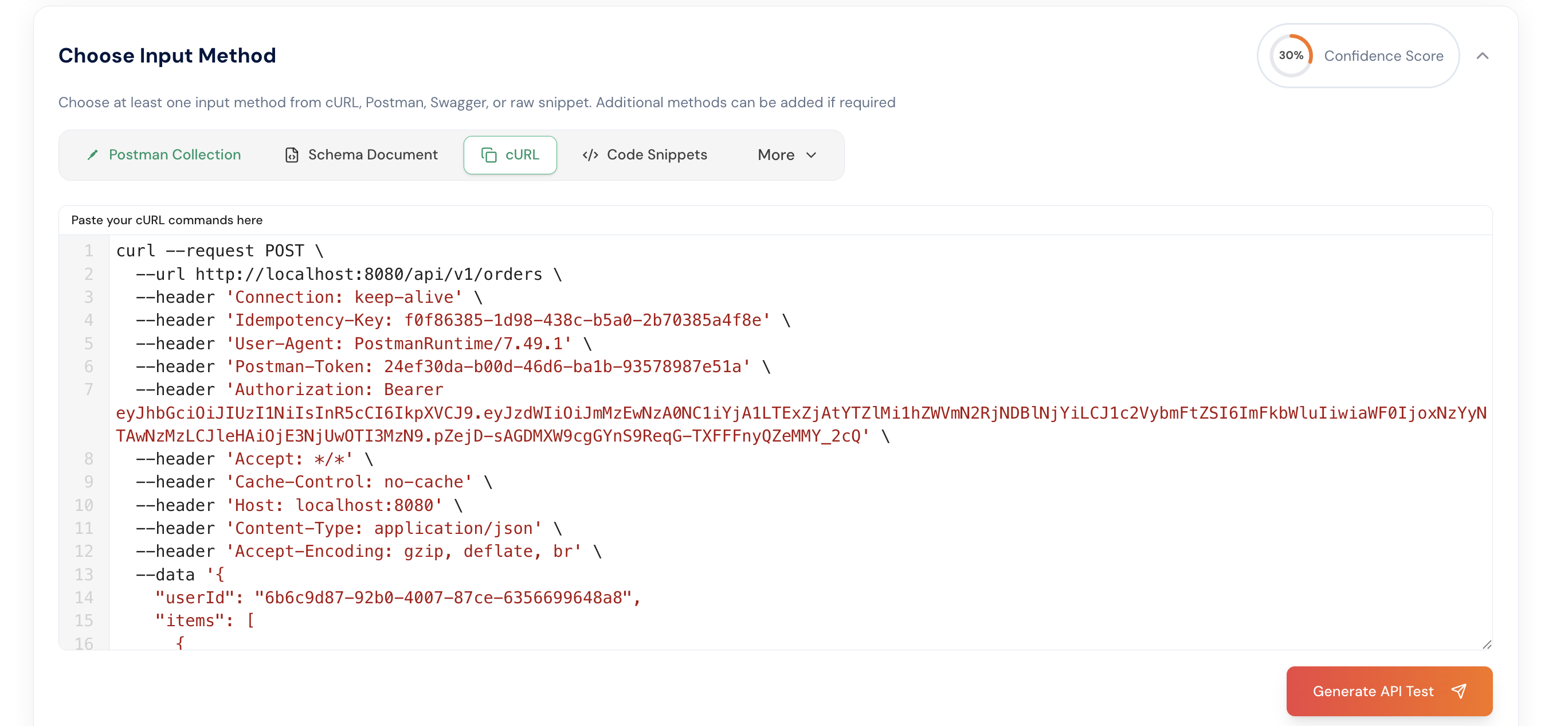
Also copy the openapi schema for the order service
<CollapsibleCode language="curl" previewLines={10} code={`
openapi: 3.1.0 info: title: Order Service API version: 1.0.0 components: securitySchemes: bearerAuth: type: http scheme: bearer bearerFormat: JWT security:
- bearerAuth: [] paths: /api/v1/orders: post: summary: Create order parameters: - in: header name: Idempotency-Key required: false schema: type: string maxLength: 64 description: Prevent duplicate order creation. If provided, repeated requests return the same order. requestBody: required: true content: application/json: schema: type: object required: - userId - items properties: userId: type: string items: type: array items: type: object required: - productId - quantity properties: productId: type: string quantity: type: integer minimum: 1 shippingAddressId: type: string nullable: true responses: '201': description: Created content: application/json: schema: type: object properties: id: type: string status: type: string enum: [PENDING, PAID, CANCELLED] '200': description: Returned existing order for idempotent request '400': description: Bad request '503': description: Dependency unavailable get: summary: List orders parameters: - in: query name: userId schema: type: string - in: query name: status schema: type: string enum: [PENDING, PAID, CANCELLED] - in: query name: limit schema: type: integer minimum: 1 maximum: 100 default: 20 - in: query name: cursor schema: type: string responses: '200': description: OK content: application/json: schema: type: object properties: orders: type: array items: type: object properties: id: type: string user_id: type: string status: type: string total_amount: type: number created_at: type: string format: date-time nextCursor: type: string nullable: true /api/v1/orders/{orderId}: get: summary: Get order by ID parameters: - in: path name: orderId required: true schema: type: string responses: '200': description: OK content: application/json: schema: type: object properties: id: type: string user_id: type: string status: type: string total_amount: type: number shipping_address_id: type: string nullable: true created_at: type: string format: date-time updated_at: type: string format: date-time items: type: array items: type: object properties: product_id: type: string quantity: type: integer price: type: number '404': description: Not found /api/v1/orders/{orderId}/details: get: summary: Get order by ID with enriched user and product details parameters: - in: path name: orderId required: true schema: type: string responses: '200': description: OK content: application/json: schema: type: object properties: id: { type: string } status: { type: string } total_amount: { type: number } created_at: { type: string, format: date-time } updated_at: { type: string, format: date-time } userId: { type: string } shippingAddressId: { type: string, nullable: true } shippingAddress: type: object nullable: true user: type: object nullable: true items: type: array items: type: object properties: productId: { type: string } quantity: { type: integer } product: type: object nullable: true /api/v1/orders/{orderId}/cancel: post: summary: Cancel order parameters: - in: path name: orderId required: true schema: type: string responses: '200': description: Cancelled '404': description: Not found '409': description: Conflict /api/v1/orders/{orderId}/pay: post: summary: Mark order paid parameters: - in: path name: orderId required: true schema: type: string responses: '200': description: Paid '404': description: Not found '409': description: Conflict /health: get: summary: Health check security: [] responses: '200': description: OK
`} />
Also Paste the OpenAPI schema into the Schema Document section. Once completed, you will be able to view the schema coverage.
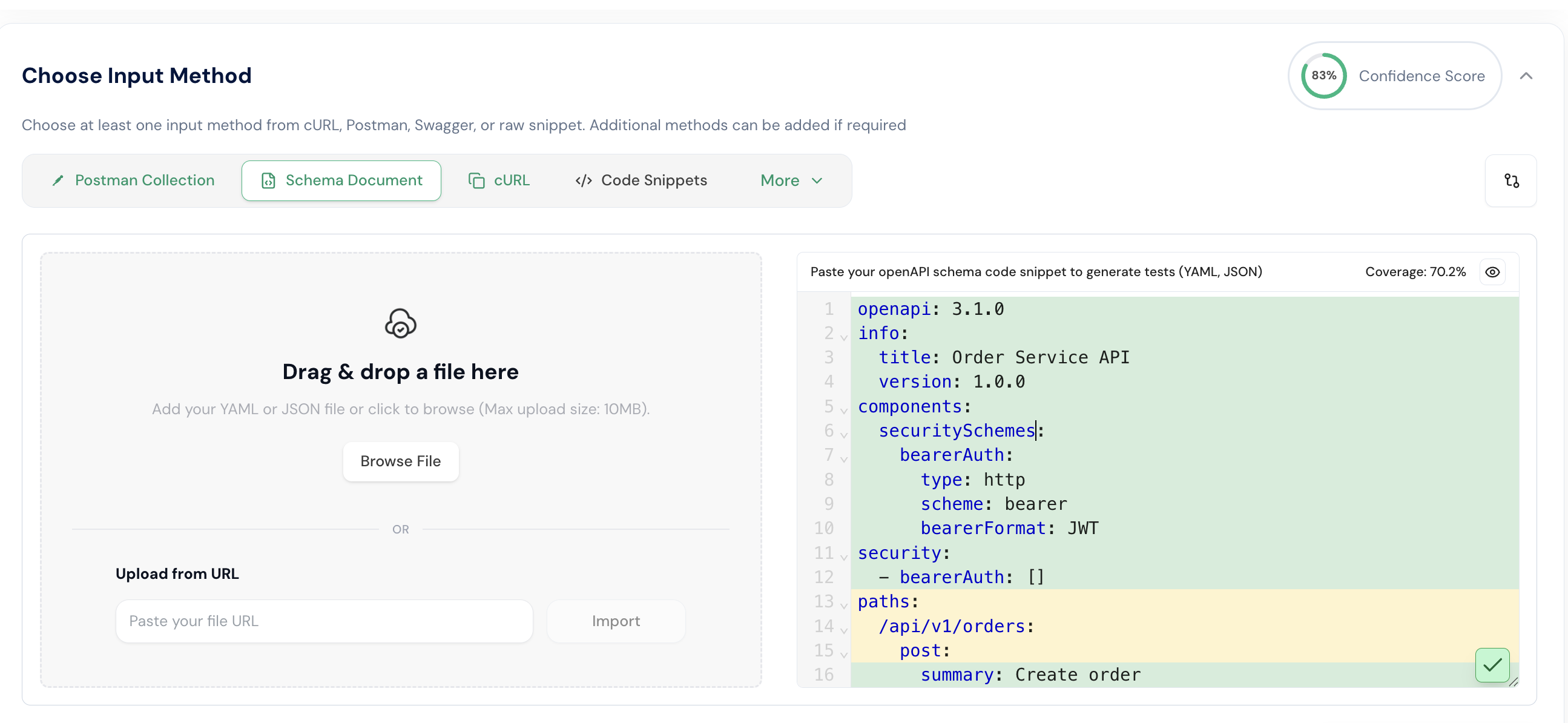
Step 4: After providing the OpenAPI schema, cURL commands, and Postman collection, click the Generate API Tests button. Then, review and confirm the generation settings. In this example, the port is changed to 8083, which means the application gateway will run on port 8083 to access all services.
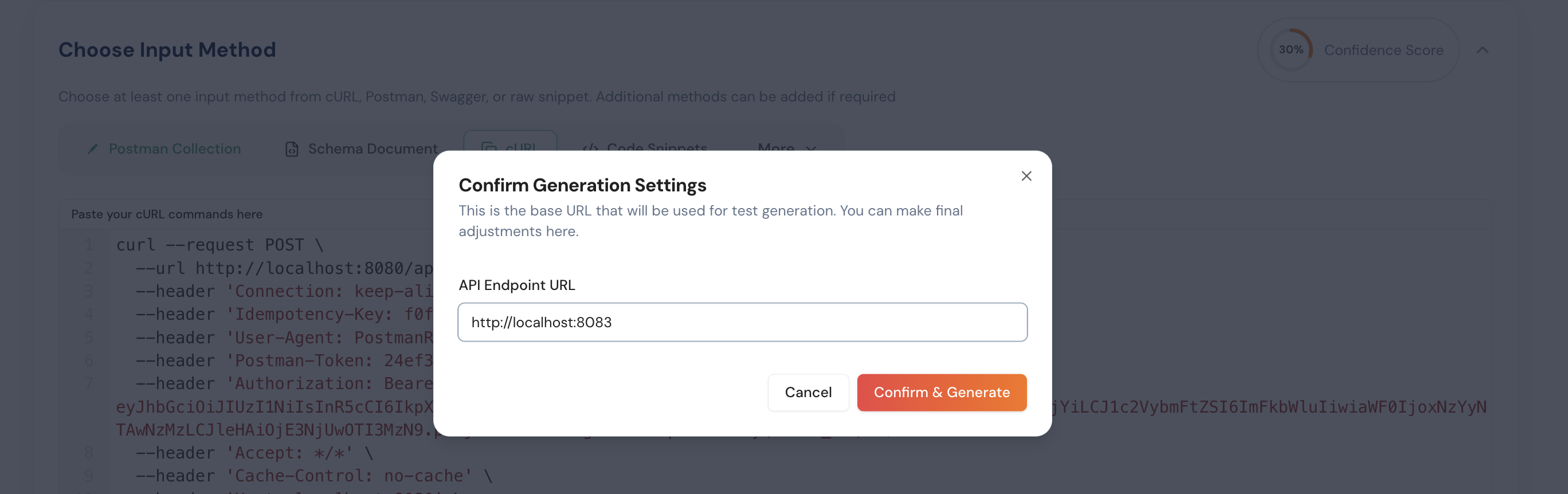
Step 5: After completing the previous steps, click the Generate API Test button to automatically create test cases for your application.
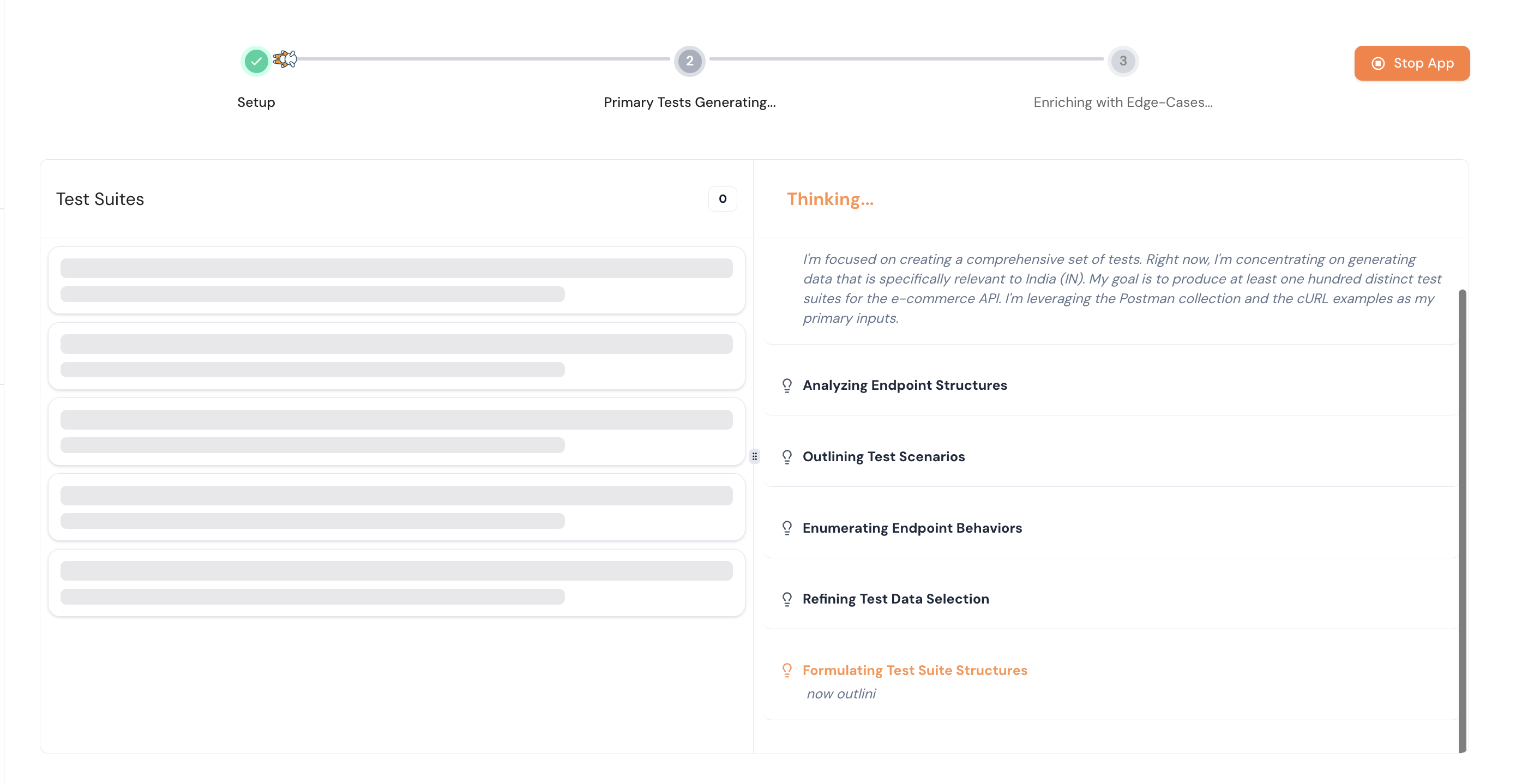
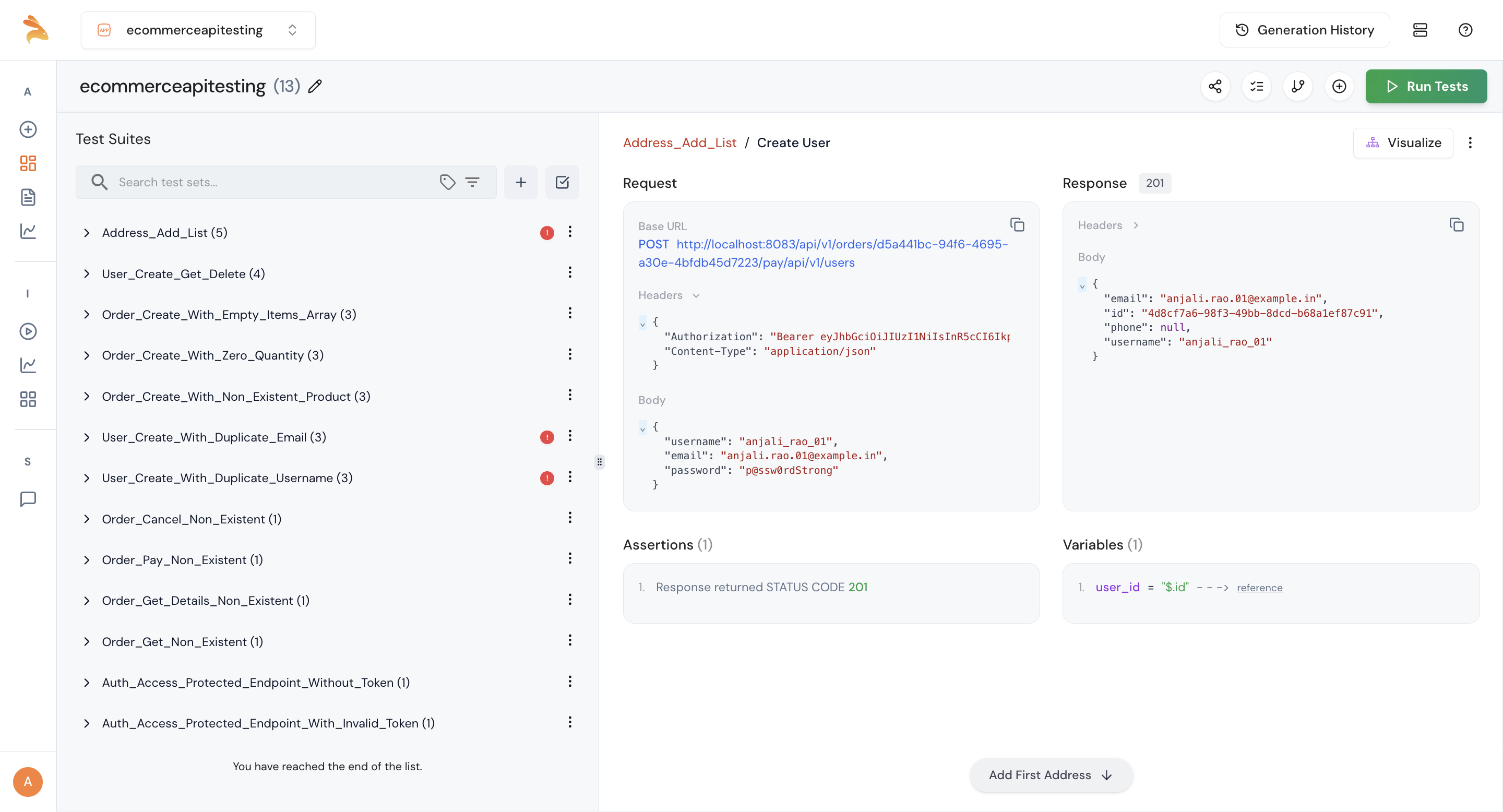
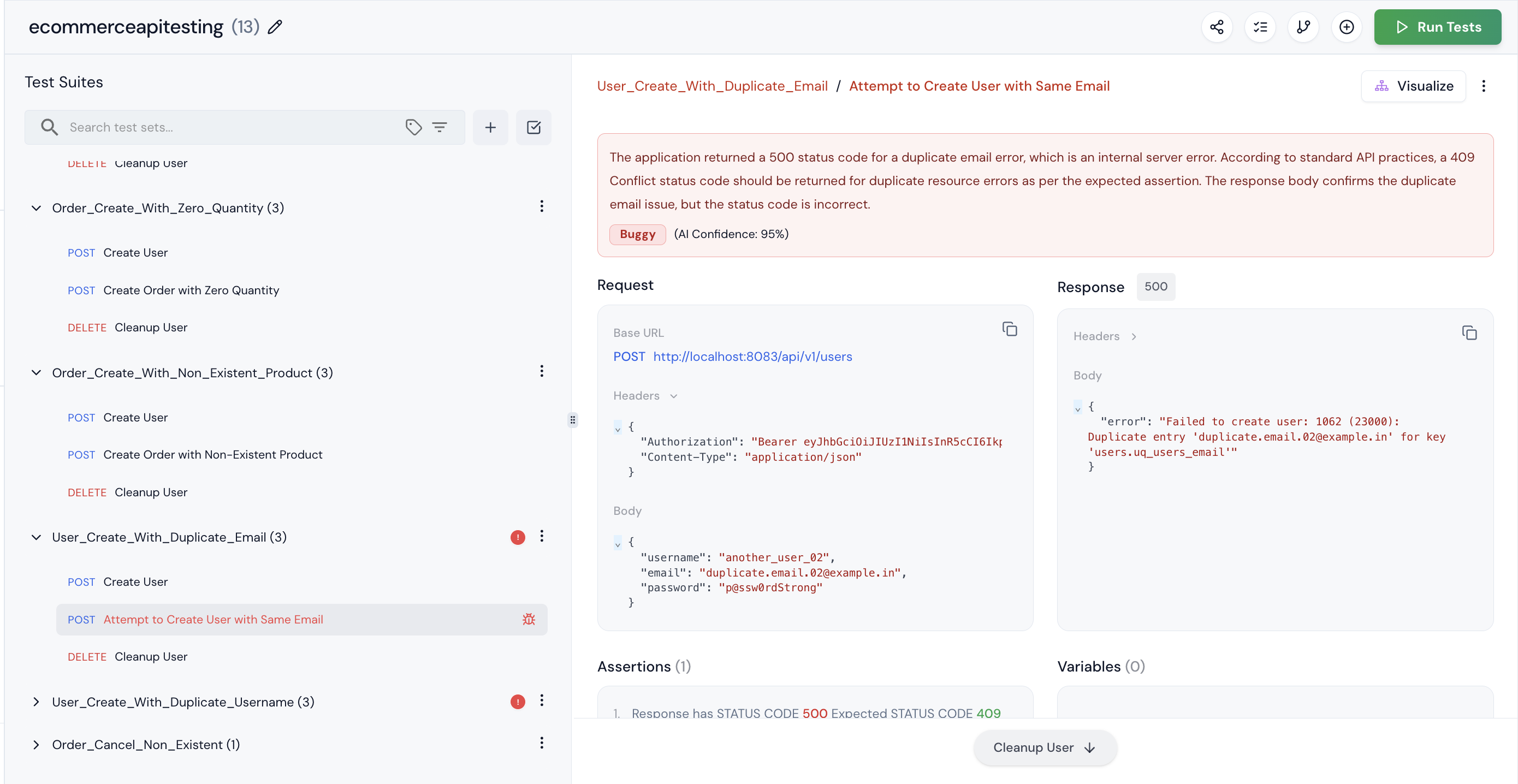
Step 6: You can see the test suites created by Keploy. Click on an individual test suite to view the request, response, and variables.
Step 7: To visualize the steps, click the Visualize button. This will display a visual representation of the test flow.
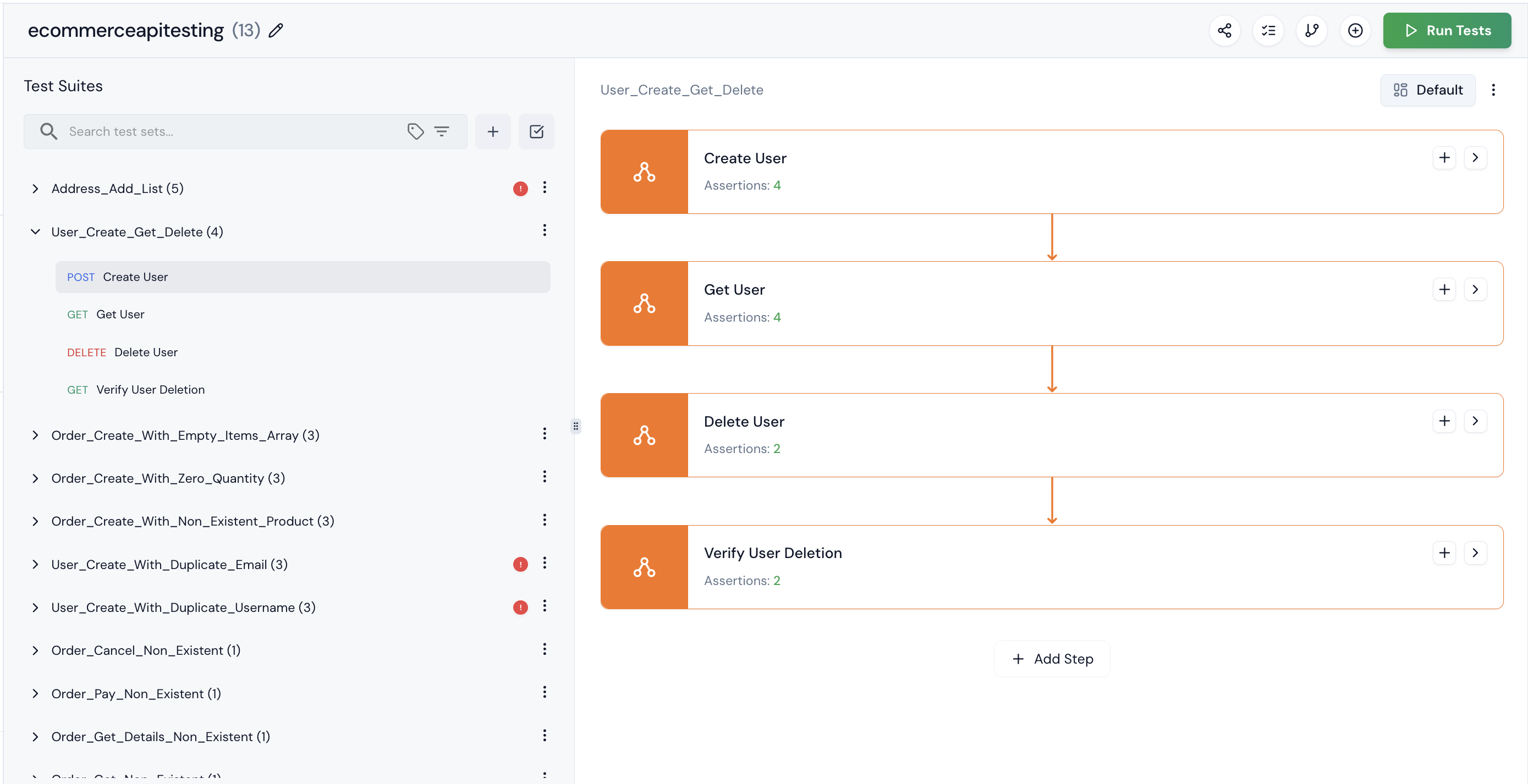
Step 8: One of the test suites is marked as buggy. This means our application has some issues that Keploy detected. If you’re sure it’s not actually buggy, you can mark it as ‘Not Buggy.
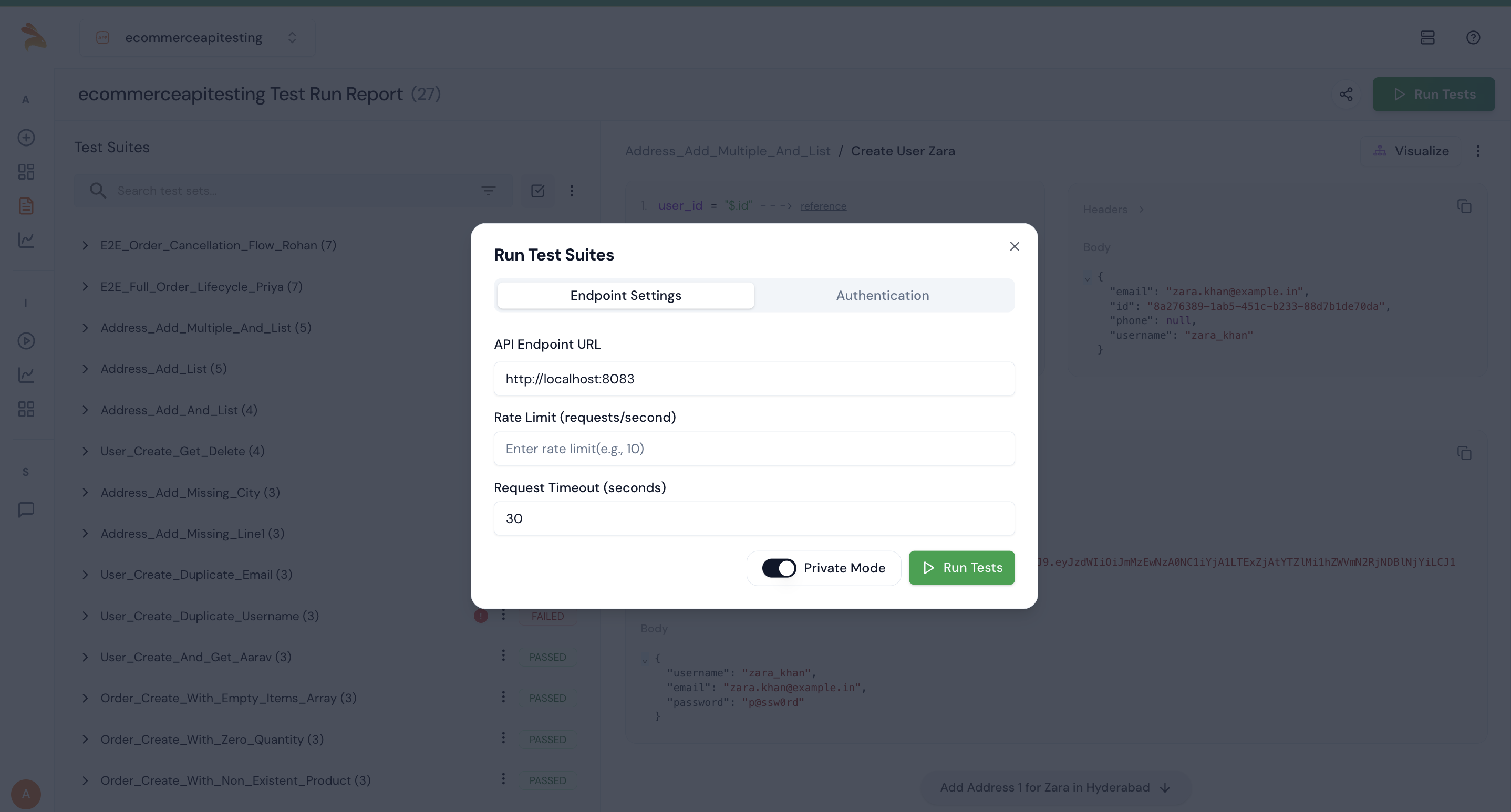
Step 9: After generating the test, click the Run Tests button to execute it. Ensure that Private Mode is turned on before running the tests.
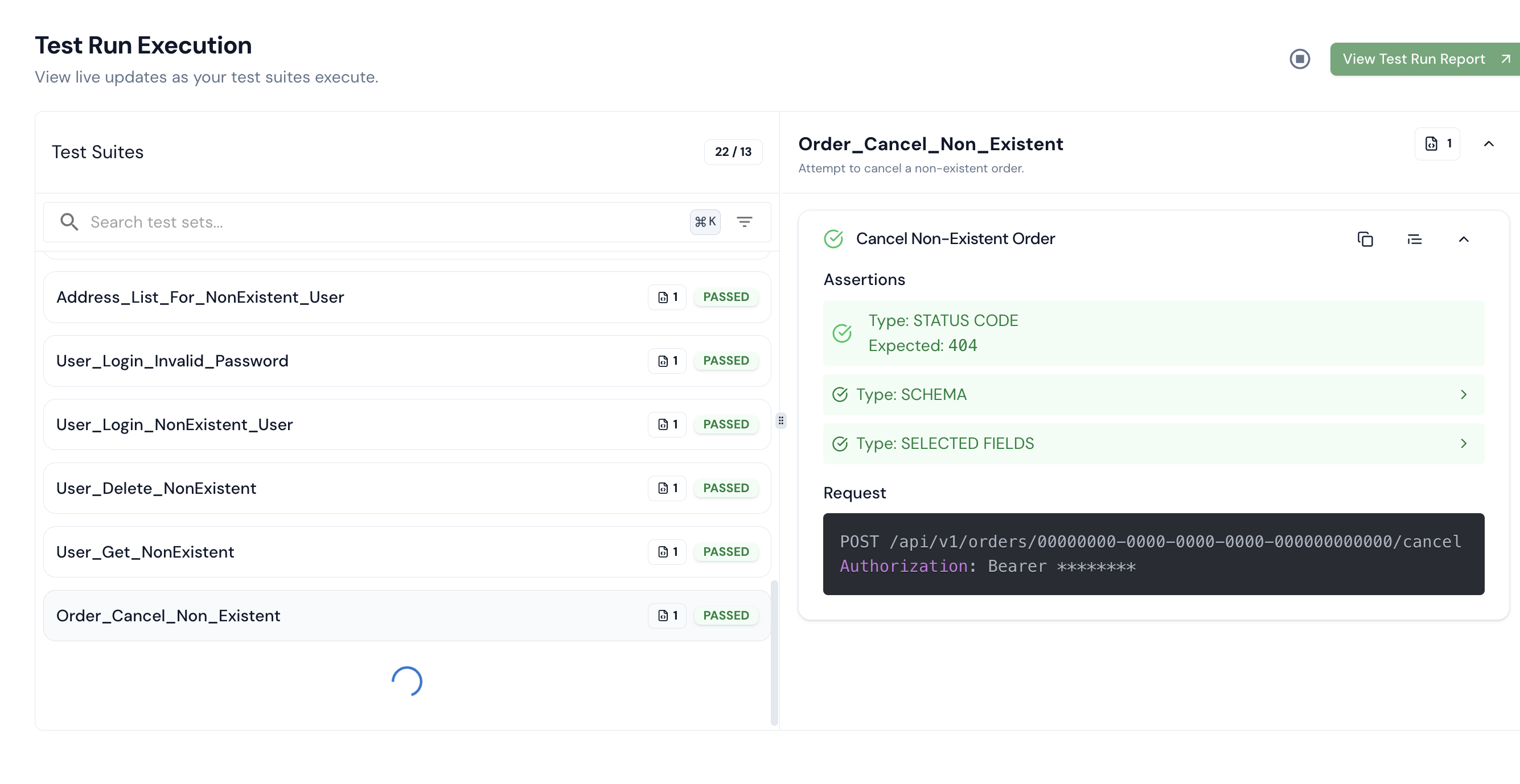
Step 10: After completion, you’ll be able to see the executed test results.
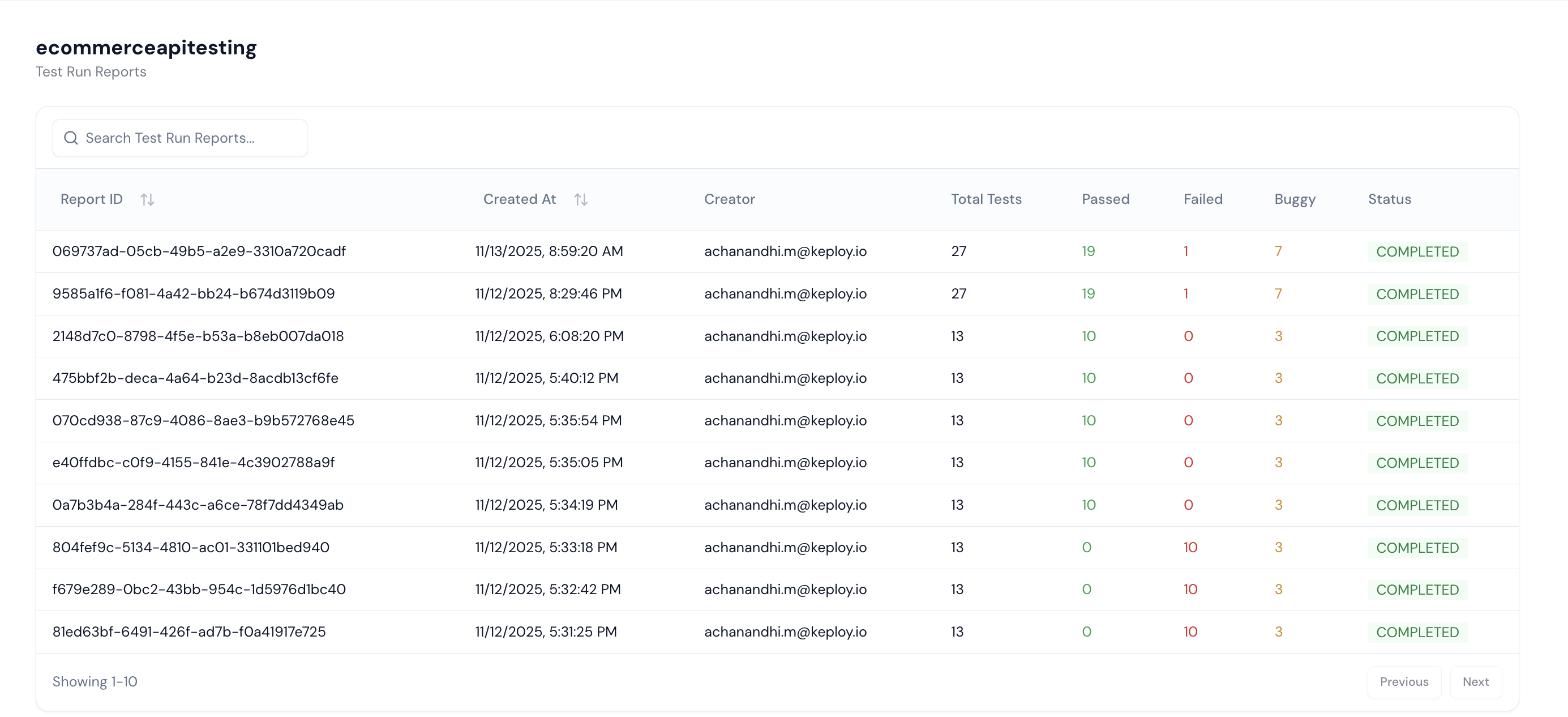
Step 11: To view detailed reports, including test run count, pass/fail status, and other insights, go to the Test Report section.
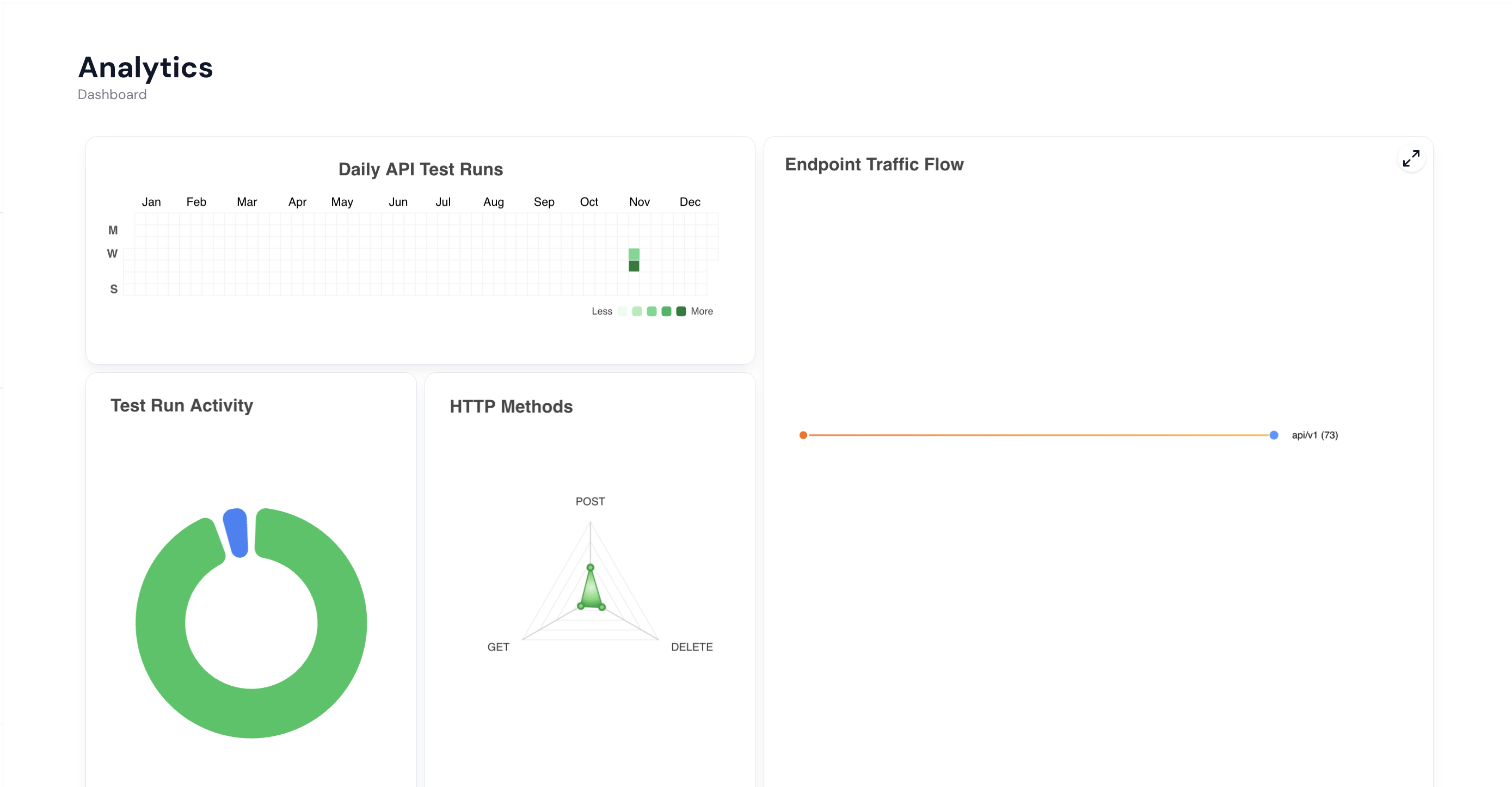
Step 12: To visualize analytics such as daily API test runs, test activity, and HTTP methods, navigate to the Dashboard section. It provides a complete overview of your testing insights.
Well done! You’ve seen how Keploy helps test your microservices without writing any code. You've generated test cases, run tests, and checked coverage—all with just a few steps.