Easy file saving and loading for player data (ex: high scores) #461

Replies: 2 comments

-
|
I did some experimenting and see that f_ver = open("version.txt", "r")
self.version = f_ver.readlines()[0].rstrip()That works in games published to the web and on PC when developing. I did try this for writing (and reading like above) for high-score: f = open("pyxshmup-high-score.txt", "w")
f.write(str(self.times_pressed))
f.close()but it doesn't appear to write the file for web builds. It also has the complication of needing to put the file in a safe place dependent on the operating system. I'm going to recategorize this as a feature request and share some more thoughts for what that could look like. |
Beta Was this translation helpful? Give feedback.
-
|
@kitao if it doesn't already exist, I'd like to make a feature request for two methods to easily save and load player data in a way that's cross-platform and works on web. Maybe the API could look like: high_score = pyxel.load_data("high-score")
high_score = int(high_score)
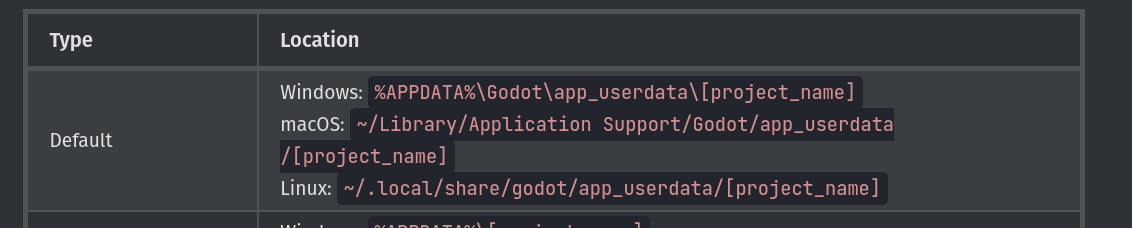
pyxel.save_data("high-score", high_score)Ideally the save data would be placed in a safe directory according to the operating system. The Godot engine uses these paths:
and maybe web could just use Maybe just a simple key value store would be enough for most purposes? I'm not sure if most games would need the ability to read and write more complex save data. Here are some use cases for why I'm requesting this:
Would this be a welcome contribution? I'd be happy to help and open a PR! |
Beta Was this translation helpful? Give feedback.

Uh oh!
There was an error while loading. Please reload this page.
-
How would I go about reading and writing a text file that contains a player's high score data? Are there any special functions in Pyxel or do I just use what comes with Python to do? I wasn't sure if using the Python approach would work with web builds of the Pyxel game or with
pyxel play.Thank you!
Beta Was this translation helpful? Give feedback.
All reactions