Setup Explained
This will explain in detail what is performed by the iOSOpenDev Installer.
A collection of filesystem directories are created at /opt/iOSOpenDev.
A symbolic link (symlink) is created for the user at ~/Library/Developer/Xcode/Templates/iOSOpenDev that points to /opt/iOSOpenDev/templates which is the directory that will contain the provided Xcode templates. Having this symlink created enables the Xcode templates to be shown in Xcode when starting a new project.
The user's Bash personal initialization file is located at either ~/.bash_profile, ~/.bash_login or ~/.profile. If neither exist, the first is created and used. The Bash profile file has the following added (if not already found):
export iOSOpenDevPath=/opt/iOSOpenDev-
export iOSOpenDevDevice=Intentionally a blank value. The user needs to manually add the value of the host name (e.g. MyiPhone.local) or IP address (e.g. 192.168.1.101) of the device used for development. export PATH=/opt/iOSOpenDev:$PATH-
export PATH=/opt/local/bin:$PATHFor MacPorts. -
export PATH=/opt/local/sbin:$PATHFor MacPorts.
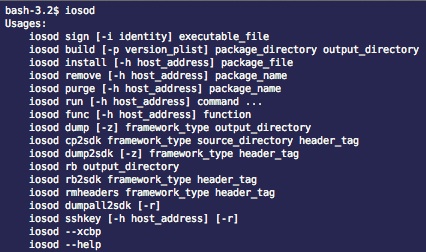
The iOSOpenDev command-line tool, iosod, is placed at /opt/iOSOpenDev/bin. This is used by Xcode during a Run Script Build Phase for projects created from iOSOpenDev provided Xcode templates, along with other various usages. To learn more about its usages, open Terminal and type iosod --help.
For both the latest iPhoneOS and iPhoneSimulator iOS SDK versions, sets the following properties found in [sdk path]/SDKSettings.plist:
- CODE_SIGNING_REQUIRED to NO.
- ENTITLEMENTS_REQUIRED to NO.
- AD_HOC_CODE_SIGNING_ALLOWED to YES.
For both the latest iPhoneOS and iPhoneSimulator iOS SDK versions, adds the following Xcode Package Type Specifications to [platform path]/Developer/Library/Xcode/Specifications/[platform name]PackageTypes.xcspec. Adding these specifications is an important factor in allowing Xcode to compile Mach-O executables (i.e. command-line tools) and Mach-O dynamic libraries (i.e. substrate tweaks, etc) for the iOS platform which is not supported by default.
- { Type = PackageType; Identifier = com.apple.package-type.mach-o-executable; Name = "Mach-O Executable"; Description = "Mach-O executable"; DefaultBuildSettings = { EXECUTABLE_PREFIX = ""; EXECUTABLE_SUFFIX = ""; EXECUTABLE_NAME = "$(EXECUTABLE_PREFIX)$(PRODUCT_NAME)$(EXECUTABLE_VARIANT_SUFFIX)$(EXECUTABLE_SUFFIX)"; EXECUTABLE_PATH = "$(EXECUTABLE_NAME)"; }; ProductReference = { FileType = compiled.mach-o.executable; Name = "$(EXECUTABLE_NAME)"; IsLaunchable = YES; }; }
- { Type = PackageType; Identifier = com.apple.package-type.mach-o-dylib; Name = "Mach-O Dynamic Library"; Description = "Mach-O dynamic library"; DefaultBuildSettings = { EXECUTABLE_PREFIX = ""; EXECUTABLE_SUFFIX = ""; EXECUTABLE_NAME = "$(EXECUTABLE_PREFIX)$(PRODUCT_NAME)$(EXECUTABLE_VARIANT_SUFFIX)$(EXECUTABLE_SUFFIX)"; EXECUTABLE_PATH = "$(EXECUTABLE_NAME)"; }; ProductReference = { FileType = compiled.mach-o.dylib; Name = "$(EXECUTABLE_NAME)"; IsLaunchable = NO; }; }
For both the latest iPhoneOS and iPhoneSimulator iOS SDK versions, adds the following Xcode Product Type Specifications to [platform path]/Developer/Library/Xcode/Specifications/[platform name]ProductTypes.xcspec. Adding these specifications is an important factor in allowing Xcode to build jailbreak-type products (i.e. command-line tools, substrate tweaks, etc) for the iOS platform which is not supported by default.
- { Type = ProductType; Identifier = com.apple.product-type.tool; Class = PBXToolProductType; Name = "Command-line Tool"; Description = "Standalone command-line tool"; IconNamePrefix = "TargetExecutable"; DefaultTargetName = "Command-line Tool"; DefaultBuildProperties = { FULL_PRODUCT_NAME = "$(EXECUTABLE_NAME)"; EXECUTABLE_PREFIX = ""; EXECUTABLE_SUFFIX = ""; REZ_EXECUTABLE = YES; INSTALL_PATH = "/usr/bin"; FRAMEWORK_FLAG_PREFIX = "-framework"; LIBRARY_FLAG_PREFIX = "-l"; LIBRARY_FLAG_NOSPACE = YES; GCC_DYNAMIC_NO_PIC = NO; GCC_SYMBOLS_PRIVATE_EXTERN = YES; GCC_INLINES_ARE_PRIVATE_EXTERN = YES; STRIP_STYLE = "all"; CODE_SIGNING_ALLOWED = YES; ENTITLEMENTS_ALLOWED = YES; MACH_O_TYPE = "mh_execute"; }; PackageTypes = (com.apple.package-type.mach-o-executable); }
- { Type = ProductType; Identifier = com.apple.product-type.library.dynamic; Class = PBXDynamicLibraryProductType; Name = "Dynamic Library"; Description = "Dynamic library"; IconNamePrefix = "TargetLibrary"; DefaultTargetName = "Dynamic Library"; DefaultBuildProperties = { FULL_PRODUCT_NAME = "$(EXECUTABLE_NAME)"; MACH_O_TYPE = "mh_dylib"; REZ_EXECUTABLE = YES; EXECUTABLE_SUFFIX = ".$(EXECUTABLE_EXTENSION)"; EXECUTABLE_EXTENSION = "dylib"; PUBLIC_HEADERS_FOLDER_PATH = "/usr/include"; PRIVATE_HEADERS_FOLDER_PATH = "/usr/include"; INSTALL_PATH = "/usr/lib"; DYLIB_INSTALL_NAME_BASE = "$(INSTALL_PATH)"; LD_DYLIB_INSTALL_NAME = "$(DYLIB_INSTALL_NAME_BASE:standardizepath)/$(EXECUTABLE_PATH)"; DYLIB_COMPATIBILITY_VERSION = "1"; DYLIB_CURRENT_VERSION = "1"; FRAMEWORK_FLAG_PREFIX = "-framework"; LIBRARY_FLAG_PREFIX = "-l"; LIBRARY_FLAG_NOSPACE = YES; STRIP_STYLE = "debugging"; GCC_INLINES_ARE_PRIVATE_EXTERN = YES; CODE_SIGNING_ALLOWED = YES; }; PackageTypes = (com.apple.package-type.mach-o-dylib); }
For both the latest iPhoneOS and iPhoneSimulator iOS SDK versions, creates the following symbolic link in [platform path]/Developer/usr/bin, which is a directory part of the PATH during Xcode's Run Script Build Phases:
-
iosodwhich points to/opt/iOSOpenDev/bin/iosod -
ldidwhich points to/opt/iOSOpenDev/bin/ldid
The following Xcode templates are placed in /opt/iOSOpenDev/templates for building jailbreak-type projects. These templates will be visible in Xcode when creating a new project under iOS > iOSOpenDev. Expect this list to change over time:
- ActionMenu Plugin
- Activator Listener
- AssistantExtensions Extension
- Cocoa Touch Library (for dynamic and static libraries)
- Command-line Tool
- Empty Project
- NotificationCenter Widget
- SBSettings Toggle
- Substrate Tweak
- Non-"concrete" templates: Base, Debian Package and Unit Tests
The following "3rd Party" projects have their header and library files placed in /opt/iOSOpenDev/include and /opt/iOSOpenDev/lib for use by provided Xcode templates. Expect this list to change over time:
- ActionMenu
- AssistantExtensions
- CaptainHook
- Cydia Substrate
- LibActivator
- Other miscellaneous sources
The following tools are placed in /opt/iOSOpenDev/bin. Expect this list to change over time:
-
class-dump: For dumping header files. -
class-dump-z: For dumping header files. -
ldid: For "signing" code.
The current aspects of dumping the header files (*.h) of the latest iOS SDK public and private frameworks and SpringBoard Core Service during installation is going to be changing soon. As of this writing (version 1.0.1), the public and private frameworks header files are placed under [sdk path]/System/Library/Frameworks and [sdk path]/System/Library/PrivateFrameworks, respectively, with an appended suffix indicating which tool (class-dump or class-dump-z) generated the header file. The SpringBoard header files are placed in /opt/iOSOpenDev/include/SpringBoard. Again, expect a near-future change to how all this is performed to better serve its purpose.