
kordoc
By chrisryugj·2,640
Parse Korean documents (HWP, HWPX, PDF, XLSX, DOCX, PPTX) to Markdown; fill forms, diff, render.
kordoc
모두 파싱해버리겠다. Parse them all.


Korea's document hell is second to none. Built by a civil servant who survived seven years in it.
Convert HWP 3.x/5.x, HWPX, HWPML, PDF, XLS/XLSX, DOCX, PPTX and PNG/JPG/WebP to Markdown and structured data. Use it as a library, CLI or MCP server.
한국어 · Usage guide · Benchmarks · Changelog
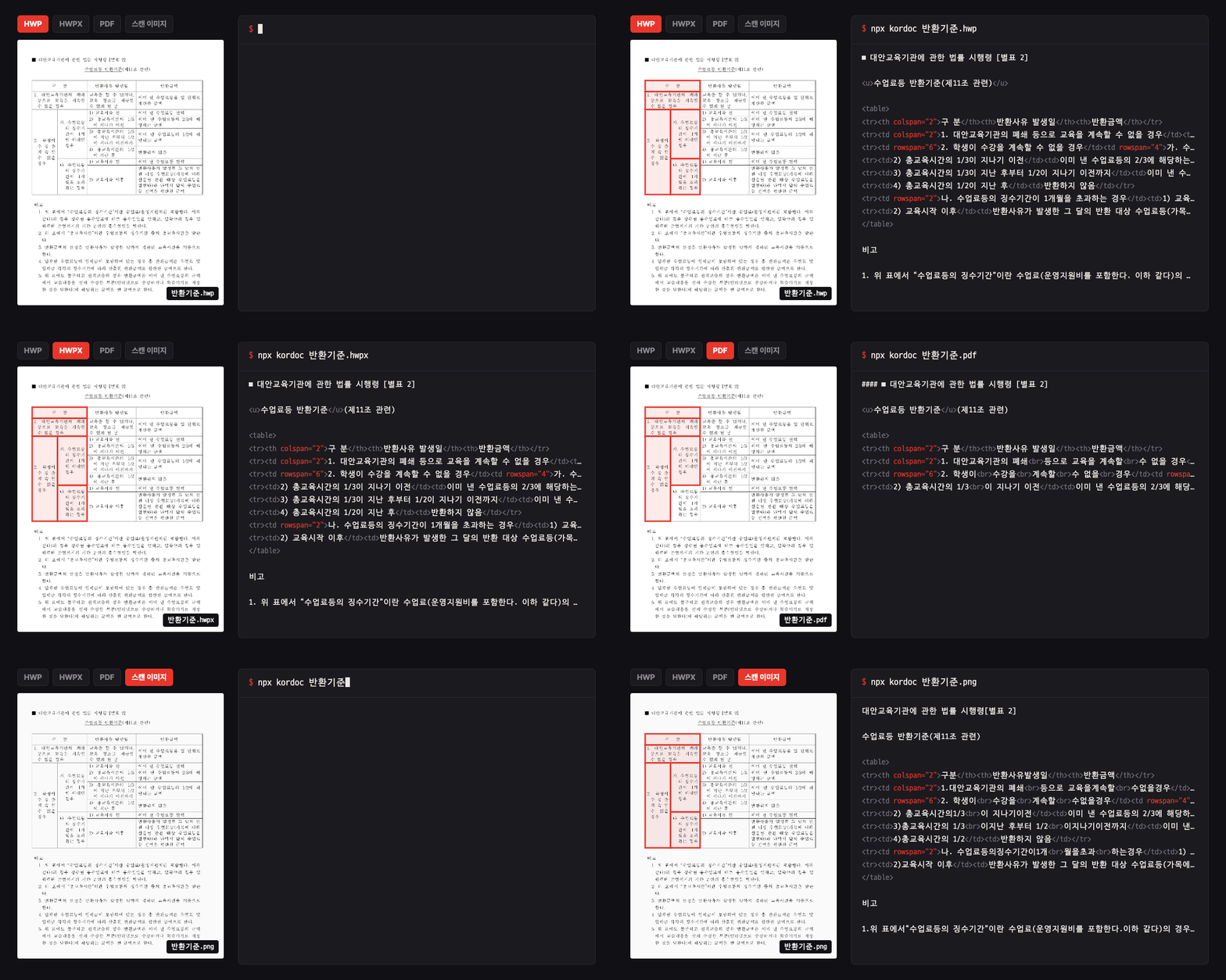
Actual output for one statute annex given as HWP, HWPX, PDF and a scanned image. All four read the merged cells (rowspan, colspan) into the same table structure. OCR turns on automatically for images.
- 📊 0.964 overall on the public PDF benchmark: opendataloader-bench, 200 documents, higher than the 12 parsers on the public leaderboard (measured on 4.22.14). Measurement details
- 🇰🇷 100% Korean document table structure match: all 10,342 visible tables from 2,424 original HWPX documents. Validation
If this saves you time, a GitHub ⭐ helps others find it.
Videos (Korean): public benchmark run (2026-09-27 cut, 1 min 31 sec) · batch form filling demo
Install
Node.js 20+ · macOS / Linux / Windows
npm install kordocRun the CLI without installing it globally: npx kordoc. PDF/OCR dependencies are installed by default; omitting them with --omit=optional limits those features.
Connect an AI agent
npx -y kordoc setupRegisters MCP with installed clients such as Claude Desktop, Claude Code, Cursor and Codex. Restart the client to use 18 tools for parsing, comparison, generation, review, rendering and more.
Claude Code plugin:
/plugin marketplace add chrisryugj/kordoc
/plugin install kordoc@kordoc
Manual MCP setup and installation troubleshooting
Quick start
CLI
npx kordoc document.hwpx -o document.md
npx kordoc *.pdf --jobs 4 -d ./output
npx kordoc document.pdf --format json --pages 1-3
npx kordoc scan.pdf --ocr -o scan.md
npx kordoc generate report.md --preset report -o report.hwpx
npx kordoc fill --template gian -j values.json -o draft.hwpx
npx kordoc lint report.hwpx --gate --preset report
--jobs converts files in parallel and increases memory use. Batch conversion details
JavaScript / TypeScript
import { parse, markdownToHwpx } from "kordoc"
import { writeFile } from "node:fs/promises"

const result = await parse("document.hwpx")
if (result.success) {
  console.log(result.markdown)
  // result.blocks: structured data; result.metadata: document metadata
}

const hwpx = await markdownToHwpx("# Plan\n\nBody text", {
  gongmun: { preset: "report" },
})
await writeFile("report.hwpx", Buffer.from(hwpx))
Parse options, APIs, forms and rendering examples
Features
| Task | Capabilities |
|---|---|
| Read | Markdown, IR, page text, RAG chunks and local OCR |
| Compare and edit | Block/cell diffs, format-preserving HWPX/HWP patches, new content in a sample's format |
| Create | Markdown → HWPX, government-document presets and department templates (--template), tables, equations and charts |
| Fill forms | Fields, click-here controls, two draft templates and seal placement |
| Review | Notation and public-language rules, structure and AI-writing gate, budget calculation checks, block-level lint for open documents (lint-blocks) |
| View and protect | HWPX/HWP previews and region crops, PII masking |
Extract Markdown for format-preserving patches with --keep-layout-tables. Unsupported edits are skipped with a reason. Format-preserving editing · Full CLI reference
Validation
4.22.14 verification · 2026-10-19. Results use fixed corpora and reference criteria.
| Target | Population | Result |
|---|---|---|
| HWPX | 2,424 documents · 10,342 tables | Table structure match 10,342/10,342 · 100% |
| HWP 5.x ↔ HWPX | 1,130 pairs · 4,315 tables | Paired-document table structure match 100% |
| PDF text | 744 pairs | Character recall 99.879% · precision 99.670% · reading order 99.247% · word-boundary F1 99.049% |
| PDF tables | 708 pairs · 2,331 tables | Detection 99.87% · structure match 98.16% · cell F1 0.9918 |
| HWPX reflow | 25,187 multiline paragraphs (12 folders) | All line starts match 24,941/25,187 · 99.02% |
| Nested PDF tables (text layer) | 29 documents · 101 tables | Structure and cell content 101/101 · 100% |
| Statute annexes | 272 documents · 346 tables | HWP 346/346, PDF 342/346 · 98.84% |
| All PDFs | 1,729 scored out of 1,911 documents | Text coverage 99.80% |
| OCR | 53 documents · 102 pages | CER 0.0409 · character recall 99.02% |
| opendataloader-bench | 200 PDF documents | Overall 0.964 with defaults · 0.939 with OCR off |
Table structure, cell content and visual fidelity are separate metrics. The nested-table 100% applies only to these 101 tables, not all PDF parsing or page layout. See benchmark details for scope, exclusions, per-option scores and reproduction.
Recent updates
Latest release: 4.24.1 · 2026-10-21
| Version | Highlights |
|---|---|
| 4.24.1 | Lint fixes: sparse-table memory blowup in block lint, quadratic thousand-won rule, budget checks (list lines, 소계(A), ratio rows), generate --template no longer overwrites the template |
| 4.24.0 | Block-level lint lintBlocks: pass paragraphs and table cells of an open document as blocks and get findings back as block id + offset (CLI lint-blocks, MCP lint_document, worker, Python SDK) |
| 4.23.1 | Template title-table approval cells filled per role, no more thousand-won false positives on calculation lines and table cells |
| 4.23.0 | New documents from a department template (generate --template), budget review (lint --budget), MCP lint_document |
| 4.22.18 | Patching the title frame, chapter bands and summary box of kordoc-generated reports; patched tracked-changes HWP files no longer show the old text in Hangul |
See the changelog for earlier releases and details.
FAQ
How do I convert an HWP or HWPX file to Markdown?
npx kordoc document.hwp -o document.md. It reads the file directly, without Hancom Office. Convert many files at once with npx kordoc *.hwpx -d ./output.
How do I let Claude, Cursor or another AI agent read Korean documents?
Run npx -y kordoc setup to register the MCP server. The agent can then read, compare and fill HWP, PDF and Excel files from a file path.
Does it work on an air-gapped network?
Yes. KORDOC_OFFLINE=1 blocks all outbound traffic, and OCR runs on the local CPU with no API key. Offline deployment
Can I use it for RAG indexing?
--format chunks emits structure chunks with heading breadcrumbs plus standalone table chunks. Use --table-format gfm (API: tableFormat: "gfm") for tables without HTML. From Python or Java, use the Python SDK or Java SDK.
Can I get OCR line boxes or use another model?
--ocr --ocr-lines --format json exports line boxes and confidence; --ocr-det and --ocr-det-long-side select the detector and resolution. OCR lines and models
Documentation and security
- Usage guide: complete CLI, MCP tools, APIs and format support
- Java SDK · Python SDK: parse from Java and Python systems through a resident engine worker (worker protocol, Korean)
- Government-document generation · Architecture
- Offline deployment:
KORDOC_OFFLINE=1; MCP file scope withKORDOC_ROOT - Security policy · MIT license · Third-party notices
About the Author
A local civil servant in Korea. Built this after seven years of wrestling HWP files at the Gwangjin-gu District Office in Seoul. Validated on thousands of real government documents across five public-sector projects.