Released on March 18, 2014.
- Java 8 is the first version of Java that supports functional programming.
- It comes with with declarative approach instead of imperative approach which gives more flexibility to the programmer by avoiding verbosity.
- Functional Interface in java 8 is an interface that has only one abstract method.
- Link to Functional Interface documentation
- Predicate is a functional interface that takes one argument and returns a boolean value (true / false).
Predicate<Player> isPlayerFromMorocco = player -> player.getCountry().equals("Morocco");

List<Player> moroccanPlayers = players.stream()
        .filter(isPlayerFromMorocco)
        .collect(Collectors.toList());

moroccanPlayers.forEach(System.out::println);- Function is a functional interface that takes one argument and produces a result.
// Example 1

static Function<Player, String> playerToName = Player::getName;

String name = playerToName.apply("Messi 🐐");

// Example 2

Function<Integer, Integer> square = x -> x * x;
int result = square.apply(5);

Function<Integer, Integer> squareAndThenAddOne = square.andThen(x -> x + 1);
int finalResult = squareAndThenAddOne.apply(5);- BiFunction is a functional interface that takes two arguments and produces a result.
BiFunction<Integer, Integer, Integer> multiplyByEightAndThenAddNumber = (x, y) -> (x * 8) + y;

int result = multiplyByEightAndThenAddNumber.apply(5, 10);- Consumer is a functional interface that takes one argument and returns nothing.
Consumer<Player> Helloplayer = player -> {
    System.out.println("Hello  ! " + player.getName());
};

Helloplayer.accept(player);- BiConsumer is a functional interface that takes two arguments and returns nothing.
BiConsumer<Player, Boolean> playerList = (player, showName) -> {
    System.out.println("Hello Everyone ! " + player.getName());
    showPlayerName ? player.getName() : " ***** Player List For The Game Not Ready Yet ***** ";
};

playerList.accept(player, true);- Supplier is a functional interface that takes no argument and returns a result, it's like a getter.
Supplier<String> getDockerImagesForTheApp = () -> {
    List.of(
        "docker pull mysql:latest",
        "docker pull redis:latest",
        "docker pull postgres:latest",
        "docker pull nginx:latest",
        "docker pull node:latest",
        "docker pull openjdk:latest"
    )
};

getDockerImagesForTheApp.get();- Stream API is a new feature in Java 8 that allows us to process data in a declarative way.
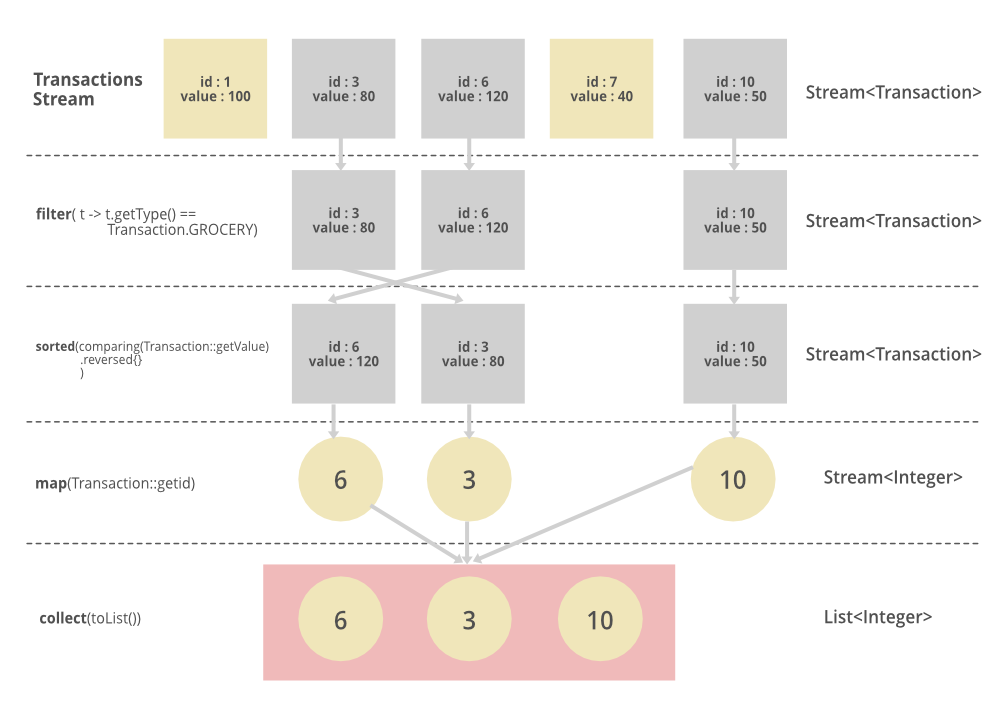
- It allows us to perform filter, map, reduce, find, match, sort, and many other operations with the collection of data.
- We process data in a functional programming style in 3 steps:
- It starts with a collection of data :
- List
- Set
- Map
- Array
- etc.
- It applies a series of operations on the data.
- It produces a result.
- It starts with a collection of data :
// List of premier league clubs (1st division in England)
List<String> premierLeagueClubs = List.of(
    "Manchester United",
    "Manchester City",
    "Liverpool",
    "Chelsea",
    "Arsenal",
    "Tottenham Hotspur",
    "..." // 19 other clubs
);

// Filter in Stream API
List<String> premierLeagueClubsStartingWithLetterM = premierLeagueClubs.stream()
    .filter(club -> club.startsWith("M"))
    .collect(Collectors.toList());

premierLeagueClubsStartingWithLetterM.forEach(System.out::println);- There is a bunch of other operations that we can apply on the data:
- filter() : filters the data based on a condition.
- map() : maps the data to another object.
- sorted() : sorts the data.
- collect() : collects the output and returns a list.
- reduce() : reduces the elements to a single value.
- count() : returns the count of elements in the stream.
- min() : returns the minimum element of the stream.
- max() : returns the maximum element of the stream.
- findAny() : returns any element of the stream.
- findFirst() : returns the first element of the stream.
- allMatch() : returns true if all elements of the stream match the given predicate.
- anyMatch() : returns true if any of the elements of the stream match the given predicate.
- Parallel Stream : Parallel stream is used to process data in parallel. It is faster than sequential stream.

List<String> premierLeagueClubs = List.of(
    "Manchester United",
    "Manchester City",
    "Liverpool",
    "Chelsea",
    "Arsenal",
    "Tottenham Hotspur",
    "..." // 19 other clubs
);

List<String> premierLeagueClubsStartingWithLetterM = premierLeagueClubs.parallelStream()
    .filter(club -> club.startsWith("M"))
    .collect(Collectors.toList());

premierLeagueClubsStartingWithLetterM.forEach(System.out::println);- Optional is a container object which may or may not contain a non-null value.
- It aims to solve the problem of NullPointerException in Java by avoiding the null value and generating exception or message to use.
Optional<String> optional = Optional.ofNullable(null);
    .orElseGet(() -> "Default value"); // Default value

Optional<String> sendEmailIfPresent = Optional.ofNullable("nano@gmail.com").ifPresent(email -> sendEmail(email)); // Send email

Optional<String> sendEmailIfPresentOrElse = Optional.ofNullable("nano@gmail.com").ifPresentOrElse(
    email -> sendEmail(email),
    () -> System.out.println("Email not found")
); - Callbacks are used to execute a function after a task is completed.
static void greet(String name, int age, Callback callback) {
    System.out.println("Hello " + name + " !");

    if (age < 18) {
        System.out.println("You are not allowed to enter the club");
    } else {
        callback.accept("Welcome to the club");
    }
}- Lambda expression is a short block of code which takes in parameters and returns a value.
// Without lambda expression
Runnable runnable = new Runnable() {
    @Override
    public void run() {
        System.out.println("Hello World !");
    }
};

// With lambda expression
Runnable runnable = () -> System.out.println("Hello World !");- Java 8 introduced a new date and time API to deal with date and time in Java.
// Get current date and time
LocalDateTime now = LocalDateTime.now();

// Get current date
LocalDate today = LocalDate.now();

// Get current time
LocalTime time = LocalTime.now();

// Get current date and time in UTC
ZonedDateTime utc = ZonedDateTime.now(ZoneId.of("UTC"));

// Get current date and time in Paris
ZonedDateTime paris = ZonedDateTime.now(ZoneId.of("Europe/Paris"));
- Default methods are methods that can have a body.
// Example of default methods
public interface Vehicule {
    void stopvehicule();
    default void startvehicule(){
        System.out.println("Vehicle is starting");
    }
}

public class Car implements Vehicule{
    @Override
    public void stopVehicle() {
        System.out.println("stop the vehicle");
    }
    public static void main(String args[]){
        var car = new Car();
        car.stopVehicle();
        car.startVehicle();
    }
}-
As shown above, our class needs to implement only the abstract method is it mandatory to override the default methods
-
The static methods in interfaces are similar to default methods but the only difference is that you can’t override them.
// Example of static methods
public interface Vehicle {
    static void stopVehicle(){
        System.out.println("I am stoping vehicle");
    }
}

public class Car implements Vehicle {
     public static void main(String args[]){
        Car car = new Car();
        Vehicle.stopVehicle();
    }
}- As shown above static methods in interfaces cannot be overridden or implemented by classes that implement the interface. Instead, they can only be called using the interface name, followed by the method name