XSEDE 2013 BigJob Tutorial
This tutorial will use the TACC Virtual Machine (VM), repex1, to submit jobs remotely to the XSEDE machine, Stampede. Please login to repex1, as we did at the beginning of this session.
ssh <username>@repex1.tacc.utexas.edu
Next, you need to install BigJob in your user account on repex1. Since BigJob, just like saga-python, is written in Python, you can use virtualenv to create a local installation:
virtualenv $HOME/bigjobenv
. $HOME/bigjobenv/bin/activate
The BigJob package that we are using is called saga-bigjob and can be installed via pip:
pip install saga-bigjob
A note on BigJob architecture:
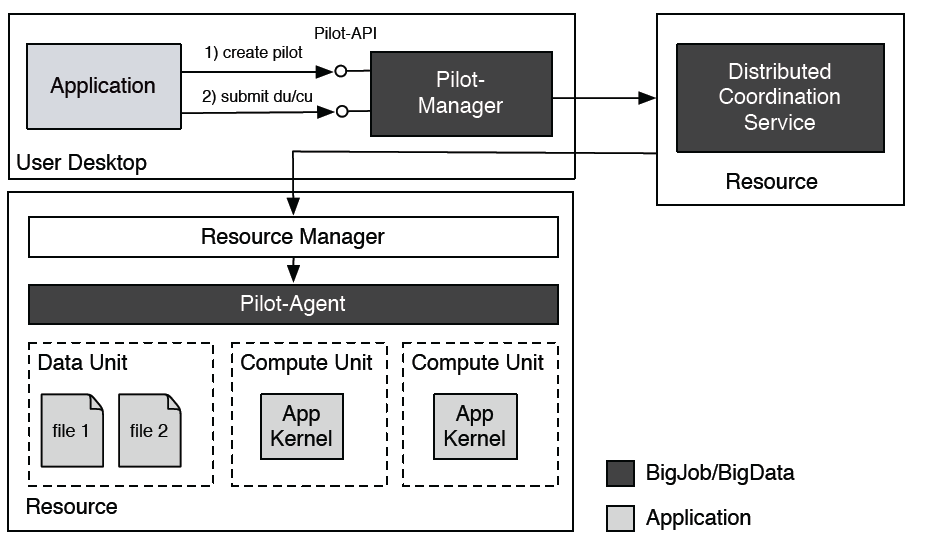
Since BigJob is meant to run in a distributed fashion, it requires a central point of communication in order to manage tasks and their associated data files across heterogenous resources. This is accomplished through the use of the "Distributed Coordination Service," a central database. The database that BigJob uses is called Redis.
For the purposes of this tutorial, we will utilize a Redis server maintained by the SAGA Project team on a Virtual Machine at Indiana University. We have set up environment variables in your home directories on repex1 that contain the 'secret' password to this VM. Please note that after this tutorial is complete, you will be able to reference this page to learn how to setup your own Redis server.
This example runs NUMBER_JOBS (32) concurrent '/bin/echo' tasks on TACC's Stampede cluster. A 32-core pilot job is initialized and 32 single-core tasks are submitted to it. This example also show basic error handling via 'try/except' and coordinated shutdown (removing pilot from Stampede's queue) once all tasks have finished running via finally (line 74).
Preparation
-
Take a look at the full example code on GitHub.
-
Create a new file in your home directory, copy & paste the code into it and save it, e.g., as
simple-ensemble.py.
Execution
Execute the Python script:
python simple-ensemble.py
The output will look something like this:
* Submitted task '0' with id 'cu-262ee4a2-e992-11e2-9fe1-14109fd519a1' to stampede.tacc.utexas.edu
* Submitted task '1' with id 'cu-26464cbe-e992-11e2-9fe1-14109fd519a1' to stampede.tacc.utexas.edu
[...]
* Submitted task '31' with id 'cu-2905ac74-e992-11e2-9fe1-14109fd519a1' to stampede.tacc.utexas.edu
Waiting for tasks to finish...
Terminating BigJob...
Discussion
Let's analyze the script that we just ran in order to understand the important components of a BigJob script.
In order to use BigJob, we must call the python module at the beginning of our script:
import pilot
Also, it's important to call your attention to two things at the beginning of the script:
# The coordination server
COORD       = "redis://%s@gw68.quarry.iu.teragrid.org:6379" % REDIS_PWD
...
# The number of jobs you want to run
NUMBER_JOBS = 32
While these are not inherent features of BigJob, notice that we tell BigJob to use the redis server at Indiana University, and we also specify the number of jobs we want to run. While you submit just a single Pilot Job in this example, that Pilot Job reserves space to run 32 jobs.
There are two main components to a BigJob script: the Pilot Compute Description and the Compute Unit Description. The Pilot Compute Description tells BigJob which resource to send your job to and characteristics about the "Pilot Job" - such as, how many cores you want to reserve, what queue you want to submit to, what your allocation is, etc. Let's take a look at the Pilot Compute Description from the script we just submitted:
        pilot_description = pilot.PilotComputeDescription()
        pilot_description.service_url = "slurm+ssh://%s" % HOSTNAME
        pilot_description.queue = QUEUE
        pilot_description.number_of_processes = 32
        pilot_description.working_directory = WORKDIR
        pilot_description.walltime = 10
Notice that we tell BigJob we want to submit to the slurm queue on HOSTNAME (where HOSTNAME is stampede.tacc.utexas.edu). Please note, this means that, even though we are currently logged into repex1.tacc.utexas.edu, we will submit from repex1 to the supercomputer Stampede. This means your jobs will actually be executed on the compute nodes of Stampede. (Advanced Note: We could have also done such task submission from your local laptop, if you had SSH keys configured for password-less login to Stampede. Read more here
We also have to tell our script what QUEUE on Stampede we want to submit to - in this case, normal. In addition, we ask for 32 cores (number_of_processes), specify a wall clock time for the job in minutes (walltime), and tell BigJob which directory we want to store our files in (working_directory). Please note that this working_directory is a directory on Stampede and NOT on repex1.
For a complete list of Pilot Compute Description parameters, please click here.
The Compute Unit Description, on the other hand, describes the details of your application kernel (executable), including what inputs the executable might require and where/how to save the stdout and stderr files. Here's the Compute Unit Description from our script:
            task_desc = pilot.ComputeUnitDescription()
            task_desc.executable = '/bin/echo'
            task_desc.arguments = ['I am task number $TASK_NO', ]
            task_desc.environment = {'TASK_NO': i}
            task_desc.number_of_processes = 1
            task_desc.output = 'stdout.txt'
            task_desc.error = 'stderr.txt'
Note that we are using the executable /bin/echo - this executable takes an argument and then echoes this argument - for instance, /bin/echo dog would return dog from the shell. Meanwhile, /bin/echo $HOME, if this environment variable is set, would print the path of your home directory, i.e. /home/tutorial-04. If we take a look at this Compute Unit Description, we see that we are calling /bin/echo 'I am task number $TASK_NO'. The environment variable, $TASK_NO is defined on the next line to be the iterator of the loop that this Compute Unit Description is contained in (recall for i in range(NUMBER_JOBS):). Here, number_of_processes refers to the number of cores allocated to a single job. We only require 1 core, so this parameter is set to 1. Next, we define the file names of the shell's stderr and stdout. Note that if you are running an executable that generates its own output files, these will be captured in the working directory as well.
Where is My Output?
Recall that we specified the working directory of our script as follows:
WORKDIR = "/home1/02554/sagatut/XSEDETutorial/%s/example1" % USER_NAME
We can ssh to Stampede (ssh sagatut@stampede.tacc.utexas.edu) and cd into this directory in order to see the output from our script. For example, for tutorial account tutorial-00, you would do the following from repex1:
 (python)tutorial-00@repex1:~$ ssh sagatut@stampede.tacc.utexas.edu

 ...
 Last login: Fri Jul 19 02:07:23 2013 from repex1.tacc.utexas.edu
 ------------------------------------------------------------------------------
               Welcome to the Stampede Supercomputer
 ...

 login2$ cd XSEDETutorial/tutorial-00/example1/
 login2$ ls
 bj-dc138466-f041-11e2-a1fa-005056a13723
 stdout-bj-dc138466-f041-11e2-a1fa-005056a13723-agent.txt
 stderr-bj-dc138466-f041-11e2-a1fa-005056a13723-agent.txt
Do not be alarmed by the random string of numbers! This is just a unique identifier that BigJob uses so that it doesn't overwrite other BigJobs that run at the same time. The two agent files in this directory are important mostly for debugging purposes - while the stderr.txt file you defined in the Compute Unit Description captures errors that occur from your application itself, these agent files capture output and errors that are specific to BigJob. If you suspect something might be wrong with your BigJob script, you may find a hint to the problem in your stderr-agent directory.
 login2$ cd bj-dc138466-f041-11e2-a1fa-005056a13723/
 login2$ ls
 login2$ ls -r
 sj-e24786ac-f041-11e2-a1fa-005056a13723
 ...
 sj-e08a17da-f041-11e2-a1fa-005056a13723
You should see a number of subjob directories with their unique identifiers appended to the end. These subjobs refer to the 32 jobs we just ran (one directory for each job). You can verify that there are 32 directories by using the Unix command wc (word count), as follows:
 login2$ ls | wc
  32      32    1280
Choose one of these directories and cd into it.
 login2$ cd sj-e24786ac-f041-11e2-a1fa-005056a13723/
 login2$ ls
 stderr.txt  stdout.txt
In this case, your stderr file should be empty, because we know that the executable /bin/echo is available on Stampede, and we know that we provided valid output to it. Let's see what our stdout file says:
 login2$ cat stdout.txt
 I am task number 31
We can cd into any number of these subjob directories and see that the echo command returns the task #, in the order it was submitted to the Pilot Job.
Now that we understand the basics of submitting simple executables via BigJob, let's extend the previous example to include file transfer. For example, once the 32 tasks have finished executing, we use SAGA-Python to transfer the individual output files back to the local machine.
Preparation
-
Take a look at the full example code on GitHub.
-
Create a new file in your home directory, copy & paste the code into it and save it, e.g., as
simple-ensemble-datatransfer.py.
Execution
Execute the Python script:
python simple-ensemble-datatransfer.py
The output will look something like this:
* Submitted task '0' with id 'cu-9bfd334c-e996-11e2-8e8b-14109fd519a1' to stampede.tacc.utexas.edu
* Submitted task '1' with id 'cu-9c169a1c-e996-11e2-8e8b-14109fd519a1' to stampede.tacc.utexas.edu
[...]
* Submitted task '31' with id 'cu-2905ac74-e992-11e2-9fe1-14109fd519a1' to stampede.tacc.utexas.edu
Waiting for tasks to finish...
* Output for 'cu-9bfd334c-e996-11e2-8e8b-14109fd519a1' copied to: './ex-2-stdout-cu-9bfd334c-e996-11e2-8e8b-14109fd519a1.txt'
* Output for 'cu-9c169a1c-e996-11e2-8e8b-14109fd519a1' copied to: './ex-2-stdout-cu-9c169a1c-e996-11e2-8e8b-14109fd519a1.txt'
[...]
* Output for 'cu-a0bc8202-e996-11e2-8e8b-14109fd519a1' copied to: './ex-2-stdout-cu-a0bc8202-e996-11e2-8e8b-14109fd519a1.txt'
Terminating BigJob...
If you open and look at the ex-2-stdout-* files, you will see the output of the tasks.
This tutorial example introduces task synchronization. It submits a set of 32 '/bin/echo' tasks (task set A). For every successfully completed task, we submits another '/bin/cat' task from task set B to the same Pilot-Job. Task from set A can be seen as producers and tasks from task set B as consumers, since B-tasks read 'consume' the output file an A-tasks.
Preparation
-
Take a look at the full example code on GitHub.
-
Create a new file in your home directory, copy & paste the code into it and save it, e.g., as
chained_ensemble.py.
Execution
Execute the Python script:
python chained_ensemble.py
The output will look something like this:
* Submitted 'A' task '0' with id 'cu-27ab3846-e9a9-11e2-88eb-14109fd519a1'
* Submitted 'A' task '1' with id 'cu-27c2cca4-e9a9-11e2-88eb-14109fd519a1'
[...]
One 'A' task cu-27ab3846-e9a9-11e2-88eb-14109fd519a1 finished. Launching a 'B' task.
* Submitted 'B' task '31' with id 'cu-352139c6-e9a9-11e2-88eb-14109fd519a1'
[...]
* Output for 'cu-352139c6-e9a9-11e2-88eb-14109fd519a1' copied to: './ex2-stdout-cu-352139c6-e9a9-11e2-88eb-14109fd519a1.txt'
* Output for 'cu-353e2946-e9a9-11e2-88eb-14109fd519a1' copied to: './ex2-stdout-cu-353e2946-e9a9-11e2-88eb-14109fd519a1.txt'
[...]
* Output for 'cu-399a8ea8-e9a9-11e2-88eb-14109fd519a1' copied to: './ex2-stdout-cu-399a8ea8-e9a9-11e2-88eb-14109fd519a1.txt'
Terminating BigJob...
If you open and look at the ex-3-stdout-* files, you will see the output of the B-tasks, which is just the 'forwarded' content they read from the A-task outputs.
Discussion
This tutorial example shows another form of task set synchronization. It exemplifies a simple workflow which submit a set of tasks (set A) and (set B) and wait until they are completed until it submits another set of tasks (set C). Both A- and B-tasks are 'producers'. C-tasks 'consumers' and concatenate the output of an A- and a B-tasks.
Preparation
-
Take a look at the full example code on GitHub.
-
Create a new file in your home directory, copy & paste the code into it and save it, e.g., as
coupled_ensembles.py.
Execution
Execute the Python script:
python coupled_ensembles.py
The output will look something like this:
* Submitted 'A' task '0' with id 'cu-833b3762-e9ac-11e2-b250-14109fd519a1'
* Submitted 'A' task '1' with id 'cu-8352c0f8-e9ac-11e2-b250-14109fd519a1'
[...]
* Submitted 'A' task '31' with id 'cu-86137aee-e9ac-11e2-b250-14109fd519a1'
* Submitted 'B' task '0' with id 'cu-862ad342-e9ac-11e2-b250-14109fd519a1'
[...]
* Submitted 'B' task '31' with id 'cu-88fe4c2a-e9ac-11e2-b250-14109fd519a1'
Waiting for 'A' and 'B' tasks to complete...
* Submitted 'C' task '0' with id 'cu-ffb024ce-e9ac-11e2-b250-14109fd519a1'
[...]
* Submitted 'C' task '31' with id 'cu-0281b708-e9ad-11e2-b250-14109fd519a1'
Waiting for 'C' tasks to complete...
* Output for 'cu-ffb024ce-e9ac-11e2-b250-14109fd519a1' copied to: './ex4-stdout-cu-ffb024ce-e9ac-11e2-b250-14109fd519a1.txt'
[...]
* Output for 'cu-0281b708-e9ad-11e2-b250-14109fd519a1' copied to: './ex4-stdout-cu-0281b708-e9ad-11e2-b250-14109fd519a1.txt'
Terminating BigJob...
If you open and look at the ex-4-stdout-* files, you will see the output of the C-tasks which is the concatenated output of the A- and B- tasks.
Discussion
In this example, we split up the calculation of a Mandelbrot set into several tiles.
Rather than submit a single job for each tile, we want to submit one BigJob and then execute each individual tile job in a distributed fashion. This is why BigJob is useful. We reserve the resources we need for all of the jobs, but submit just one job that requests all of these resources. Once the job becomes active, the compute units are executed in a distributed fashion. The tiles are then retrieved using features included in BigJob such as the SAGA File API, and the final image is stitched together from the individual tiles.

Preparation
-
Install the Python Image Library (PIL):
pip install PIL
-
Download the Mandelbrot application kernel and the 'bootstrap' script:
curl --insecure -Os https://raw.github.com/saga-project/BigJob/develop-prod/examples/xsede2013/mandelbrot.sh

curl --insecure -Os https://raw.github.com/saga-project/BigJob/develop-prod/examples/xsede2013/mandelbrot.py
-
Take a look at the full example code on GitHub.
-
Create a new file in your home directory, copy & paste the code into it and save it, e.g., as
bigjob_mandelbrot.py.
Execution
Execute the Python script:
python bigjob_mandelbrot.py
The output will look something like this:
* Submitted task 'cu-6f26b08c-ee05-11e2-9309-005056a13723' to sagatut@stampede.tacc.utexas.edu
* Submitted task 'cu-6f3cff54-ee05-11e2-9309-005056a13723' to sagatut@stampede.tacc.utexas.edu
[...]
* Submitted task 'cu-706628ec-ee05-11e2-9309-005056a13723' to sagatut@stampede.tacc.utexas.edu
Waiting for tasks to finish...
* Copying sftp://sagatut@stampede.tacc.utexas.edu//home1/02554/sagatut/XSEDETutorial/tutorial00/example5/tile_x0_y0.gif back to /home/tutorial-00
* Copying sftp://sagatut@stampede.tacc.utexas.edu//home1/02554/sagatut/XSEDETutorial/tutorial-00/example5/tile_x0_y1.gif back to /home/tutorial-00
[...]
* Copying sftp://sagatut@stampede.tacc.utexas.edu//home1/02554/sagatut/XSEDETutorial/tutorial-00/example5/tile_x3_y3.gif back to /home/tutorial-00
* Stitching together the whole fractal: mandelbrot_full.gif
Terminating BigJob...
You can copy the final output file mandelbrot_full.gif back to your laptop (e.g., via sftp or scp) and open it with an image viewer. You should see the full 8192x8192 Mandelbrot fractal.
Discussion
TODO: Compare and contrast with saga-python mandelbrot