




The Universal Robots SDK enables seamless integration with Universal Robots for automation, data exchange, and remote control. Ideal for industrial automation, research, and advanced robotics applications.
🔗 More Information: https://underautomation.com/universal-robots
🔗 Also available for 🟨 LabVIEW & 🐍 Python & 🧊 Unity
👁️ Watch to be notified of latest updates !
✔️ Full RTDE Support – Read & write at up to 500Hz
✔️ Send URScript Commands – Control robots in real-time
✔️ Dashboard Server + REST API – Manage power, programs, and states
✔️ Secure Connections – SSH & SFTP support
✔️ Forward & Inverse kinematics
✔️ Multi-Platform – Works on Windows, Linux, and macOS
✔️ Commercial License – Deploy with no royalties
📹 Watch Introduction Video
Universal.Robots.communication.SDK.mp4
Explore the Universal Robots SDK with fully functional example applications and precompiled binaries for various platforms. See Github releases
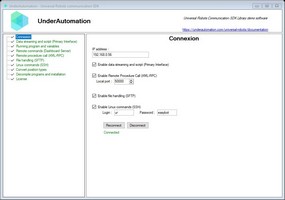
A Windows Forms application demonstrating all the features of the library.
📌 Download: 📥 UnderAutomation.UniversalRobots.Showcase.Forms.exe
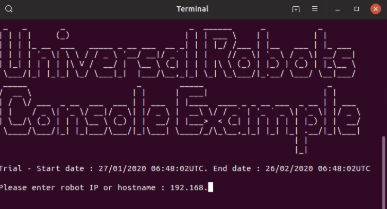
Precompiled console applications showcasing compilation for multiple operating systems.
📌 Downloads:
| OS | Architecture | Download |
|---|---|---|
| 🐧 Linux | ARM | 📥 Download |
| 🐧 Linux | x64 | 📥 Download |
| 🍏 macOS | ARM64 | 📥 Download |
| 🍏 macOS | x64 | 📥 Download |
| 🖥 Windows | x64 | 📥 Download |
| 🖥 Windows | x86 | 📥 Download |
Communicate with your robot at 500Hz, read live data, and control its behavior.
var robot = new UR();

var param = new ConnectParameters("192.168.0.1");

// Enable RTDE
param.Rtde.Enable = true;

// Exchange data at 500Hz
param.Rtde.Frequency = 500;

// Select data you want to write in robot controller
param.Rtde.InputSetup.Add(RtdeInputData.StandardAnalogOutput0);
param.Rtde.InputSetup.Add(RtdeInputData.InputIntRegisters, 0);

// Select data you want the robot to send
param.Rtde.OutputSetup.Add(RtdeOutputData.ActualTcpPose);
param.Rtde.OutputSetup.Add(RtdeOutputData.ToolOutputVoltage);
param.Rtde.OutputSetup.Add(RtdeOutputData.OutputDoubleRegisters, 10);

// Connect to robot
robot.Connect(param);

// Be notified at 500Hz when data is received
robot.Rtde.OutputDataReceived += Rtde_OutputDataReceived;

// Write input values in robot
var inputValues = new RtdeInputValues();
inputValues.StandardAnalogOutput0 = 0.2;
inputValues.InputIntRegisters.X0 = 12;
robot.Rtde.WriteInputs(inputValues);Send URScript commands and monitor robot state at 10Hz.
// Send script
robot.PrimaryInterface.Script.Send("movej([-1.5,-1.5,-2,-0.5,1.8,0], a=1.4, v=1.05)");

// Get data
double x = robot.PrimaryInterface.CartesianInfo.TCPOffsetX;
double shoulderSpeed = robot.PrimaryInterface.JointData.Shoulder.ActualSpeed;

// Read program variables
GlobalVariable myVar = robot.PrimaryInterface.GlobalVariables.GetByName("myVar");
GlobalVariable[] variables = robot.PrimaryInterface.GlobalVariables.GetAll();Manage power, brakes, program execution, and more.
// For cobots with Polyscope
robot.Dashboard.PowerOn();
robot.Dashboard.ReleaseBrake();
robot.Dashboard.LoadProgram("prg1.urp");
robot.Dashboard.Play();

// For robots with Polyscope X
robot.Rest.PowerOn();
robot.Rest.ReleaseBrake();
robot.Rest.LoadProgram("prg1.urp");
robot.Rest.Play();Calculates joint positions corresponding to a cartesian position and vice versa. Uses a purely algebraic and optimized algorithm.
// Get default DH parameters for UR3e robot model²
IUrDhParameters dhParameters = KinematicsUtils.GetDhParametersFromModel(RobotModelsExtended.UR3e);

// Calculate forward kinematics for given joint angles in radians
KinematicsResult fkResult = KinematicsUtils.ForwardKinematics(new double[] { 0, -1.57, 1.57, 0, 0, 0 }, dhParameters);

// Calculate inverse kinematics for given cartesian pose
var matrix = vectorPose.FromRotationVectorTo4x4Matrix();
double[][] ikSolutions = KinematicsUtils.InverseKinematics(matrix, dhParameters);Enable remote function calls from your robot program.
rpc := rpc_factory("xmlrpc", "http://192.168.0.10:50000")
answer := rpc.GetPose(100)
// Answer sent to the robot
robot.XmlRpc.XmlRpcServerRequest += (o, request) =>
{
if(request.MethodName == "GetPose") request.Answer = new Pose(request.Arguments[0], 200, 100, 0, 0, 0);
};Allow robots to send and receive custom data via sockets.
robot.SocketCommunication.SocketWrite("Hello, Robot!");
robot.SocketCommunication.SocketRequest += (sender, e) => Console.WriteLine(e.Message);Upload, download, and manage files securely on your robot.
robot.Sftp.UploadFile(content, "/home/ur/ursim/programs/my-program.urp");
robot.Sftp.Delete("/home/ur/ursim/programs/old-program.urp");Execute shell commands remotely.
robot.Ssh.RunCommand("echo 'Hello' > /home/ur/Desktop/NewFile.txt");Choose the installation method that works best for you:
| Method | NuGet (Recommended) | Direct Download |
|---|---|---|
| How to Install | Install via NuGet. See on Nuget | Download and reference the DLL manually |
dotnet add package UnderAutomation.UniversalRobots |
📥 Download ZIP |
using UnderAutomation.UniversalRobots;var robot = new UR();
robot.Connect(new ConnectParameters("192.168.0.1"));✅ Supported Robots: UR3, UR5, UR10, UR16, UR20, UR30, CB-Series, e-Series, Polyscope, Polyscope X
✅ Operating Systems: Windows, Linux, macOS
✅ .NET Versions: .NET Framework (≥3.5), .NET Standard, .NET Core, .NET 5/6/8/9
We welcome contributions! Feel free to:
- Report issues via GitHub Issues
- Submit pull requests with improvements
- Share feedback & feature requests
🔗 Learn more: UnderAutomation Licensing
If you have any questions or need support:
- 📖 Check the Docs: Documentation
- 📩 Contact Us: Support