


A command-line tool for one-click switching of Claude Code API configurations. Supports multi-site, multi-token management, intelligent configuration merging, WebDAV cloud backup, and no manual file editing required.
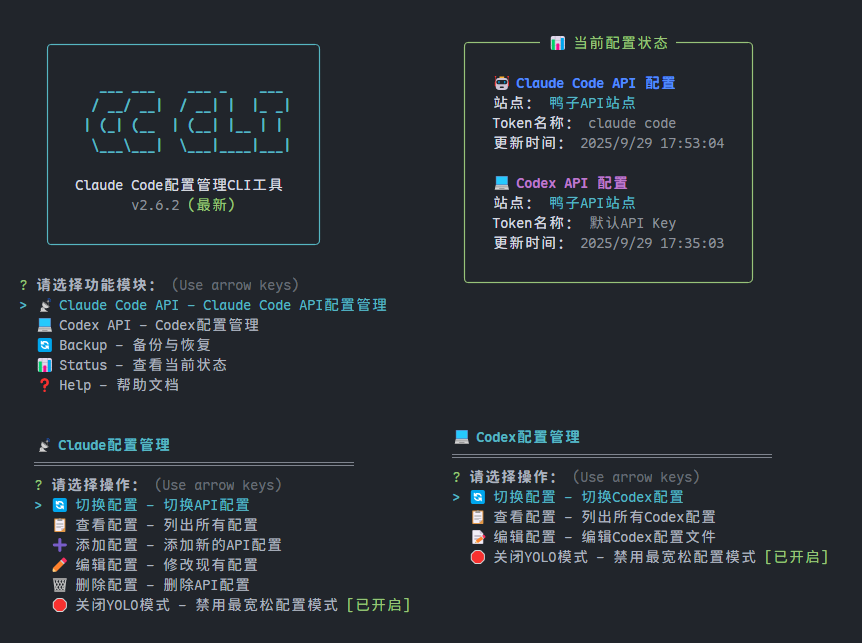
- 🔄 One-Click Switching - Quickly switch between different API sites and tokens
- 📋 Configuration Management - View, add, and delete API configurations
- 🔗 Intelligent Merging - Automatically sync with Claude Code configuration files
- ⚙️ Full Support - Supports all Claude Code configuration items
- 💻 Codex Support - Manage Claude Code Codex configurations (Claude models only), support enabling/disabling YOLO mode
- 🚀 YOLO Mode - Provides the most permissive configuration mode for Claude Code API and Codex, unconditionally approves all tool usage requests
- ☁️ WebDAV Backup - Support cloud backup and restore of configuration files (Nutstore, other standard WebDAV, etc.)
- CC-CLI Configuration Backup - 📁.cc-cli 下 api_config.json etc.
- Claude Code Configuration Backup - 📄 settings.json 📄 CLAUDE.md 📁 agents/ 📁 commands/
- Codex Backup - 📄 config.toml 📄 auth.json 📄 AGENTS.md
# Global installation
npm install -g @cjh0/cc-cli# Start interactive interface
cc
# If you encounter command conflicts, use the backup command
cc-cli
# API configuration management
cc api
# Quick switch API configuration
cc apiuse
# View current status
cc status
# View help
cc --helpclang: error errors, it means the cc command conflicts with the system's C compiler, please use the cc-cli command
The tool will automatically merge your selected API configuration with existing Claude Code settings, preserving all original configuration items and only updating API-related settings.
{
  "sites": {
    "XX Public Site": {
      "url": "https://api.example.com",
      "description": "Supports both Claude Code and Codex",
      "claude": {
        "env": {
          "ANTHROPIC_BASE_URL": "https://api.example.com",
          "ANTHROPIC_AUTH_TOKEN": {
            "Primary Token": "sk-xxxxxxxxxxxxxx",
            "Backup Token": "sk-yyyyyyyyyyyyyy"
          }
        }
      },
      "codex": {
        "OPENAI_API_KEY": "sk-xxxxxxxxxxxxxx",
        "model": "gpt-5",
        "model_reasoning_effort": "high",
        "model_providers": {
          "duckcoding": {
            "name": "duckcoding",
            "base_url": "https://jp.duckcoding.com/v1"
          }
        }
      }
    },
    "XX Public Site 2": {
      "url": "https://api.demo.com", // (Optional) Site address to remember public sites, will support one-click opening later
      "description": "Claude Code API only", // Optional, can be left empty
      // Claude Code API configuration (minimal config, compatible with most official configurations, will override config file)
      "claude": {
        "env": {
          "ANTHROPIC_BASE_URL": "https://api.demo.com",
          // Token supports two formats:
          // 1. Object format (supports multiple tokens)
          "ANTHROPIC_AUTH_TOKEN": {
            "Token1": "sk-aaaaaaaaaaaaaaa",
            "Token2": "sk-bbbbbbbbbbbbbbb",
            "Token3": "sk-ccccccccccccccc"
          }
          // 2. String format (single token, automatically named "Default Token")
          // "ANTHROPIC_AUTH_TOKEN": "sk-xxxxxxxxxxxxxx"
        }
      },
      // Codex API configuration (minimal config, compatible with most official configurations)
      "codex": {
        // API Key also supports two formats:
        // 1. Object format (supports multiple API Keys)
        "OPENAI_API_KEY": {
          "Primary Key": "sk-xxxxxxxxxxxxxx",
          "Backup Key": "sk-yyyyyyyyyyyyyy",
          "Test Key": "sk-zzzzzzzzzzzzzzz"
        },
        // 2. String format (single API Key, automatically named "Default API Key")
        // "OPENAI_API_KEY": "sk-xxxxxxxxxxxxxx",
        "model": "claude-3-5-sonnet-20241022", // Use Claude model
        "model_reasoning_effort": "medium", // Reasoning intensity: low/medium/high
        "model_providers": {
          "custom_provider": {
            "name": "custom_provider",
            "base_url": "https://api.demo.com/v1"
          }
        }
      }
    }
  }
}Supports backing up configuration files to cloud storage to ensure configuration security:
- Nutstore -
https://dav.jianguoyun.com/dav/ - Other WebDAV Services - Any standard WebDAV protocol service
- CC-CLI Configuration - 📁.cc-cli 下 api_config.json etc.
- Claude Code Configuration - 📄 settings.json 📄 CLAUDE.md 📁 agents/ 📁 commands/
- Codex Configuration - 📄 config.toml 📄 auth.json 📄 AGENTS.md
- 🔐 Secure Authentication - Supports username and password authentication
- 📦 Selective Backup - Can choose to backup specific configuration categories
- 🕒 Automatic Cleanup - Automatically keeps the latest 5 backup files
- 🔄 Complete Recovery - Supports selecting backup files and configuration categories for recovery
- 📊 Status Monitoring - Real-time display of backup status and cloud connectivity