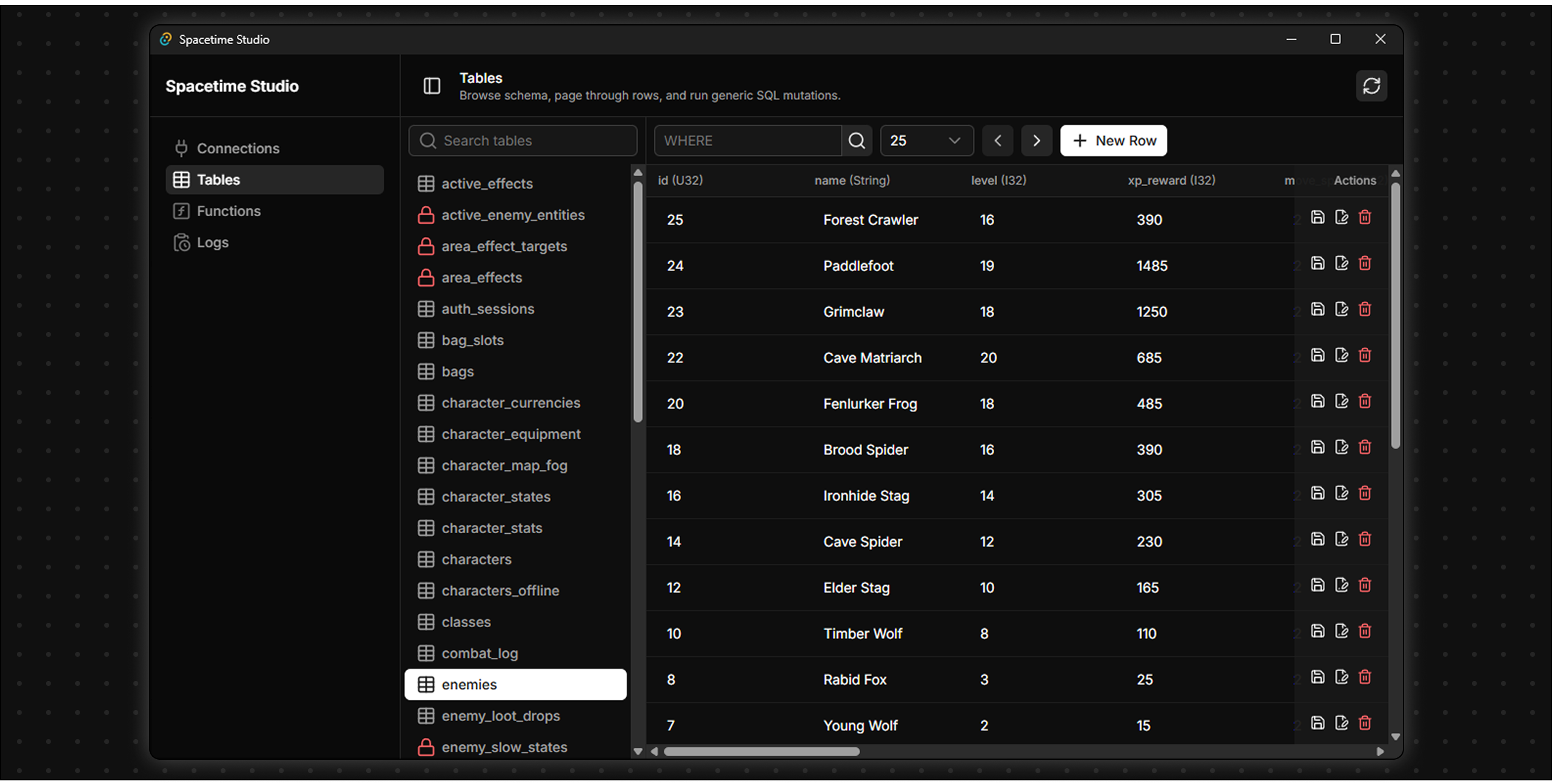
Spacetime Studio is a desktop admin client for SpacetimeDB. It gives you a lightweight way to connect to a local or hosted SpacetimeDB instance, inspect schemas, browse and edit table data, run raw SQL, view reducers/functions, and tail database logs.
Windows builds are available from the GitHub Releases page. macOS and Linux builds are planned for a future release; for now, those platforms can build and run the app from source.
- Save connection profiles for local or hosted SpacetimeDB databases.
- Store bearer tokens in the operating system keychain instead of the frontend.
- Inspect tables, columns, access modes, and primary keys from the database schema.
- Browse table rows with pagination.
- Create, update, and delete rows through the table UI.
- Run raw SQL against the selected database.
- Browse reducers, lifecycle functions, and function parameters.
- Read database logs with live refresh.
- Tauri 2 for the desktop shell and native Rust backend.
- Vue 3 and TypeScript for the frontend.
- Vite for development and frontend builds.
- Nuxt UI and Tailwind CSS for the interface.
- Rust
reqwestfor SpacetimeDB HTTP API calls. - Rust
keyringfor secure token storage.
There are two intended ways to use Spacetime Studio:
- Download a release for the easiest Windows setup.
- Build from source if you are on macOS or Linux, want the latest development version, or want to contribute.
Windows installers are available from the repository's GitHub Releases page.
- Open the repository's GitHub Releases page.
- Download the Windows installer from the latest release.
- Install Spacetime Studio.
- Launch the app and connect to your SpacetimeDB database.
This path does not require Node.js, Rust, or compiling the project yourself. macOS and Linux release downloads will be added in a future release.
Use this path if you want to run Spacetime Studio on macOS or Linux, use the latest development version, or contribute to the project.
Install these before running the app:
- Node.js and npm.
- Rust.
- The platform dependencies required by Tauri 2 for your operating system.
- A running SpacetimeDB host to connect to.
For a local SpacetimeDB server, the default connection URL in the app is:
http://localhost:3000You will also need the database name or database identity for the module you want to inspect.
Clone the repository:
git clone <repository-url>
cd spacetime-studio
Install JavaScript dependencies:
npm installRun the desktop app in development mode:
npm run tauri devTauri will start the Vite dev server and open the Spacetime Studio desktop window.
- Open Spacetime Studio.
- Create a connection profile.
- Enter a friendly profile name.
- Enter the SpacetimeDB host URL, such as
http://localhost:3000. - Enter the database name or database identity.
- Optionally enter a bearer token for private databases or admin-only actions.
- Click the test action to verify the host and database can be reached.
- Save the profile and select it.
Connection profile metadata is stored locally by the app. Bearer tokens are stored in your OS keychain using the service name spacetime-studio.
Use the main navigation to move between the available workspace views:
- Overview shows the currently selected connection.
- Tables shows the schema, table rows, row editing controls, and raw SQL runner.
- Functions lists reducers, lifecycle functions, and their parameters.
- Logs shows recent database logs and can refresh automatically.
Some operations require database permissions. If a request fails with an authorization error, update the connection profile with a token that has the needed access.
Type-check and build the frontend:
npm run buildPreview the built frontend in a browser:
npm run previewBuild a desktop bundle with Tauri:
npm run tauri buildBuild outputs are generated by Tauri under src-tauri/target/.
spacetime-studio/
+-- src/                 Vue frontend
|   +-- components/       Shared UI components
|   +-- lib/              Frontend API wrappers and helpers
|   +-- pages/            App views
+-- src-tauri/           Tauri and Rust backend
|   +-- src/spacetime.rs  SpacetimeDB profile, schema, SQL, row, and log commands
+-- public/              Static assets
+-- package.json         npm scripts and frontend dependencies
+-- README.md- The frontend calls Rust commands through Tauri
invoke. - SpacetimeDB HTTP requests happen in the Rust backend, not directly in the browser layer.
- Saved profiles live in the app data directory.
- Tokens are never returned to the frontend after they are saved.
- The app is early-stage, so expect rough edges and incomplete workflows.
Issues, ideas, and pull requests are welcome. Useful areas to help with include:
- Better onboarding and connection diagnostics.
- Safer row editing flows.
- Reducer invocation support.
- Frontend improvements, including layout, navigation, accessibility, and interaction polish.
- Tests around SpacetimeDB response parsing and SQL mutation helpers.
- Documentation for common local SpacetimeDB workflows.
When contributing, try to keep changes focused and include enough context in the pull request for someone else to test the behavior.
Spacetime Studio is released under the MIT License.