



Advanced, typed, and centralized query params management for React Router.
npm install react-magic-search-params- General Introduction 1.1 Hook Purpose 1.2 Implementation Context
- Accepted Parameter Types 2.1 mandatory (Required) 2.2 optional (Optional) 2.3 defaultParams 2.4 forceParams 2.5 omitParamsByValues 2.6 arraySerialization 2.7 coerceParams
- Usage Recommendation with a Constants File
- Main Functions 4.1 getParams 4.2 updateParams 4.3 clearParams 4.4 pagination helpers
- Key Features and Benefits
- Usage Example & Explanations
- Array Serialization in the URL (new)
- Best Practices and Considerations
- Advanced Options
- Unit Tests with Vitest
- Conclusion
useMagicSearchParams centralizes how your app reads, converts, and writes query parameters.
It is especially useful for pages that depend on URL state, such as:
- pagination (
page,page_size) - filtering (
status,tags,only_is_active) - searching (
search) - sorting (
order)
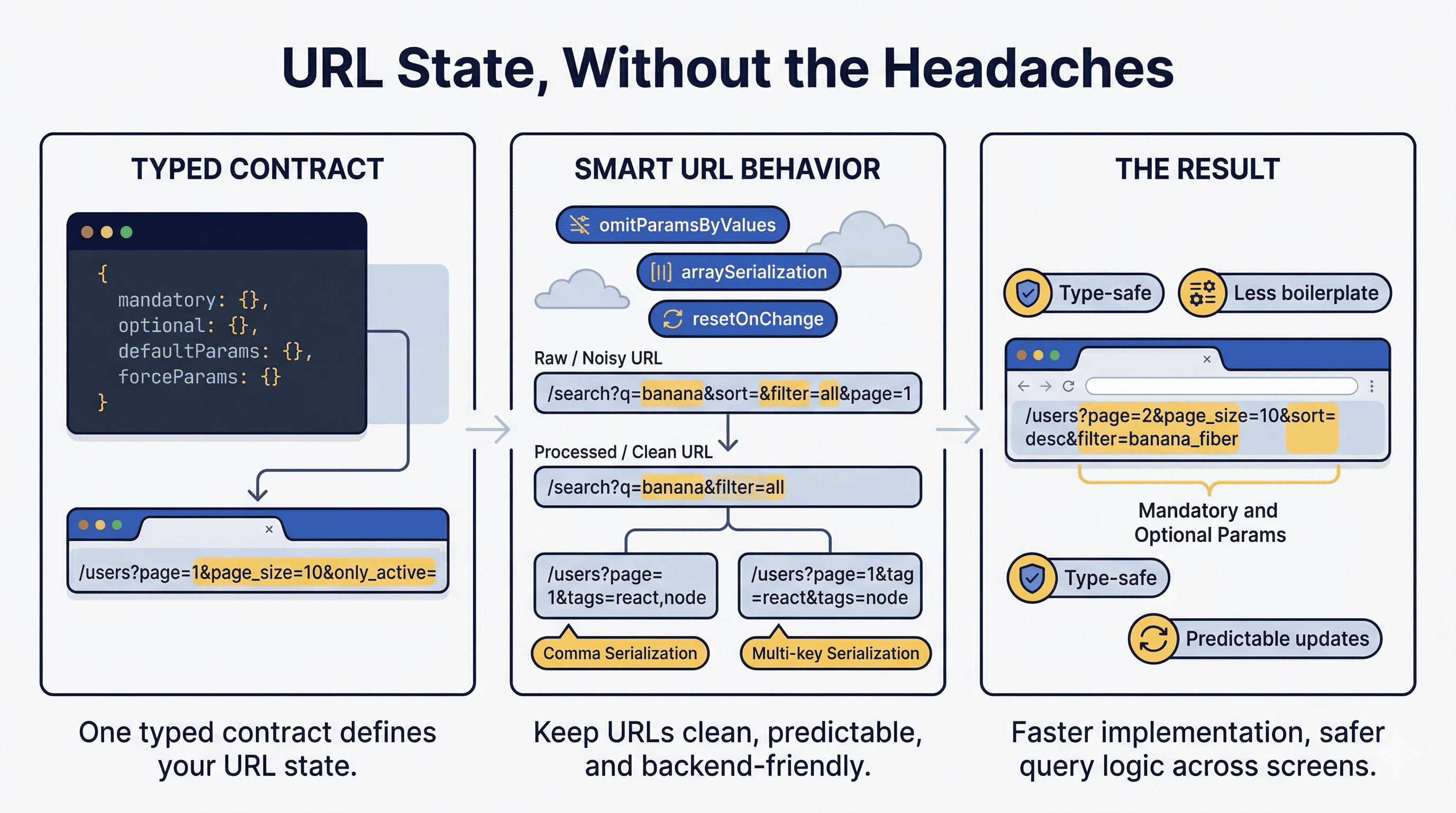
Without a shared abstraction, each page usually re-implements parsing and update logic differently. This hook solves that by enforcing one typed contract per view.
Note
Because this hook relies on react-router-dom, your app must be rendered inside BrowserRouter or RouterProvider.
Before (manual URL handling) ❌
import { useSearchParams } from 'react-router-dom';

export function BeforeHookExample() {
  const [searchParams, setSearchParams] = useSearchParams();

  const page = parseInt(searchParams.get('page') || '1', 10);
  const pageSize = parseInt(searchParams.get('page_size') || '10', 10);
  const search = searchParams.get('search') || '';

  function handleNextPage() {
    searchParams.set('page', String(page + 1));
    setSearchParams(searchParams);
  }

  return (
    <div>
      <p>Page: {page}</p>
      <p>Page size: {pageSize}</p>
      <p>Search: {search}</p>
      <button onClick={handleNextPage}>Next page</button>
    </div>
  );
}
After (typed + safer) ✅
import { useMagicSearchParams } from 'react-magic-search-params';

const paramsUsers = {
  mandatory: { page: 1, page_size: 10 as const, only_is_active: false },
  optional: { search: '', order: '' as 'asc' | 'desc' | '' },
};

export function AfterHookExample() {
  const { getParams, updateParams } = useMagicSearchParams({
    ...paramsUsers,
    defaultParams: paramsUsers.mandatory,
    forceParams: { page_size: 10 },
    omitParamsByValues: ['all', 'default'],
  });

  const { page, search } = getParams({ convert: true });

  function handleNextPage() {
    updateParams({ newParams: { page: (page ?? 1) + 1 } });
  }

  return (
    <div>
      <p>Page: {page}</p>
      <p>Search: {search}</p>
      <button onClick={handleNextPage}>Next page</button>
    </div>
  );
}In 2026, this is still a real practical problem for many apps. It is not a React Router bug; it is a natural consequence of URL semantics:
- query strings are string-based by design
- each screen often re-implements conversion logic (
stringtonumber,boolean, arrays) - defaults and forced values can drift between components
- repeated updates can create noisy, inconsistent query states
useMagicSearchParams addresses this by:
- defining a single source of truth for params per page
- preserving predictable ordering in the URL
- converting values to original types when reading
- supporting omission rules to keep URLs clean
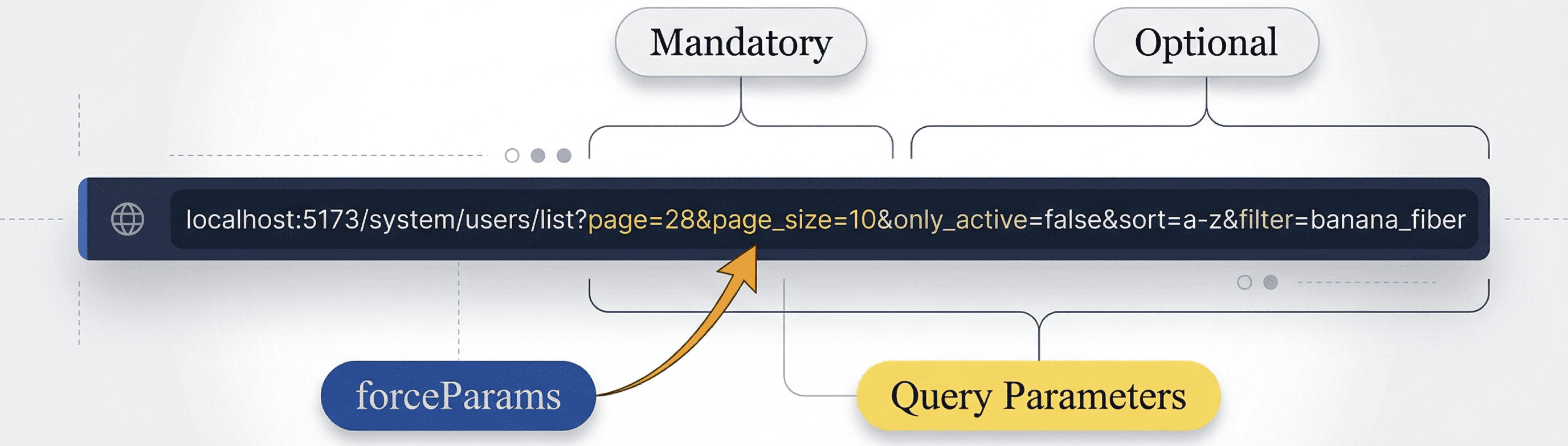
Parameters that your page needs to work reliably, such as page and page_size.
These keys are always part of your params contract.
Parameters that may or may not exist, such as search, order, or extra filters.
Optional params are useful when you only want values in the URL if they carry meaningful state.
Initial values the hook writes when the page is loaded.
Useful when the view should boot with a known query state even if the incoming URL has missing values.
Protected values that should not be overridden by user-provided query values.
Typical use case: enforce page_size: 10 to avoid unsupported pagination sizes.
Removes params if their value is considered non-informative.
Supported values are: all, default, unknown, none, void.
This keeps URLs shorter and easier to read.
Controls how array params are represented in the URL:
csv->tags=react,noderepeat->tags=react&tags=nodebrackets->tags[]=react&tags[]=node
Use coerceParams when a key cannot be inferred correctly from runtime defaults (for example boolean | '' or number | '').
This lets you provide explicit conversion hints without writing full codecs.
const paramsGirosMapping = {
  mandatory: {
    page: 1,
    page_size: 50 as const,
  },
  optional: {
    search: '',
    rubro: '',
    only_unmapped: '' as boolean | '',
  },
};

useMagicSearchParams({
  ...paramsGirosMapping,
  coerceParams: {
    only_unmapped: 'boolean',
  },
});
Supported coercion hints: string, number, boolean, array.
For optional boolean unions declared as boolean | '' with default '', boolean coercion keeps '' for absent, empty, or invalid URL values instead of forcing false. This preserves a clean "not selected" filter state.
For arrays, prefer declaring real array defaults in the contract (for example tags: []). In that contract shape, coerceParams: { key: 'array' } works with query-array formats (csv, repeat, brackets). A custom codec is only needed when a key is modeled as a string that contains JSON-like array text (for example "[]").
Define one constants file per view/screen.
This pattern gives you:
- one source of truth for that page's query contract
- better autocomplete and stricter TypeScript checks
- easier maintenance as filters evolve
Note
This way TypeScript can infer the types of the query parameters and their default values to manage them.
type UserTag = 'react' | 'node' | 'typescript' | 'javascript';
type UserOrder = 'role' | 'date' | '';

export const paramsUsers = {
  mandatory: {
    page: 1,
    page_size: 10 as const,
    only_is_active: false,
    tags: [] as UserTag[],
  },
  optional: {
    search: '',
    order: '' as UserOrder,
  },
};
Tip
By explicitly declaring the types (instead of relying solely on type inference), you enable TypeScript to provide stricter type checking. This ensures that only the defined values are allowed for each parameter, helping to avoid accidental assignment of invalid values.
Returns current query params as an object.
getParams follows your declared contract (mandatory + optional) and only exposes known keys from that contract.
unknownParamsPolicy (default: drop) controls how unknown keys are preserved or dropped in URL operations; it does not add unknown keys to getParams output.
convert: true(default): values are converted to inferred original typesconvert: false: values are returned in URL-oriented format
const { page, only_is_active, tags } = getParams({ convert: true });
const tagsRaw = getParams({ convert: false }).tags;
You can also read a single key:
const tags = getParam('tags', { convert: true });Safely updates URL params.
newParams: keys to set/updatekeepParams: optional map to explicitly remove selected keys from previous state (false)historyMode: optional per-call override (pushorreplace)newParamsalso supports functional updater
Type note:
updateParamspreserves the declared contract types (including string unions), so TypeScript autocomplete stays precise.- For array params,
updateParamsaccepts either an array or a single typed item (toggle behavior). - You can pass
''as a remove signal for optional keys; omitted values are removed from the URL.
updateParams({
  newParams: { page: 1, search: 'john' },
});

updateParams({
  newParams: (prev) => ({ page: (prev.page ?? 1) + 1 }),
});

updateParams((prev) => ({
  newParams: { page: (prev.page ?? 1) + 1 },
  keepParams: { search: false },
  historyMode: 'replace',
}));
keepParams is not required for keys you want to keep. Use it only when you want to explicitly remove a key (false).
Clears params and optionally keeps mandatory ones.
clearParams();
clearParams({ keepMandatoryParams: false });
Optional advanced subscription:
const unsubscribe = onChange('search', [
  ({ previousValue, currentValue }) => {
    // side effects on search changes
    console.log(previousValue, currentValue);
  },
]);

// Later
unsubscribe();The hook now returns pagination helpers to reduce repeated navigation code:
pagination.next(cursor?)pagination.prev()pagination.reset()pagination.setCursor(cursor)
Configure with paginationStrategy:
const { pagination } = useMagicSearchParams({
  mandatory: { page: 1, page_size: 10 },
  optional: { search: '', cursor: '' },
  paginationStrategy: { mode: 'page', pageKey: 'page' },
});

pagination.next();
pagination.prev();
pagination.reset();- typed query state with better DX
- centralized defaults, force rules, and omission rules
- cleaner URL output and predictable key order
- array support with three serialization strategies
- declarative reset rules for dependent params
- built-in pagination helpers (page, offset, cursor)
- unknown param policy (
drop/preserve) - functional updater support for complex transitions
- better scalability across medium and large React Router apps
import { useEffect } from 'react';
import { useMagicSearchParams } from 'react-magic-search-params';
import { paramsUsers } from './constants/defaultParamsPage';

export function FilterUsers() {
  const { searchParams, getParams, updateParams, clearParams, onChange } =
    useMagicSearchParams({
      ...paramsUsers,
      defaultParams: paramsUsers.mandatory,
      forceParams: { page_size: 10 },
      omitParamsByValues: ['all', 'default'],
      arraySerialization: 'repeat',
    });

  const { page, search, order, tags } = getParams({ convert: true });

  function handleSearchChange(nextSearch: string) {
    updateParams({ newParams: { page: 1, search: nextSearch } });
  }

  function handleOrderChange(nextOrder: string) {
    updateParams({
      newParams: { order: nextOrder },
      keepParams: { search: true },
    });
  }

  function handleTagToggle(tag: string) {
    updateParams({ newParams: { tags: tag } });
  }

  useEffect(() => {
    onChange('search', [
      () => {
        // Trigger analytics, cache invalidation, etc.
      },
    ]);
  }, [onChange]);

  return (
    <>
      <p>URL: {searchParams.toString()}</p>
      <p>Page: {page}</p>
      <p>Search: {search}</p>
      <p>Order: {order}</p>
      <p>Tags: {Array.isArray(tags) ? tags.join(', ') : ''}</p>

      <button onClick={() => handleSearchChange('john')}>Search john</button>
      <button onClick={() => handleOrderChange('date')}>Order by date</button>
      <button onClick={() => handleTagToggle('react')}>Toggle react tag</button>
      <button onClick={() => clearParams({ keepMandatoryParams: true })}>
        Reset filters
      </button>
    </>
  );
}arraySerialization lets you adapt the same frontend state to different backend expectations.
| Mode | URL Example |
|---|---|
csv |
tags=react,node,typescript |
repeat |
tags=react&tags=node&tags=typescript |
brackets |
tags[]=react&tags[]=node&tags[]=typescript |
- backend compatibility without custom per-page serialization code
- consistent conversion flow when reading params
- simpler components with less URL plumbing
- when sending a string value for an array key, the hook toggles that entry in the array
- when sending an array value, the hook stores a deduplicated version of the provided array
- Validate sensitive values in the backend as well.
- Keep the constants contract updated when product requirements change.
- Prefer one params constants file per view to avoid accidental contract drift.
- Use
forceParamsfor limits that should never be user-controlled. - Use
omitParamsByValuesto avoid noisy URLs with non-informative values.
If your sidebar/menu routes should always open with a known mandatory URL state, generating links with mandatory params is a good pattern.
const assignMandatoryParams = (
  paramsMandatory: Record<string, string | number | boolean>
) => {
  const stringParams: Record<string, string> = {}
  for (const [key, val] of Object.entries(paramsMandatory)) {
    stringParams[key] = String(val)
  }
  return new URLSearchParams(stringParams).toString()
}

const path = `/admin/categories/list?${assignMandatoryParams(paramsCategoriesList.mandatory)}`
Then, inside the page hook, keep this contract-first setup:
const { getParams, updateParams } = useMagicSearchParams({
  ...paramsUsers,
  defaultParams: paramsUsers.mandatory,
  forceParams: { page_size: 10 },
})
Notes:
defaultParams: paramsUsers.mandatoryensures mandatory keys are present when the page boots.- Use
forceParamsfor non-user-controllable keys (for examplepage_size), not necessarily all mandatory keys. - Forcing all mandatory keys can block legitimate runtime changes (for example
pagein pagination).
Use codecs when default conversion is not enough (opaque cursor, trimmed q, date parsing, etc.).
const { getParams, updateParams } = useMagicSearchParams({
  mandatory: { page: 1 },
  optional: { q: '', cursor: '' },
  codecs: {
    q: {
      parse: (value) => String(Array.isArray(value) ? value[0] : value ?? '').trim(),
      serialize: (value) => String(value ?? '').trim().toLowerCase(),
    },
    cursor: {
      parse: (value) => (Array.isArray(value) ? value[0] : value ?? ''),
    },
  },
});

const { q } = getParams({ convert: true });
updateParams({ newParams: { q: ' React ' } });Reset dependent params automatically when a source param changes.
useMagicSearchParams({
  mandatory: { page: 1, page_size: 10 },
  optional: { search: '', order: '', cursor: '' },
  resetOnChange: {
    search: ['page', 'cursor'],
    order: ['page'],
  },
});Supported modes:
page(classic page/page_size)offset(offset/limit)cursor(opaque cursor)
useMagicSearchParams({
  mandatory: { offset: 0, limit: 20 },
  optional: { q: '' },
  paginationStrategy: {
    mode: 'offset',
    offsetKey: 'offset',
    limitKey: 'limit',
  },
});Define what happens with URL params not declared in mandatory / optional:
drop(default)preserve
useMagicSearchParams({
  mandatory: { page: 1 },
  optional: { q: '' },
  unknownParamsPolicy: 'preserve',
});Set default navigation behavior for updates:
useMagicSearchParams({
  mandatory: { page: 1 },
  optional: { q: '' },
  historyMode: 'replace',
});Run all tests:
npm testRun type checks:
npm run typecheckRun one test file:
npm test -- test/useMagicSearchParams.test.tsxreact-magic-search-params gives you a reliable, typed, and scalable query param workflow for React Router applications.
It keeps URL behavior predictable while reducing duplicated logic across screens.
If this library helps you, consider giving it a star ⭐️ on GitHub!