
A lightweight, type-safe, PaddleOCR implementation in Bun/Node.js for text detection and recognition in JavaScript environments.
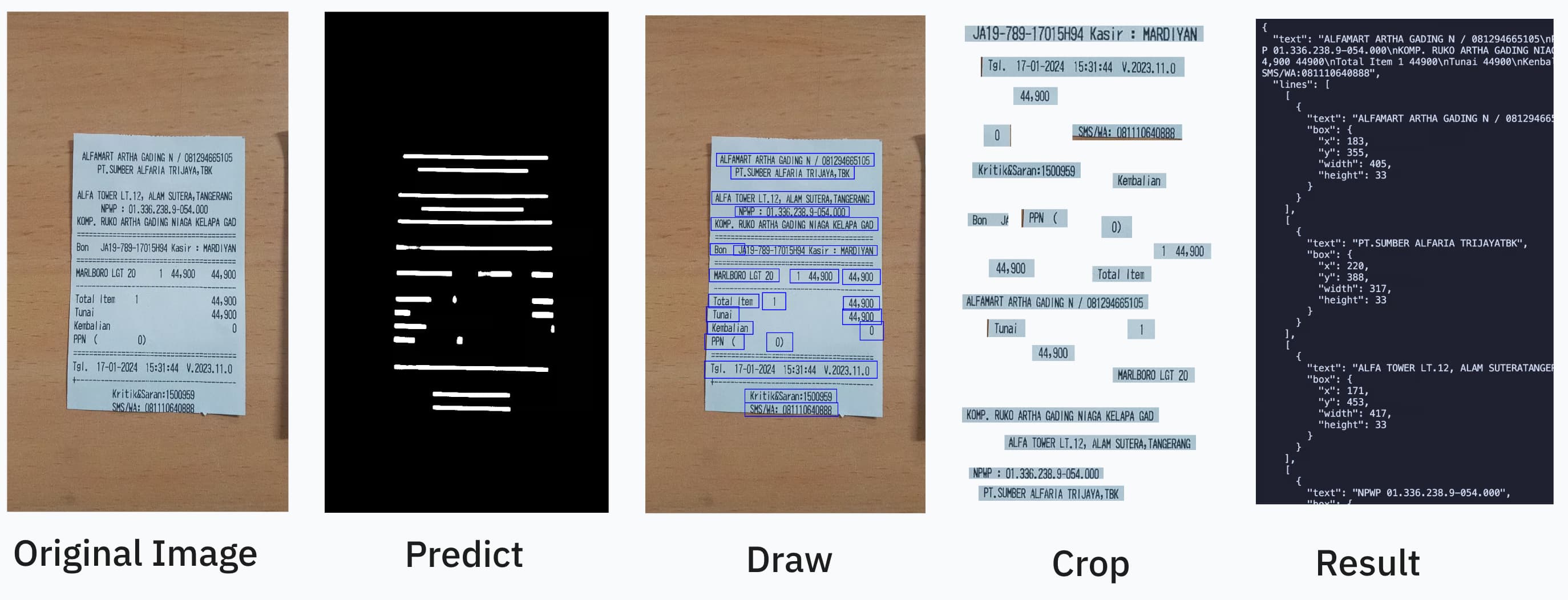
OCR should be as easy as:
import { PaddleOcrService } from "ppu-paddle-ocr";

const service = new PaddleOcrService();
await service.initialize();

const result = await service.recognize(fileBufferOrCanvas);
await service.destroy();
You can combine it further by using open-cv https://github.com/PT-Perkasa-Pilar-Utama/ppu-ocv for more improved accuracy.
Upgrading from v4.x? See the Migration Guide below for step-by-step instructions.
New in v5.1.0: The default image processing engine is now OpenCV (restored from v4 behavior). You can still opt into the lighter canvas-native engine via
processing: { engine: "canvas-native" }. See Processing Engine for details.
import { ImageProcessor, CanvasProcessor } from "ppu-ocv";
const processor = new ImageProcessor(bodyCanvas);

// For non-opencv environment like browser extension
// const processor = new CanvasProcessor(bodyCanvas)
processor.grayscale().blur();

const canvas = processor.toCanvas();
processor.destroy();
For other languages beyond English, pre-converted ONNX models for 40+ languages (including Thai, Arabic, Chinese, Korean, Japanese, and many European languages) are available at ppu-paddle-ocr-models. See the Models and Language Support section for details on how to use them.
ppu-paddle-ocr brings the powerful PaddleOCR optical character recognition capabilities to JavaScript environments. This library simplifies the integration of ONNX models with Node.js applications, offering a lightweight solution for text detection and recognition without complex dependencies.
Built on top of onnxruntime-node and onnxruntime-web, ppu-paddle-ocr handles all the complexity of model loading, preprocessing, and inference, providing a clean and simple API for developers to extract text from images with minimal setup.
- Lightweight: Optimized for performance with minimal dependencies
- Easy Integration: Simple API to detect and recognize text in images
- Cross-Platform: Works in Node.js and Bun environments
- Customizable: Support for custom models and dictionaries
- Pre-packed Models: Defaults to optimized PP-OCRv5 mobile models (English) ready for immediate use, with automatic fetching and caching on the first run. Supports 40+ languages via ppu-paddle-ocr-models.
- TypeScript Support: Full TypeScript definitions for enhanced developer experience
- Web Support: Supports running directly in the browser
Run bun task bench. Current result:
> bun task bench
$ bun scripts/task.ts bench
Running benchmark: index.bench.ts
clk: ~3.03 GHz
cpu: Apple M1
runtime: bun 1.3.7 (arm64-darwin)

benchmark                   avg (min … max) p75 / p99    (min … top 1%)
------------------------------------------- -------------------------------
cached infer                   2.59 µs/iter   2.54 µs     █
                       (2.17 µs … 82.08 µs)   4.25 µs     █
                    (  0.00  b … 288.00 kb) 701.72  b ▂▅▂██▁▁▁▁▁▁▁▁▁▁▁▁▁▁▁▁

------------------------------------------- -------------------------------
opencv: no cache             245.83 ms/iter 257.50 ms     █    █
                    (217.75 ms … 346.86 ms) 266.70 ms ▅▅▅▅█    █      ▅▅  ▅
                    (160.00 kb …  10.77 mb)   3.22 mb █████▁▁▁▁█▁▁▁▁▁▁██▁▁█

canvas-native: no cache      225.62 ms/iter 226.50 ms    ███
                    (222.81 ms … 231.70 ms) 229.66 ms ▅  ███▅    ▅▅       ▅
                    (  0.00  b …   8.88 mb)   1.01 mb █▁▁████▁▁▁▁██▁▁▁▁▁▁▁█

summary
  canvas-native: no cache
1.09x faster than opencv: no cacheInstall using your preferred package manager:
npm install ppu-paddle-ocr
yarn add ppu-paddle-ocr
bun add ppu-paddle-ocrTo get started, create an instance of PaddleOcrService and call the initialize() method. This will download and cache the default PP-OCRv5 mobile models (English) on the first run.
import { PaddleOcrService } from "ppu-paddle-ocr";

// Create a new instance of the service
const service = new PaddleOcrService({
  debugging: {
    debug: false,
    verbose: true,
  },
});

// Initialize the service (this will download models on the first run)
await service.initialize();

const result = await service.recognize("./assets/receipt.jpg");
console.log(result.text);

// It's important to destroy the service when you're done to release resources.
await service.destroy();

// If you're updating ppu-paddle-ocr to the new release and wants to change/redownload the model
service.clearModelCache();You can provide custom models via file paths, URLs, or ArrayBuffers during initialization. If no models are provided, the default PP-OCRv5 mobile models for English will be fetched from the ppu-paddle-ocr-models repository.
For available models and languages, see the Models and Language Support section below.
const service = new PaddleOcrService({
  model: {
    detection: "./models/custom-det.onnx",
    recognition: "https://example.com/models/custom-rec.onnx",
    charactersDictionary: customDictArrayBuffer,
  },
});

// Don't forget to initialize the service
await service.initialize();You can dynamically change the models or dictionary on an initialized instance.
// Initialize the service first
const service = new PaddleOcrService();
await service.initialize();

// Change the detection model
await service.changeDetectionModel("./models/new-det-model.onnx");

// Change the recognition model
await service.changeRecognitionModel("./models/new-rec-model.onnx");

// Change the dictionary
await service.changeTextDictionary("./models/new-dict.txt");
See: Example usage
You can provide a custom dictionary for a single recognize call without changing the service's default dictionary. This is useful for one-off recognitions with special character sets.
// Initialize the service first
const service = new PaddleOcrService();
await service.initialize();

// Use a custom dictionary for this specific call
const result = await service.recognize("./assets/receipt.jpg", {
  dictionary: "./models/new-dict.txt",
});

// The service's default dictionary remains unchanged for subsequent calls
const anotherResult = await service.recognize("./assets/another-image.jpg");You can disable caching for individual OCR calls if you need fresh processing each time:
// Initialize the service first
const service = new PaddleOcrService();
await service.initialize();

// Process with caching (default behavior)
const cachedResult = await service.recognize("./assets/receipt.jpg");

// Process without caching for this specific call
const freshResult = await service.recognize("./assets/receipt.jpg", {
  noCache: true,
});

// You can also combine noCache with other options
const result = await service.recognize("./assets/receipt.jpg", {
  noCache: true,
  flatten: true,
});You can fine-tune the ONNX Runtime session configuration for optimal performance:
import { PaddleOcrService } from "ppu-paddle-ocr";

// Create a service with optimized session options
const service = new PaddleOcrService({
  session: {
    executionProviders: ["cpu"], // Use CPU-only for consistent performance
    graphOptimizationLevel: "all", // Enable all optimizations
    enableCpuMemArena: true, // Better memory management
    enableMemPattern: true, // Memory pattern optimization
    executionMode: "sequential", // Better for single-threaded performance
    interOpNumThreads: 0, // Let ONNX decide optimal thread count
    intraOpNumThreads: 0, // Let ONNX decide optimal thread count
  },
});

await service.initialize();

const result = await service.recognize("./assets/receipt.jpg");
console.log(result.text);

await service.destroy();Starting from 4.0.0, ppu-paddle-ocr supports running directly in the browser! Import from ppu-paddle-ocr/web instead of the root package to use browser-native capabilities (HTMLCanvasElement, OffscreenCanvas, and fetch buffering) instead of the Node APIs.
Note that the browser build depends on onnxruntime-web rather than onnxruntime-node.
import { PaddleOcrService } from "ppu-paddle-ocr/web";

const service = new PaddleOcrService();
await service.initialize();

// If you have a file input:
// <input type="file" id="upload" />
const file = document.getElementById("upload").files[0];

// Convert to an HTMLImageElement or an offscreen Canvas
const img = new Image();
img.src = URL.createObjectURL(file);
await new Promise((r) => (img.onload = r));

const canvas = document.createElement("canvas");
canvas.width = img.width;
canvas.height = img.height;
canvas.getContext("2d").drawImage(img, 0, 0);

const result = await service.recognize(canvas);
console.log(result.text);You can check out our live index.html demo to see how to include the dependencies directly via CDN using ESM modules, and how to configure fallback model loading.
See the interactive demo implementation here: Web Demo
By default, ppu-paddle-ocr uses PP-OCRv5 mobile models optimized for English text:
- Detection Model:
PP-OCRv5_mobile_det_infer.onnx - Recognition Model:
en_PP-OCRv5_mobile_rec_infer.onnx - Dictionary:
ppocrv5_en_dict.txt
These models are automatically downloaded and cached on the first run. PP-OCRv5 provides excellent accuracy for general text recognition while maintaining fast inference speeds.
The library supports multiple PaddleOCR model versions from the ppu-paddle-ocr-models repository:
- PP-OCRv3: Legacy models with basic accuracy
- PP-OCRv4: Improved accuracy over v3, available in mobile and server variants
- PP-OCRv5: Latest models with the best accuracy (recommended), available in mobile and server variants
Model Types:
- Mobile: Optimized for speed and smaller size, suitable for most use cases
- Server: Larger models with higher accuracy, better for accuracy-critical applications
PP-OCRv5 supports 40+ languages across different script systems. Pre-converted ONNX models are available for:
Latin Scripts: English, French, German, Italian, Spanish, Portuguese, and 40+ other languages
Cyrillic: Russian, Ukrainian, Bulgarian, Kazakh, Serbian, and 30+ related languages
Asian Languages:
- Arabic script: Arabic, Persian, Urdu, Kurdish
- Indic scripts: Hindi (Devanagari), Tamil, Telugu
- East Asian: Korean, Japanese
- Southeast Asian: Thai
All available models can be found in the ppu-paddle-ocr-models repository.
To use a different language model, specify the model URLs in the configuration:
import { PaddleOcrService } from "ppu-paddle-ocr";

const MODEL_BASE =
  "https://media.githubusercontent.com/media/PT-Perkasa-Pilar-Utama/ppu-paddle-ocr-models/refs/heads/main";
const DICT_BASE =
  "https://raw.githubusercontent.com/PT-Perkasa-Pilar-Utama/ppu-paddle-ocr-models/refs/heads/main";

// Example: Using Thai models
const service = new PaddleOcrService({
  model: {
    detection: `${MODEL_BASE}/detection/PP-OCRv5_mobile_det_infer.onnx`,
    recognition: `${MODEL_BASE}/recognition/multi/thai/v5/th_PP-OCRv5_mobile_rec_infer.onnx`,
    charactersDictionary: `${DICT_BASE}/recognition/multi/thai/v5/ppocrv5_th_dict.txt`,
  },
});

await service.initialize();// Example: Using PP-OCRv5 server models for English
const service = new PaddleOcrService({
model: {
detection: `${MODEL_BASE}/detection/PP-OCRv5_server_det_infer.onnx`,
recognition: `${MODEL_BASE}/recognition/multi/en/v5/en_PP-OCRv5_server_rec_infer.onnx`,
charactersDictionary: `${DICT_BASE}/recognition/multi/en/v5/ppocrv5_en_dict.txt`,
},
});
await service.initialize();You can also use locally downloaded models:
const service = new PaddleOcrService({
  model: {
    detection: "./models/custom-det.onnx",
    recognition: "./models/custom-rec.onnx",
    charactersDictionary: "./models/custom-dict.txt",
  },
});

await service.initialize();PaddleOCR models are designed for text-only recognition. They detect and recognize plain text characters in images. For specialized use cases:
- Tables: Models detect text within table cells but do not preserve table structure. You'll need additional post-processing to reconstruct table layouts.
- Math Formulas: Standard PaddleOCR models are not optimized for mathematical notation. Consider specialized OCR models for LaTeX/math formula recognition.
- Document Layout: For complex document analysis including layout detection, consider using PP-DocLayoutV2/V3 models available in the ppu-paddle-ocr-models repository.
If you need to convert PaddlePaddle models to ONNX format, see our conversion guide.
Starting from v5.1.0, you can choose between two image processing engines for the detection and recognition preprocessing pipeline:
| Engine | Default | OpenCV Required | Description |
|---|---|---|---|
"opencv" |
Yes | Yes | Uses OpenCV.js (ImageProcessor / Contours from ppu-ocv). More accurate region detection. |
"canvas-native" |
No | No | Pure HTML Canvas operations (CanvasProcessor from ppu-ocv/canvas). Lighter, no OpenCV dep. |
The OpenCV engine is the default because it produces more accurate bounding boxes during text detection using proper contour analysis. The canvas-native engine is a good alternative for environments where OpenCV is unavailable (e.g., browser extensions) or when minimizing dependencies is a priority.
Note
The Web/browser build (ppu-paddle-ocr/web) always uses canvas-native regardless of this setting, since OpenCV.js is not bundled in the web entry point.
// Use the default OpenCV engine (recommended)
const service = new PaddleOcrService();

// Or explicitly choose canvas-native for lighter processing
const service = new PaddleOcrService({
  processing: { engine: "canvas-native" },
});

await service.initialize();All options are grouped under the PaddleOptions interface:
export interface PaddleOptions {
  /** File paths, URLs, or buffers for the OCR model components. */
  model?: ModelPathOptions;

  /** Controls parameters for text detection. */
  detection?: DetectionOptions;

  /** Controls parameters for text recognition. */
  recognition?: RecognitionOptions;

  /** Controls logging and image dump behavior for debugging. */
  debugging?: DebuggingOptions;

  /** ONNX Runtime session configuration options. */
  session?: SessionOptions;

  /** Controls the image processing backend. */
  processing?: ProcessingOptions;
}Options for individual recognize() calls.
| Property | Type | Default | Description |
|---|---|---|---|
flatten |
boolean |
false |
Return flattened results instead of grouped by lines. |
dictionary |
string | ArrayBuffer |
null |
Custom character dictionary for this specific call. |
noCache |
boolean |
false |
Disable caching for this specific call. |
Specifies paths, URLs, or buffers for the OCR models and dictionary files.
| Property | Type | Required | Description |
|---|---|---|---|
detection |
string | ArrayBuffer |
No (uses default model) | Path, URL, or buffer for the text detection model. |
recognition |
string | ArrayBuffer |
No (uses default model) | Path, URL, or buffer for the text recognition model. |
charactersDictionary |
string | ArrayBuffer |
No (uses default dictionary) | Path, URL, buffer, or content of the dictionary file. |
Note
If you omit model paths, the library will automatically fetch the default models from the official GitHub repository. Don't forget to add a space and a blank line at the end of the dictionary file.
Controls preprocessing and filtering parameters during text detection.
| Property | Type | Default | Description |
|---|---|---|---|
mean |
[number, number, number] |
[0.485, 0.456, 0.406] |
Per-channel mean values for input normalization [R, G, B]. |
stdDeviation |
[number, number, number] |
[0.229, 0.224, 0.225] |
Per-channel standard deviation values for input normalization. |
maxSideLength |
number |
960 |
Maximum dimension (longest side) for input images (px). |
paddingVertical |
number |
0.4 |
Fractional padding added vertically to each detected text box. |
paddingHorizontal |
number |
0.6 |
Fractional padding added horizontally to each detected text box. |
minimumAreaThreshold |
number |
20 |
Discard boxes with area below this threshold (px²). |
Controls parameters for the text recognition stage.
| Property | Type | Default | Description |
|---|---|---|---|
imageHeight |
number |
48 |
Fixed height for resized input text line images (px). |
Enable verbose logs and save intermediate images to help debug OCR pipelines.
| Property | Type | Default | Description |
|---|---|---|---|
verbose |
boolean |
false |
Turn on detailed console logs of each processing step. |
debug |
boolean |
false |
Write intermediate image frames to disk. |
debugFolder |
string |
out |
Output directory for debug images. |
Controls ONNX Runtime session configuration for optimal performance.
| Property | Type | Default | Description |
|---|---|---|---|
executionProviders |
string[] |
['cpu'] |
Execution providers to use (e.g., ['cpu'], ['cuda', 'cpu']). |
graphOptimizationLevel |
'disabled' | 'basic' | 'extended' | 'layout' | 'all' |
'all' |
Graph optimization level for better performance. |
enableCpuMemArena |
boolean |
true |
Enable CPU memory arena for better memory management. |
enableMemPattern |
boolean |
true |
Enable memory pattern optimization. |
executionMode |
'sequential' | 'parallel' |
'sequential' |
Execution mode for the session ('sequential' for single-threaded performance). |
interOpNumThreads |
number |
0 |
Number of inter-op threads (0 lets ONNX decide). |
intraOpNumThreads |
number |
0 |
Number of intra-op threads (0 lets ONNX decide). |
Contributions are welcome! If you would like to contribute, please follow these steps:
- Fork the Repository: Create your own fork of the project.
- Create a Feature Branch: Use a descriptive branch name for your changes.
- Implement Changes: Make your modifications, add tests, and ensure everything passes.
- Submit a Pull Request: Open a pull request to discuss your changes and get feedback.
This project uses Bun for testing. To run the tests locally, execute:
bun test
bun build:test
bun lint
bun lint:fix
Ensure that all tests pass before submitting your pull request.
This project is licensed under the MIT License. See the LICENSE file for details.
If you encounter any issues or have suggestions, please open an issue in the repository.
Join our community on Slack to get help, share feedback, or discuss features.
Recommended development environment is in linux-based environment. Library template: https://github.com/aquapi/lib-template
All script sources and usage.
Emit .js and .d.ts files to lib.
Move package.json, README.md to lib and publish the package.
Run files that ends with .bench.ts extension.
To run a specific file.
bun task bench index # Run bench/index.bench.tsTo run the benchmark in node, add a --node parameter
bun task bench --node

bun task bench --node index # Run bench/index.bench.ts with node