
A simple utility to easily fetch movie metadata from a list of movie titles using the API from the Open Movie Database.



movie-metadata will take an Array, List or JSON file filled with movie titles, and search the Open Movie Database (omdb) API for their respective metadata (Title, Rating, Writers, Actors, Plot, Runtime, etc.) and output the metadata into a JSON file (CLI) or return an Object with the same information.
movie-metadata is available via npm.
It can be installed either locally (for programmatic implementation) or globally (for general usage)
Local Installation:
npm install movie-metadata --save
Global Installation:
npm install -g movie-metadata --save
This is how you can use movie-metadata.
How to use movie-metadata with the Command-Line Interface (CLI).
Note: Assuming that
movie-metadatais globally installed
Example
$ getmetadata --key YOUR_API_KEY /Users/me/moviesList.jsonThis will create a moviesList-metadata.json and moviesList-notFound.json file in the /Users/me/ directory.
Note: The
moviesList-notFound.jsonfile is only created if some movies in the list were not found on the omdb API server.
The moviesList-metadata.json file will contain an Array of Objects containing each movies respective metadata fetched from omdb's API server omdbapi.com.
How to use movie-metadata from within a .js file
Note: Assuming that
movie-metadatais locally installed
Example: Async/Await
const { getMetadata } = require('movie-metadata')

async function getIt() {
    const metadata = await getMetadata({
        key: 'YOUR_API_KEY',
        source: ['dead man\'s chest', 'at world\'s end', 'ralph breaks the internet', 'Ocean\'s Eight']
    })

    console.log(metadata)
}

getIt()

// Outputs

{ fetchedMetadata: [
    {
        Title: 'Pirates of the Caribbean: Dead Man\'s Chest',
        Year: '2006',
        Rated: 'PG-13',
        Released: '07 Jul 2006',
        Runtime: '151 min',
        Genre: 'Action, Adventure, Fantasy',
        Director: 'Gore Verbinski',
        Writer: 'Ted Elliott, Terry Rossio, Ted Elliott (characters), Terry Rossio (characters), Stuart Beattie (characters), Jay Wolpert...'
        Actors: 'Johnny Depp, Orlando Bloom, Keira Knightley, Jack Davenport',
        Plot: 'Jack Sparrow races to recover the heart of Davy Jones to avoid enslaving his soul to Jones\' service, as other friends a...'
        Language: 'English, Turkish, Greek, Mandarin, French',
        Country: 'USA',
        Awards: 'Won 1 Oscar. Another 42 wins & 53 nominations.',
        Poster: 'https://m.media-amazon.com/images/M/MV5BMTcwODc1MTMxM15BMl5BanBnXkFtZTYwMDg1NzY3._V1_SX300.jpg',
        Ratings: [Array],
        Metascore: '53',
        imdbRating: '7.3',
        imdbVotes: '597,591',
        imdbID: 'tt0383574',
        Type: 'movie',
        DVD: '05 Dec 2006',
        BoxOffice: '$423,032,628',
        Production: 'Buena Vista',
        Website: 'http://pirates.movies.com',
        Response: 'True'
    },
    ...
],
notFoundMovies: [] }
Example: Promises
const { getMetadata } = require('movie-metadata')

getMetadata({
    key: 'YOUR_API_KEY',
    source: ['dead man\'s chest', 'at world\'s end', 'ralph breaks the internet', 'Ocean\'s Eight']
}).then(metadata => {
  console.log(metadata)
})

// Same outputBelow is a reference to all of movie-metadata's API properties.
This is the API when movie-metadata is installed globally, and is used within the CLI.
omdb API key
- Default:
none - Type:
String
Example
$ getmetadata -k YOUR_API_KEY
// or
$ getmetadata --key YOUR_API_KEYSource JSON file of movie titles to search with
- Default:
none - Type:
String / JSON File Path
Example
$ getmetadata -k YOUR_API_KEY -s /path/to/movies/list.json
// or
$ getmetadata -k YOUR_API_KEY --source /path/to/movies/list.jsonWhether or not to show a CLI progress bar while downloading the metadata
- Default:
true - Type:
Boolean
Example
$ getmetadata -k YOUR_API_KEY -s /movies/list.json -p false
// or
$ getmetadata -k YOUR_API_KEY -s /movies/list.json --progress false
Whether or not to run verbosely
Note: This disables
--progressparameter, if enabled
- Default:
false - Type:
Boolean
Example
$ getmetadata -k YOUR_API_KEY -s /movies/list.json -v
// or
$ getmetadata -k YOUR_API_KEY -s /movies/list.json --verbose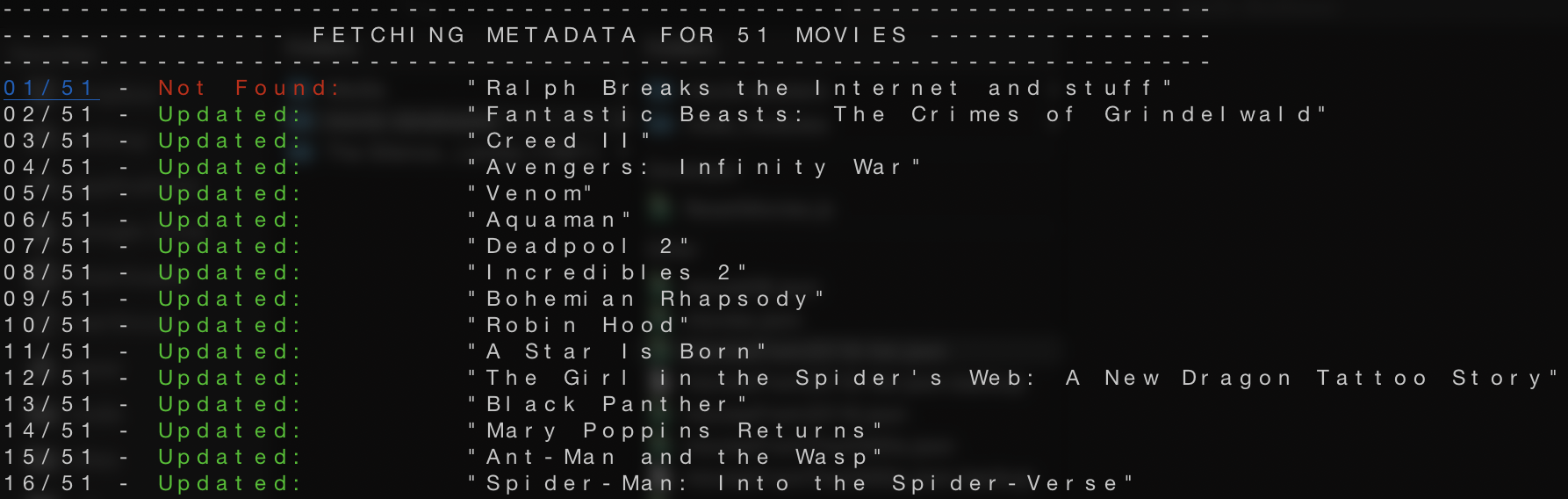
Where to save the JSON file with metadata
- Default:
Same path as source with '-metadata' appended - Type:
String
Example
$ getmetadata -k YOUR_API_KEY -s /movies/list.json -d /movies/metadata.json
// or
$ getmetadata -k YOUR_API_KEY -s /movies/list.json --dest /movies/metadata.jsonWhere to save the JSON file that holds the movies that were not found on the omdb API server
Note: the
notFoundfile will only be create if there was any movies that were not found on the omdb API server.
- Default:
Same path as source with '-notFound' appended - Type:
String
Example
$ getmetadata -k YOUR_API_KEY -s /movies/list.json -n /movies/metadata.json
// or
$ getmetadata -k YOUR_API_KEY -s /movies/list.json --notFound /movies/notFound.jsonWhether or not to overwrite the source file with the metadata JSON data
Note: If enabled, this disables
destparameter.
- Default:
false - Type:
Boolean
Example
$ getmetadata -k YOUR_API_KEY -s /movies/list.json -o
// or
$ getmetadata -k YOUR_API_KEY -s /movies/list.json --overwriteThis is the API when movie-metadata is installed locally, and is used within a .js file.
omdb API key
- Default:
none - Type:
String
Example
const { getMetadata } = require('movie-metadata')

getMetadata({
    key: 'YOUR_API_KEY',
    source: 'path/to/list/of/movies.json'
}).then(metadata => {
  // Do stuff with the Array of movies (with metadata)
})Path to JSON file, Array, or list of movie titles to fetch metadata for
- Default:
none - Type:
String|Array|JSON file path
Note: If a string is provided and it is not a path to a JSON file, then the "splitter" parameter is used to
splittheStringinto anArrayofStrings
Example: JSON file
const { getMetadata } = require('movie-metadata')

getMetadata({
    key: 'YOUR_API_KEY',
    source: 'path/to/list/of/movies.json'
}).then(metadata => {
  // Do stuff with the Array of movies (with metadata)
})

// movies.json file format
[
    "Ocean's Eight",
    "Ralph Breaks the Internet"
    // ...
]
Example: Array (inline)
const { getMetadata } = require('movie-metadata')

getMetadata({
    key: 'YOUR_API_KEY',
    source: ["Ocean's Eight", "Ralph Breaks the Internet", "Pulp Fiction"]
}).then(metadata => {
  // Do stuff with the Array of movies (with metadata)
})Whether or not to show a CLI progress bar while downloading the metadata
- Default:
true - Type:
Boolean
Example
const { getMetadata } = require('movie-metadata')

getMetadata({
    key: 'YOUR_API_KEY',
    source: 'path/to/list/of/movies.json',
    progress: true
}).then(metadata => {
  // Do stuff with the Array of movies (with metadata)
})
This will display a CLI progress bar using the cli-progress module.
Whether or not to run verbosely
Note: This disables
progressparameter, if enabled
- Default:
false - Type:
Boolean
Example
const { getMetadata } = require('movie-metadata')

getMetadata({
    key: 'YOUR_API_KEY',
    source: 'path/to/list/of/movies.json',
    verbose: true
}).then(metadata => {
  // Do stuff with the Array of movies (with metadata)
})
This will output each movie title to the console, along with whether or not it was found.
Where to save the fetched Array of movie metadata
Note: If set to false, the fetched movie metadata will be returned as a Promise of an Object with two properties
fetchedMetadata:[Object]andnotFoundMovies:[String].
- Default:
Same path as source with '-metadata' appended - Type:
String|Boolean
Example
const { getMetadata } = require('movie-metadata')

getMetadata({
    key: 'YOUR_API_KEY',
    source: 'path/to/list/of/movies.json',
    dest: false
}).then(metadata => {
  // Do stuff with the Array of movies (with metadata)
})Where to save the JSON file that holds the movies that were not found on the omdb API server
Note: If set to false, the fetched movie metadata will be returned as a Promise of an Object with two properties
fetchedMetadata:[Object]andnotFoundMovies:[String].
- Default:
Same path as source with '-notFound' appended - Type:
String|Boolean
Example
const { getMetadata } = require('movie-metadata')

getMetadata({
    key: 'YOUR_API_KEY',
    source: 'path/to/list/of/movies.json',
    notFound: false
}).then(metadata => {
  // Do stuff with the Array of movies (with metadata)
})Whether or not to overwrite the source file with the metadata JSON data
Note: If enabled, this disables
destparameter. This is automatically disabled ifdestparameter is disabled (false)
- Default:
false - Type:
Boolean
Example
const { getMetadata } = require('movie-metadata')

getMetadata({
    key: 'YOUR_API_KEY',
    source: 'path/to/list/of/movies.json',
    overwrite: true
}).then(metadata => {
  // Do stuff with the Array of movies (with metadata)
})What character to use to split the source String into an Array
Note: This is only applied if the
sourceparameter is not a JSON file, or is a plainString.
Note: As of version
1.0.3this feature is not completely working yet. If thesourceparameter is a file, it must be aJSONfile
- Default:
\n - Type:
String
Example
const { getMetadata } = require('movie-metadata')

getMetadata({
    key: 'YOUR_API_KEY',
    source: "Lucy::Se7en::Dead Man's Chest::Ocean's Eleven",
    splitter: '::'
}).then(metadata => {
  // Do stuff with the Array of movies (with metadata)
})- abort-controller - Smooth API fetch operations
- cli-progress - CLI progress bar
- command-line-args - Processing command-line arguments
- fs-extra - Reading/writing JSON files
- lodash - General utilities
- node-fetch - Running API calls to omdb
- omdb - Open Movie Database (metadata API server)
- node-tap - Unit testing (not yet implemented)
We use SemVer for versioning.
- Martin Cox - Initial work
This project is licensed under the CC BY-NC 4.0 License - see the LICENSE file for details.
movie-metadata is not affiliated or endorsed by omdbapi.com in any way. An API Key (free) must be obtained prior to using this module.
- Future additions/features for
movie-metadata