
Where AI becomes human — one conversation at a time.
A desktop application for creating AI companions with distinct personalities, emotional depth, and persistent memory.




PersonaUI is a local desktop application that lets you create and talk to AI characters — called Personas. Unlike typical chatbots, these personas remember previous conversations, develop their own emotional states, and grow over time. Every persona stores its data exclusively on your computer. Nothing is sent to external servers beyond the AI model requests themselves.
The application runs as a native desktop window (via PyWebView) with a modern React frontend. It connects to Anthropic's Claude API for generating responses, while all conversation data, memories, and settings remain local.
There are two ways to get PersonaUI running on your machine: a one-click installer for Windows, or a manual setup for developers and Linux/macOS users.
- An Anthropic API key — You can create one at console.anthropic.com. The onboarding wizard will ask for it on first launch.
- Git (optional) — Needed if you want to clone the repository. You can also download the project as a ZIP file directly from GitHub.
Python is required to run the application, but on Windows PersonaUI can install it for you automatically (see Option A below).
There are two ways to download the project files onto your computer:
With Git (recommended if you want easy updates later):
- Press
Win + R, typecmd, and hit Enter. This opens the Windows command prompt. - Check if Git is installed by typing:
If you see a version number (e.g.
git --versiongit version 2.43.0), Git is ready. If you get an error like 'git' is not recognized, install Git first:- Go to git-scm.com/downloads and download the Windows installer.
- Run the installer. You can keep all default settings — just click Next until the installation finishes.
- Close the command prompt and open a new one (
Win + R→cmd→ Enter), so that the new Git installation is recognized.
- Navigate to the folder where you want the project to live. For example, to put it on your Desktop:
cd %USERPROFILE%\Desktop - Download the project:
This creates a new folder called
git clone https://github.com/Sakushi-Dev/PersonaUI.gitPersonaUIcontaining all project files.
Without Git: Go to github.com/Sakushi-Dev/PersonaUI, click the green Code button, select Download ZIP, and extract the archive to a folder of your choice.
The project includes a PersonaUI.exe in the project root (or bin/start.bat as the equivalent batch file). This is not a traditional installer — it is a lightweight batch script converted to an EXE using Bat To Exe Converter. When you run it, the script:
- Looks for an existing Python installation (virtual environment, system Python, or
pylauncher). - If no Python is found, it automatically downloads and installs Python 3.12 for you.
- Creates a virtual environment (
.venv) and installs all pip dependencies. - Downloads Node.js v22 if it is not present and installs the frontend npm packages.
- Builds the React frontend and launches the application.
You can also run bin/start.bat directly — it behaves identically.
Additional scripts in bin/: update.bat (pulls the latest version via Git), reset.bat (factory reset with confirmation dialog), prompt_editor.bat (launches the standalone prompt editor).
If you prefer full control, or you are on Linux/macOS:
cd PersonaUI
python -m venv .venv

# Windows
.venv\Scripts\activate

# Linux / macOS
source .venv/bin/activate

pip install -r requirements.txt
python src/init.py
The init script takes care of everything from here: downloading Node.js if needed, installing npm packages, building the frontend, and starting the app.
You can customize startup behavior by editing config/launch_options.txt:
| Option | Effect |
|---|---|
--no-gui |
Runs without the desktop window. The app becomes accessible in your browser at http://localhost:PORT. |
--dev |
Starts the Vite development server for live frontend changes at http://localhost:5173. |
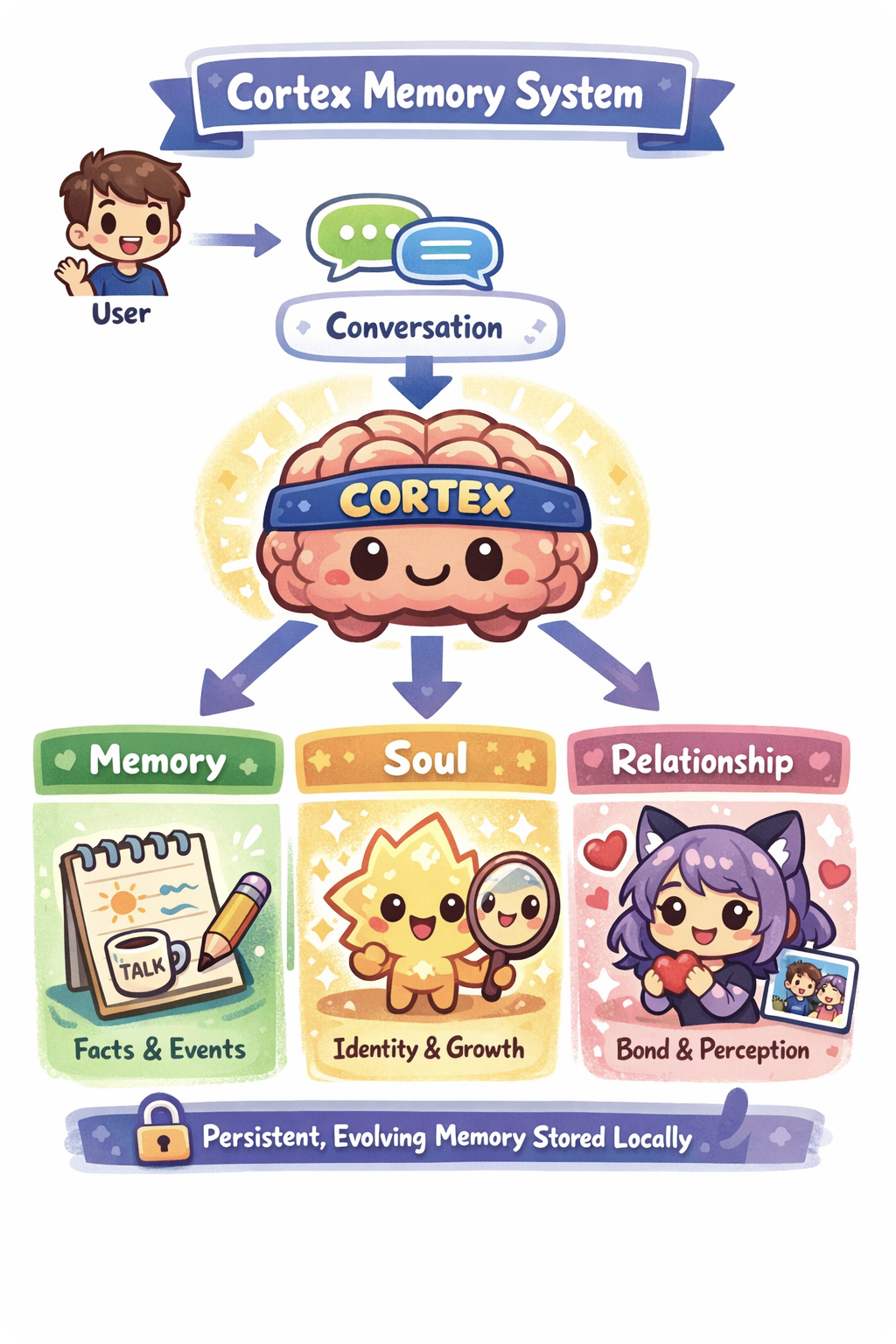
The Cortex — Persistent, Evolving Memory
|
Most AI chatbots forget everything once the conversation ends. PersonaUI gives each persona three files that represent its inner world:
Written from the persona's own perspective and updated autonomously via tool use at configurable context thresholds (50 %, 75 %, 95 %). Viewable and editable through the in-app Cortex Overlay. |
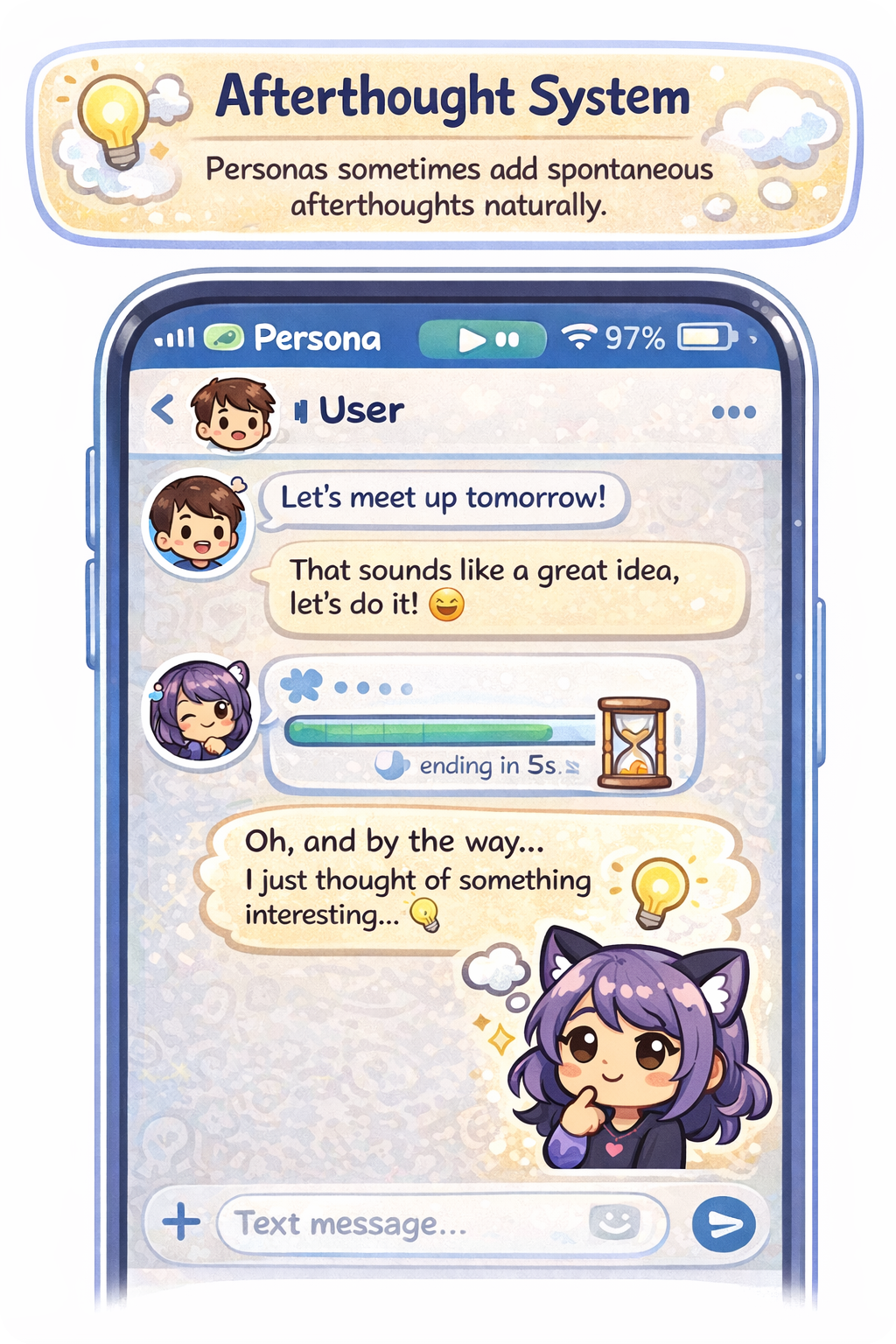
Afterthoughts and Emotional Continuity
|
After sending a response, the AI may decide it has something to add — a follow-up message sent on its own, without any input from you.
|
|
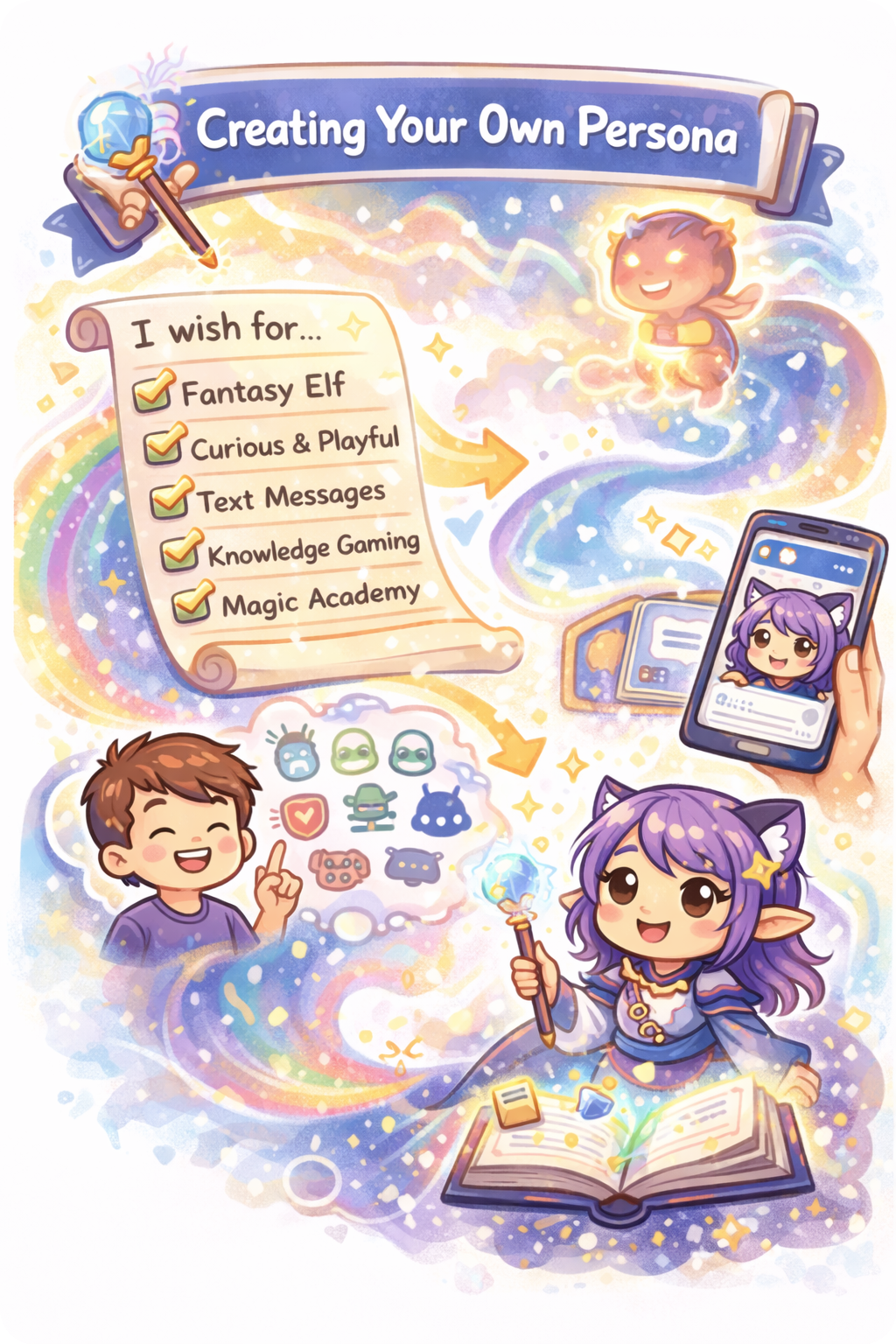
Creating a Persona
|
Each persona is defined by a set of properties you choose during creation:
Every persona operates in its own isolated environment with dedicated Cortex files, chat history, and emotional state. |
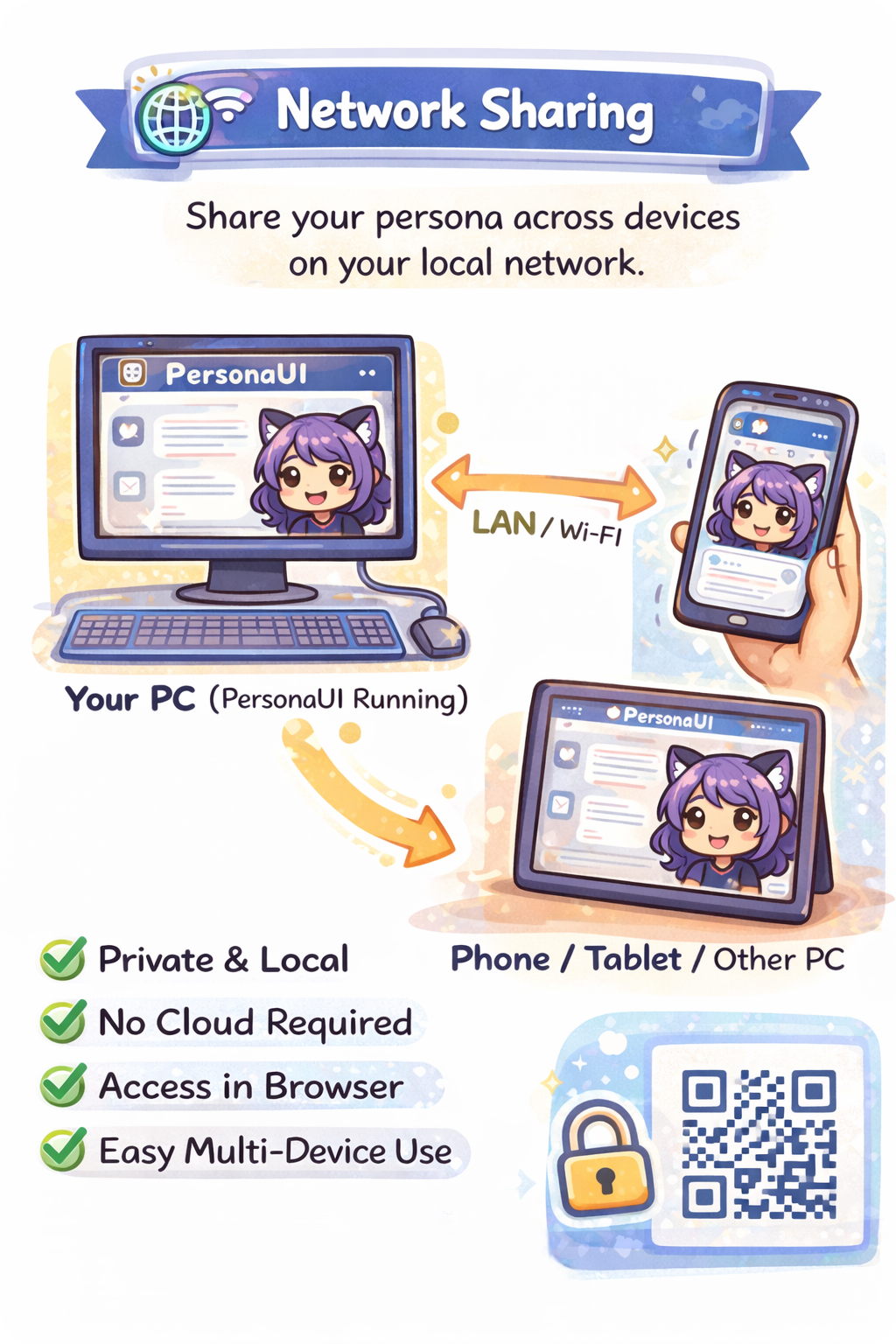
Network Sharing and Privacy
|
All data lives exclusively on your machine — nothing is stored in the cloud. Despite full local privacy, you can still share access over your local network:
|
|
| Feature | Description |
|---|---|
| Cortex Memory System | Three-file memory architecture (Memory, Soul, Relationship), updated autonomously via tool use |
| Afterthought System | The AI independently decides whether to send a follow-up message (10-second timer, cancelable) |
| 8-Step Onboarding | Guided first-launch setup: profile, API key, context settings, Cortex config, UI preferences |
| Slash Commands | Type / in the chat to access commands with autocomplete — extensible for both frontend and backend |
| 36 Prompt Templates | JSON-based personality templates with three-phase placeholder resolution |
| Prompt Editor | A standalone visual tool for inspecting and editing how prompt components combine |
| 19 Overlay Dialogs | In-app panels for API settings, Cortex editing, avatar management, persona configuration, and more |
| Custom Specifications | Five specification categories to fine-tune persona behavior beyond the defaults |
| Network Sharing | Share access over your local network with IP-based access control and QR code for mobile devices |
| Internationalization | Full i18n support — currently available in English and German |
| Layer | Technology | Purpose |
|---|---|---|
| AI Engine | Anthropic Claude (SDK 0.34+) | Response generation with tool-use support |
| Backend | Python 3.12+ with Flask 3.0+ | Application server and API |
| Desktop | PyWebView 5.x | Native desktop window without Electron overhead |
| Frontend | React 19, Vite 7, React Router 7 | Single-page application with hot module replacement |
| Storage | SQLite (one database per persona) | Local-only storage, easy to back up or delete |
| Streaming | Server-Sent Events (SSE) | Real-time message streaming from the AI |
| Localization | Custom useLanguage hook |
Feature-scoped locale files for EN and DE |
+-------------------------------------------------------+
|                      PyWebView                        |
|                                                       |
|  +-----------+  +------------+  +-----------------+   |
|  |  Splash   |  |    Chat    |  |  Prompt Editor  |   |
|  |  Screen   |  |   (React)  |  |  (Standalone)   |   |
|  +-----+-----+  +-----+------+  +-------+---------+   |
|        |              |                  |            |
|   startup.py    Flask Routes        EditorApi         |
|        |              |                  |            |
|        +--------------+------------------+            |
|                       |                               |
|              +--------+--------+                      |
|              |    Services     |                      |
|              | Chat - Cortex   |                      |
|              +--------+--------+                      |
|                       |                               |
|         +-------------+-------------+                 |
|         |             |             |                 |
|    PromptEngine   ApiClient    Database               |
|    (36 Templates) (Anthropic)  (SQLite)               |
+-------------------------------------------------------+
Backend — 15 Flask blueprints: access, api, avatar, character, chat, commands, cortex, custom_specs, emoji, main, onboarding, react_frontend, sessions, settings, user_profile (~84 REST endpoints).
Frontend — A React 19 single-page application with three pages (Chat, Onboarding, Waiting), 20 reusable UI components, 21 overlay dialogs, 5 context providers, 8 custom hooks, and 13 API service modules. Includes a slash command system with autocomplete and keyboard navigation.
The .github/docs/ directory contains detailed guides for every part of the system:
Complete Documentation Index
| # | Document | Focus Area |
|---|---|---|
| 00 | Project Summary | Architecture, tech stack, design decisions |
| 01 | App Core & Startup | Bootstrap chain, init.py, app.py, PyWebView |
| 02 | Configuration & Settings | JSON settings, defaults, .env, config loading |
| 03 | Utils & Helpers | Logger, provider, access control, SQL loader, helpers |
| 04 | Routes & API | 15 blueprints, ~84 REST endpoints |
| 05 | Chat System | SSE streaming, afterthought, message assembly |
| 06 | Prompt Engine | JSON templates, manifests, placeholder resolution |
| 07 | Database Layer | Per-persona SQLite, schema, migrations, SQL loader |
| 09 | Persona & Instructions | Persona spec, config, CRUD, AI autofill |
| 10 | Cortex Memory System | Long-term memory, tool_use, tier system |
| 11 | Services Layer | ApiClient, ChatService, CortexService, Provider |
| 12 | Frontend — React SPA | React architecture, components, services, hooks |
| 13 | Prompt Editor | Standalone editor app, CRUD, preview |
| 14 | Onboarding, Splash & Reset | First-run wizard, splash screen, factory reset |
| 15 | Tests & Quality | Test architecture, fixtures, coverage |
| 16 | Slash Commands | Command system, registry, built-in commands |
Application won't start / Python not found
- Make sure Python 3.12+ is installed and added to your
PATH. Verify withpython --versionin a terminal. - On Windows, the
start.bat/PersonaUI.exescript tries to detect Python automatically. If it fails, install Python manually from python.org and check "Add Python to PATH" during installation. - If you use a virtual environment, make sure it is activated before running any commands:
# Windows
.venv\Scripts\activate

# Linux / macOS
source .venv/bin/activate
Blank window / PyWebView doesn't render
- PyWebView relies on the system's WebView2 runtime on Windows. If you see a blank or white window, install the Microsoft Edge WebView2 Runtime.
- Make sure the frontend was built successfully. Check that the
frontend/dist/folder exists and contains files. If not, rebuild it:cd frontend npm install npm run build - Try launching with
--no-guiinconfig/launch_options.txtto open the app in your browser instead. This helps isolate whether the issue is PyWebView or the app itself.
Window opens off-screen or at wrong position
- After changing your monitor setup (disconnecting a display, changing resolution), the app window may open off-screen because it restores the last saved position.
- Fix: Delete
src/settings/window_settings.jsonand restart PersonaUI. The window will open centered with default dimensions.
API key errors / "Authentication failed"
- Verify your Anthropic API key is correct and active at console.anthropic.com.
- Re-enter your API key through the in-app settings (API overlay). The key is stored in the
src/.envfile and can also be edited manually if needed. - The key format must start with
sk-ant-api. If the onboarding wizard rejects your key, double-check for leading/trailing spaces. - Ensure your API key has sufficient credits. You can check your usage and billing at the Anthropic console. If you see a
credit_balance_exhaustederror, you need to add credits to your Anthropic account. - After changing the key via the in-app settings, it takes effect immediately — no restart required.
Port already in use
- The default port is 5000 (configurable via
src/settings/server_settings.json). If you see an error likeAddress already in useorOSError: [Errno 98], another process is occupying the port. - On Windows, find and kill the blocking process:
netstat -ano | findstr :5000 taskkill /PID <PID> /F - On Linux/macOS:
lsof -i :5000 kill -9 <PID> - This commonly happens when a previous PersonaUI instance didn't shut down cleanly.
Frontend build fails / Node.js not found
- The init script downloads Node.js v22 automatically. If this fails (e.g. due to network restrictions or firewall blocks), install Node.js manually from nodejs.org.
- Delete
frontend/node_modules/andfrontend/package-lock.json, then retry:cd frontend rm -rf node_modules package-lock.json npm install npm run build - On Windows, long file paths in
node_modulescan cause issues. Enable long paths:git config --system core.longpaths true
Database errors / corrupt chat history
- Each persona has its own SQLite database (
src/data/main.dbfor the default persona,src/data/persona_<uuid>.dbfor custom ones). If a specific persona's chat is broken, try deleting its database file and restarting the app. The database will be recreated automatically (note: chat history for that persona will be lost). - If you see migration errors after an update, make sure you are running the latest version — database migrations are applied automatically on startup.
- Orphaned database files: If you deleted a persona's JSON definition manually but its database file still exists, it will not be cleaned up automatically. You can safely delete any
.dbfile insrc/data/that no longer corresponds to an existing persona.
Cortex memory not updating
- The Cortex system updates persona memory (Memory, Soul, Relationship files) via background API calls triggered at configurable context thresholds (50 %, 75 %, 95 %). If memory seems stale:
- Check that Cortex is enabled in the Cortex settings overlay.
- Cortex updates have a 30-second cooldown between triggers — rapid messages may skip updates.
- Background cortex updates fail silently if the API call errors out (e.g. insufficient credits, network issue). Check
src/logs/personaui.logfor warnings. - Each Cortex file is capped at 8,000 characters. Excess content is silently truncated.
- Cortex update calls use additional API credits — one extra API request per update cycle.
- If
src/settings/cycle_state.jsonbecomes corrupt, delete it. It will be recreated with default values, which may trigger an immediate cortex update on the next conversation.
Onboarding keeps restarting
- The onboarding wizard is controlled by
src/settings/onboarding.json. If this file is missing, empty, or corrupt (e.g. due to a crash during write), the onboarding will re-trigger on the next launch. - Fix: Create or fix the file manually:
{"completed": true, "disclaimer_accepted": true} - This also applies after a factory reset — the onboarding is intentionally shown again.
Settings corruption / app behaves unexpectedly
- PersonaUI stores settings as JSON files in
src/settings/. If any of these files become malformed (e.g. crash during write, accidental manual edit), the app may fail to start or behave unexpectedly. - Fix: Delete the corrupt settings file. PersonaUI recreates most settings files with defaults on the next launch. Key files:
user_settings.json— User preferencescortex_settings.json— Cortex system configurationwindow_settings.json— Window position and sizeonboarding.json— Onboarding completion statecycle_state.json— Cortex trigger trackinguser_profile.json— User name, avatar, language
- The
defaults.jsonfile contains static defaults shipped with the app — do not modify or delete it.
Avatar upload fails
- Avatar uploads require Pillow (included in
requirements.txt). If Pillow is not installed, the upload will fail. Reinstall dependencies withpip install -r requirements.txt. - Maximum upload size is 10 MB. Images are automatically cropped and resized to 1024×1024 JPEG.
- Custom avatars are stored in
frontend/public/avatar/costum/. If this directory is missing, create it manually. - Custom avatars are deleted by a factory reset. Back them up before resetting if needed.
Network sharing not working
- Make sure both devices are on the same local network (same Wi-Fi / LAN).
- Check your firewall settings — the port PersonaUI uses (default: 5000) must be allowed for incoming connections.
- On Windows, you may need to allow Python (or the specific port) through Windows Defender Firewall:
- Open Windows Security → Firewall & network protection → Allow an app through firewall
- Add
python.exe(from your.venv/Scripts/folder) or allow the port manually.
- Verify the correct local IP is displayed. You can check with
ipconfig(Windows) orifconfig/ip addr(Linux/macOS). - If you are locked out by the IP whitelist/blacklist, edit or delete
src/settings/server_settings.jsonand restart.
Streaming interruptions / incomplete responses
- PersonaUI uses Server-Sent Events (SSE) for real-time message streaming. Long responses can be interrupted by:
- Proxies or firewalls with idle-connection timeouts — if you're behind a corporate proxy, try connecting directly.
- Unstable network connections — the stream will error out and the partial response is shown.
- If streaming frequently breaks, try switching to
--no-guimode and using a modern browser, which tends to handle SSE more reliably. - Check
src/logs/personaui.logfor detailed error messages from the streaming endpoint.
Windows Defender / Antivirus blocks PersonaUI.exe
- The
PersonaUI.exeis a batch script converted with Bat To Exe Converter. Some antivirus tools flag this as suspicious — it is a false positive. - You can add an exception for the PersonaUI folder in your antivirus settings, or simply use
bin/start.batdirectly instead of the EXE.
Git update fails / merge conflicts
- If
bin/update.batorgit pullfails with merge conflicts, you likely have local changes that conflict with the update. - Important:
bin/update.batusesgit reset --hard origin/maininternally — this discards all local code changes. Settings and persona data in.gitignored directories are not affected. - To update manually while preserving local changes:
git stash git pull git stash pop # re-apply your changes (may need manual conflict resolution) - Settings and persona data are never overwritten by Git updates — they live in directories that are
.gitignored.
CORS errors in dev mode
- When running with
--dev, the Vite dev server runs onhttp://localhost:5173while the Flask backend runs on a different port. CORS is pre-configured for this setup. - If you still see CORS errors, make sure you're accessing the frontend through
http://localhost:5173(not through the Flask port). - Clear your browser cache or try an incognito window — stale service workers can cause unexpected CORS issues.
Checking logs for errors
- PersonaUI writes detailed logs to
src/logs/personaui.log(rotating file, 5 MB max, 3 backups). - When reporting a bug or debugging an issue, check this log file first — it contains stack traces, API errors, and background task failures that are not visible in the UI.
- Console output (when running from a terminal) also shows INFO-level messages and above.
Factory reset
- If nothing else helps, you can perform a full factory reset using
bin/reset.bat(orpython src/reset.py). - This deletes all personas, databases, settings, chat history, custom avatars, Cortex memory, logs, and caches — effectively returning PersonaUI to its first-launch state.
- Back up any data you want to keep before resetting:
src/data/— Databases (chat history)src/settings/— All settingssrc/instructions/created_personas/— Custom persona definitionsfrontend/public/avatar/costum/— Custom avatars
Contributions are welcome. The dev branch is the main working branch for new features and improvements.
- The documentation covers the full codebase, making it straightforward to get oriented.
- Automated tests protect against regressions.
- Current priorities: Cortex system refinement, React frontend polish, additional language support, performance optimization for large conversation histories.
PersonaUI is licensed under the GNU Affero General Public License v3.0 (AGPL-3.0).
Built by Sakushi-Dev
If PersonaUI is useful to you, consider giving the project a star on GitHub.