This repository contains tools for parsing motn files from Shenmue with Nodejs and C. Implementing the animations is out of scope from this repository, which describes the format and how to read the values from the files. An implementation will be needed to confirm the interpretation of the format described within this document.
$ git clone https://github.com/DashGL/Tool-ShenmueMotn.git
$ cd Tool-ShenmueMotn/c
$ gcc main.c -lm
$ ./a.out
$ git clone https://github.com/DashGL/Tool-ShenmueMotn.git
$ cd Tool-ShenmueMotn/c
$ node main.js
- Provide a list of bones
This section covers technical information about the .motn format used in Shenmue. Animations in Shenmue are encoded with Inverse Kinematics(IK), which uses a target to define where a limb of a character should be. The game engine runs through several calculations to find the rotation needed for the limb to get as close to the target as possivle per-frame.
The game effectively defines the animations a list of F-curves for position and rotation per bone, per axis. Position values are used to define where targets are to be located for key frames in the animation. Rotation values provide pre-rotation values for a limb, to get a desired angle for the limb in the animation.
The binary is broken down into "blocks" in order to get to the values per keyframe. This document will provide the steps for reading each of the blocks needed to parse the values for the animation.
The .motn file contains all of the animations in the game for Shenmue. The way this works is that all of the characters share the same skeleton, and everything from cat walking to kicks and punches are included in this one large file. This file is persisted in the game's memory.
typedef struct {
	uint32_t tableOfs;
	uint32_t nameOfs;
	uint32_t dataOfs;
	uint32_t animCount;
	uint32_t byteLength;
} MotnFileHeader_t;
The first 0x14 bytes that make up the header are shown by the struct above. The first value to bring attention to is the animCount. This contains the number of animations in the file. The dataOfs provides a pointer to the start of the section of the file where the animation values can be parsed. The tableOfs contains a list of pointers relative to the start of the dataOfs. The number of pointers being provided by the animCount.
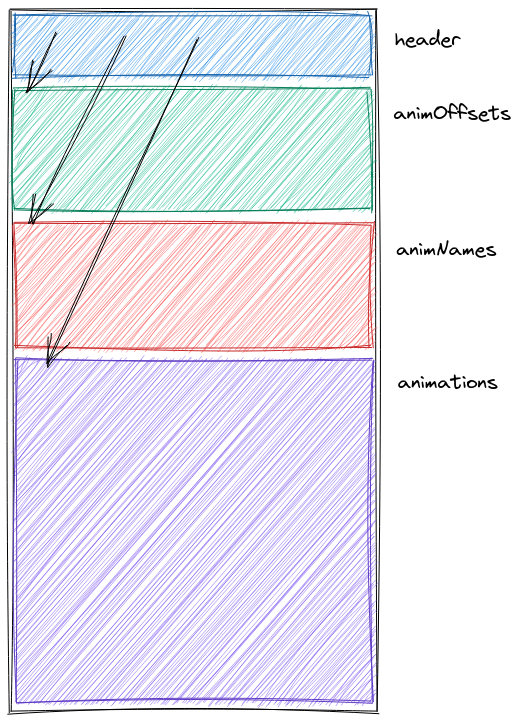
Likewise the nameOfs provides an offset to where the animation names are defined. The start of the names section contains a list of points to the actual string values. All of the values except for the last one will be zero terminated. The last animation string name is terminated by the start of the animation section. The figure above shows an outline of the structure of the file.
typedef struct {
	uint16_t animLength;
	uint16_t block1Ofs;
	uint16_t block2Ofs;
	uint16_t block3Ofs;
	uint16_t block4Ofs;
	uint16_t block5Ofs;
} MotnAnimHeader_t;
Each animation in the animation section has a small header with a length of 0x12 bytes. The first value is the length of the animation in frames. And the rest of the five values are the relative offsets to the different blocks from the start of the animation definition. With the exception of block 1, which is actually a fixed values of 0x12.
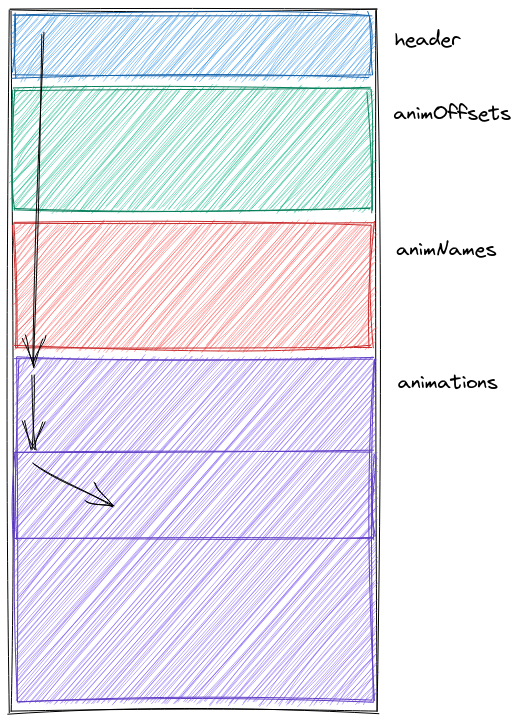
The figure above shows this relationship visually. The file header contains the offset to the start of the animation section. The animOfs table, provides the relative start to a specific animation from the start of the animation section. And each animation provides offsets to the blocks inside the animation from the start of the animation definition.
Block 1 is a list of bone ids and which axis as defined for motion within that animation. This section is a zero-terminated list comprised of uint16_t values. The structure of each one of the uint16_t values is shown in the figure below.

The first three bits of the uint16_t have no function. The next three bits are bitflags indicating the bone has rotation x, y, z and values for each one of their axis respective of their individual bits. Following that are three bitflags for position values which x, y, and z being signaled by their respective bits. All of the remains bits above are used for the bone id. Example code for parsing each uint16_t value is shown below.
uint16_t instruction;
fread(&instruction, sizeof(uint16_t), 1, fp);
uint16_t bone_id = instruction >> 9;
bool pos_x = instruction & 0x100 ? true : false;
bool pos_y = instruction & 0x80 ? true : false;
bool pos_z = instruction & 0x40 ? true : false;
bool rot_x = instruction & 0x20 ? true : false;
bool rot_y = instruction & 0x10 ? true : false;
bool rot_z = instruction & 0x08 ? true : false;
Block 2 defines the number of intermediate keyframes for each bone-axis pair. What this means is that for each axis, a byte will be defined to show how many keyframes exist for that pair to be read in the following blocks. This means that is the bits for pos x, y, z were set for bone 0 in the previous block. there will be three bytes in block 2 defining the number of intermediate keyframes for each of these axis.
For axis, the first and last keyframe are implied. That means is that for example if a value of 0 is provided for a byte, that means there are two keyframes, the first and last one. If a value of three is provided that actually means there are 5 key frames total including the first and last ones.
Following Block 2, Block 2 contains a list of bytes for the specific intermediate key frame numbers. The first and last key frames are implicit. So for example, if 3 intermediate key frames were defined for a key frame in block 2. The values for those frames could be defined as 12, 18, 22. The first frame is 0. The last frame is defined by frameCount in the header, which could be for example 36. Which means the full sequence of keyframes for a bone-axis would be 0, 12, 18, 22, 36.
Block 4 is a bitfield for each frame value. The summarize the example we are running with, if in block 3 there were three intermediate frames. And in block 3 the intermetidate frames were defined as 12, 18, 22. Then we would have five key frames, 0, 12, 18, 22, 36. In this block 2 bits are provided per-frame to define if easing values are defined for these key frames when reading the key frame values from block 5.

The image above shows the bit layout of this section. Each bone-axis pair is separated into its own section of bytes. The number of bytes is the rounded up quotient of the number of frames divided by 4. In the example we have 5 frames, so there would be two bytes. If we say that for bone 0 pos x have 5 key frames, there would be 2 bytes. If bone 0 pos y has two key frames that would be one byte. The bitflags for pairs are not a continuous bitfield, but are bits separated into a sequence of bytes per category. This is effectively wasted space, but it's not a lot of wasted space.
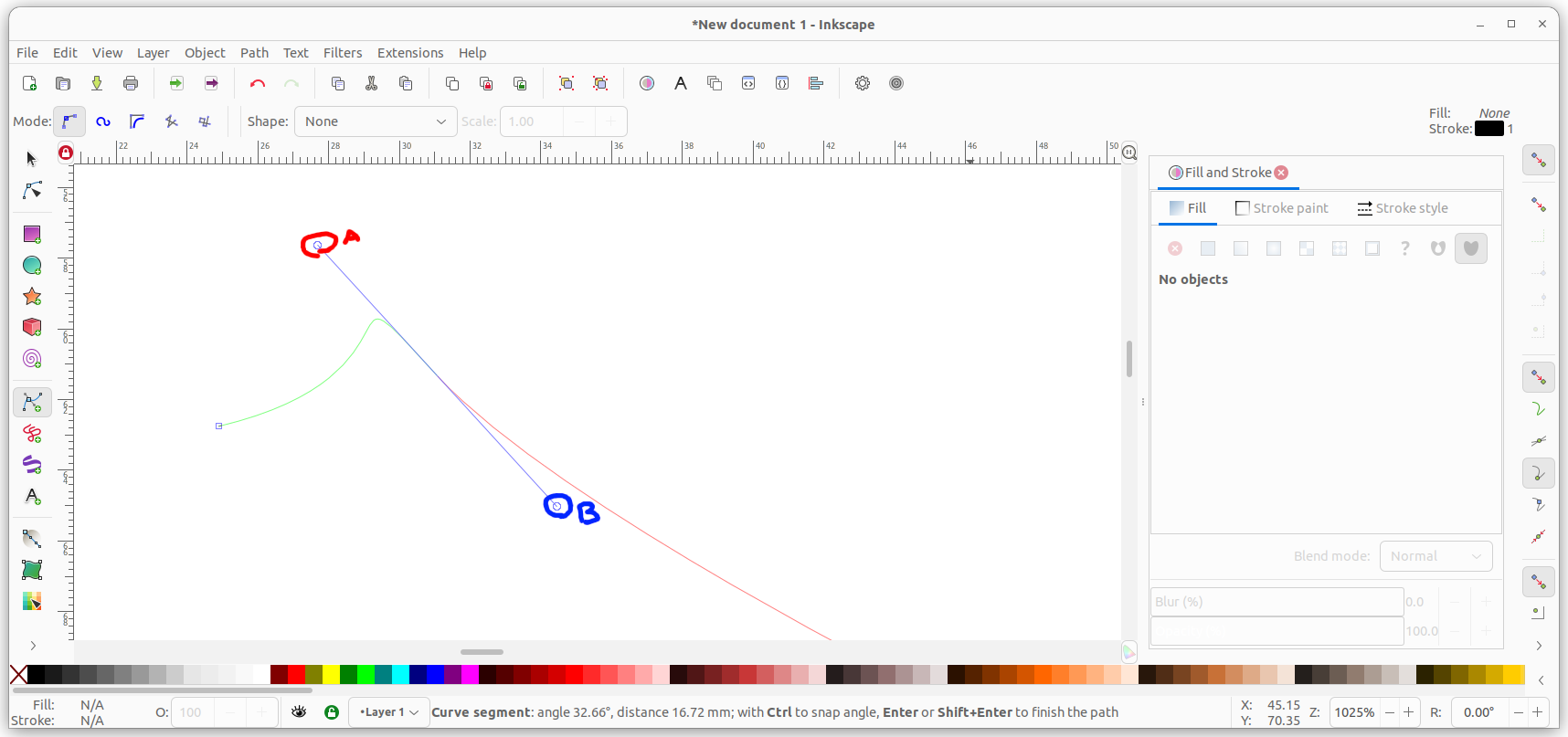
While I don't work with Bézier curves, what I think the bitflags are indicating is the precense of the two points labeled A and B in the firgure above to adjust the easing for calculating the interoplated frame-by-frame values in between the key frames. This section is not defining the values for the easing curves, but the booleans on whether to read the easing values in the next block.
Block 5 is the last section with the most ambiuity, which will need to be verified with an implimentation. This section contains the easingA value (if bitflag defined), the easingB value if bitflag defined and the keyframe value itself.
All of these values are two byte values. Which means there are easing, rot and pos values in this section. The number of values is equal to the number of easing bits defined for easing in block for, plus an implicit value for each key frame.
There are a few open questions for how to interpret this sections.
- Order - Is the order [
easingA,easingB,value], or [easingA,value,easingB] - Easing - It is assumed these are half floats, but there could be some other mechanism of encoding
- Pos - It is assumed these are half floats, but there could be some other mechanism of encoding
- Rot - It is thought these are degrees where 0x00 is 0 degrees, 0x800 is 180 degress and 0x1000 is 360 degrees, which will be needed to convert to radians.
Copyright 2017, 2023 kion@dashgl.com MIT License