University of Michigan, UC Berkeley, Bosch Center for AI
The IEEE/CVF Conference on Computer Vision and Pattern Recognition (CVPR) 2025
Zilin Wang*, Sangwoo Mo*, Stella X. Yu, Sima Behpour, Liu Ren
[Paper] | [Project Page] [Poster] | [Citation]
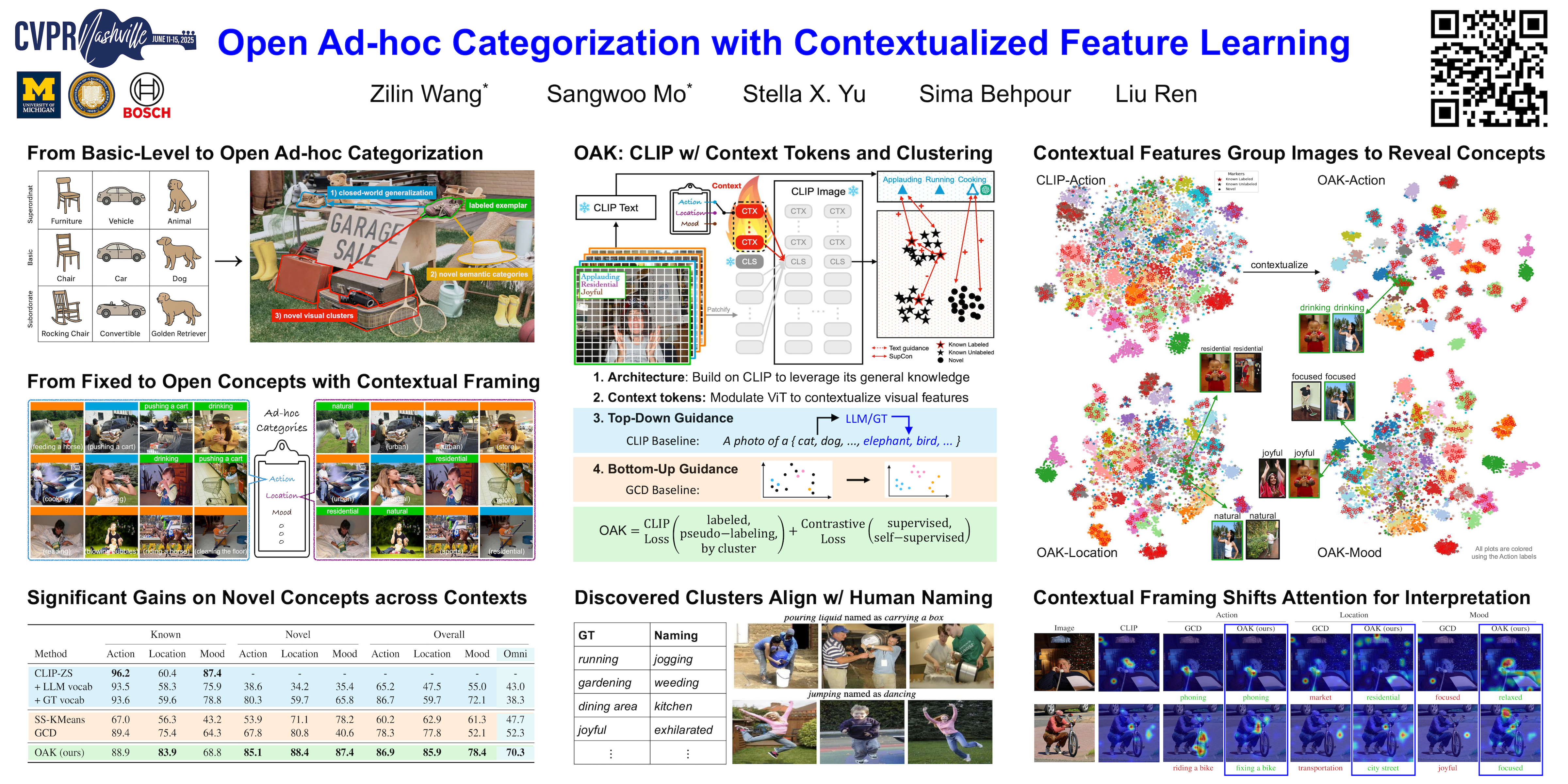

TL;DR: Ad-hoc categories are created dynamically to achieve specific tasks based on context at hand, such as things to sell at a garage sale. We introduce open ad-hoc categorization (OAK), a novel task requiring discovery of novel classes across diverse contexts, and tackle it by learning contextualized visual features with text guidance based on CLIP.
If you find our work inspiring or use our codebase in your research, please consider giving a star ⭐ and a citation.
@InProceedings{wang2025oakCVPR,
    author    = {Wang, Zilin and Mo, Sangwoo and Yu, Stella X. and Behpour, Sima and Ren, Liu},
    title     = {Open Ad-hoc Categorization with Contextualized Feature Learning},
    booktitle = {Proceedings of the Computer Vision and Pattern Recognition Conference (CVPR)},
    month     = {June},
    year      = {2025},
    pages     = {15108-15117}
}
We develop this codebase on Python 3.12 and PyTorch 2.3.1 with CUDA 12.1
conda create -n oak python=3.12
conda activate oak
pip install -r requirements.txt
We download the JPEG images from the official website of Stanford-40-Action here.
The annotations for the Action context are parsed directly from the dataset. For the Location and Mood contexts, we parse from the annotations provided by IC|TC. You may directly download our parsed annotations from here.
Stanford40/
├── JPEGImages/
├── action.txt
├── location.txt
├── mood.txt
The Clevr-4 datasets can be downloaded from the official website here. We use the 10k split.
clevr_4_10k_v1/
├── images/
├── clevr_4_annots.json
Please download our provided models weights from here.
weights/
├── oak_stanford_action.pt
├── oak_stanford_location.pt
├── oak_stanford_mood.pt
├── oak_clevr4_texture.pt
├── oak_clevr4_color.pt
├── oak_clevr4_shape.pt
├── oak_clevr4_count.pt
To run evaluation, use the following commands:
python main.py [CONFIG_FILE] --eval_path [PATH_TO_WEIGHTS] --opts DATA.ROOT [PATH_TO_DATA_ROOT]
To visualize the t-SNE plots, use the following commands:
python visualize_tsne.py [CONFIG_FILE] --eval_path [PATH_TO_WEIGHTS] --opts DATA.ROOT [PATH_TO_DATA_ROOT]

To run training, use the following commands. The training log and model weights will be automatically saved to the SAVE_DIR specified in the config file (default: saved).
python main.py [CONFIG_FILE] --opts DATA.ROOT [PATH_TO_DATA_ROOT]
OAK is released under the MIT License (refer to the LICENSE file for details).
We would like to thank the following projects for their contributions to this work: