

I develop scientific tools and reproducible modelling workflows that connect atmospheric science, wind energy, and physical and statistical analysis. I'm currently building the components of an integrated atmospheric and wind-energy modelling platform, amongst others.
WRF_tools is the public entry point: analyse existing WRF output, explore the diagnostics and see the results without compiling or running a new simulation.
- See the result: real-data demonstration PDF.
- Try it on your data: beginner examples.
- Prepare a simulation: TOML-driven ERA5 cases and rootless WRF/WPS builds.

The public packages run independently.
| Project | Role in the platform |
|---|---|
| wrf-autocompiler | Build WRF-ARW/WPS without root access, with configurable compiler, dependency and build-mode choices. |
| wrf-era5-case | Download ERA5/geodata and generate readable WRF/WPS configuration from TOML, including stationary one-way nests. |
| WRF_tools | Analyse WRF/WRF-LES output: meteorology, turbulence, wind energy, comparisons, visualisation, reports and TurbSim/OpenFAST inflow. |
| wrf-source-tools | Inspect WRF Fortran interfaces, direct-call chains and selected assignments offline; support source-level investigation. |
| LocalHarness | Set up local Qwen, Gemma and Phi models, with OpenCode, Cline support, shared skills and browser switching. Optional development support, not part of the numerical model. |
Each repository provides its own setup, editable examples and limitations.
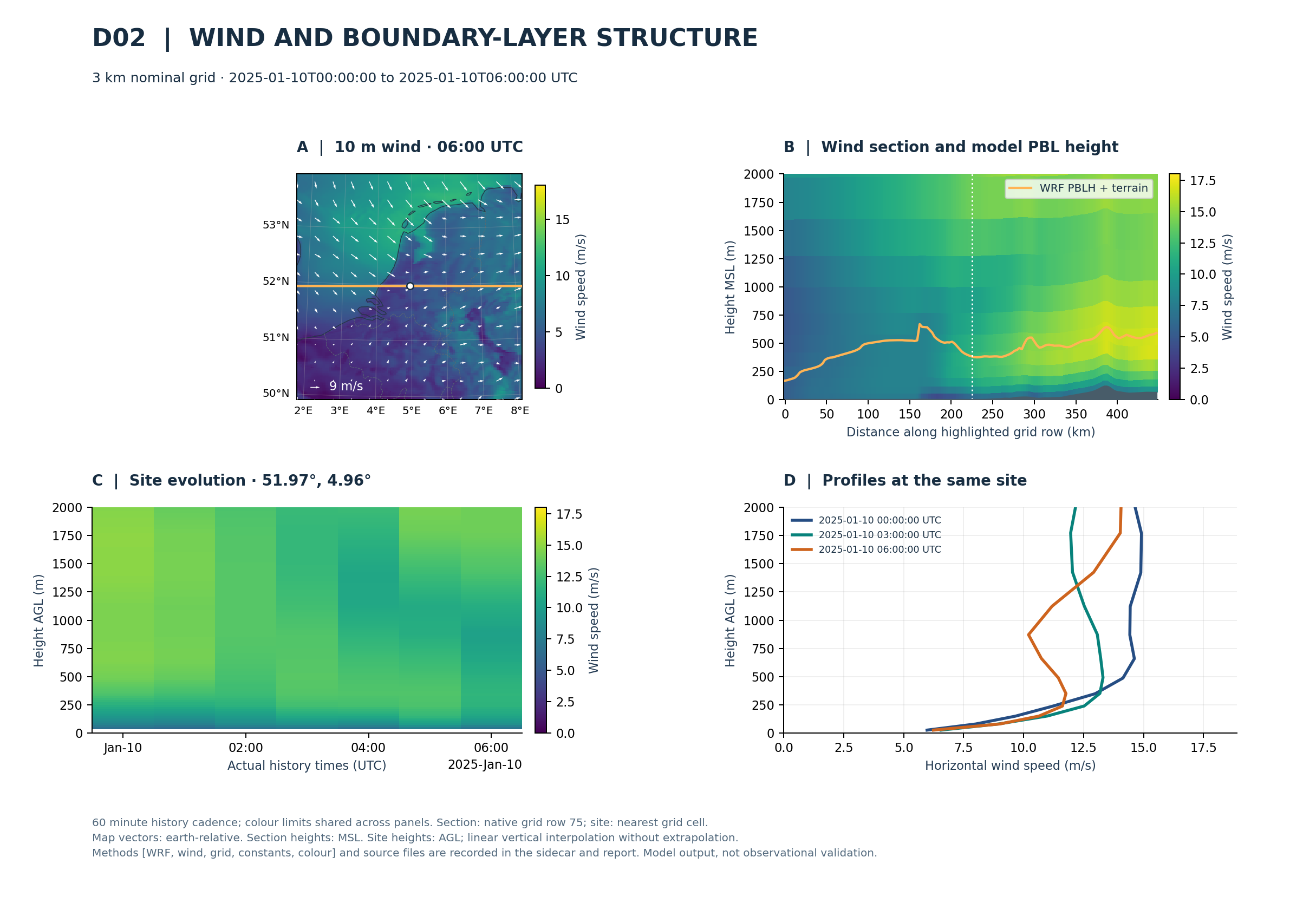
This WRF_tools figure combines a wind map, vertical section, time-height evolution and profiles. The linked demonstration report uses a two-domain Netherlands hindcast: 9 km and 3 km grids, 10 January 2025, 00–06 UTC.
To generate a report from your own output, clone WRF_tools, follow its
installation guide,
then run from that repository:
python examples/create_hindcast_report.py /path/to/wrf/run \
  --domain d02 --diagnostics all --output reports/my-case
Open reports/my-case/hindcast-report.pdf. The report includes the domains
found in the run; d02 selects the primary domain for this example. The same
workflow can be reused on another case rather than rewriting the analysis.
Scientific scope: these are model-based research workflows. Diagnostic assumptions, sampling requirements and validation boundaries are documented in the methods and references.

LocalHarness, previously named
qwen-local, is a separate local AI project for software development. It handles
verified model downloads and local runtime/client setup.
OpenCode is the default coding client; Cline and the optional
llama.cpp browser shown above are also
supported. See platform support
for the tested compatibility boundary.
- Atmospheric boundary-layer dynamics and turbulence.
- Wind-farm wakes and atmosphere–turbine interactions.
- Numerical modelling, physics ensembles and model uncertainty.
- Physical interpretation and reproducible computational research.
- Local AI for private automation.
- Music creation with Open-Weight AI models, amongst others.