

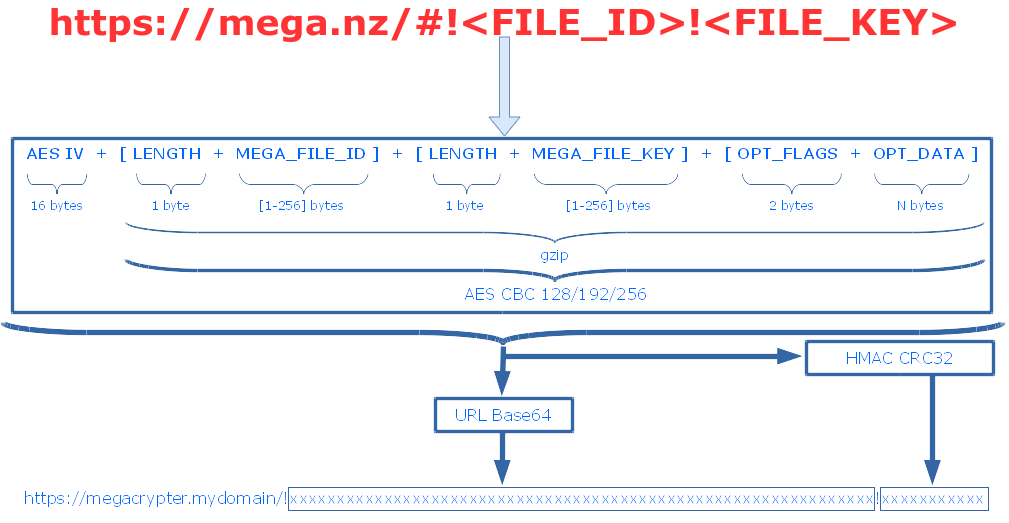
-
Apache (mod_rewrite ON) (Or another web server that supports URL rewrite)
-
PHP >= 7.2 (cURL + mbstring + openssl). Memcache is optional (for blacklist caching).
-
MySQL (optional for blacklist).
Windows users: Skip to Installing on Windows for XAMPP-based instructions with PowerShell commands.
Step 1: Download tarball (or clone repo) and upload to your server.
git clone https://github.com/tonikelope/megacrypter.git /var/www/megacrypter
cd /var/www/megacrypter
Step 2: Install composer dependencies.
php composer.phar installStep 3: Rename ALL config sample files and edit them.
cd application/config
cp miscellaneous.php.sample miscellaneous.php
cp paths.php.sample paths.php
cp memcache.php.sample memcache.php
cp database.php.sample database.php
cp gmail.php.sample gmail.php
At a minimum, edit miscellaneous.php and update:
URL_BASE— Set to the domain or subdomain where your Megacrypter will be accessible (e.g.http://megacrypter.yourdomain.com). A domain or subdomain is required (the API URL is fixed to the root path).MASTER_KEY— Generate a random 128, 192, or 256-bit AES key in hex string format (e.g. 64 hex characters for 256-bit). This key is used to encrypt and decrypt Megacrypter links. You can generate one with:openssl rand -hex 32GENERIC_PASSWORD— Set a strong random password (at least 16 characters recommended).
Step 4: Prepare the Apache virtual host:
<VirtualHost *:80>
  Servername megacrypter.mydomain
  DocumentRoot /var/www/megacrypter/public
  RewriteEngine On
  <directory /var/www/megacrypter/public>
    AllowOverride None
    Include /var/www/megacrypter/public/.htaccess
  </directory>
</VirtualHost>
After adding the virtual host, enable the site and restart Apache:
sudo a2enmod rewrite
sudo a2ensite megacrypter
sudo systemctl restart apache2
Step 5: Use Megabasterd to download files from your Megacrypter links (it supports any Megacrypter clone out of the box).
You can run Megacrypter on Windows using XAMPP, which bundles Apache, PHP, and MySQL in a single installer. Note: the memcache PHP extension is not included in XAMPP by default and must be installed separately if needed (it is optional and only required for blacklist caching performance).
Step 1: Download and install XAMPP (select Apache, PHP, and MySQL during installation). Also install Git for Windows if you haven't already.
Step 2: Open PowerShell and clone the repository into the XAMPP htdocs directory.
⚠️ Important: Run each command on its own line. Do not combine them.
cd C:\xampp\htdocs
git clone https://github.com/tonikelope/megacrypter.git
cd megacrypter
Step 3: Install composer dependencies (still in the megacrypter directory):
php composer.phar installStep 4: Copy all config sample files. Run each line separately:
cd application\config
Copy-Item miscellaneous.php.sample miscellaneous.php
Copy-Item paths.php.sample paths.php
Copy-Item memcache.php.sample memcache.php
Copy-Item database.php.sample database.php
Copy-Item gmail.php.sample gmail.php
cd ..\..
Edit application\config\miscellaneous.php in a text editor (e.g. Notepad) and update:
URL_BASE— Set tohttp://localhostor a domain/subdomain pointing to your machine.MASTER_KEY— Generate a random hex key. Run this in PowerShell to generate one:-join ((1..32) | ForEach-Object { '{0:x2}' -f (Get-Random -Maximum 256) })
GENERIC_PASSWORD— Set a strong random password (at least 16 characters).
Step 5: Enable mod_rewrite and configure the virtual host. Open C:\xampp\apache\conf\httpd.conf in a text editor:
-
Ensure this line is uncommented (no
#at the start):LoadModule rewrite_module modules/mod_rewrite.so -
Open
C:\xampp\apache\conf\extra\httpd-vhosts.confand add:<VirtualHost *:80> ServerName localhost DocumentRoot "C:/xampp/htdocs/megacrypter/public" <Directory "C:/xampp/htdocs/megacrypter/public"> AllowOverride All Require all granted </Directory> </VirtualHost>
Step 6: Ensure the required PHP extensions are enabled. Open C:\xampp\php\php.ini and make sure the following lines are uncommented (no ; at the start):
extension=curl
extension=mbstring
extension=openssl
Step 7: Start Apache (and MySQL if using the blacklist feature) from the XAMPP Control Panel, then open http://localhost in your browser to verify Megacrypter is running.
Megabasterd is a download manager that natively supports Megacrypter links. Once your Megacrypter instance is running:
-
Generate Megacrypter links by sending a request to your Megacrypter API (see API DOC below). For example, send a POST request to
http://megacrypter.yourdomain.com/apiwith:{"m": "crypt", "links": ["https://mega.nz/file/XXXXXXXX#YYYYYYYY"]}The response will contain your Megacrypter links.
-
Open Megabasterd and paste your Megacrypter links using the download button. Megabasterd automatically recognizes the
http(s)://megacrypter.yourdomain.com/!xxxxxxxxlink format. -
If the link is password protected, Megabasterd will prompt you for the password.
-
Megabasterd handles decryption and downloading automatically — no additional configuration is needed beyond pasting the link.
API URL -> http(s)://[BASE_URL]/api
(Content-Type: application/json)
{"m": "crypt",
"links": ["MEGA_LINK_1", "MEGA_LINK_2" ... "MEGA_LINK_N"],
*"expire": 0-6,
*"no_expire_token": true OR false,
*"tiny_url": true OR false,
*"app_finfo": true OR false,
*"hide_name": true OR false,
*"pass": "PASS",
*"referer": "DOMAIN_NAME",
*"extra_info": "EXTRA_INFO",
*"email": "EMAIL",
*"folder_node_list": ["NODE_ID_1", "NODE_ID_2" ... "NODE_ID_N"]}
- Expiration values: 0 -> never (default), 1 -> 10 minutes, 2 -> 1 hour...
- True by default.
- Tiny url option is false by default.
- Append file info option is false by default.
- Hide name option is false by default.
- Passwords are case-sensitive.
- Referer is not required to include 'http://'. It's limited to 256 chars
- Extra-info is limited to 256 chars.
- Email is limited to 256 chars.
- Only encrypt and return the indicated folder child nodes. Note: link list is limited to 500
{"links": ["MC_LINK_1", "MC_LINK_2" ... "MC_LINK_N"]}
{"m": "info",
"link": "MC_LINK",
*"reverse": "port:b64_proxy_auth[:host]"}
- Reverse query: Megacrypter will connect to MEGA API using HTTPS proxy running on the client. Client must send port and 'user:password' (base64 encoded) for proxy auth (host is optional).
{"name": "FILE_NAME" OR "CRYPTED_FILE_NAME",
"path": false OR "PATH" OR "CRYPTED_FILE_PATH",
"size": FILE_SIZE,
"key": "FILE_KEY" OR "CRYPTED_FILE_KEY",
"extra": false OR "EXTRA_INFO" OR "CRYPTED_EXTRA_INFO",
"expire": false OR "EXPIRE_TIMESTAMP#NOEXPIRE_TOKEN",
"pass": false OR "ITER_LOG2#KCV#SALT#IV"}
File name, file key, and extra-info will be returned crypted using AES CBC (PKCS7) with 256 bits key derivated from pass (PBKDF2 SHA256).
Follow this algorithm to decrypt crypted fields:
REPEAT

    password := read_password()

    info_key := hmac := hmac_sha256(password, base64_dec(SALT) + hex2bin('00000001'))

    FOR i=2 : 1 : pow(2, ITER_LOG2)

        hmac := hmac_sha256(password, hmac)

        info_key := info_key XOR hmac

    END

UNTIL aes_cbc_dec(base64_dec(KCV), info_key, base64_dec(IV)) = info_key

crypted_field := aes_cbc_dec(base64_dec(CRYPTED_FIELD), info_key, base64_dec(IV))
{"m": "dl",
"link": "MC_LINK",
*"ssl": true OR false,
*"noexpire": "NOEXPIRE_TOKEN",
*"sid" : "MEGA_SID",
*"reverse": "port:b64_proxy_auth[:host]"}
- Default is false (better performance in slow machines)
- If link has expiration time you can use NOEXPIRE_TOKEN (cached from a previous "info-request") to bypass it and get the download url.
- MEGA SESSION ID (for download MegaCrypter link using your MEGA PRO ACCOUNT)
- Reverse query: Megacrypter will connect to MEGA API using HTTPS proxy running on the client. Client must send port and 'user:password' (base64 encoded) for proxy auth (host is optional).
{"url": "MEGA_TEMP_URL" OR "CRYPTED_MEGA_TEMP_URL",
"pass": false OR "IV"}
Note: use the same algorithm described above to decrypt temp url (if password protected)
{"error": ERROR_CODE}
MC_EMETHOD(1)
MC_EREQ(2)
MC_ETOOMUCHLINKS(3)
MC_ENOLINKS(4)
MC_INTERNAL_ERROR(21)
MC_LINK_ERROR(22)
MC_BLACKLISTED_LINK(23)
MC_EXPIRED_LINK(24)
MEGA_EINTERNAL(-1)
MEGA_EARGS(-2)
MEGA_EAGAIN(-3)
MEGA_ERATELIMIT(-4)
MEGA_EFAILED(-5)
MEGA_ETOOMANY(-6)
MEGA_ERANGE(-7)
MEGA_EEXPIRED(-8)
MEGA_ENOENT(-9)
MEGA_ECIRCULAR(-10)
MEGA_EACCESS(-11)
MEGA_EEXIST(-12)
MEGA_EINCOMPLETE(-13)
MEGA_EKEY(-14)
MEGA_ESID(-15)
MEGA_EBLOCKED(-16)
MEGA_EOVERQUOTA(-17)
MEGA_ETEMPUNAVAIL(-18)
MEGA_ETOOMANYCONNECTIONS(-19)
MEGA_EWRITE(-20)
MEGA_EREAD(-21)
MEGA_EAPPKEY(-22)
MEGA_EDLURL(-101)