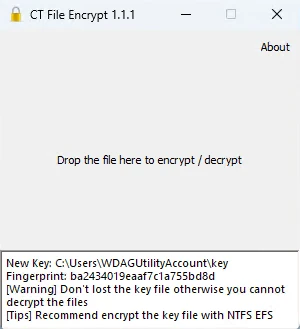
CT File Encrypt can encrypt your private documents using strong AES-256 encryption without password.
Encryption and decryption are easy. Just drop the file into it, that it! No password required. It is designed for encrypting small size (< 10MB) documents, photo, screenshots, etc. before uploading to cloud storage or restrict others to access.
Important: The private key will be generated automatically in %USERPROFILE%\key for the first time. The key is unique, SAVE it to a secure and safe place. You can zip it with password (7z with AES-256 protected recommended) for the backup. DON'T lost it otherwise you won't be able to open your encrypted files anymore.
Note: Folders are not supported yet. But you can drag multiple files into it.
- OpenSSL 1.1.1
- Qt 5.9
Available for Windows and Mac OS X.
- Folder support (zip or tar it first)
- Large files optimization
- Compile in MinGW will lost support for non-ASCII file names
Enjoy! Welcome for forking and pull request.
CT File Encrypt 可以把你重要的文件、相片用 AES-256 加密。一拖即加密/解密、無須密碼! 用,其間有畀過其他人試用,開始時已計劃開源,只是沒有時間整埋源碼,今次終於放上了 GitHub 了。
重要訊息: 第一次開啟時,會在 %USERPROFILE% 中建立 key 這個檔案。這個 key 是唯一的,萬一不見了,我也沒有辦法幫你解密檔案,請小心保管!可以用 7z AES-256 把它備份好。
- OpenSSL 1.1.1
- Qt 5.9
Windows 及 Mac OS X
- 未支援資料夾 (可先 zip or tar),但支援拖多個檔案
- 未對大檔案 (> 10MB) 優化,因原為文件、相片設計
- 使用 MinGW 編譯會失去對非 ASCII 檔案名的支持