Filament Exact is a FilamentPHP plugin that makes it easy to integrate ExactOnline API calls into your Laravel application. The package provides a queue system to process API calls efficiently and displays job statuses and errors inside the Filament admin panel.
- ✅ ExactOnline API authentication & token management automatically.
- ✅ Rate-limiting to ensure compliance with ExactOnline's API restrictions.
- ✅ Job processing & error handling, allowing developers to focus on business logic.
- ✅ Error Handling to ensure that errors are logged and displayed in the panel. You can also rec
- ✅ Job Progress to see the progress of the jobs right from your Filament panel.
- ✅ Priority Queue to prioritize jobs based on their importance.
- ✅ Webhook support to handle ExactOnline webhooks in a structured way.
- ✅ Permission-based access control (optional) with Filament Shield integration.
- 🔄 Retry-policy to automatically retry failed jobs.
- 🚀 Realtime overview of the queue status.

composer require codewow/filament-exactphp artisan filament-exact:installEdit your .env file and add the following environment variables:
EXACT_ONLINE_CLIENT_ID=""
EXACT_ONLINE_CLIENT_SECRET=""
EXACT_ONLINE_CLIENT_WEBHOOK_SECRET=""
EXACT_ONLINE_REDIRECT_URI=""
EXACT_ONLINE_WEBHOOK_URI=""
EXACT_ONLINE_DIVISIONS="" # Comma-separated list of divisions (123456,654321)use CodeWOW\FilamentExact\FilamentExactPlugin;
public function panel(Panel $panel): Panel
{
return $panel
->plugins([
FilamentExactPlugin::make()
]);
}Specify the scheduler in your bootstrap/app.php file:
use Illuminate\Console\Scheduling\Schedule;
use Illuminate\Foundation\Application;
use Illuminate\Foundation\Configuration\Exceptions;
use Illuminate\Foundation\Configuration\Middleware;

return Application::configure(basePath: dirname(__DIR__))
    ->withRouting(
        web: __DIR__.'/../routes/web.php',
        commands: __DIR__.'/../routes/console.php',
        health: '/up',
    )
    ->withMiddleware(function (Middleware $middleware) {
        //
    })
    ->withExceptions(function (Exceptions $exceptions) {
        //
    })
    ->withSchedule(function (Schedule $schedule) {
        if (app()->environment('production')) {
            $schedule->command('exact:process-queue production')->everyMinute();
        }
    })
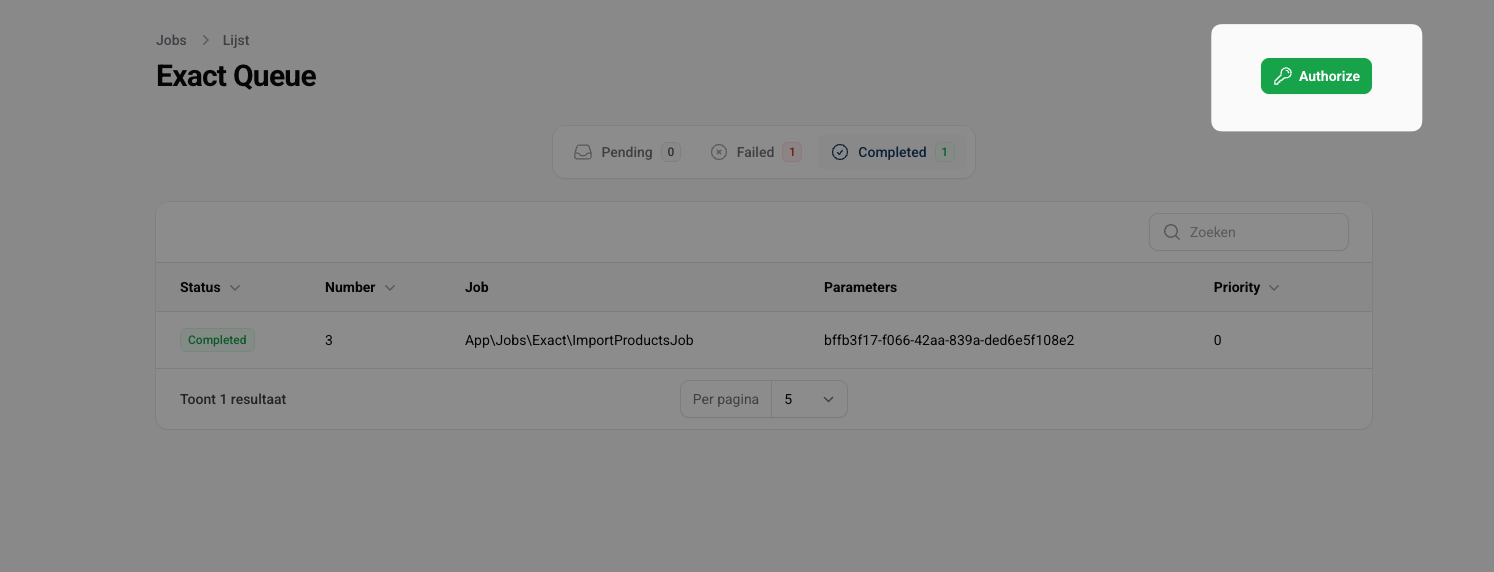
->create();Navigate to the Filament panel and click on the "Authorize" button in the ExactOnline Resource.
You will be redirected to the ExactOnline login page to authorize the application.
The package provides a configuration file that allows you to customize the behavior of the package. You can publish the configuration file using:
php artisan vendor:publish --tag="filament-exact-config"After publishing the configuration file, you can find it in config/filament-exact.php.
return [
    'model' => ExactQueue::class,
    'resource' => ExactQueueResource::class,

    'database' => [
        'tables' => [
            'queue' => 'exact_queue',
            'tokens' => 'exact_tokens',
        ],
        'pruning' => [
            'after' => 30, // days
        ],
    ],

    'notifications' => [
        'mail' => [
            'to' => [],
        ],
    ],

    'exact' => [
        'redirect_uri' => env('EXACT_ONLINE_REDIRECT_URI'),
        'client_id' => env('EXACT_ONLINE_CLIENT_ID'),
        'client_secret' => env('EXACT_ONLINE_CLIENT_SECRET'),
        'webhook_secret' => env('EXACT_ONLINE_WEBHOOK_SECRET'),
        'webhook_uri' => env('EXACT_ONLINE_WEBHOOK_URI'),
        'divisions' => array_filter(
            array_map('trim', explode(',', env('EXACT_ONLINE_DIVISIONS', '')))
        ),
    ],

    'navigation' => [
        'group' => null,
        'sort' => -1,
    ],

    'shield' => [
        'enabled' => false,
        'permissions' => [
            'view_any_exact_queue',
            'view_exact_queue',
            'authorize_exact_queue',
            'duplicate_exact_queue',
            'cancel_exact_queue',
            'prioritize_exact_queue',
        ],
    ],
];- model: The model used to store the queue items.
- resource: The resource used to display the queue items in the Filament panel.
- database.tables: The database tables used to store the queue items and tokens.
- database.pruning: Configuration for pruning old queue items.
- notifications.mail.to: The email addresses to send notifications to. (e.g ["errors@codewow.nl", "jesse@codewow.nl"])
- exact: Configuration for the ExactOnline API.
- navigation.group: The group to add the ExactOnline plugin to in the Filament panel.
- navigation.sort: The sort order of the ExactOnline plugin in the Filament panel.
- shield.enabled: Whether to enable the permission-based access control (optional).
- shield.permissions: The permissions used for the ExactOnline plugin when using Filament Shield.
The FilamentExact plugin includes optional permission-based access control. This feature integrates seamlessly with Filament Shield.
Note: Permissions are completely optional. The plugin works perfectly without any permission system - all features will be accessible to all users by default.
- Make sure you have the required
filament-shieldpackage installed:
composer require bezhanSalleh/filament-shield

php artisan vendor:publish --provider="Spatie\Permission\PermissionServiceProvider"
php artisan migrate- Add the
HasRolestrait to your auth provider model:
use Spatie\Permission\Traits\HasRoles;

class User extends Authenticatable
{
    use HasRoles;
}- Setup Filament Shield by running the following command:
php artisan shield:setup- Register Filament Shield in your
PanelProvider:
->plugins([
    \BezhanSalleh\FilamentShield\FilamentShieldPlugin::make(),
])- Enable
custom_permissionsin theconfig/filament-shield.phpconfiguration file:
'entities' => [
    ...
    'custom_permissions' => true,
],- Enable the permissions in the
config/filament-exact.phpconfiguration file:
'shield' => [
    'enabled' => true,
    ...
]
That's it! The plugin will now use the permissions defined in the shield.permissions array to control access to the ExactOnline plugin features.
| Permission Name | Description |
|---|---|
view_any_exact_queue |
View the ExactQueue resource in navigation and access the list |
view_exact_queue |
View individual queue items and their details |
authorize_exact_queue |
Access the "Authorize ExactOnline" button and manage API connection |
duplicate_exact_queue |
Duplicate existing queue items |
cancel_exact_queue |
Cancel pending or processing queue items |
prioritize_exact_queue |
Change priority of queue items to urgent |
You can manage permissions using the Filament Shield interface. Navigate to the "Shield" section in your Filament panel, and you will find the ExactOnline permissions listed there. You can assign these permissions to roles or users as needed.
If needed, you can also grant permissions programmatically using the givePermissionTo method:
Assign Permissions to Users
use App\Models\User;

$user = User::find(1);

// Give specific permissions
$user->givePermissionTo('view_exact_queue');
$user->givePermissionTo('authorize_exact_queue');

// Give all permissions
$user->givePermissionTo([
    'view_any_exact_queue',
    'view_exact_queue',
    'authorize_exact_queue',
    'duplicate_exact_queue',
    'cancel_exact_queue',
    'prioritize_exact_queue',
]);
Assign permissions to Roles
use Spatie\Permission\Models\Role;

// Create roles
$adminRole = Role::create(['name' => 'exact-admin']);
$userRole = Role::create(['name' => 'exact-user']);

// Give permissions to roles
$adminRole->givePermissionTo([
    'view_any_exact_queue',
    'view_exact_queue',
    'authorize_exact_queue',
    'duplicate_exact_queue',
    'cancel_exact_queue',
    'prioritize_exact_queue',
]);

$userRole->givePermissionTo([
    'view_any_exact_queue',
    'view_exact_queue',
]);

// Assign roles to users
$user->assignRole('exact-admin');
Helper Trait (Optional)
For convenience, you can use the included HasExactPermissions trait in your user model to check permissions easily:
use CodeWOW\FilamentExact\Traits\HasExactQueuePermissions;
use Spatie\Permission\Traits\HasRoles;

class User extends Authenticatable
{
    use HasRoles, HasExactQueuePermissions;
}

---

## 🚀 Usage

### Adding a Job to the Exact Queue
```php
use App\Jobs\ImportProductsJob;
use CodeWOW\FilamentExact\Models\ExactQueue;
use CodeWOW\FilamentExact\Enums\QueuePriorityEnum;

ExactQueue::create([
    "job" => ImportProductsJob::class,
    "parameters" => [
        "invoice_id" => $invoice->id,
    ],
    "priority" => QueuePriorityEnum::NORMAL,
    "environment" => 'production' // Optional (Default: production)
]);The priority field in the ExactQueue model can be set to one of the following values:
| Enum constant | Value | Description |
|---|---|---|
QueuePriorityEnum::VERY_LOW |
0 |
Background tasks |
QueuePriorityEnum::LOW |
1 |
Low-importance tasks |
QueuePriorityEnum::NORMAL |
2 |
Default priority |
QueuePriorityEnum::HIGH |
3 |
Time-sensitive |
QueuePriorityEnum::URGENT |
4 |
Immediate execution |
use CodeWOW\FilamentExact\Jobs\ExactQueueJob;
use Exception;
use Log;
use CodeWOW\FilamentExact\Services\ExactService;
use CodeWOW\FilamentExact\Endpoints\Item;
use App\Models\Product;

class ImportProductsJob extends ExactQueueJob
{

    public $id;

    public function __construct(string $id)
    {
        $this->id = $id;
    }

    public function handle(ExactService $service): void
    {
        $connection = $service->getConnection();

        $itemWrapper = new Item($connection);
        $item = $itemWrapper->find($this->id);
        if (! $item) {
            throw new Exception('Product not found in Exact: '.$this->id);
        }

        // Create a new product in the database
        Product::create([
            'name' => $item->Description,
            'price' => $item->SalesPrice,
            ...
        ]);
    }
}This package allows you to register and handle Exact Online webhooks in a simple and structured way.
Create a class that extends ExactWebhook and implement the handle method to process the webhook.
namespace App\Webhooks;

use CodeWOW\FilamentExact\Webhooks\ExactWebhook;

class ItemsWebhook extends ExactWebhook
{

    // Something to identify the webhook
    public string $topic = 'Items';

    // The slug of the webhook
    public string $slug = 'items';

    public function handle($body): void
    {
        // Handle the webhook here
    }

}To register webhooks, call the webhooks() method in your PanelProvider.
use CodeWOW\FilamentExact\FilamentExactPlugin;

public function panel(Panel $panel): Panel
{
    return $panel
        ->plugins([
            FilamentExactPlugin::make()
                ->webhooks([
                    new ItemsWebhook()
                ])
        ]);
}After registering the webhooks, you need to run the following command to subscribe to the webhooks with ExactOnline.
php artisan exact:register-webhooksOnce registered, Exact Online will send webhooks to your application at the url specified in the EXACT_ONLINE_WEBHOOK_URI environment variable.
Make sure the route has a parameter {slug} to identify the webhook handler.
For example:
EXACT_ONLINE_WEBHOOK_URI="https://mydomain.com/exact/webhook/{slug}"To authorize the webhook, you need to provide the EXACT_ONLINE_WEBHOOK_SECRET environment variable.
This package supports multiple languages. You can publish the translation files using:
php artisan vendor:publish --tag="filament-exact-translations"By default, the package provides translations for:
- 🇬🇧 English
- 🇳🇱 Dutch
To customize the translations, modify the language files inside resources/lang/vendor/filament-exact/.
If you would like to contribute translations for other languages, feel free to submit a pull request!
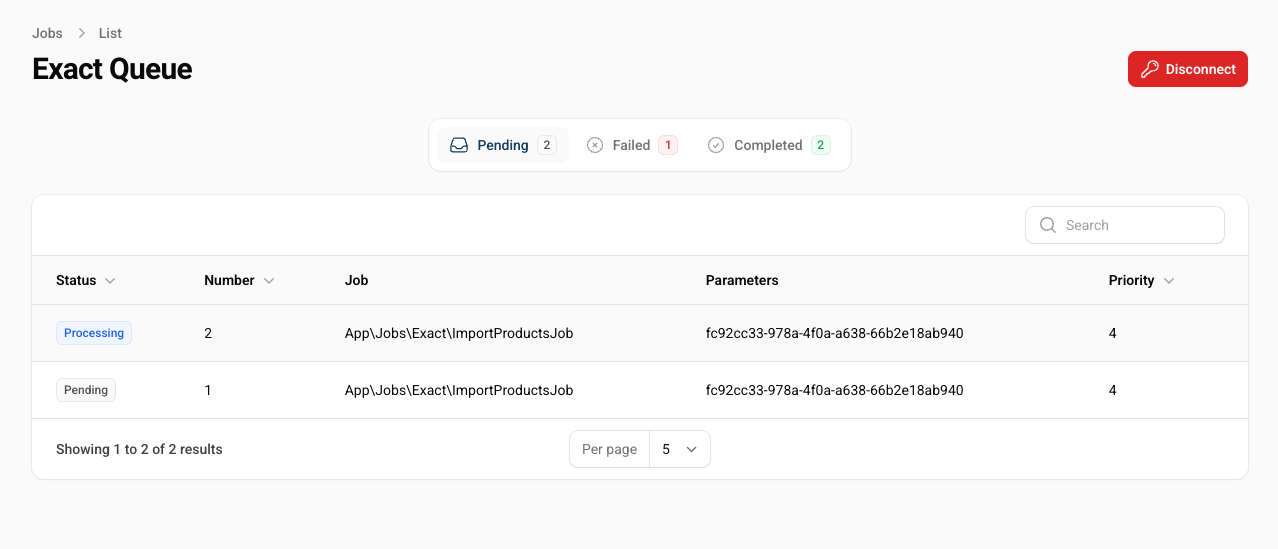
The queue overview provides a list of all jobs in the queue, including their status, priority, and progress.
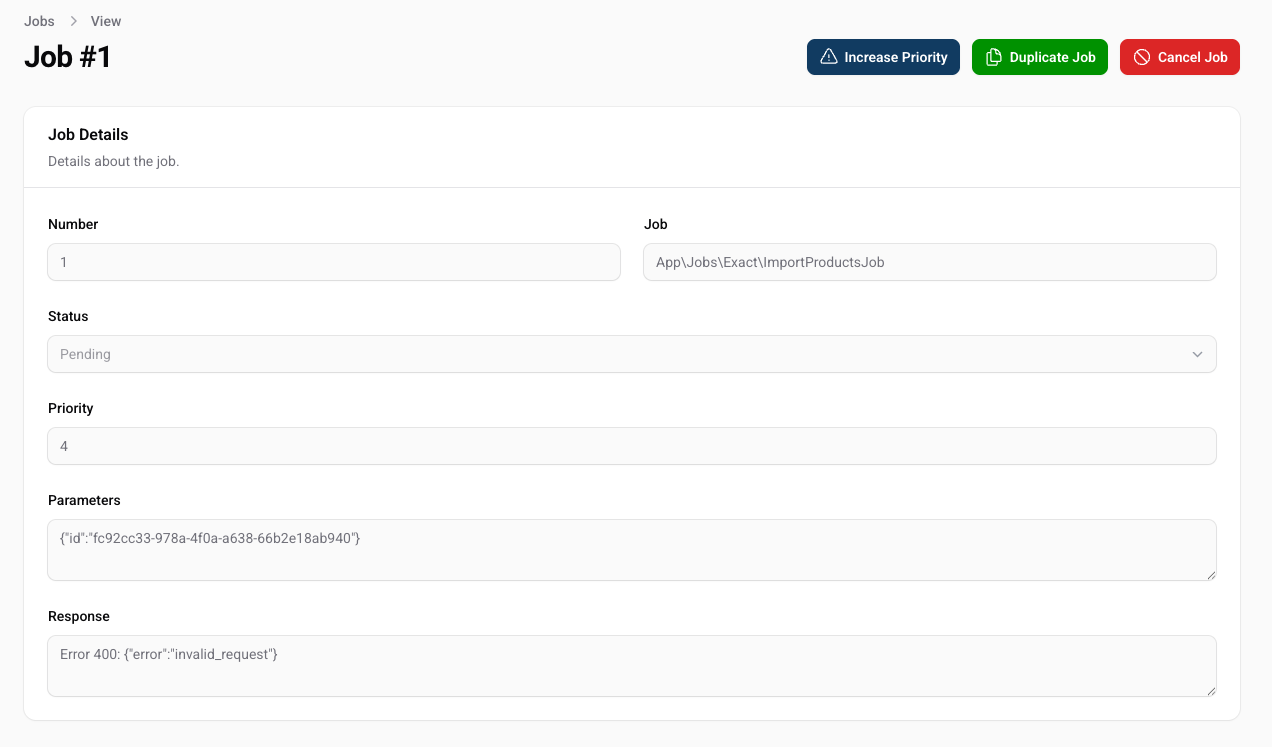
You can filter the queue by status quickly find the job you are looking for. If you want to see more details about a job, you can click on the job to view the details.
From within this view you can see the progress of the job, the status, and any errors that occurred. You can also retry the job or delete it from the queue. If you wish to put the job on top of the queue, you can raise the priority of the job.
You can manually process the queue by running the following command:
php artisan exact:process-queue {environment}tail -f storage/logs/laravel.logYou may need to authorize the application again. You can do this from the Filament panel by clicking on the "Authorize" button in the ExactOnline Resource.
composer testPlease see CHANGELOG for more information on what has changed recently.
Please see CONTRIBUTING for details.
Please review our security policy on how to report security vulnerabilities.
The MIT License (MIT). Please see License File for more information.