






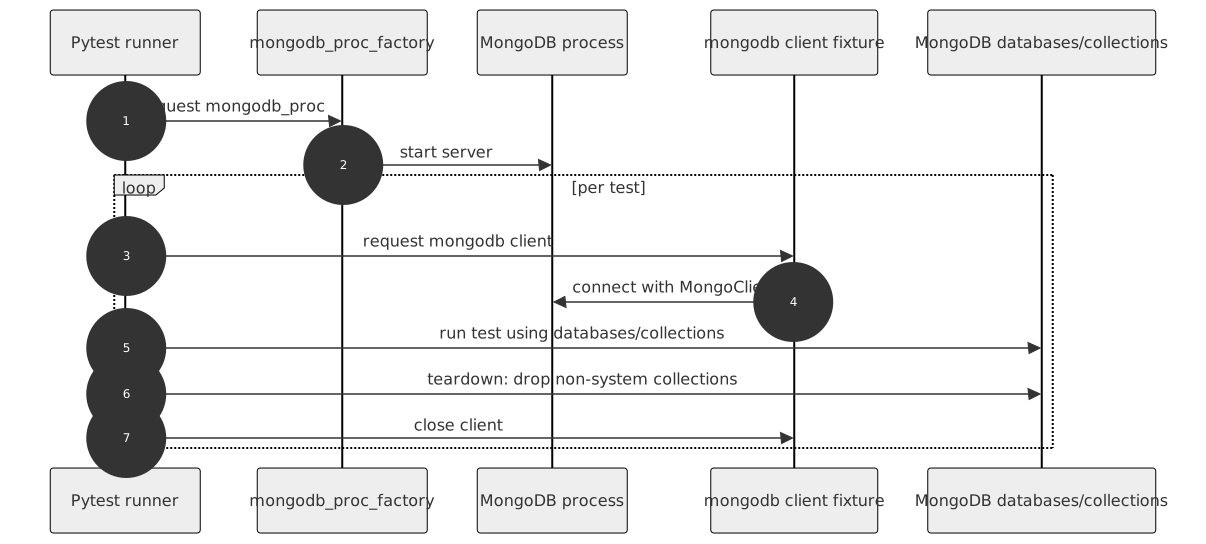
This is a pytest plugin that helps you test code that relies on a running MongoDB database. It provides fixtures for a MongoDB process and client.
Runtime requirements are defined in pyproject.toml.
The plugin contains three fixtures:
- mongodb - a function-scoped client fixture that cleans MongoDB at the end of each test.
- mongo_proc - a session-scoped fixture that starts a MongoDB instance on first use and stops it at the end of the test session.
- mongo_noproc - a no-process fixture that connects to an already running MongoDB instance. For example, on dockerized test environments or CI providing MongoDB services.
Simply include one of these fixtures in your test or fixture list.
Both mongo_proc and mongo_noproc support authentication via the username,
password, and auth_source arguments. When username is passed to mongo_proc,
mongod is started with --auth and the user is created via the MongoDB localhost
exception, so subsequent connections authenticate with that account. The mongo_noproc
fixture additionally accepts tls and a full uri for connecting to existing servers.
You can also create additional MongoDB client and process fixtures if you need to:
from pytest_mongo import factories

mongo_my_proc = factories.mongo_proc(port=None)
mongo_my = factories.mongodb('mongo_my_proc')
Note
Each MongoDB process fixture can be configured in a different way than the others through the fixture factory arguments.
Some projects use already running MongoDB servers (e.g., on docker instances).
To connect to them, use the mongo_noproc fixture.
mongo_external = factories.mongodb('mongo_noproc')By default, the mongo_noproc fixture connects to a MongoDB instance on port 27017.
Standard configuration options apply to it.
The mongo_noproc fixture also supports authenticated and TLS connections, as well as
connecting via a full connection URI:
mongo_auth_proc = factories.mongo_noproc(
    host="mongo.example.com",
    port=27017,
    username="user",
    password="secret",
    auth_source="admin",
    tls=True,
)
mongo_auth = factories.mongodb("mongo_auth_proc")
When uri is provided, it takes precedence over the host/port/credential arguments:
mongo_uri_proc = factories.mongo_noproc(
    uri="mongodb://<user>:<password>@mongo.example.com:27017/?authSource=admin"
)
The following configuration options apply to the mongo_noproc fixture as well:
You can define settings in three ways: fixture factory argument, command line option, and pytest.ini configuration option. You can pick which you prefer, but remember that these settings are handled in the following order:
Fixture factory argumentCommand line optionConfiguration option in your pytest.ini file
| MongoDB server option | Fixture factory argument | Command line option | pytest.ini option | Applies to mongo_noproc |
Default |
|---|---|---|---|---|---|
| Path to mongodb exec | executable | --mongo-exec | mongo_exec | no | /usr/bin/mongod |
| MongoDB host | host | --mongo-host | mongo_host | 127.0.0.1 | 127.0.0.1 |
| MongoDB port | port | --mongo-port | port | 27017 | random |
| Port search count | --mongo-port-search-count | mongo_port_search_count | 5 | ||
| Additional parameters | params | --mongo-params | mongo_params | no | |
| MongoDB client's time zone awareness (override with --mongo-tz-aware/--no-mongo-tz-aware) | tz_aware | --mongo-tz-aware, --no-mongo-tz-aware | mongo_tz_aware | no | False |
| Username for authentication | username | --mongo-username | mongo_username | yes | |
| Password for authentication | password | --mongo-password | mongo_password | yes | |
| Authentication database (authSource) | auth_source | --mongo-auth-source | mongo_auth_source | yes | admin |
| Full MongoDB connection URI (takes precedence over host/port/credentials) | uri (mongo_noproc only) |
--mongo-uri | mongo_uri | yes | |
| Enable TLS/SSL (override with --mongo-tls/--no-mongo-tls) | tls (mongo_noproc only) |
--mongo-tls, --no-mongo-tls | mongo_tls | yes | False |
Example usage:
pass it as an argument in your own fixture
mongo_proc = factories.mongo_proc(port=8888)
pass additional
mongodparameters via a single stringmongo_proc = factories.mongo_proc( params="--quiet --setParameter diagnosticDataCollectionEnabled=false" )
use
--mongo-portcommand line option when you run your testspytest tests --mongo-port=8888
specify your port as
mongo_portin yourpytest.inifile.To do so, put a line like the following under the
[pytest]section of yourpytest.ini:[pytest] mongo_port = 8888
CI covers MongoDB 7.0 and 8.0; other versions may work but aren't tested.
- Bug tracker: https://github.com/dbfixtures/pytest-mongo/issues