














The goal of BaseRepository is to significantly reduce the boilerplate code required to implement data access layers for persistance entities by providing out of the box actions on the database.
- Table of Contents
- Installation
- Usage
Option 1: UsingBaseRepositorywithStandard SAP CAP CDS-TSOption 2: UsingBaseRepositorywithCDS-TS-DispatcherDrafts:BaseRepositoryDraftMethods- create
- createMany
- getAll
- getDistinctColumns
- getLocaleTexts
- paginate
- find
- findOne
- findOneAndUpdate
- builder
- update
- updateOrCreate
- updateLocaleTexts
- delete
- deleteMany
- deleteAll
- exists
- count
- findFirst
- findLast
- findOrCreate
- countWhere
- updateMany
- deleteWhere
- increment
- decrement
- incrementMany
- decrementMany
HelpersDecorators
Samples- Contributing
- License
- Authors
npm install @dxfrontier/cds-ts-repositoryImportant
CDS-TS-Repository uses @sap/cds, @sap/cds-dk version 9
If you're using @sap/cds, @sap/cds-dk version 8 then install npm install @dxfrontier/cds-ts-repository@5.
Execute the following commands :
cds add typernpm installTip
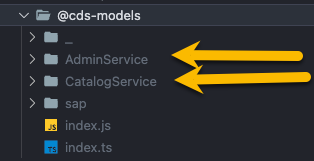
If above option is being used, this means whenever we change a .CDS file the changes will be reflected in the generated @cds-models folder.
Caution
Import always the generated entities from the service folders and not from the index.ts
Tip
By default cds-typer will create in your package.json a quick path alias like :
"imports": {
  "#cds-models/*": "./@cds-models/*/index.js"
}
Use import helper to import entities from #cds-models like example :
import { Book } from '#cds-models/CatalogService';
This guide explains how to use the BaseRepository with the Standard SAP CDS-TS, allowing you to work without the need for the CDS-TS-Dispatcher.
Start by creating MyRepository class, which will extend the BaseRepository<T> to handle operations for your entity.
Example
import { BaseRepository, Request } from '@dxfrontier/cds-ts-repository'
import { MyEntity } from 'LOCATION_OF_YOUR_ENTITY_TYPE'

// Imported to have visibility over INSERT, SELECT, UPDATE, DELETE ...
import { Service } from '@sap/cds';

export class MyRepository extends BaseRepository<MyEntity> {

  constructor() {
    super(MyEntity)
  }

  public aMethod(req: Request<MyEntity>) {
    const result1 = await this.create(...)
    const result2 = await this.createMany(...)
    const result5 = await this.getAll()
    const result6 = await this.paginate(...)
    const result7 = await this.find(...)
    const result8 = await this.findOne(...)
    const result9 = await this.delete(...)
    const result10 = await this.update(...)
    const result11 = await this.updateLocaleTexts(...)
    const result12 = await this.exists(...)
    const result13 = await this.count()
  }

  public anotherMethod(results: MyEntity[], req: Request<MyEntity>) {
    // ...
  }

  // Enhance with custom QL methods ...
  public customQLMethod() {
    const customQL = SELECT(MyEntity).columns(...).where(...)
    // ...
  }
}Now that you have MyRepository class, you can integrate it into your implementation.
- Create a new private field:
private myRepository: MyRepository = new MyRepository();- Use the handler on the
callbackof theevents:
this.before('READ', MyEntity, (req) => this.myRepository.aMethod(req));
this.after('READ', MyEntity, (results, req) => this.myRepository.anotherMethod(results, req));
Example
import { MyEntity } from 'LOCATION_OF_YOUR_ENTITY_TYPE';

export class MainService extends cds.ApplicationService {
  private myRepository: MyRepository = new MyRepository();

  init() {
    this.before('READ', MyEntity, (req) => this.myRepository.aMethod(req));
    this.after('READ', MyEntity, (results, req) => this.myRepository.anotherMethod(results, req));

    return super.init();
  }
}
Note
MyEntity was generated using CDS-Typer and imported in the the class.
This guide explains how to use the BaseRepository with the CDS-TS-Dispatcher.
Start by creating a MyRepository class, which will extend the BaseRepository<T> to handle operations for your entity.
- Create a new class
MyRepository:
export class MyRepository {}- Add
@Repositorydecorator :
@Repository()
export class MyRepository {}- Extend
MyRepositoryclass to inherit theBaseRepositorymethods
@Repository()
export class MyRepository extends BaseRepository<MyEntity> {
  constructor() {
    super(MyEntity); // CDS-Typer entity
  }
}
Example
import { BaseRepository } from '@dxfrontier/cds-ts-repository'
import { Repository, Service } from '@dxfrontier/cds-ts-dispatcher'

import { MyEntity } from 'LOCATION_OF_YOUR_ENTITY_TYPE'

@Repository()
export class MyRepository extends BaseRepository<MyEntity> {

  constructor() {
    super(MyEntity) // CDS-Typer entity
  }

  aMethod() {
    const result1 = await this.create(...)
    const result2 = await this.createMany(...)
    const result5 = await this.getAll()
    const result6 = await this.paginate(...)
    const result7 = await this.find(...)
    const result8 = await this.findOne(...)
    const result9 = await this.delete(...)
    const result10 = await this.update(...)
    const result11 = await this.updateLocaleTexts(...)
    const result12 = await this.exists(...)
    const result13 = await this.count()
  }

  // Enhance with custom QL methods ...
  customQLMethod() {
    const customQL = SELECT(MyEntity).columns(...).where(...)
    // ...
  }
}Now MyRepository class can be injected in another class using @Inject decorator.
Example
@EntityHandler(Book)
class MyEntityHandler {
  @Inject(MyRepository) private readonly myRepository: MyRepository;
  ...
}
Note
MyEntity was generated using CDS-Typer and imported in the the class.
The BaseRepositoryDraft class extends BaseRepository by providing support for draft-enabled entities.
The BaseRepositoryDraft repository provides a clear separation of methods for working with active entities and draft instances.
Use BaseRepository methods when dealing with active entity instances.
updatedeletecreatecreateMany...
Use BaseRepositoryDraft methods when working with draft entity instances.
updateDraftdeleteDraftfindOneDraftfindDrafts...
Example 1: Integrate BaseRepository & BaseRepositoryDraft using Mixin
import { BaseRepository, BaseRepositoryDraft, Mixin } from '@dxfrontier/cds-ts-repository';
import { MyEntity } from 'LOCATION_OF_YOUR_ENTITY_TYPE';

export class MyRepository extends Mixin(BaseRepository<MyEntity>, BaseRepositoryDraft<MyEntity>) {
  constructor() {
    super(MyEntity);
  }
  // ... define custom CDS-QL actions if BaseRepository ones are not satisfying your needs !
}
Note
MyRepository class will inherit all methods for active entities and drafts.
Active entity methods: .create, createMany, update, exists, delete, deleteMany ...
Draft entity methods: .updateDraft, existsDraft, deleteDraft, deleteManyDrafts ...
Example 2: Use only BaseRepositoryDraft methods
import { BaseRepository, BaseRepositoryDraft, Mixin } from '@dxfrontier/cds-ts-repository';
import { MyEntity } from 'LOCATION_OF_YOUR_ENTITY_TYPE';

export class MyRepository extends BaseRepositoryDraft<MyEntity> {
  constructor() {
    super(MyEntity);
  }
  // ... define custom CDS-QL actions if BaseRepository ones are not satisfying your needs !
}
Important
Entity MyEntity must be annotated with @odata.draft.enabled: true to use BaseRepositoryDraft methods.
(method) this.create(entry: Entry<T>) : Promise<boolean>.
The create method allows you to create a new entry in the table.
Parameters
entry (object): An object representing the entry to be created. The object should match the structure expected byMyEntity
Return
Promise<boolean>: This method returns a Promise that resolves when the insertion operation is completed successfully.
Example 1
import { BaseRepository } from '@dxfrontier/cds-ts-repository';
import { MyEntity } from 'LOCATION_OF_YOUR_ENTITY_TYPE';

export class MyRepository extends BaseRepository<MyEntity> {
  constructor() {
    super(MyEntity); // a CDS Typer entity type
  }

  public async aMethod() {
    const createdInstance = await this.create({
      name: 'Customer 1',
      description: 'Customer 1 description',
    });
    // Further logic with createdInstance
  }
}
Example 2
The method is also able to create deep entities like
import { BaseRepository } from '@dxfrontier/cds-ts-repository';
import { MyEntity } from 'LOCATION_OF_YOUR_ENTITY_TYPE';

export class MyRepository extends BaseRepository<MyEntity> {
  constructor() {
    super(MyEntity); // a CDS Typer entity type
  }

  public async aMethod() {
    const createdInstance = > await this.create({
      name: 'Customer 1',
      description: 'Customer 1 description',
      to_children: [{
        name: 'child 1'
        // ...
      }]
    });
    // Further logic with createdInstance
  }
}
Note
MyEntity was generated using CDS-Typer and imported in the the class.
(method) this.createMany(...entries: Entries<T>[]) : Promise<boolean>.
The createMany method allows you to add multiple entries in the table.
Parameters
entries (...entries: Entries<T>[]): An array of objects representing the entries to be created. Each object should match the structure expected byMyEntity.
Return
Promise<boolean>: This method returns aPromisethat resolves when the insertion operation is completed successfully.
Example 1
import { BaseRepository } from '@dxfrontier/cds-ts-repository';
import { MyEntity } from 'LOCATION_OF_YOUR_ENTITY_TYPE';

export class MyRepository extends BaseRepository<MyEntity> {
  constructor() {
    super(MyEntity); // a CDS Typer entity type
  }

  public async aMethod() {

    const create: MyEntity = {
      name: 'Customer 1',
      description: 'Customer 1 description',
    },
    {
      name: 'Customer 2',
      description: 'Customer 2 description',
    };

    // example 1
    const createdInstance = await this.createMany([create]);

    // example 2
    const createdInstance2 = await this.createMany({
      name: 'Customer 1',
      description: 'Customer 1 description',
    },
    {
      name: 'Customer 2',
      description: 'Customer 2 description',
    });

}
}
Note
MyEntity was generated using CDS-Typer and imported in the the class.
(method) this.getAll(): Promise<T[] | undefined>
The getAll method retrieves all table entries.
Return
Promise<T[] | undefined>: A Promise resolving to an array of typeT(e.g.,MyEntity). If no results are found, the Promise resolves toundefined.
Example
import { BaseRepository } from '@dxfrontier/cds-ts-repository';
import { MyEntity } from 'LOCATION_OF_YOUR_ENTITY_TYPE';

export class MyRepository extends BaseRepository<MyEntity> {
  constructor() {
    super(MyEntity); // a CDS Typer entity type
  }

  public async aMethod() {
    // Variant 1
    const results = await this.getAll();
    if (results) {
      // do something with results
    }

    // Variant 2
    const items = results?.length;
    const oneItem = results![0];

    // Further logic with results
  }
}
Note
MyEntity was generated using CDS-Typer and imported in the the class.
(method) this.getDistinctColumns<Column extends keyof T>(columns: Column[]>): Promise<Array<Pick<T, Column>> | undefined>
The getDistinctColumns method retrieves distinct values for the specified columns from the table.
Parameters
Parameters
columns (...columns : Columns<T>[]): An array of column names to retrieve distinct records for. Each column name should be of a type that matches the entity's schema.
Return
Promise<Array<Pick<T, Column>> | undefined>: A Promise resolving to an array of objects containing the selected columns from the entity. If no results are found, the Promise resolves toundefined.
Example
import { BaseRepository } from '@dxfrontier/cds-ts-repository';
import { MyEntity } from 'LOCATION_OF_YOUR_ENTITY_TYPE';

export class MyRepository extends BaseRepository<MyEntity> {
  constructor() {
    super(MyEntity); // a CDS Typer entity type
  }

  public async aMethod() {
    const results = await this.getDistinctColumns(['currency_code', 'ID', 'name']);
    // or using spread strings
    // const results = await this.getDistinctColumns('currency_code', 'ID', 'name');

    // Variant 1
    if (results) {
      // do something with results
    }

    // Variant 2
    const items = results?.length;
    const oneItem = results![0];
    // Further logic with results
  }
}
Note
MyEntity was generated using CDS-Typer and imported in the the class.
(method) this.getLocaleTexts<Column extends keyof T>(columns: Column[]): Promise<Array<Pick<T, Column> & Locale> | undefined>
The getLocaleTexts method is designed to retrieve a list of items with localized text.
Parameters
columns (...columns : Columns<T>[]): An array of name of the columns to extract the localized text.
Return
Promise<Array<Pick<T, Column> & Locale> | undefined>: A Promise resolving to an array of objects containing the selected columns from the entity along with locale information. If no results are found, the Promise resolves toundefined.
Example
import { BaseRepository } from '@dxfrontier/cds-ts-repository';
import { MyEntity } from 'LOCATION_OF_YOUR_ENTITY_TYPE';

export class MyRepository extends BaseRepository<MyEntity> {
  constructor() {
    super(MyEntity); // a CDS Typer entity type
  }

  public async aMethod() {
    const results = await this.getLocaleTexts(['descr', 'ID']);
    // or
    const results = await this.getLocaleTexts('descr', 'ID');

    // Variant 1
    if (results) {
      // do something with results
    }

    // Variant 2
    const items = results?.length;
    const oneItem = results![0];
    // Further logic with results
  }
}
Note
MyEntity was generated using CDS-Typer and imported in the the class.
(method) this.paginate(options: { limit: number; skip?: number | undefined }): Promise<T[]>
The paginate method allows you to find and retrieve a list of items with optional pagination similar to limit from SQL.
Parameters
options(object): An object containing the following properties:limit(number): The maximum number of items to retrieve.skip?(optional, number): This property, if applied, will 'skip' a certain number of items (default: 0).
Return
Promise<T[] | undefined>: A Promise resolving to an array of objects representing instances of typeT(e.g.,MyEntity). If no results are found, the Promise resolves toundefined.
Example 1 : Retrieve the first 10 items
import { BaseRepository } from '@dxfrontier/cds-ts-repository';
import { MyEntity } from 'LOCATION_OF_YOUR_ENTITY_TYPE';

export class MyRepository extends BaseRepository<MyEntity> {
  constructor() {
    super(MyEntity); // a CDS Typer entity type
  }

  public async aMethod() {
    const results = await this.paginate({ limit: 10 });

    // Variant 1
    if (results) {
      // do something with results
    }

    // Variant 2
    const items = results?.length;
    const oneItem = results![0];
    // Further logic with results
  }
}
Example 2 : Retrieve items starting from the 20th item, limit to 5 items
import { BaseRepository } from '@dxfrontier/cds-ts-repository';
import { MyEntity } from 'LOCATION_OF_YOUR_ENTITY_TYPE';

export class MyRepository extends BaseRepository<MyEntity> {
  constructor() {
    super(MyEntity); // a CDS Typer entity type
  }

  public async aMethod() {
    const resultsWithSkip = await this.paginate({ limit: 5, skip: 20 });

    // Variant 1
    if (resultsWithSkip) {
      // do something with results
    }

    // Variant 2
    const items = resultsWithSkip?.length;
    const oneItem = resultsWithSkip![0];

    // Further logic with resultsWithSkip
  }
}
Note
MyEntity was generated using CDS-Typer and imported in the the class.
The find method allows you to find and retrieve entries from the table that match the specified keys.
Overloads
| Method | Parameters | Description |
|---|---|---|
| `this.find(): Promise<T | undefined>` | |
| `this.find(keys: Entry): Promise<T | undefined>` | keys (object) |
this.find(filter :Filter<T>`): Promise<T |
undefined>` | filter (Filter) |
Return
Promise<T[] | undefined>: A Promise that resolves to an array of typeT(e.g.,MyEntity). If no results are found, the Promise resolves toundefined.
Example 1 using object
import { BaseRepository } from '@dxfrontier/cds-ts-repository';
import { MyEntity } from 'LOCATION_OF_YOUR_ENTITY_TYPE';

export class MyRepository extends BaseRepository<MyEntity> {
  constructor() {
    super(MyEntity); // a CDS Typer entity type
  }

  public async aMethod() {
    const results = await this.find({ name: 'Customer', description: 'description' });

    // Variant 1
    if (results) {
      // do something with results
    }

    // Variant 2
    const items = results?.length;
    const oneItem = results![0];
    // Further logic with results
  }
}
Note
MyEntity was generated using CDS-Typer and imported in the the class.
Example 2 using Filter
import { BaseRepository, Filter } from '@dxfrontier/cds-ts-repository';
import { MyEntity } from 'LOCATION_OF_YOUR_ENTITY_TYPE';

export class MyRepository extends BaseRepository<MyEntity> {
  constructor() {
    super(MyEntity); // a CDS Typer entity type
  }

  public async aMethod() {
    const filter = new Filter<MyEntity>({
      field: 'name',
      operator: 'LIKE',
      value: 'Customer',
    });

    // Execute the query using the find
    const results = await this.find(filter);
  }
}
Tip
See Filter for more complex QUERY filters
Note
MyEntity was generated using CDS-Typer and imported in the the class.
findOne(keys: Entry<T>): Promise<T | undefined>
The findOne method allows you to find and retrieve a single entry from the table that matches the specified keys.
Parameters
keys (object): An object representing the keys to filter the entries. Each key should correspond to a property in theMyEntity, and the values should match the filter criteria.
Return
Promise<T | undefined>: This method returns a Promise with a single entry of typeT, whereTisMyEntity. If no result is found, the Promise resolves toundefined.
Example
import { BaseRepository } from '@dxfrontier/cds-ts-repository';
import { MyEntity } from 'LOCATION_OF_YOUR_ENTITY_TYPE';

export class MyRepository extends BaseRepository<MyEntity> {
  constructor() {
    super(MyEntity); // a CDS Typer entity type
  }

  public async aMethod() {
    const itemFound = await this.findOne({ name: 'Customer', description: 'description' });
    // Variant 1
    if (itemFound) {
      // do something with result
    }

    // Further logic with result
  }
}
Note
MyEntity was generated using CDS-Typer and imported in the the class.
findOneAndUpdate(keys: Entry<T>, fieldsToUpdate: Entry<T>): Promise<boolean>
The findOneAndUpdate method performs an atomic find-and-update operation. It first checks if an entity matching the specified keys exists, and if found, updates it with the provided fields.
Parameters
keys (object): An object representing the keys to identify the entity to find. Each key should correspond to a property inMyEntity, and the values should match the filter criteria.fieldsToUpdate (object): An object representing the fields and their new values to update on the found entity.
Return
Promise<boolean>: This method returns a Promise that resolves to:trueif the entity was found and successfully updatedfalseif the entity was not found or the update failed
Example 1: Basic usage
import { BaseRepository } from '@dxfrontier/cds-ts-repository';
import { MyEntity } from 'LOCATION_OF_YOUR_ENTITY_TYPE';

export class MyRepository extends BaseRepository<MyEntity> {
  constructor() {
    super(MyEntity); // a CDS Typer entity type
  }

  public async aMethod() {
    const wasUpdated = await this.findOneAndUpdate(
      { ID: '123' },
      { name: 'Updated Name', status: 'active' }
    );

    if (wasUpdated) {
      console.log('Entity updated successfully');
    } else {
      console.log('Entity not found or update failed');
    }
  }
}
Note
MyEntity was generated using CDS-Typer and imported in the class.
Tip
The method first verifies entity existence before attempting the update, ensuring safe update operations.
Overloads
| Method | Parameters | Description |
|---|---|---|
this.builder().find(): FindBuilder<T> |
Get all table items. | |
this.builder().find(keys: Entry<T>): FindBuilder<T> |
keys (object) |
An object representing the keys to filter the entries. Each key should correspond to a property in MyEntity, and the values should match the filter criteria. |
this.builder().find(filter :Filter<T>): FindBuilder<T> |
filter (Filter) |
An instance of Filter<T> |
Return
-
FindBuilder<T>: AFindBuilderinstance that provides access to the following methods for constructing aSELECT:
Provides the Metadata of Entity fields.
Example
const results = this.builder().find().columns('ID', 'currency_code').elements;Warning
Currently SAP does not offer typing on the elements.
Skip duplicates similar to SQL distinct.
Example
const results = await this.builder()
  .find() // get all items
  .distinct.columns('country')
.execute();To order the ASC selected columns, you can use the orderAsc methods. Pass an array of column names to specify the order.
Parameters
columns (...columns : Columns<T>[]): An array of name of the columns to order by.
Example
const results = await this.builder()
  .find({
    name: 'A company name',
  })
  .orderAsc('name', 'ID', 'company')
  // or
  //.orderAsc(['name', 'ID', 'company'])
.execute();To order the DESC selected columns, you can use the orderDesc methods. Pass an array of column names to specify the order.
Parameters
columns (...columns : Columns<T>[]): An array of name of the columns to order by.
Example
const results = await this.builder()
  .find({
    name: 'A company name',
  })
  .orderDesc('name', 'ID', 'company')
  // or
  //.orderDesc(['name', 'ID', 'company'])
.execute();This method allows retrieve a list of items with optional pagination similar to limit from SQL.
Parameters
options(object): An object containing the following properties:limit(number): The maximum number of items to retrieve.skip?(number): This property, if applied, will 'skip' a certain number of items (default: 0).
Example
const results = await this.builder()
  .find({
    name: 'A company name',
  })
  .paginate({ limit: 1 })
.execute();If you want to group the selected columns, use the groupBy method. Pass an array of column names to group by.
Parameters
columns (...columns : Columns<T>[]): An array of name of the columns to group by.
Example
const results = await this.builder()
  .find({
    name: 'A company name',
  })
  .groupBy('name', 'company')
  // or
  //.groupBy(['name', 'company'])
.execute();Specifies which columns to be fetched.
Parameters
columns (...columns : Columns<T>[]): An array of name of the columns to show only.
Example
const results = await this.builder()
  .find({
    name: 'A company name',
  })
  .columns('name', 'currency_code')
  // or
  //.columns(['name', 'currency_code'])
  .execute();
Warning
If columns() method is used together with getExpand() / columnsFormatter() / groupBy() / orderAsc() / orderDesc(), the columns() method can have impact on the final typing
The columnsFormatter can be used :
- To
renamecolumns in your query results. - To apply
aggregate functionsto specific columns, such as calculating averages, sums etc.
Parameters
-
columns (object-1, object-n, ...)column(string): The name of the column to be processed.column1(string): The name of the column to be processed. (Applied only forCONCAT)column2(string): The name of the column to be processed. (Applied only forCONCAT)aggregate?[optional] (string): This property, if applied, willcall aggregate functionfor the specifiedcolumnname, below you can find the available aggregate functions :- String :
'LOWER' | 'UPPER' | 'LENGTH' | 'CONCAT' | 'TRIM' - Number :
'AVG' | 'MIN' | 'MAX' | 'SUM' | 'ABS' | 'CEILING' | 'TOTAL' | 'COUNT' | 'ROUND' | 'FLOOR' - Date :
'DAY' | 'MONTH' | 'YEAR' | 'HOUR' | 'MINUTE' | 'SECOND'
- String :
renameAs(string): This property creates a new column with the given name
Example 1
const results = await this.builder()
  .find()
  .columnsFormatter(
    { column: 'price', aggregate: 'AVG', renameAs: 'average' },
    { column: 'stock', renameAs: 'stockRenamed' },
  )
  .execute();
Example 2
const results = this.builder()
  .find({ ID: 201 })
  .getExpand(['reviews'])
  .columns('reviews', 'bookName', 'authorName')
  .columnsFormatter({ column1: 'bookName', column2: 'authorName', aggregate: 'CONCAT', renameAs: 'bookAndAuthorName' })
  .execute();

// above typing will have the following properties
// 'reviews', 'bookName', 'authorName', 'bookAndAuthorName'Use getExpand to specify which columns you want to expand from the table.
Overloads
| Type | Method | Parameters | Description |
|---|---|---|---|
Single expand |
getExpand(...associations : Columns<T>[]): FindBuilder<T> |
...associations: Array<string> |
Use Single expand when you want to expand only certain associations from the root level of the entity. -------- An array of strings representing the columns to expand, this will expand only first level of associations. |
Deep expand |
getExpand(associations : Expand<T>): FindBuilder<T> |
associations: object |
Use Deep expand option when you want to deep expand certain associations. -------- An object representing the columns to expand. Value: - {} - If empty object is used as a value for an association, the empty object will perform a full expand of the association. Properties: - select? : Array<string> [optional]: Fetch only the mentioned columns. - expand? : object [optional]: Expand nested associations. |
Auto expand |
getExpand(options : { levels : number }): FindBuilder<T> |
levels: number |
Use Auto expand to deep expand all associations within your entity. -------- You can control how deeply the method should expand associations by providing the levels. |
Example 1 : Auto expand
Root- Entitychild- (association) - expandedchild- (composition) - expanded- ...
child- (association) - expandedchild(association) - expanded- ...
const results = await this.builder()
  .find({
    name: 'A company name',
  })
  .getExpand({ levels: 2 })
  .execute();
Example 2 : Deep expand
// expand 'author', 'genre' and 'reviews' associations
const results = await this.builder()
  .find({
    name: 'A company name',
  })
  .getExpand({
    // expand 'author'
    author: {},

    // expand 'genre', having only 'ID' and 'name'
    genre: {
      select: ['ID', 'name'],
    },

    // expand 'reviews', having only 'ID', 'book_ID' fields and 'reviewer' association
    reviews: {
      select: ['ID', 'book_ID'],

      // expand 'reviewer', having only the 'ID'
      expand: {
        reviewer: {
          select: ['ID'],
        },
      },
    },
  })
  .execute();
Example 3 : Deep expand stored in a variable & using columns()
import { Expand } from '@dxfrontier/cds-ts-repository';

// expand 'author', and 'reviews' associations
const associations: Expand<MyEntity> = {
  // expand 'author'
  author: {},

  // expand 'reviews' having all fields + expand reviewer association having only 'ID'
  reviews: {
    // expand 'reviewer', having only the 'ID'
    expand: {
      reviewer: {
        select: ['ID'],
      },
    },
  },
};

const results = await this.builder()
  .find() // get all items
  .columns('author', 'reviews')
  .getExpand(associations)
  .execute();
Note
If columns is used with getExpand the columns method will have impact on the final typing.
Example 4 : Simple expand (root only)
// expand only 'orders' and 'reviews' associations
const results = await this.builder()
  .find({
    name: 'A company name',
  })
  .getExpand('orders', 'reviews')
  // or
  //.getExpand(['orders', 'reviews'])
.execute();Exclusively locks the selected rows for subsequent updates in the current transaction, thereby preventing concurrent updates by other parallel transactions.
Parameters
options(object): An object containing the following properties:wait?(number) [optional]: an integer specifying the timeout after which to fail with an error in case a lock couldn't be obtained.
Example
const results = await this.builder()
  .find({
    name: 'A company name',
  })
  .getExpand('orders', 'reviews')
  .forUpdate({ wait: 5 })
  //or
  //.forUpdate()
  .execute();
Tip
More info can be found on the official SAP CAP forUpdate documentation.
Locks the selected rows in the current transaction, thereby preventing concurrent updates by other parallel transactions, until the transaction is committed or rolled back. Using a shared lock allows all transactions to read the locked record.
If a queried record is already exclusively locked by another transaction, the .forShareLock() method waits for the lock to be released.
Example
// Expand only 'orders' association
const results = await this.builder()
  .find({
    name: 'A company name',
  })
  .getExpand('orders', 'reviews')
  .forShareLock()
  .execute();
Tip
More info can be found on the official SAP CAP forShareLock documentation. documentation.
Passes hints to the database query optimizer that can influence the execution plan. The hints can be passed as individual arguments or as an array.
The SQL Optimizer usually determines the access path (for example, index search versus table scan) on the basis of the costs (Cost-Based Optimizer). You can override the SQL Optimizer choice by explicitly specifying hints in the query that enforces a certain access path.
Parameters
...hints(string[]): Query optimizer hings
Example
const results = await this.builder()
  .find({
    name: 'A company name',
  })
  .hints('IGNORE_PLAN_CACHE', 'MAX_CONCURRENCY(1)')
  .execute();
Important
This works only for HANA DB.
Tip
More info can be found on the official SAP CAP hints documentation. documentation.
Finally, to execute the constructed query and retrieve the results as an array of objects, use the execute method. It returns a promise that resolves to the constructed query result.
Return
Promise<T[] | undefined>: This method returns a Promise ofT[]orundefinedif nothing was found.
Example 1
const results = await this.builder()
  .find({
    name: 'A company name',
  })
  .execute();
Example 2
const results = await this.builder()
  .find({ name: 'A company name' })
  .orderAsc(['name'])
  .paginate({ limit: 5 })
  .getExpand('orders')
  .execute();
Note
MyEntity was generated using CDS-Typer and imported in the the class.
Overloads
| Method | Parameters | Description |
|---|---|---|
this.builder().findOne(keys: Entry<T>): FindOneBuilder<T> |
keys (object) |
An object representing the keys to filter the entries. Each key should correspond to a property in MyEntity, and the values should match the filter criteria. |
this.builder().findOne(filter :Filter<T>): FindOneBuilder<T> |
filter (Filter) |
An instance of Filter<T> |
Return
-
FindOneBuilder<T>: AFindOneBuilderinstance that provides access to the following methods for constructing aSELECT:
Provides the Metadata of Entity fields.
Example
const oneResult = this.builder().findOne({ currency_code: 'USD' }).columns('ID', 'currency_code').elements;Warning
Currently SAP does not offer typing on the elements.
Specifies which columns to be fetched.
Parameters
columns (...columns : Columns<T>[]): An array of name of the columns to show only.
Example
const oneResult = await this.builder()
  .findOne({
    name: 'A company name',
  })
  .columns('name', 'currency_code')
  // or
  //.columns(['name', 'currency_code'])
  .execute();
Warning
If columns() method is used together with getExpand() / columnsFormatter() the columns() method can have impact on the final typing
The columnsFormatter can be used :
- To
renamecolumns in your query results. - To apply
aggregate functionsto specific columns, such as calculating averages, sums etc.
Parameters
-
columns (object-1, object-n, ...)column(string): The name of the column to be processed.column1(string): The name of the column to be processed. (Applied only forCONCAT)column2(string): The name of the column to be processed. (Applied only forCONCAT)aggregate?[optional] (string): This property, if applied, willcall aggregate functionfor the specifiedcolumnname, below you can find the available aggregate functions :- String :
'LOWER' | 'UPPER' | 'LENGTH' | 'CONCAT' | 'TRIM' Number :Applicable only for this.builder().find'AVG' | 'MIN' | 'MAX' | 'SUM' | 'ABS' | 'CEILING' | 'TOTAL' | 'COUNT' | 'ROUND' | 'FLOOR'.- Date :
'DAY' | 'MONTH' | 'YEAR' | 'HOUR' | 'MINUTE' | 'SECOND'
- String :
renameAs(string): This property creates a new column with the given name
Example 1
const oneResult = this.builder()
  .findOne({ ID: 201 })
  .getExpand(['reviews'])
  .columns('reviews', 'bookName', 'authorName')
  .columnsFormatter({ column1: 'bookName', column2: 'authorName', aggregate: 'CONCAT', renameAs: 'bookAndAuthorName' })
  .execute();

// above typing will have the following properties
// 'reviews', 'bookName', 'authorName', 'bookAndAuthorName'Use getExpand to specify which columns you want to expand from the table.
Overloads
| Type | Method | Parameters | Description |
|---|---|---|---|
Single expand |
getExpand(...associations : Columns<T>[]): FindBuilder<T> |
...associations: Array<string> |
Use Single expand when you want to expand only certain associations from the root level of the entity. -------- An array of strings representing the columns to expand, this will expand only first level of associations. |
Deep expand |
getExpand(associations : Expand<T>): FindBuilder<T> |
associations: object |
Use Deep expand option when you want to deep expand certain associations. -------- An object representing the columns to expand. Value: - {} - If empty object is used as a value for an association, the empty object will perform a full expand of the association. Properties: - select? : Array<string> [optional]: Fetch only the mentioned columns. - expand? : object [optional]: Expand nested associations. |
Auto expand |
getExpand(options : { levels : number }): FindBuilder<T> |
levels: number |
Use Auto expand to deep expand all associations within your entity. -------- You can control how deeply the method should expand associations by providing the levels. |
Example 1 : Auto expand
Root- Entitychild- (association) - expandedchild- (composition) - expanded- ...
child- (association) - expandedchild(association) - expanded- ...
const oneResult = await this.builder()
  .findOne({
    name: 'A company name',
  })
  .getExpand({ levels: 2 })
  .execute();
Example 2 : Deep expand
// expand 'author', 'genre' and 'reviews' associations
const oneResult = await this.builder()
  .findOne({
    name: 'A company name',
  })
  .getExpand({
    // expand 'author'
    author: {},

    // expand 'genre', having only 'ID' and 'name'
    genre: {
      select: ['ID', 'name'],
    },

    // expand 'reviews', having only 'ID', 'book_ID' fields and 'reviewer' association
    reviews: {
      select: ['ID', 'book_ID'],

      // expand 'reviewer', having only the 'ID'
      expand: {
        reviewer: {
          select: ['ID'],
        },
      },
    },
  })
  .execute();
Example 3 : Deep expand stored in a variable & using columns()
import { Expand } from '@dxfrontier/cds-ts-repository';

// expand 'author', and 'reviews' associations
const associations: Expand<MyEntity> = {
  // expand 'author'
  author: {},

  // expand 'reviews' having all fields + expand reviewer association having only 'ID'
  reviews: {
    // expand 'reviewer', having only the 'ID'
    expand: {
      reviewer: {
        select: ['ID'],
      },
    },
  },
};

const oneResult = await this.builder()
  .findOne({
    name: 'A company name',
  })
  .columns('author', 'reviews')
  .getExpand(associations)
  .execute();
Note
If columns is used with getExpand the columns method will have impact on the final typing.
Example 4 : Simple expand
// expand only 'orders' and 'reviews' associations
const oneResult = await this.builder()
  .findOne({
    name: 'A company name',
  })
  .getExpand('orders', 'reviews')
  // or
  //.getExpand(['orders', 'reviews'])
.execute();Exclusively locks the selected rows for subsequent updates in the current transaction, thereby preventing concurrent updates by other parallel transactions.
Parameters
options(object): An object containing the following properties:wait?(number) [optional]: an integer specifying the timeout after which to fail with an error in case a lock couldn't be obtained.
Example
const oneResult = await this.builder()
  .findOne({
    name: 'A company name',
  })
  .forUpdate({ wait: 5 })
  //or
  //.forUpdate()
  .execute();
Tip
More info can be found on the official SAP CAP forUpdate documentation.
Locks the selected rows in the current transaction, thereby preventing concurrent updates by other parallel transactions, until the transaction is committed or rolled back. Using a shared lock allows all transactions to read the locked record.
If a queried record is already exclusively locked by another transaction, the .forShareLock() method waits for the lock to be released.
Example
// Expand only 'orders' association
const oneResult = await this.builder()
  .findOne({
    name: 'A company name',
  })
  .forShareLock()
  .execute();
Tip
More info can be found on the official SAP CAP forShareLock documentation. documentation.
Passes hints to the database query optimizer that can influence the execution plan. The hints can be passed as individual arguments or as an array.
The SQL Optimizer usually determines the access path (for example, index search versus table scan) on the basis of the costs (Cost-Based Optimizer). You can override the SQL Optimizer choice by explicitly specifying hints in the query that enforces a certain access path.
Parameters
...hints(string[]): Query optimizer hings
Example
const results = await this.builder()
  .find({
    name: 'A company name',
  })
  .hints('IGNORE_PLAN_CACHE', 'MAX_CONCURRENCY(1)')
  .execute();
Important
This works only for HANA DB
Tip
More info can be found on the official SAP CAP hints documentation. documentation.
Finally, to execute the constructed query and retrieve the result as a single object, use the execute method. It returns a promise that resolves to the constructed query result.
Return
Promise<T | undefined>: This method returns a Promise ofTorundefinedif nothing was found.
Example 1
const oneResult = await this.builder()
  .findOne({
    name: 'A company name',
  })
  .execute();
Example 2
const oneResult = await this.builder().findOne({ name: 'A company name' }).getExpand('orders').execute();Note
MyEntity was generated using CDS-Typer and imported in the the class.
update(keys: Entry<T>, fieldsToUpdate: Entry<T>): Promise<boolean>
The update method allows you to update entries in the table that match the specified keys with new values for specific fields.
Parameters
keys (object): An object representing the keys to filter the entries. Each key should correspond to a property in theMyEntity, and the values should match the filter criteria.fieldsToUpdate (object): An object representing the fields and their updated values for the matching entries.
Return
Promise<boolean>: This method returns a Promise oftrueif the update operation issuccessful, andfalseotherwise.
Example
import { BaseRepository } from '@dxfrontier/cds-ts-repository';
import { MyEntity } from 'LOCATION_OF_YOUR_ENTITY_TYPE';

export class MyRepository extends BaseRepository<MyEntity> {
  constructor() {
    super(MyEntity); // a CDS Typer entity type
  }

  public async aMethod() {
    const updated = await this.update(
      { ID: 'a51ab5c8-f366-460f-8f28-0eda2e41d6db' },
      { name: 'a new name', description: 'a new description' },
    );
    // Further logic with updated
  }
}
Note
MyEntity was generated using CDS-Typer and imported in the the class.
updateOrCreate(...entries: Entries<T>[]): Promise<boolean>
The updateOrCreate method is a database operation that will update an existing row if a specified value already exists in a table, and insert a new row if the specified value doesn't already exist, similar to UPSERT from SQL.
Parameters
entries (...entries: Entries<T>[]): An array of objects representing the entries to be created. Each object should match the structure expected byMyEntity.
Return
Promise<boolean>: This method returns a Promise oftrueif the update/create operation issuccessful, andfalseotherwise.
Example
import { BaseRepository } from '@dxfrontier/cds-ts-repository';
import { MyEntity } from 'LOCATION_OF_YOUR_ENTITY_TYPE';

export class MyRepository extends BaseRepository<MyEntity> {
  constructor() {
    super(MyEntity); // a CDS Typer entity type
  }

  public async aMethod() {
    const updatedOrCreated = await bookRepository.updateOrCreate(
      {
        ID: 123,
        title: 'Magic Forest',
        descr: 'A magical journey through enchanted woods!',
      },
      {
        ID: 456,
        title: 'Mystic Mountain',
        descr: 'Explore the mysteries of the ancient mountain!',
      },
    );
    // Further logic with updated
  }
}
Note
MyEntity was generated using CDS-Typer and imported in the the class.
updateLocaleTexts(localeCodeKeys: Entry<T> & Locale, fieldsToUpdate: Entry<T>): Promise<boolean>
The updateLocaleTexts method allows you to update entries in the table that match the specified localeCodeKeys with new values for specific fields.
Parameters
localeCodeKeys (object): An object containing language codes'en', 'de', 'fr', 'ro', ...and entity keys to filter entries.fieldsToUpdate (object): An object representing the keys and values to update. Each key corresponds to a property in the entity.
Return
Promise<boolean>: This method returns a Promise oftrueif the update operation issuccessful, andfalseotherwise.
Example
import { BaseRepository } from '@dxfrontier/cds-ts-repository';
import { MyEntity } from 'LOCATION_OF_YOUR_ENTITY_TYPE';

export class MyRepository extends BaseRepository<MyEntity> {
  constructor() {
    super(MyEntity); // a CDS Typer entity type
  }

  public async aMethod() {
    const updated = await this.updateLocaleTexts({ locale: 'de', ID: 201 }, { name: 'ein neuer Name' });
    // Further logic with updated
  }
}
Note
MyEntity was generated using CDS-Typer and imported in the the class.
delete(keys: Entry<T>): Promise<boolean>
The delete method allows you to delete entries from the table that match the specified keys.
Parameters
keys (object): An object representing the keys to filter the entries. Each key should correspond to a property in theMyEntity, and the values should match the filter criteria.
Return
Promise<boolean>: This method returns a Promise oftrueif the delete operation issuccessful, andfalseotherwise.
Example
import { BaseRepository } from '@dxfrontier/cds-ts-repository';
import { MyEntity } from 'LOCATION_OF_YOUR_ENTITY_TYPE';

export class MyRepository extends BaseRepository<MyEntity> {
  constructor() {
    super(MyEntity); // a CDS Typer entity type
  }

  public async aMethod() {
    const deleted1 = await this.delete({ name: 'Customer' });
    const deleted2 = await this.delete({ ID: '2f12d711-b09e-4b57-b035-2cbd0a02ba19' });
    // Further logic with deleted1 and deleted2
  }
}
Note
MyEntity was generated using CDS-Typer and imported in the the class.
deleteMany(...entries: Entries<T>[]): Promise<boolean>
The deleteMany method allows you to delete multiple entries from the table that match the specified keys.
Parameters
entries (...entries: Entries<T>[])- An object representing the keys to filter the entries. Each key should correspond to a property in theMyEntity, and the values should match the filter criteria.
Return
Promise<boolean>: This method returns a Promise oftrueif all instances were successfully deleted andfalseotherwise.
Example 1
import { BaseRepository } from '@dxfrontier/cds-ts-repository';
import { MyEntity } from 'LOCATION_OF_YOUR_ENTITY_TYPE';

export class MyRepository extends BaseRepository<MyEntity> {
  constructor() {
    super(MyEntity); // a CDS Typer entity type
  }

  public async aMethod() {
    // as an array of objects
    const deleted = await this.deleteMany([
      { ID: '2f12d711-b09e-4b57-b035-2cbd0a02ba19' },
      { ID: 'a51ab5c8-f366-460f-8f28-0eda2e41d6db' },
    ]);

    // as an spread of objects
    const deleted2 = await this.deleteMany(
      { ID: '2f12d711-b09e-4b57-b035-2cbd0a02ba19' },
      { ID: 'a51ab5c8-f366-460f-8f28-0eda2e41d6db' },
    );

    // Further logic with deleted
  }
}
Note
MyEntity was generated using CDS-Typer and imported in the the class.
deleteAll(): Promise<boolean>
The deleteAll method allows you to delete all entries from the table but preserving the table structure, performing a cleanup of the table.
Return
Promise<boolean>: This method returns a Promise oftrueif all instances were successfully deleted andfalseotherwise.
Example 1
import { BaseRepository } from '@dxfrontier/cds-ts-repository';
import { MyEntity } from 'LOCATION_OF_YOUR_ENTITY_TYPE';

export class MyRepository extends BaseRepository<MyEntity> {
  constructor() {
    super(MyEntity); // a CDS Typer entity type
  }

  public async aMethod() {
    const deleted = await this.deleteAll();
    // Further logic with deleted
  }
}
Note
MyEntity was generated using CDS-Typer and imported in the the class.
exists(keys: Entry<T>): Promise<boolean>
The exists method allows you to check whether entries exist in the table that match the specified fields.
Parameters
keys (object): Each key should correspond to a property in theMyEntity, and the values should match the filter criteria.
Return
Promise<boolean>: This method returns a Promise oftrueif the item exists in the databse andfalseotherwise.
Example
import { BaseRepository } from '@dxfrontier/cds-ts-repository';
import { MyEntity } from 'LOCATION_OF_YOUR_ENTITY_TYPE';

export class MyRepository extends BaseRepository<MyEntity> {
  constructor() {
    super(MyEntity); // a CDS Typer entity type
  }

  public async aMethod() {
    const exists = await this.exists({ ID: '2f12d711-b09e-4b57-b035-2cbd0a02ba09' });
    // Further logic with exists
  }
}
Note
MyEntity was generated using CDS-Typer and imported in the the class.
count(): Promise<number>
The count method allows you to count all items from the table.
Return
Promise<number>: This method returns the count / number of items fromMyEntity.
Example
import { BaseRepository } from '@dxfrontier/cds-ts-repository';
import { MyEntity } from 'LOCATION_OF_YOUR_ENTITY_TYPE';

export class MyRepository extends BaseRepository<MyEntity> {
  constructor() {
    super(MyEntity); // a CDS Typer entity type
  }

  public async aMethod() {
    const numberOfItemsInMyEntity = await this.count();
    // Further logic with numberOfItemsInMyEntity
  }
}
Note
MyEntity was generated using CDS-Typer and imported in the the class.
findFirst<Column extends keyof T>(column: Column): Promise<T | undefined>
The findFirst method retrieves the first entry ordered by the specified column in ascending order.
Parameters
column (keyof T): The column name to order by when finding the first entry.
Return
Promise<T | undefined>: A Promise resolving to a single entity of typeT(e.g.,MyEntity), orundefinedif no entries exist.
Example
import { BaseRepository } from '@dxfrontier/cds-ts-repository';
import { MyEntity } from 'LOCATION_OF_YOUR_ENTITY_TYPE';

export class MyRepository extends BaseRepository<MyEntity> {
  constructor() {
    super(MyEntity); // a CDS Typer entity type
  }

  public async aMethod() {
    // Get the first entry ordered by 'createdAt' ascending
    const firstCreated = await this.findFirst('createdAt');

    // Get the first entry ordered by 'name' ascending
    const firstByName = await this.findFirst('name');

    if (firstCreated) {
      // do something with the first entry
    }
  }
}
Note
MyEntity was generated using CDS-Typer and imported in the the class.
findLast<Column extends keyof T>(column: Column): Promise<T | undefined>
The findLast method retrieves the last entry ordered by the specified column in descending order.
Parameters
column (keyof T): The column name to order by when finding the last entry.
Return
Promise<T | undefined>: A Promise resolving to a single entity of typeT(e.g.,MyEntity), orundefinedif no entries exist.
Example
import { BaseRepository } from '@dxfrontier/cds-ts-repository';
import { MyEntity } from 'LOCATION_OF_YOUR_ENTITY_TYPE';

export class MyRepository extends BaseRepository<MyEntity> {
  constructor() {
    super(MyEntity); // a CDS Typer entity type
  }

  public async aMethod() {
    // Get the last entry ordered by 'createdAt' descending
    const lastCreated = await this.findLast('createdAt');

    // Get the last entry ordered by 'name' descending
    const lastByName = await this.findLast('name');

    if (lastCreated) {
      // do something with the last entry
    }
  }
}
Note
MyEntity was generated using CDS-Typer and imported in the the class.
findOrCreate(keys: Entry<T>, defaults: Entry<T>): Promise<{ created: boolean; entry: T }>
The findOrCreate method finds an entry matching the specified keys, or creates a new one if it doesn't exist. The entry is created by merging the keys and defaults.
Parameters
keys (object): An object representing the keys to find the entry. Each key should correspond to a property inMyEntity.defaults (object): An object representing additional fields to use when creating a new entry. These are merged with keys if the entry doesn't exist.
Return
Promise<{ created: boolean; entry: T }>: A Promise resolving to an object containing:created:trueif a new entry was created,falseif an existing entry was found.entry: The found or newly created entity.
Example
import { BaseRepository } from '@dxfrontier/cds-ts-repository';
import { MyEntity } from 'LOCATION_OF_YOUR_ENTITY_TYPE';

export class MyRepository extends BaseRepository<MyEntity> {
  constructor() {
    super(MyEntity); // a CDS Typer entity type
  }

  public async aMethod() {
    const result = await this.findOrCreate(
      { ID: '2f12d711-b09e-4b57-b035-2cbd0a02ba19' },
      { name: 'Default Name', description: 'Default Description' }
    );

    if (result.created) {
      console.log('New entry was created:', result.entry);
    } else {
      console.log('Existing entry was found:', result.entry);
    }
  }
}
Note
MyEntity was generated using CDS-Typer and imported in the the class.
The countWhere method counts entries in the table that match the specified criteria.
Overloads
| Method | Parameters | Description |
|---|---|---|
this.countWhere(keys: Entry<T>): Promise<number> |
keys (object) |
An object representing the keys to filter entries. Each key should correspond to a property in MyEntity. |
this.countWhere(filter:Filter<T>): Promise<number> |
filter (Filter) |
An instance of Filter<T> for complex filtering. |
Return
Promise<number>: A Promise resolving to the count of matching entries.
Example 1 using object
import { BaseRepository } from '@dxfrontier/cds-ts-repository';
import { MyEntity } from 'LOCATION_OF_YOUR_ENTITY_TYPE';

export class MyRepository extends BaseRepository<MyEntity> {
  constructor() {
    super(MyEntity); // a CDS Typer entity type
  }

  public async aMethod() {
    const activeCount = await this.countWhere({ status: 'active' });
    console.log(`There are ${activeCount} active entries`);
  }
}
Example 2 using Filter
import { BaseRepository, Filter } from '@dxfrontier/cds-ts-repository';
import { MyEntity } from 'LOCATION_OF_YOUR_ENTITY_TYPE';

export class MyRepository extends BaseRepository<MyEntity> {
  constructor() {
    super(MyEntity); // a CDS Typer entity type
  }

  public async aMethod() {
    const filter = new Filter<MyEntity>({
      field: 'price',
      operator: 'GREATER THAN',
      value: 100,
    });

    const expensiveCount = await this.countWhere(filter);
    console.log(`There are ${expensiveCount} entries with price > 100`);
  }
}
Tip
See Filter for more complex QUERY filters
Note
MyEntity was generated using CDS-Typer and imported in the the class.
The updateMany method updates multiple entries in the table that match the specified criteria.
Overloads
| Method | Parameters | Description |
|---|---|---|
this.updateMany(keys: Entry<T>, fieldsToUpdate: Entry<T>): Promise<number> |
keys (object), fieldsToUpdate (object) |
An object representing the keys to filter entries, and an object with fields to update. |
this.updateMany(filter:Filter<T>, fieldsToUpdate: Entry<T>): Promise<number> |
filter (Filter), fieldsToUpdate (object) |
An instance of Filter<T> for complex filtering, and an object with fields to update. |
Return
Promise<number>: A Promise resolving to the number of entries that were updated.
Example 1 using object
import { BaseRepository } from '@dxfrontier/cds-ts-repository';
import { MyEntity } from 'LOCATION_OF_YOUR_ENTITY_TYPE';

export class MyRepository extends BaseRepository<MyEntity> {
  constructor() {
    super(MyEntity); // a CDS Typer entity type
  }

  public async aMethod() {
    const updatedCount = await this.updateMany(
      { status: 'pending' },
      { status: 'processed', processedAt: new Date() }
    );
    console.log(`Updated ${updatedCount} entries from pending to processed`);
  }
}
Example 2 using Filter
import { BaseRepository, Filter } from '@dxfrontier/cds-ts-repository';
import { MyEntity } from 'LOCATION_OF_YOUR_ENTITY_TYPE';

export class MyRepository extends BaseRepository<MyEntity> {
  constructor() {
    super(MyEntity); // a CDS Typer entity type
  }

  public async aMethod() {
    const filter = new Filter<MyEntity>({
      field: 'price',
      operator: 'LESS THAN',
      value: 10,
    });

    const updatedCount = await this.updateMany(filter, { discount: 0.1 });
    console.log(`Applied 10% discount to ${updatedCount} low-priced items`);
  }
}
Tip
See Filter for more complex QUERY filters
Note
MyEntity was generated using CDS-Typer and imported in the the class.
The deleteWhere method deletes multiple entries from the table that match the specified criteria.
Overloads
| Method | Parameters | Description |
|---|---|---|
this.deleteWhere(keys: Entry<T>): Promise<number> |
keys (object) |
An object representing the keys to filter entries to delete. |
this.deleteWhere(filter:Filter<T>): Promise<number> |
filter (Filter) |
An instance of Filter<T> for complex filtering. |
Return
Promise<number>: A Promise resolving to the number of entries that were deleted.
Example 1 using object
import { BaseRepository } from '@dxfrontier/cds-ts-repository';
import { MyEntity } from 'LOCATION_OF_YOUR_ENTITY_TYPE';

export class MyRepository extends BaseRepository<MyEntity> {
  constructor() {
    super(MyEntity); // a CDS Typer entity type
  }

  public async aMethod() {
    const deletedCount = await this.deleteWhere({ status: 'expired' });
    console.log(`Deleted ${deletedCount} expired entries`);
  }
}
Example 2 using Filter
import { BaseRepository, Filter } from '@dxfrontier/cds-ts-repository';
import { MyEntity } from 'LOCATION_OF_YOUR_ENTITY_TYPE';

export class MyRepository extends BaseRepository<MyEntity> {
  constructor() {
    super(MyEntity); // a CDS Typer entity type
  }

  public async aMethod() {
    const filter = new Filter<MyEntity>({
      field: 'lastAccessed',
      operator: 'LESS THAN',
      value: '2024-01-01',
    });

    const deletedCount = await this.deleteWhere(filter);
    console.log(`Deleted ${deletedCount} old entries`);
  }
}
Tip
See Filter for more complex QUERY filters
Note
MyEntity was generated using CDS-Typer and imported in the the class.
(method) this.increment(keys: Entry<T>, column: NumericKeys<T>, value?: number): Promise<boolean>
The increment method atomically increments a numeric field by the specified value.
Parameters
keys (object): An object representing the keys to identify the entity to update.column (string): The name of the numeric column to increment.value (number): The value to increment by (default: 1).
Return
Promise<boolean>: A Promise resolving totrueif the increment was successful,falseotherwise.
Example
import { BaseRepository } from '@dxfrontier/cds-ts-repository';
import { MyEntity } from 'LOCATION_OF_YOUR_ENTITY_TYPE';

export class MyRepository extends BaseRepository<MyEntity> {
  constructor() {
    super(MyEntity); // a CDS Typer entity type
  }

  public async aMethod() {
    // Increment viewCount by 1
    const success = await this.increment({ ID: '123' }, 'viewCount', 1);

    // Increment stock by 10
    const success2 = await this.increment({ ID: '456' }, 'stock', 10);

    if (success) {
      console.log('View count incremented successfully');
    }
  }
}
Note
MyEntity was generated using CDS-Typer and imported in the the class.
(method) this.decrement(keys: Entry<T>, column: NumericKeys<T>, value?: number): Promise<boolean>
The decrement method atomically decrements a numeric field by the specified value.
Parameters
keys (object): An object representing the keys to identify the entity to update.column (string): The name of the numeric column to decrement.value (number): The value to decrement by (default: 1).
Return
Promise<boolean>: A Promise resolving totrueif the decrement was successful,falseotherwise.
Example
import { BaseRepository } from '@dxfrontier/cds-ts-repository';
import { MyEntity } from 'LOCATION_OF_YOUR_ENTITY_TYPE';

export class MyRepository extends BaseRepository<MyEntity> {
  constructor() {
    super(MyEntity); // a CDS Typer entity type
  }

  public async aMethod() {
    // Decrement stock by 1
    const success = await this.decrement({ ID: '123' }, 'stock', 1);

    // Decrement quantity by 5
    const success2 = await this.decrement({ ID: '456' }, 'quantity', 5);

    if (success) {
      console.log('Stock decremented successfully');
    }
  }
}
Note
MyEntity was generated using CDS-Typer and imported in the the class.
The incrementMany method atomically increments multiple numeric fields for all entries matching the specified criteria.
Overloads
| Method | Parameters | Description |
|---|---|---|
this.incrementMany(keys: Entry<T>, fields: IncrementFields<T>): Promise<number> |
keys (object), fields (object) |
An object representing the keys to filter entries, and an object with numeric fields to increment. |
this.incrementMany(filter:Filter<T>, fields: IncrementFields<T>): Promise<number> |
filter (Filter), fields (object) |
An instance of Filter<T> for complex filtering, and an object with numeric fields to increment. |
Return
Promise<number>: A Promise resolving to the number of entries that were updated.
Example 1 using object
import { BaseRepository } from '@dxfrontier/cds-ts-repository';
import { MyEntity } from 'LOCATION_OF_YOUR_ENTITY_TYPE';

export class MyRepository extends BaseRepository<MyEntity> {
  constructor() {
    super(MyEntity); // a CDS Typer entity type
  }

  public async aMethod() {
    // Increment viewCount by 1 and priority by 2 for all active items
    const updatedCount = await this.incrementMany(
      { status: 'active' },
      { viewCount: 1, priority: 2 }
    );
    console.log(`Incremented fields for ${updatedCount} entries`);
  }
}
Example 2 using Filter
import { BaseRepository, Filter } from '@dxfrontier/cds-ts-repository';
import { MyEntity } from 'LOCATION_OF_YOUR_ENTITY_TYPE';

export class MyRepository extends BaseRepository<MyEntity> {
  constructor() {
    super(MyEntity); // a CDS Typer entity type
  }

  public async aMethod() {
    const filter = new Filter<MyEntity>({
      field: 'stock',
      operator: 'GREATER THAN',
      value: 0,
    });

    const updatedCount = await this.incrementMany(filter, { viewCount: 1 });
    console.log(`Incremented viewCount for ${updatedCount} items in stock`);
  }
}
Tip
See Filter for more complex QUERY filters
Note
MyEntity was generated using CDS-Typer and imported in the the class.
The decrementMany method atomically decrements multiple numeric fields for all entries matching the specified criteria.
Overloads
| Method | Parameters | Description |
|---|---|---|
this.decrementMany(keys: Entry<T>, fields: IncrementFields<T>): Promise<number> |
keys (object), fields (object) |
An object representing the keys to filter entries, and an object with numeric fields to decrement. |
this.decrementMany(filter:Filter<T>, fields: IncrementFields<T>): Promise<number> |
filter (Filter), fields (object) |
An instance of Filter<T> for complex filtering, and an object with numeric fields to decrement. |
Return
Promise<number>: A Promise resolving to the number of entries that were updated.
Example 1 using object
import { BaseRepository } from '@dxfrontier/cds-ts-repository';
import { MyEntity } from 'LOCATION_OF_YOUR_ENTITY_TYPE';

export class MyRepository extends BaseRepository<MyEntity> {
  constructor() {
    super(MyEntity); // a CDS Typer entity type
  }

  public async aMethod() {
    // Decrement stock by 1 for all sold items
    const updatedCount = await this.decrementMany(
      { status: 'sold' },
      { stock: 1 }
    );
    console.log(`Decremented stock for ${updatedCount} sold items`);
  }
}
Example 2 using Filter
import { BaseRepository, Filter } from '@dxfrontier/cds-ts-repository';
import { MyEntity } from 'LOCATION_OF_YOUR_ENTITY_TYPE';

export class MyRepository extends BaseRepository<MyEntity> {
  constructor() {
    super(MyEntity); // a CDS Typer entity type
  }

  public async aMethod() {
    const filter = new Filter<MyEntity>({
      field: 'quantity',
      operator: 'GREATER THAN',
      value: 10,
    });

    const updatedCount = await this.decrementMany(filter, { quantity: 5 });
    console.log(`Decremented quantity for ${updatedCount} items`);
  }
}
Tip
See Filter for more complex QUERY filters
Note
MyEntity was generated using CDS-Typer and imported in the the class.
Use Filter to create complex WHERE QUERY filters.
| # | Method | Parameters | Description |
|---|---|---|---|
| 1 | new Filter(operator: LogicalOperator, ...filters: Filter<T>) |
operator: LogicalOperator ('AND', 'OR')filters: Array<Filter<T>> |
Combines two or more filters with a logical operator. |
| 2 | new Filter<T>(filters: (Filter<T> | LogicalOperator | Filter<T>)[]) |
filters: Array<Filter<T> | LogicalOperator> |
Creates a multidimensional filter combining nested filters and logical operators ('AND', 'OR') with arrays of other filters. |
Note
Tshould be a type generated using CDS-Typer.LogicalOperatorvalues are'AND'and'OR', used to combine multiple filters.
| # | Method | Parameters | Description |
|---|---|---|---|
| 1 | new Filter<T>(options: FilterOptions<T>) |
options:- field: keyof T (string)- operator: FilterOperator- value: string, number, boolean, null, string[], number[] |
Creates a new filter based on a field, operator, and value. FilterOperator values: 'EQUALS', 'NOT EQUAL', 'LIKE', 'STARTS_WITH', 'ENDS_WITH', 'LESS THAN', 'LESS THAN OR EQUALS', 'GREATER THAN', 'GREATER THAN OR EQUALS', 'IN', 'NOT IN'. |
| 2 | new Filter<T>(options: FilterOptions<T>) |
options:- field: keyof T (string)- operator: FilterOperator- value1: string, number, string[], number[]- value2: string, number, string[], number[] |
Creates a new filter for range operations. FilterOperator values: 'BETWEEN', 'NOT BETWEEN'. |
| 3 | new Filter<T>(options: FilterOptions<T>) |
options:- field: keyof T (string)- operator: FilterOperator |
Creates a new filter for null checks. FilterOperator values: 'IS NULL', 'IS NOT NULL'. |
Note
FilterOperatorvalues are predefined operators for filtering.Tshould be a type generated using CDS-Typer.
Example 1 : Single filter
import { MyEntity } from 'LOCATION_OF_YOUR_ENTITY_TYPE';
import { Filter, BaseRepository } from '@dxfrontier/cds-ts-repository';

export class MyRepository extends BaseRepository<MyEntity> {
  constructor() {
    super(MyEntity); // a CDS Typer entity type
  }

  public async aMethod() {
    // create filter
    const filter = new Filter<MyEntity>({
      field: 'name',
      operator: 'LIKE',
      value: 'Customer',
    });

    // execute filter using .find
    const results = await this.builder().find(filter).orderAsc('name', 'location').execute();
    // OR
    const results2 = await this.find(filter);
  }
}
Example 2 : Combination of 2...n filters
import { MyEntity } from 'LOCATION_OF_YOUR_ENTITY_TYPE';
import { Filter, BaseRepository } from '@dxfrontier/cds-ts-repository';

export class MyRepository extends BaseRepository<MyEntity> {
  constructor() {
    super(MyEntity); // a CDS Typer entity type
  }

  public async aMethod() {

    const filter1 = new Filter<MyEntity>({
      field: 'customer_name',
      operator: 'LIKE',
      value: 'abs',
    });

    const filter2 = new Filter<MyEntity>({
      field: 'stock',
      operator: 'BETWEEN',
      value1: 11,
      value2: 333,
    });

    // combinedFilters translates to => customer_name like 'abs' or stock between 11 and 333
    const combinedFilters = new Filter('OR', filter1, filter2);

    const filter3 = new Filter<MyEntity>({
      field: 'ID',
      operator: 'IN',
      value: [201, 203, 207],
    });

    // filters translates to (customer_name LIKE 'abs' OR stock BETWEEN 11 and 333) AND ID IN (201, 203, 207)
    const filters = new Filter('AND', combinedFilters, filter3);

    // execute filter using .find
    const results = await this.builder().find(filters).execute();
    // OR
    const results2 = await this.find(filters);
  }
}
Example 3 : Multidimensional filters
import { MyEntity } from 'LOCATION_OF_YOUR_ENTITY_TYPE';
import { Filter, BaseRepository } from '@dxfrontier/cds-ts-repository';

export class MyRepository extends BaseRepository<MyEntity> {
  constructor() {
    super(MyEntity); // a CDS Typer entity type
  }

  public async aMethod() {
    const filter1 = new Filter<MyEntity>([
      new Filter<MyEntity>({
        field: 'genre_ID',
        operator: 'EQUALS',
        value: 13,
      }),
      'AND',
      new Filter<MyEntity>({
        field: 'price',
        operator: 'EQUALS',
        value: 150,
      }),
    ]);

    const filter2 = new Filter<MyEntity>({
      field: 'stock',
      operator: 'NOT EQUAL',
      value: 100,
    });

    const filter3 = new Filter<MyEntity>({
      field: 'descr',
      operator: 'STARTS_WITH',
      value: 'Catweazle',
    });

    const filter4 = new Filter<MyEntity>({
      field: 'currency_code',
      operator: 'EQUALS',
      value: 'JPY',
    });

    // Combine all filters into a multidimensional structure
    // This translates to: ((genre_ID = 13 AND price = 150) AND stock != 100 AND descr STARTS_WITH 'Catweazle' OR currency_code = 'JPY')
    const filters = new Filter<MyEntity>([
      filter1,
      'AND',
      filter2,
      'AND',
      filter3,
      'OR',
      filter4,
    ]);

    // execute filters using .find
    const results = await this.builder().find(filters).execute();
    // OR
    const results2 = await this.find(filters);
  }
}
Note
MyEntity was generated using CDS-Typer and imported in the the class.
@ExternalService(service : string)
The @ExternalService decorator is used to connect the BaseRepository / BaseRepositoryDraft to the class as pointing to an external service.
This decorator connects the class to the specified external service via SAP Cloud SDK's cds.connect.to method.
Parameters
service: The name / or the namespace of the external service to connect to.
Example
import { BaseRepository, ExternalService } from '@dxfrontier/cds-ts-repository';

import { A_BusinessPartner } from '../../@cds-models/API_BUSINESS_PARTNER'; // <= This can be different, depending on your location of the @cds-models

@ExternalService('API_BUSINESS_PARTNER')
export class BusinessPartnerRepository extends BaseRepository<A_BusinessPartner> {
  constructor() {
    super(A_BusinessPartner);
  }
  // ... define custom CDS-QL actions if BaseRepository ones are not satisfying your needs !
}
Tip
You can find all external services SAP Business Accelerator Hub
Tip
The service was imported using the command : cds import API_BUSINESS_PARTNER.edmx and as a result a new folder external under srv/external/ was created containing schema of the entity.
Tip
The entity A_BusinessPartner was generated automatically by the cds-typer after cds import command was used.
Note
API_BUSINESS_PARTNER is just for showing, it can differ from use case to use case.
Find here a collection of samples for the CDS-TS-Dispatcher & CDS-TS-Repository
Pull requests are welcome. For major changes, please open an issue first to discuss what you would like to change.
Please make sure to update tests as appropriate.

Copyright (c) 2024 DXFrontier
Permission is hereby granted, free of charge, to any person obtaining a copy of this software and associated documentation files (the "Software"), to deal in the Software without restriction, including without limitation the rights to use, copy, modify, merge, publish, distribute, sublicense, and/or sell copies of the Software, and to permit persons to whom the Software is furnished to do so, subject to the following conditions:
The above copyright notice and this permission notice shall be included in all copies or substantial portions of the Software.
THE SOFTWARE IS PROVIDED "AS IS", WITHOUT WARRANTY OF ANY KIND, EXPRESS OR IMPLIED, INCLUDING BUT NOT LIMITED TO THE WARRANTIES OF MERCHANTABILITY, FITNESS FOR A PARTICULAR PURPOSE AND NONINFRINGEMENT. IN NO EVENT SHALL THE AUTHORS OR COPYRIGHT HOLDERS BE LIABLE FOR ANY CLAIM, DAMAGES OR OTHER LIABILITY, WHETHER IN AN ACTION OF CONTRACT, TORT OR OTHERWISE, ARISING FROM, OUT OF OR IN CONNECTION WITH THE SOFTWARE OR THE USE OR OTHER DEALINGS IN THE SOFTWARE.
- @dragolea
- @sblessing
- @ABS GmbH team