MyExpensesDB, a very basic and simple SQL Server database. I started this project to practice my database creation knowledge, boost my skills for T-SQL and SQL Server knowledge on on-premises and cloud. The second purpose of this project, I want a database that I can interact and update everyday. This database will serve as a database to record all my daily bought items, calculate my per cut-off/payday expenses and savings. I will just use Excel with add-ins that will connect to SQL Server and enter records. For my privacy, I will only show the database creation, management, some of my bought items but not my personal salary records :)
Download and install the following:
- Microsoft SQL Server Developer Edition (https://www.microsoft.com/en-us/sql-server/sql-server-downloads)
- Microsoft SQL Server Management Studio (https://docs.microsoft.com/en-us/sql/ssms/download-sql-server-management-studio-ssms?view=sql-server-ver15)
- Optional, Microsoft Azure Studio (part of SQL Server Management Studio)
Here's my diagram of the database:
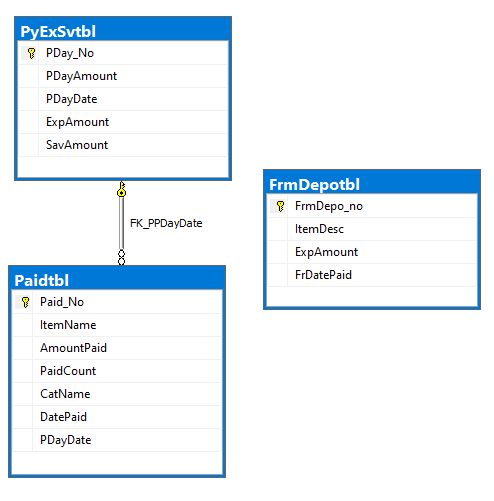
Tables:
PyExSvtbl = table to log my every Cut-off/PayDay salary. Here in my home country, the typical Cut-off/PayDay salary is every 15th and last of day of the month. This was the setup of my previous job. My current job (as of March 2022), my Cut-off/PayDay salary is every 10th and 25th of the Month. This table also serve to compute my per Cut-off/PayDay expenses (how much money I spent) and savings (how money I saved).
Paidtbl = table to list anything that I spend (paid, bought, & etc).
FrmDepotbl = table to list my expenses directly from my deposit account.
View:
vw_ExpensesBreakDown = view use for BI Reporting
Stored Procedures
usp_CutOffExpSav_param = stored procedure use for manually updating the expenses and saving per cut-off/payday
Create database objects. Proceed to "Create DB Stage.md.md" file.
https://github.com/fortehub/MyExpensesDB/blob/main/Create%20DB%20Stage.md