



Deeplink plugin provides a unified GDScript interface for processing of App Links on the Android platform and Universal Links on the iOS platform in order to enable direct navigation to specific app content.
Features:
- Enable web links to directly access app content.
- Provide support for custom schemes.
- Check if a domain is associated with app.
- Forward users to related app settings on platform.
- Demo
- Installation
- Usage
- Signals
- Methods
- Classes
- Export
- Platform-Specific Notes
- Links
- All Plugins
- Credits
- Contributing
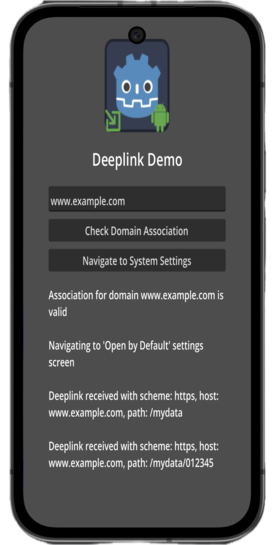
Try the demo app located in the demo directory.
Uninstall previous versions before installing. If using both Android & iOS, ensure same addon interface version.
Options:
- AssetLib
- Search for
Deeplink - Click
Download-->Install - Install to project root,
Ignore asset rootchecked - Enable via Project --> Project Settings --> Plugins
- Ignore file conflict warnings when installing both versions
- Search for
- Manual
- Download release from GitHub
- Unzip to project root
- Enable via Plugins tab
- Add
Deeplinknodes to your scene per URL association and follow the following steps:- set the required field on each
Deeplinknodescheme- schemes likehttp,https, or a custom scheme (don't include://)host- domain namepath prefix- optional path before link is considered a deeplink
- note that
scheme,host, andpath prefixmust all match for a URI to be processed by the app- leave
path prefixempty to process all paths inhost
- leave
- set the required field on each
- register a listener for the
deeplink_receivedsignal- process
url,scheme,host, andpathdata from the signal
- process
- invoke the
initialize()method at startupinitialize()plugin and connect its signals as early as possible (ie. in_ready()lifecycle method of your main node)
- alternatively, use the following methods to get most recent deeplink data:
get_link_url()-> full URL for the deeplinkget_link_scheme()-> scheme for the deeplink (ie. 'https')get_link_host()-> host for the deeplink (ie. 'www.example.com')get_link_path()-> path for the deeplink (the part that comes after host)
- additional methods:
is_domain_associated(a_domain: String)-> returns true if your application is correctly associated with the given domain on the tested device- note:
is_domain_associated()method does not support custom schemes
- note:
navigate_to_open_by_default_settings()-> navigates to the Android OS'Open by Defaultsettings screen for your application
Usage Example:
extends Node

@onready var deeplink: Deeplink = $Deeplink


func _ready() -> void:
	# Initialize the plugin as early as possible
	deeplink.initialize()

	# Connect the signal (can also be done in the editor)
	deeplink.deeplink_received.connect(_on_deeplink_received)


func _on_deeplink_received(url: DeeplinkUrl) -> void:
	print("Full URL: ", url.get_url())
	print("Scheme: ", url.get_scheme())
	print("Host: ", url.get_host())
	print("Path: ", url.get_path())
	print("Query: ", url.get_query())
Notes:
initialize()should be called in the main scene’s_ready()method.- The
deeplink_receivedsignal is emitted only when the URL matches the configuredscheme,host, and optionalpath_prefix. - Deeplink data is also accessible via
get_link_*()methods on the Deeplink node.
deeplink_received(url: DeeplinkUrl): Emitted when app content is requested via deeplink. Must be connected at startup, as early as possible, or via Godot Editor.
-
initialize() -> intInitializes the native plugin and connects platform-specific listeners. Must be called as early as possible, ideally in _ready() of the main scene. -
navigate_to_open_by_default_settings() -> voidOpens the Android Open by Default settings screen for the application. Android only. -
get_link_url() -> StringReturns the full deeplink URL as a string. -
get_link_scheme() -> StringReturns the scheme of the last received deeplink (e.g. https, myapp). -
get_link_host() -> StringReturns the host/domain of the last received deeplink. -
get_link_path() -> StringReturns the path portion of the last received deeplink. -
clear_data() -> voidClears stored deeplink data inside the plugin.
is_domain_associated(a_domain: String) -> boolReturns true if the given domain is correctly associated with the app on the current device. Android only. Custom schemes are not supported.
Plugin classes.
Main node used to declare and configure deeplink associations for your application.
Responsibilities:
- Defines which
scheme,host, and optionalpath_prefixshould be handled - Exports deeplink configuration for Android App Links and iOS Universal Links
- Connects to the native plugin singleton
- Emits the
deeplink_receivedsignal when a matching deeplink is opened
Typical usage:
- Add one or more Deeplink nodes to your scene
- Configure their exported properties
- Call
initialize()at startup - Listen to
deeplink_receivedsignal
Lightweight wrapper class representing a parsed deeplink URL.
This class is constructed from native platform data and provides structured access to URL components such as:
schemeuserpasswordhostportpathpath_componentsqueryfragment
It is emitted as the argument of the deeplink_received signal and can also reconstruct the full URL string.
Sample usage:
func _on_deeplink_received(url: DeeplinkUrl) -> void:
	print(url.get_url())
	print(url.get_host())
	print(url.get_path())
Three options:
- Add
Deeplinknode to main scene - Open scene with
Deeplinknodes in the editor before export - Use file-based export
- File-based Export Configuration
In order to enable file-based export configuration, an
export.cfgfile should be placed in theaddons/DeeplinkPlugindirectory. Theexport.cfgconfiguration file may contain multiple deeplink configurations. Theschemeandhostproperties are mandatory for each deeplink configuration.
The following is a sample export.cfg file:
[Deeplink1]
scheme = "https"
host = "www.example.com"

[Deeplink2]
scheme = "https"
host = "www.example2.com"
Example export.cfg file with Android-specific properties:
[Deeplink3]
label = "deeplink1"
is_auto_verify = true
is_default = true
is_browsable = true
scheme = "https"
host = "www.example.com"
path_prefix = "/my_data"
- Node-based Export Configuration
If
export.cfgfile is not found or file-based configuration is invalid, then the plugin will attempt to load node-based configuration.
During iOS export, the plugin searches for Deeplink nodes in the scene that is open in the Godot Editor. If none found, then the plugin searches for Deeplink nodes in the project's main scene. Therefore;
- Make sure that the scene that contains the
Deeplinknode(s) is selected in the Godot Editor when building and exporting for Android, or - Make sure that your Godot project's main scene contains one or more
Deeplinknodes.
In addition to adding and enabling the plugin, platform-level configuration is also required before deeplinks can work.
- Build: Create custom Android gradle build.
- Domain Association: Associate Godot app with a domain.
- Custom schemes: Chrome has issues opening custom schemes; Firefox is able to open them successfully.
- Testing:
- Use
adb shellas follows:
$> adb shell am start -a android.intent.action.VIEW -c android.intent.category.BROWSABLE -d "https://www.example.com/mydata/path"
- Use
- Troubleshooting:
- Logs:
adb logcat | grep 'godot'(Linux),adb.exe logcat | select-string "godot"(Windows)
- Logs:
- Domain Association: Associate Godot app with a domain.
- Troubleshooting:
- View XCode logs while running the game for troubleshooting.
- See Godot iOS Export Troubleshooting.
| ✦ | Plugin | Android | iOS | Latest Release | Downloads | Stars |
|---|---|---|---|---|---|---|
 |
Admob | ✅ | ✅ |   |
  |
 |
 |
Connection State | ✅ | ✅ |   |
  |
 |
 |
Deeplink | ✅ | ✅ |   |
  |
 |
 |
Firebase | ✅ | ✅ | - | - |  |
 |
In-App Review | ✅ | ✅ |   |
  |
 |
 |
Native Camera | ✅ | ✅ |   |
  |
 |
 |
Notification Scheduler | ✅ | ✅ |   |
  |
 |
 |
OAuth 2.0 | ✅ | ✅ |   |
  |
 |
 |
QR | ✅ | ✅ |   |
  |
 |
 |
Share | ✅ | ✅ |   |
  |
 |
Developed by Cengiz
Based on Godot Mobile Plugin Template v5
Original repository: Godot Deeplink Plugin
See our guide if you would like to contribute to this project.
If this plugin has helped you, consider supporting its development! Every bit of support helps keep the plugin updated and bug-free.
| ✦ | Ways to Help | How to do it |
|---|---|---|
| ✨⭐ | Spread the Word | Star this repo to help others find it. |
| 💡✨ | Give Feedback | Open an issue or suggest a feature. |
| 🧩 | Contribute | Submit a PR to help improve the codebase. |
| ❤️ | Buy a Coffee | Support the maintainers on GitHub Sponsors or other platforms. |
