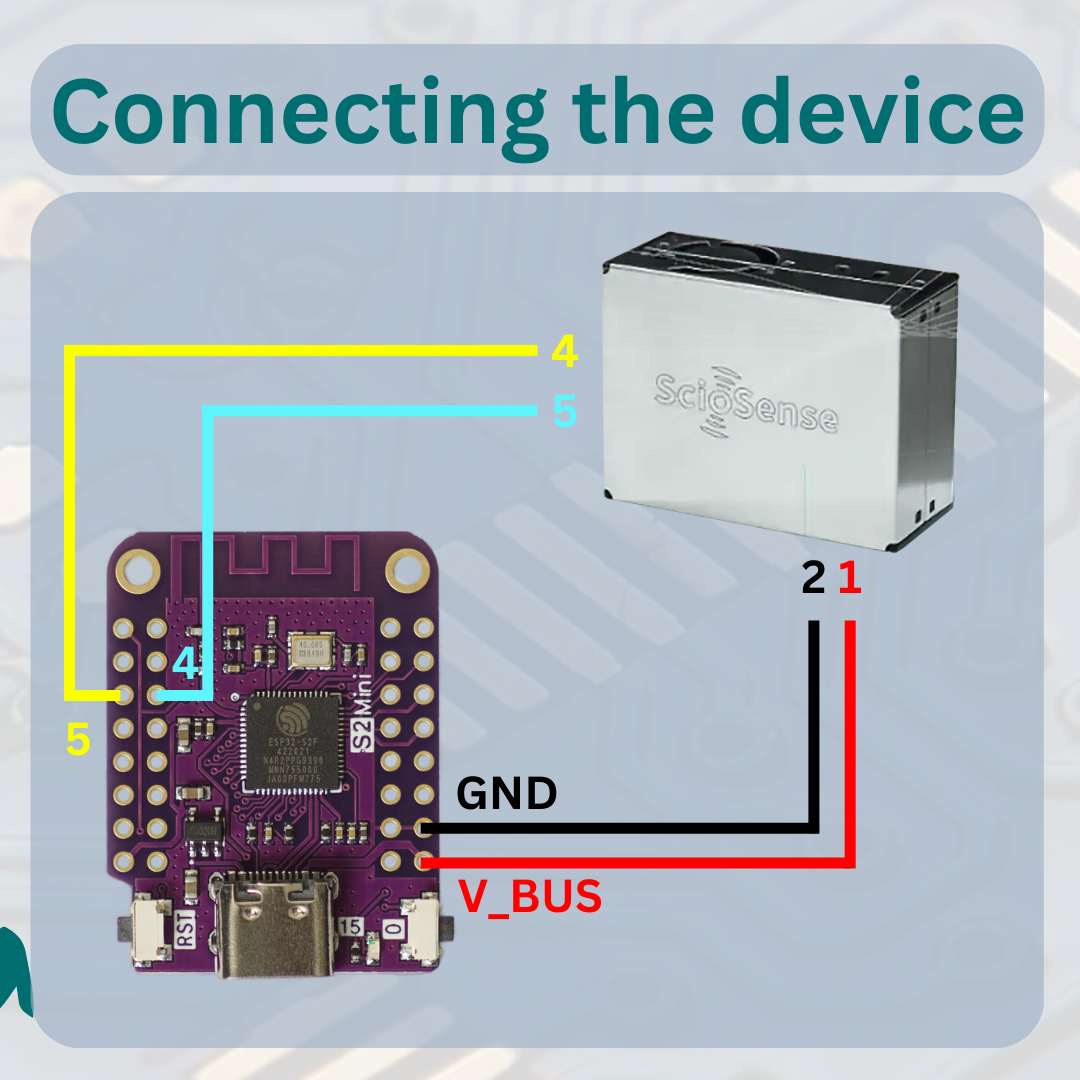
This Project supplies the neccessary code files to use the APC1 sensor (UART Version) from sciosense in combination with an ESP32 S2 Mini to gather air-quality data on a Prometheus server.
- If not done install the Arduino IDE from https://www.arduino.cc/en/software
- Add the ESP32 refference link "https://raw.githubusercontent.com/espressif/arduino-esp32/gh-pages/package_esp32_index.json" under File > Preferences... > Additional boards manager URLs
- Install the ESP32 hardware package under Tools > Board > Boards Manager... searching for esp32 by espressif
- Add the ESPAsyncWebServer library by dvarrel in the library manager
- Add the ESPSoftwareSerial library by Dirk Kaar in the library manager
- Download the APC1 library from https://github.com/sciosense/apc1-arduino and also add it
- Clone or download this repository
- Open the Arduino Sketch
- Enter your SSID and Password as well as IP configuration in the code
- Select the LOLIN S2 Mini Board and upload the code
- Add the following lines to the scrape_configs section of your prometheus.yml file
- job_name: 'APC1'
scrape_interval: 500ms
static_configs:
- targets: ['YOUR_ESP_IP']
This Project uses the UART Version of the APC1!!!
Sciosense-APC1-ESP32 by highonvoltageen
is licensed under a
Creative Commons Attribution 4.0 International License.

