
One room image. An editable scene. A viewer you can explore.
An agent-operated interior reconstruction skill for Claude Code, Codex and OpenCode, powered by the img2 harness. Your agent reads the reference, authors a Blender scene, compares renders, and builds a Three.js viewer with native and portable exports.
Not a pretrained image-to-mesh model or a one-click fidelity guarantee. The workflow depends on scene-specific authoring and visual review.
Live demo · Showcase · Copy-and-use prompt · What you get · Installation · Support
Package:
@img2threejs/img2interior@0.3.1; public npm distribution. Source: img2threejs/img2interior, the same project published to npm. Install withnpm install+ official img2 harnessadd --link, or from the public source — see installation.


Oak / Linen — Living Room — Try the live demo
The comparison image below is the AI-generated design reference and an actual native Blender render of the opened packed master — it is not a browser frame. Click the image to open the original at full size.
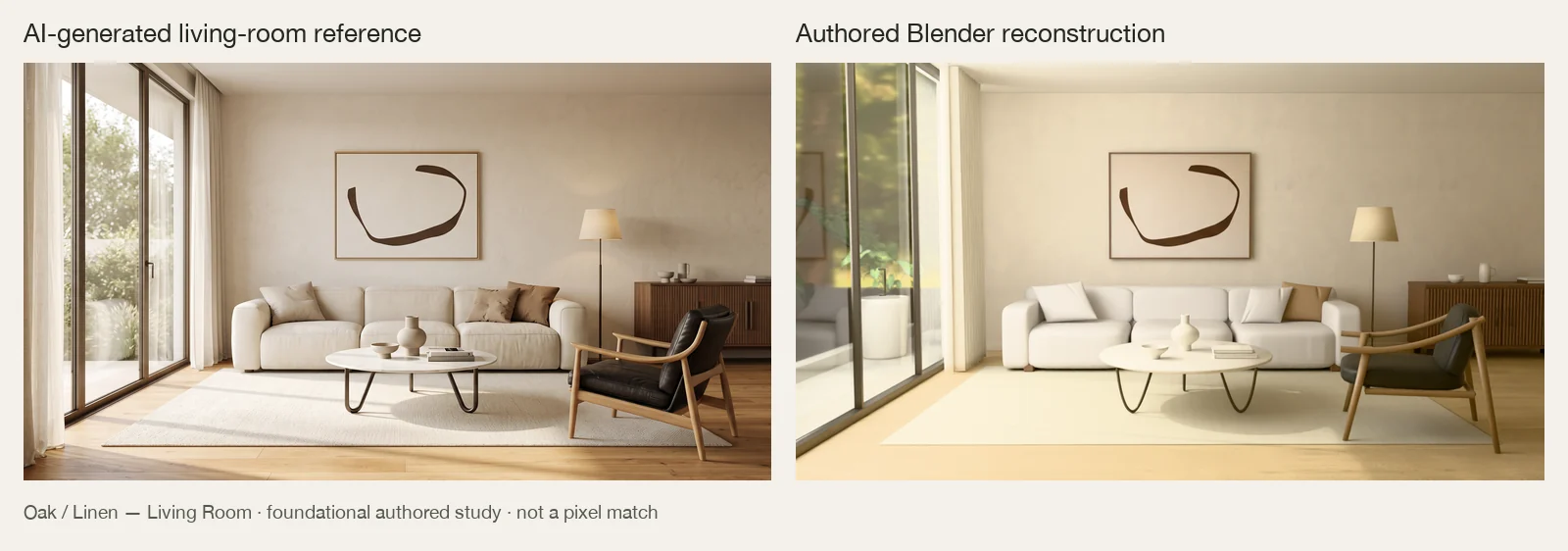
Left: design reference. Right: reconstruction. The reference is AI-generated, not a photograph or measured survey. The result is an actual render of the reopened Blender deliverable, not a retouched reference or an image plane standing in for a room.
The live demo is the same authored scene running in a hosted Three.js viewer — camera views, wireframe, curtain controls, sofa finishes and downloads. The screenshot below is an archived capture of that browser project, while the comparison image above is the native Blender deliverable; the live page is interactive.
This is the original Oak / Linen living-room research study from which the packaged recipe and workflow lessons were extracted. It used scene-specific Blender/Python authoring and viewer integration, not a fresh run of the packaged 0.3.0 skill or the prompt below. Framing, proportions, fabric folds and lighting still differ from the reference; this is not a universal fidelity benchmark.
Archived browser screenshot — same viewer as the live demo, captured frame rather than interactive page
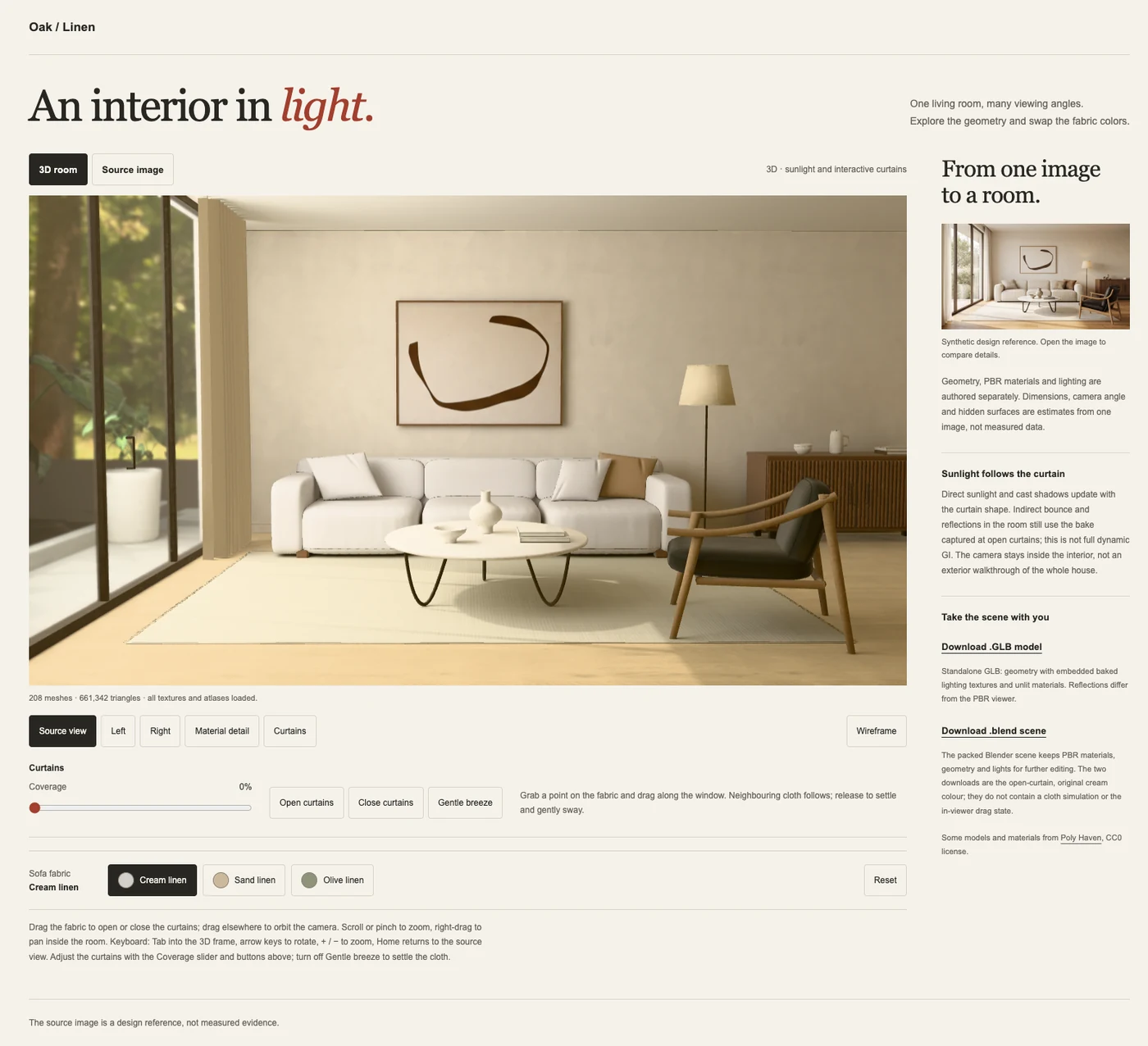
This is a static capture of the working Three.js project; the live, interactive page lives at img2threejs.io/living-room/. Indirect lighting is baked; curtain movement does not produce fully dynamic global illumination. The portable GLB is a separate static product, not a copy of every browser behavior.
Live demo · Public preview gallery · Bundled gallery and limitations
- Install and activate the skill using the installation instructions. Your agent must be able to read images, execute local commands and inspect a real browser.
- Open your project, outside the plugin checkout. Attach one interior reference image you have permission to use.
- Copy the entire prompt below. No room-specific placeholders, JSON specification or Python builder to prepare yourself; the agent authors those inputs.
Use the installed img2-interior skill to reconstruct the attached room
reference as an editable 3D interior and a working Three.js viewer in
this project. Complete the workflow, not just a plan or a Blender file.

Read the installed SKILL.md and its required reference guides first.
Confirm that you can see the image and access the required agent tools,
img2 harness, native authoring environment, image tools and WebGL browser.
Set up missing dependencies only in project-local environments. If a
required image, permission or compatible runtime is unavailable, report
the exact blocker instead of inventing progress or substituting a room.

Inspect the actual pixels. Identify the composition, camera, room shell,
furniture, materials and lighting. Preserve the source and its provenance.
Document estimated metre scale, dimensions, hidden surfaces and other
single-view assumptions. Make reasonable labeled estimates; ask only
when a material requirement cannot be decided safely.

Author scene-specific, editable geometry and physically based materials.
Do not reuse a bundled room as the answer, put the reference on furniture
cards, or ask me to write the scene specification or builder. Use suitable
permitted resources, keep their provenance, and preserve unrelated files.

Render, open the images, compare against the reference and repair causes
in camera/composition, geometry, then materials/lighting order. Inspect
lateral and reverse views as well as the source view. Repeat the relevant
reviews and regenerate affected bakes/exports after changes. A passing
build, audit or score does not establish visual fidelity.

Deliver all three products: a packed editable Blender master; a runtime
GLB with every required sidecar and the working Three.js viewer; and a
separate static portable GLB. Follow all eight review stages and the
three blocking gates on current evidence without relaxing their checks.

Launch and inspect the actual viewer. Exercise navigation, source view,
wireframe, reset, applicable material/curtain controls, errors/retry and
downloads at desktop and narrow widths. Reopen the native and portable
files in independent consumer sessions and inspect actual renders.

Hand off artifact locations, setup/launch/reproduction commands, observed
verification evidence, resource notices and remaining visual/technical
limits. Distinguish estimates, emulation and untested claims from proof.
Do not claim exact recovery, universal photorealism or mobile performance.

Do not use paid services, upload private images, publish packages, deploy
publicly or change global configuration without separate authorization.
Keep the same workspace when continuing. For a revision, describe the visible difference to fix; the skill should resume its recorded workflow, preserve evidence and revisit affected stages rather than initialize a new project. The prompt standardizes execution, not the artistic quality of every result.
| Product | Use it for | What travels with it |
|---|---|---|
Packed Blender master (.blend) |
Edit geometry, cameras, materials and lighting | Native scene with packed images; editable rather than flattened into a reference picture |
| Runtime scene + Three.js viewer | Explore the authored room in a browser | Runtime GLB, declared lightmaps/probe/other sidecars, viewer code and applicable controls |
| Portable GLB | Open a standalone model in another glTF consumer | Embedded static baked appearance; no browser cloth state or full native PBR relighting |
The handoff also includes the scene specification and Python builder, source/assumptions, resource notices, evidence, commands and known limitations. Generated rooms and full-resolution assets live in your project, not in the plugin package. The two small documentation previews above are not downloadable scene assets.
| Component | Requirement |
|---|---|
| Agent | Image-capable Claude Code, Codex or OpenCode, configured through img2; command execution and browser/image inspection tools |
| Harness | img2 ≥0.4.0, core API 1 |
| CLI / viewer | Git, npm and Node.js 18, 20 or ≥22; prefer a supported LTS release |
| Audit / workspace tools | Python ≥3.10 |
| Native authoring | Separate Python 3.11 environment with bpy==4.3.0 and numpy==1.26.4 |
| Image tools / preview | Separate environment from requirements-surfaces.txt; a WebGL-capable browser |
The harness registers the skill; it does not install bpy or create the finished app. The agent follows the bundled environment setup and preflight before authoring. Compatible Blender wheels must exist for your platform. Installation and use are free under the license, including commercial project work; commercializing the tool itself requires prior written permission.
Install @img2threejs/img2interior@0.3.1 from the public npm registry into a dedicated, persistent prefix, then register it with the official img2 harness via add --link. npm install is the real distribution and tracking event; add --link is the host registration step. The package has no lifecycle scripts, so npm install performs only a fetch and a directory copy.
npm install --prefix "$HOME/.local/share/img2interior" @img2threejs/img2interior@0.3.1
npx --yes @img2threejs/img2@0.4.0 install --yes
npx --yes @img2threejs/img2@0.4.0 add --link "$HOME/.local/share/img2interior/node_modules/@img2threejs/img2interior" --yes
npx --yes @img2threejs/img2@0.4.0 doctor --json
npx --yes @img2threejs/img2@0.4.0 sync --check
Skip the install --yes step if a compatible harness already exists on this host; the add --link flow alone is sufficient then. Keep the dedicated prefix in place at $HOME/.local/share/img2interior — future npm install --prefix "$HOME/.local/share/img2interior" @img2threejs/img2interior@<version> commands update the live link without moving it. Do not pass --force, do not run a global install, and do not delete the prefix while a host link still points inside it.
Restart the agent session, open your project and use the prompt above. The registry ID is interior; the agent-facing skill is img2-interior. To install from a Git clone or supplied source archive (pre-publication, an exact commit, or working without npm connectivity), follow install from public source. To remove and update, see installation and removal.
Why this two-step path? The img2 0.4.0 harness
add npm:@img2threejs/img2interior@<version> --yesflow expectsnpm viewto return a nestedinfo.dist.integrity, but npm 10/11 return a flatdist.integrity;addtherefore refuses the package rather than registering it. Real consumers usenpm installto fetch the public package into a dedicated prefix, thenadd --linkthat installed copy. Theadd npm:transport bug lives in the img2 harness, not in this package; until the harness ships a fix, the documented supported install path is the two-step flow above.
- Package:
@img2threejs/img2interior, version0.3.1, published with--access public. - Download counts (last month, daily series, custom date ranges) and package metadata come from the documented public npm registry API — see download metrics for the exact endpoints and their limits. The version + downloads badges at the top of this README resolve through that same API; they reflect real registry values, not local instrumentation, and lag the registry by roughly one day.
npm install is the source of the download counts that the badge shows; add --link is local-only registration and is not tracked by the npm registry.
Detailed guides are bundled with the installed skill; ask the agent to read them there. The GitHub repository and the public npm package ship the same project, so the links below point at the public GitHub repo. The live demo above and the bundled preview gallery need no extra access.
| Guide | Start here when… |
|---|---|
| Installation and release | Installing from npm or source, updating, removing, or preparing a new public release |
| Production runbook · Agent entry point | Running or resuming the complete reconstruction |
| Scene contract | Understanding editable scene inputs and the Blender builder |
| Resources · Materials | Selecting assets, recording rights, and preparing PBR surfaces |
| Bake / export · Viewer | Understanding the native/runtime/portable split |
| Delivery | Handing off and inspecting the final native/runtime/portable products |
| Changelog · Maintainer checks | Reviewing changes or validating a contribution |
- One image is incomplete evidence. Dimensions, hidden geometry, camera and material properties are estimates unless additional evidence is supplied.
- Visual review is required. Contract gates catch stale or inconsistent deliverables; they cannot prove likeness, physical accuracy or photorealism. The showcase is not a universal benchmark.
- Lighting and exports differ. Indirect bakes/probes are static. The portable product does not preserve every native material or browser interaction.
- Interaction is scoped. Optional rail-mounted curtains use a position-based approximation, not a general cloth solver.
- Performance is scene-dependent. Desktop or narrow-viewport captures do not certify physical phones, arbitrary hardware or production network performance.
If this skill saved you time, consider supporting continued work via the same payment channels used by the broader img2threejs project:
- Ko-fi: ko-fi.com/O8A625YLSR
- Donate page (VietQR / MoMo / PayPal / Binance Pay): img2threejs.io/donate.html
- Direct PayPal: paypal.com/paypalme/NguyenHoai545
- Direct Binance Pay: app.binance.com/uni-qr/Trcs9shL
Supporting this project is not required to install or use the skill; the license covers all permitted free use without it.
Use GitHub issues for reproducible bugs and pull requests for fixes. Include plugin/harness versions, OS, the command, expected/actual behavior and a minimal reproduction. Remove credentials, private references, client assets and identifying paths before posting.
Report security-sensitive information privately to the repository owner; read the bundled security policy before executing authored Python or consuming external resources. Paid generation, private-image uploads, public deployment and redistribution of third-party content need the relevant authorization; sharing this tool follows the license.
Keep generated projects, dependencies and private evidence out of commits; the approved documentation previews are the explicit exception. Describe the behavior changed and checks exercised. Modifications and free noncommercial sharing are permitted under the license; agree contribution terms with the maintainer before submission. Separately licensed components retain their own terms; see component notices and maintainer checks.
Free to use, including commercial project work; commercialization of the tool requires permission. The img2 Interior Free Use, Restricted Commercialization License 1.0 permits use, modification, paid client work and commercial delivery of your outputs without a license fee. It also permits free noncommercial sharing with the license and notices preserved.
You must obtain the copyright holder's prior written permission to sell or rebrand and resell the tool, bundle it into a commercial software product, or offer paid hosted/API access to its authoring or generation workflow. Attribution or publishing your modified source does not replace permission. Request it through img2threejs.
Your original scenes, models, renders and artwork remain yours. Viewer/runtime code may accompany paid output deliverables under the license's output exception; it may not be sold as a standalone toolkit without permission. Third-party content retains its own terms.
This is source-available, not OSI-approved open source. Component notices and prior grants preserve separately licensed material, including existing Apache-2.0 rights and their commercial permissions; the new restrictions do not override those grants.