


Python driver for DaMiao brushless motors over CAN with a unified CLI, web GUI, and library API.
| Resource | Link |
|---|---|
| Documentation home | GitHub Pages docs |
| Control modes and control laws | Motor Control Modes |
| API reference | DaMiaoController API |
| Firmware reference | DaMiao motor firmware (Gitee) |
| Source code | GitHub repository |
- Control modes:
MIT,POS_VEL,VEL,FORCE_POS - Typical motor types:
3507,4310,4340,6006,8006,8009,10010/L - Unified CLI:
damiao scan,send-cmd-*, register tools, anddamiao gui - Python API for multi-motor control with continuous feedback polling
pip install damiao-motorRequirements: Linux + CAN interface (socketcan on can0, etc.). Set CAN bitrate to match your motor before running commands.
Safety: these examples can move hardware. Secure the motor and keep clear of moving parts.
python examples/example.pyEdit examples/example.py to set motor_id, feedback_id, motor_type, and channel.
from damiao_motor import DaMiaoController

controller = DaMiaoController(channel="can0", bustype="socketcan")
motor = controller.add_motor(motor_id=0x01, feedback_id=0x00, motor_type="4340")

controller.enable_all()
motor.ensure_control_mode("MIT")
motor.send_cmd_mit(
    target_position=1.0,
    target_velocity=0.0,
    stiffness=20.0,
    damping=0.5,
    feedforward_torque=0.0,
)

state = motor.get_states()
print(state["pos"], state["vel"], state["torq"])
controller.shutdown()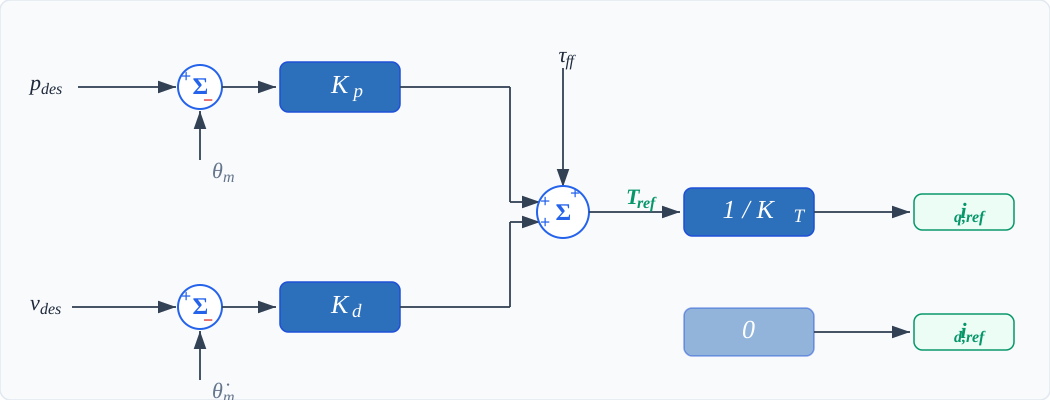
T_ref  = Kp * (p_des - theta_m) + Kd * (v_des - dtheta_m) + tau_ff
iq_ref = T_ref / K_T
id_ref = 0
Full mode documentation:
All damiao subcommands require --motor-type (example: 4340).
| Command | Purpose |
|---|---|
damiao scan --motor-type 4340 |
Scan bus for motors |
damiao send-cmd-mit --motor-type 4340 --id 1 |
MIT command |
damiao send-cmd-pos-vel --motor-type 4340 --id 1 |
POS_VEL command |
damiao send-cmd-vel --motor-type 4340 --id 1 |
VEL command |
damiao send-cmd-force-pos --motor-type 4340 --id 1 |
FORCE_POS command |
damiao set-zero-command --motor-type 4340 --id 1 |
Zero hold command |
damiao set-zero-position --motor-type 4340 --id 1 |
Set current position to zero |
damiao set-can-timeout --motor-type 4340 --id 1 --timeout-ms 1000 |
Set CAN timeout (reg 9) |
damiao set-motor-id / damiao set-feedback-id |
Change IDs (reg 8 / reg 7) |
damiao gui |
Launch web GUI |
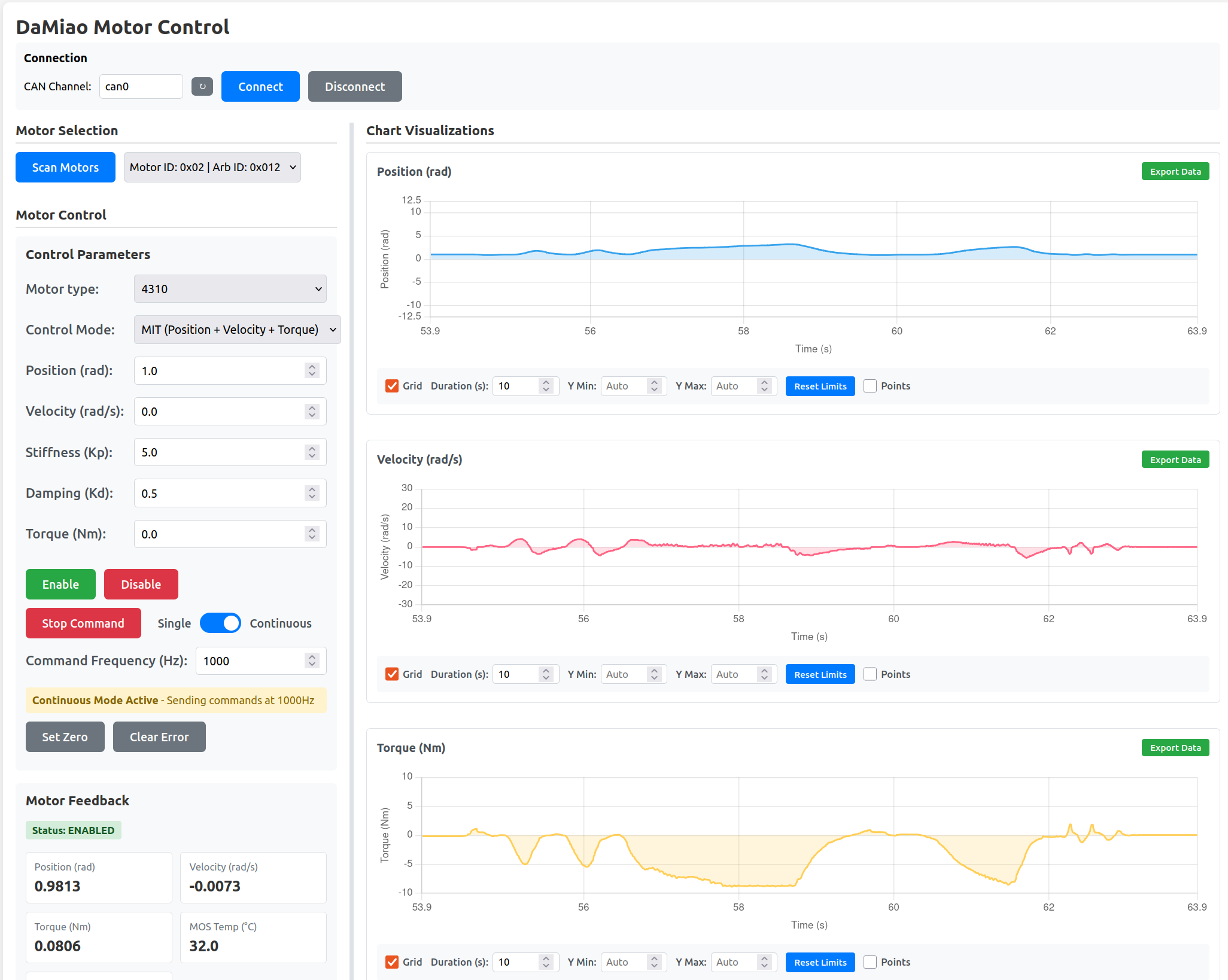
damiao guiOpen the local web UI (default to http://127.0.0.1:5000).
GUI docs: Web GUI guide
DaMiaoController(channel, bustype)controller.add_motor(motor_id, feedback_id, motor_type)motor.ensure_control_mode(mode)motor.send_cmd_mit(...)motor.send_cmd_pos_vel(...)motor.send_cmd_vel(...)motor.send_cmd_force_pos(...)motor.send_cmd(...)motor.get_states()motor.get_register(...)/motor.write_register(...)
API docs: