




See what changed—not just where pixels moved.
DocRefract is an open-source PDF diff and DOCX diff tool: a document regression testing CLI for local-first, deterministic CI. It classifies emitted changes as content, format, layout, media, or structure (visual is schema-reserved), then produces machine-readable JSON and a self-contained HTML report without uploading documents to a service.
30-second quickstart · Live report · GitHub Action · Runnable example · Install
Run a safe synthetic comparison once without permanently installing a tool:
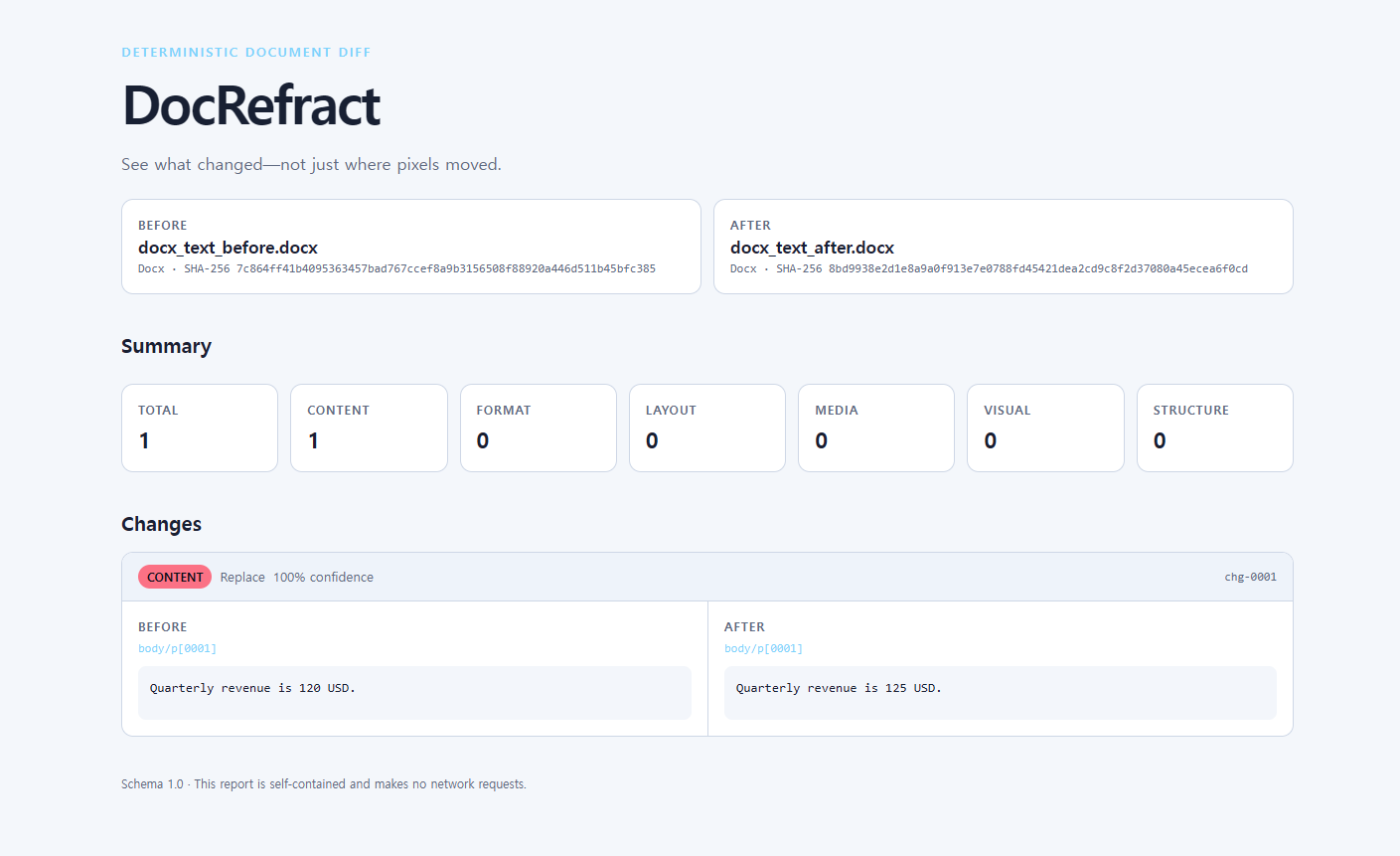
dnx DocRefract.Tool@0.2.4 -- demo --out reportOpen report/index.html. The demo creates its own synthetic DOCX files, reports known content, format, and layout changes, and uploads nothing. dnx ships with the .NET 10 SDK.
No .NET available? Open the live report or use a self-contained release archive.
Important
DocRefract is an early alpha. Pin version 0.2.4 in automation and review the current boundaries before using it as a release gate.
Install the pinned release from NuGet.org. This path requires the .NET 10 SDK.
dotnet tool install --global DocRefract.Tool --version 0.2.4Confirm the command is available:
docrefract --versionIf DocRefract is already installed:
dotnet tool update --global DocRefract.Tool --version 0.2.4Open a new terminal if docrefract is not yet on PATH.
If the global tool is unsuitable, the v0.2.4 GitHub Release provides six self-contained fallback archives that do not require a separately installed .NET runtime.
| Platform | Architecture | Release asset |
|---|---|---|
| Linux | x64 | docrefract-0.2.4-linux-x64.tar.gz |
| Linux | Arm64 | docrefract-0.2.4-linux-arm64.tar.gz |
| macOS | Intel x64 | docrefract-0.2.4-osx-x64.tar.gz |
| macOS | Apple silicon | docrefract-0.2.4-osx-arm64.tar.gz |
| Windows | x64 | docrefract-0.2.4-win-x64.zip |
| Windows | Arm64 | docrefract-0.2.4-win-arm64.zip |
For example, on Linux x64:
tar -xzf docrefract-0.2.4-linux-x64.tar.gz
./docrefract-0.2.4-linux-x64/docrefract --version
On Windows x64 in PowerShell:
Expand-Archive .\docrefract-0.2.4-win-x64.zip
.\docrefract-0.2.4-win-x64\docrefract.exe --version
The Linux builds target glibc-based distributions; musl/Alpine is not supported yet. The macOS and Windows archives are not code-signed in v0.2.4, so Gatekeeper or SmartScreen may warn. Do not weaken operating-system security controls; use the NuGet tool install when an unsigned executable is not acceptable.
To verify downloaded release assets:
gh release download v0.2.4 --repo jinyounghub/docrefract --dir .docrefract-release
cd .docrefract-release
sha256sum --check SHA256SUMS
On macOS, use shasum -a 256 --check SHA256SUMS. In PowerShell, compare each manifest entry with Get-FileHash -Algorithm SHA256.
Generate two safe synthetic DOCX files and a complete report in about 30 seconds:
docrefract demo --out reportOpen report/index.html to explore the result, or inspect report/diff.json for the stable automation contract. The demo intentionally contains known changes and returns exit code 0; it does not read your documents.
No installation available right now? Open the same generated report at jinyounghub.github.io/docrefract.
docrefract path/to/before.pdf path/to/after.pdf \
  --out artifacts/docrefract \
  --fail-on content,layout,media
The two inputs must currently have the same supported format: PDF-to-PDF or DOCX-to-DOCX. Open artifacts/docrefract/index.html for review or consume artifacts/docrefract/diff.json from another tool.
docrefract <before> <after> --out <directory> [options]
docrefract demo --out <directory>

Options:
  --out <directory>       Write diff.json and index.html to this directory.
  --fail-on <categories>  `any` or a comma-separated policy:
                          content,format,layout,media,visual,structure
  --json-only             Write diff.json and remove any stale index.html.
  --quiet                 Suppress the console summary.
  -h, --help              Show help.
  -V, --version           Show the tool version.
| Exit code | Meaning |
|---|---|
0 |
Comparison passed, or the demo completed successfully |
1 |
Comparison completed and one or more prohibited changes were found |
2 |
Usage, input, parsing, configuration, or report generation failed |
Without --fail-on, any detected change fails the comparison. Processing errors always return 2, regardless of policy.
The official composite Action installs the pinned tool, runs the comparison, uploads the report even when the policy fails, and writes a job summary. Its artifact-url output gives later workflow steps a direct evidence link. Start in observation mode so the first run teaches you what the pipeline changes before it blocks a pull request.
Warning
The uploaded HTML and JSON reports can contain text and metadata extracted from the inputs. Treat them with the same confidentiality as the documents, and do not publish confidential reports through public-repository workflows. See the security policy.
name: Document regression

on:
  pull_request:

permissions:
  contents: read

jobs:
  compare:
    runs-on: ubuntu-latest
    steps:
      - uses: actions/checkout@9c091bb21b7c1c1d1991bb908d89e4e9dddfe3e0 # v7.0.0
      # Build your candidate document before this step.
      - name: Compare generated document (observe first)
        id: docrefract
        continue-on-error: true
        uses: jinyounghub/docrefract@v0.2.4
        with:
          before: test/baseline.pdf
          after: build/report.pdf
          fail-on: content,layout,media
          out: artifacts/docrefract
Commit the approved baseline, point after at the document produced by your existing build, and inspect the uploaded HTML report. After the policy matches your pipeline, remove continue-on-error: true to enforce the gate.
Want a copyable starting point? Use the consumer workflow template. The repository's tiny synthetic fixtures exercise the published Action in live contract runs.
The Action exposes exit-code, report-path, json-path, html-path, artifact-id, and artifact-url outputs. Exit codes keep the same CLI meaning, so a prohibited change fails the step after the evidence has been uploaded.
Official release packages are checked against SHA256SUMS on an immutable GitHub Release. If you override source, keep source and version as workflow-owned literals rather than pull-request data; direct non-official HTTPS .nupkg URLs also require the sha256 input, and HTTP is rejected.
Document pipelines break in ways ordinary snapshot tests do not explain:
- a total changes while the page still looks almost identical;
- a font fallback moves content onto another page;
- a table cell changes but a full-page pixel diff becomes noisy;
- a regenerated DOCX changes package metadata even though its content does not.
DocRefract gives PDF and DOCX pipelines one offline CI contract:
- Semantic changes: distinguish text, styling, geometry, media, and document structure.
- Stable automation: canonical anchors and ordered JSON make results suitable for baselines, code review, and policy checks.
- Useful evidence: inspect an offline HTML report without uploading confidential documents to a service.
- Intentional gates: fail on
contentandlayout, for example, while allowing an approved formatting refresh.
| Category | Typical examples |
|---|---|
content |
text inserted, deleted, or replaced |
format |
font, size, emphasis, color, or paragraph style changed |
layout |
margins, page geometry, position, or reflow changed |
media |
an embedded image was added, removed, or replaced |
visual |
schema-reserved for a future raster fallback; not emitted in v0.2 |
structure |
pages, paragraphs, rows, cells, or other nodes moved or changed |
See Change categories for classification rules and diff.json for the report contract.
| DocRefract | Pixel diff | Word redline | |
|---|---|---|---|
| Primary job | CI regression policy | visual snapshot | authoring review |
| Inputs | PDF and DOCX workflows | rendered images/pages | usually DOCX |
| Explains semantic changes | Yes | No | Yes, for editing changes |
| Separates change categories | Yes | Usually no | Partially |
| Stable machine-readable report | Yes | Tool-specific | Not the focus |
| Offline operation | Yes | Usually | Usually |
DocRefract does not replace a legal redline workflow and does not promise pixel identity across different renderers, operating systems, or font installations.
diff.json excludes timestamps and absolute paths, uses stable ordering, and records extractor context. For comparable results, pin the DocRefract version and use the same fonts and renderer profile across CI runs.
Treat every input as untrusted. DocRefract does not fetch external DOCX relationships or execute embedded content. Reports are self-contained and escape document text before display. Resource limits bound archive expansion and extracted evidence, but DocRefract is not a hard parser sandbox. See the Security policy for private reporting and Determinism for reproducibility boundaries.
v0.2.4 intentionally does not include:
- PDF-to-DOCX or DOCX-to-PDF comparison;
- OCR for scanned or image-only PDFs;
- a built-in raster visual-diff fallback (
visualremains schema-reserved); - exact Microsoft Word pagination or layout emulation;
- exact visual equivalence across renderer, operating-system, or font environments;
- three-way merge or tracked-change document generation;
- a desktop GUI, hosted document service, or hard parser sandbox;
- musl Linux binaries or signed/notarized macOS and Windows executables.
Use this path when developing DocRefract rather than for a normal installation. It requires the exact .NET 10.0.302 SDK.
git clone https://github.com/jinyounghub/docrefract.git
cd docrefract
dotnet restore --locked-mode
dotnet test --configuration Release --no-restore
dotnet run --project src/DocRefract.Cli -- demo --out report
To build and install a local package:
dotnet pack src/DocRefract.Cli -c Release -o artifacts/packages
dotnet tool install --global DocRefract.Tool --version 0.2.4 --source artifacts/packages- Shipped in 0.2: one-command synthetic demo, live report, official GitHub Action, NuGet global-tool distribution, and self-contained archives for six OS/architecture targets.
- Next: richer layout evidence, renderer fingerprints, improved table/move matching, and CI adapters such as SARIF or JUnit.
- Later: baseline management and opt-in OCR or raster evidence after the deterministic semantic core is proven.
Roadmap items are direction, not promises. If a missing case matters to your pipeline, open a feature request with a small synthetic reproduction.
Small, reproducible document cases are especially valuable. Read CONTRIBUTING.md, the architecture notes, and the Code of Conduct before opening a pull request.
Apache License 2.0. See LICENSE.