✅ SYSTEM STATUS (2025-09-05): Post sub-agent analysis remediation complete. AI services operational with enhanced autonomous recovery, comprehensive quality gates, and systematic goal progress pipeline. Advanced AI-driven features fully functional.
Multi-Agent AI Platform - Complete functionality with 14 specialized sub-agents, AI-driven business value analysis, and intelligent task orchestration.


- Live AI Reasoning: Watch agents think step-by-step in real-time
- Collaborative Intelligence: Multi-agent coordination with handoffs
- Explainable Decisions: Full transparency into AI decision-making
- OPERATIONAL: 14 specialized sub-agents providing comprehensive quality validation
- AI-Driven: Director orchestrates systematic quality gates based on change analysis
- Intelligent: Sub-agents automatically triggered based on file patterns and architectural impact
- AI-Driven Logic: Universal learning engine provides semantic understanding
- Business Value Analysis: AI-powered task evaluation replacing hardcoded patterns
- Adaptive System: Context-aware decision making via universal AI pipeline engine
- Autonomous Recovery: Enhanced auto-complete with intelligent failed task recovery
- Goal Planning: AI-driven goal decomposition with business insight extraction
- Professional Output: AI content transformation providing business-ready deliverables
- Real Cost Tracking: OpenAI Usage API v1 integration for accurate budget management
- Cost Intelligence: AI-driven optimization alerts detecting duplicate calls and waste
- Basic Document Upload: Simple file upload may work, advanced processing broken
- RAG BROKEN: OpenAI Assistants API integration failing due to SDK issues
- Vector Search BROKEN: Semantic search not working, using basic keyword matching
- AI Analysis BROKEN: Document intelligence features not working
- Agent Knowledge BROKEN: Cannot assign documents to agents due to agent creation failures
- Context DEGRADED: Basic conversation memory only, advanced context broken
- MCP BROKEN: Model Context Protocol integration not functional
- Processing LIMITED: Basic text extraction only, AI analysis failing
- Node.js 18+ and Python 3.11+
- OpenAI API key (for AI agents)
- Supabase account (free tier works)
# Clone and setup everything
git clone https://github.com/khaoss85/multi-agents.git
cd ai-team-orchestrator
./scripts/quick-setup.sh# Backend setup
cd backend
pip install -r requirements.txt
cp .env.example .env # Add your API keys
# Frontend setup
cd ../frontend
npm install
# Start both services
npm run dev # Frontend (port 3000)
python main.py # Backend (port 8000) - run from backend/The following configuration files are required but not included in Git for security. Create them locally:
Copy backend/.env.example and fill in your credentials:
# 🔑 Required API Keys
OPENAI_API_KEY=sk-your-openai-api-key-here
SUPABASE_URL=https://your-project-id.supabase.co
SUPABASE_KEY=your-supabase-anon-public-key

# 📚 OpenAI Assistants API (RAG)
USE_OPENAI_ASSISTANTS=true                    # Enable native OpenAI Assistants for RAG
OPENAI_ASSISTANT_MODEL=gpt-4-turbo-preview    # Model for assistants (optional)
OPENAI_ASSISTANT_TEMPERATURE=0.7              # Response temperature (optional)
OPENAI_FILE_SEARCH_MAX_RESULTS=10             # Max search results (optional)

# 🎯 Goal-Driven System (Core Features)
ENABLE_GOAL_DRIVEN_SYSTEM=true
AUTO_CREATE_GOALS_FROM_WORKSPACE=true
GOAL_VALIDATION_INTERVAL_MINUTES=20
MAX_GOAL_DRIVEN_TASKS_PER_CYCLE=5
GOAL_COMPLETION_THRESHOLD=80

# 📦 Asset & Deliverable Configuration
USE_ASSET_FIRST_DELIVERABLE=true
PREVENT_DUPLICATE_DELIVERABLES=true
MAX_DELIVERABLES_PER_WORKSPACE=3
DELIVERABLE_READINESS_THRESHOLD=100
MIN_COMPLETED_TASKS_FOR_DELIVERABLE=2
DELIVERABLE_CHECK_COOLDOWN_SECONDS=30

# 🤖 AI Quality Assurance
ENABLE_AI_QUALITY_ASSURANCE=true
ENABLE_DYNAMIC_AI_ANALYSIS=true
ENABLE_AUTO_PROJECT_COMPLETION=true

# 🧠 Enhanced Reasoning (Claude/o3 Style)
ENABLE_DEEP_REASONING=true
DEEP_REASONING_THRESHOLD=0.7
REASONING_CONFIDENCE_MIN=0.6
MAX_REASONING_ALTERNATIVES=3

# ⚡ Performance & Rate Limiting
OPENAI_RPM_LIMIT=3000
VALIDATION_CACHE_TTL=600
ENABLE_AGGRESSIVE_CACHING=true
AUTO_REFRESH_INTERVAL=600- Visit OpenAI Platform
- Create new API key
- Copy the
sk-...key to your.envfile - Important: Add payment method for usage beyond free tier
- Visit Supabase Dashboard
- Create new project (free tier available - 500MB database, 2 CPU hours)
- Go to Settings → API
- Copy Project URL and anon public key
- Paste both in your
.envfile
The AI Team Orchestrator uses a sophisticated PostgreSQL schema optimized for AI-driven operations with support for multi-agent coordination, real-time thinking processes, and intelligent deliverable management.
-
Create Supabase Project
# After creating your Supabase project, get your connection details:
# Project URL: https://YOUR-PROJECT-ID.supabase.co
# API Key: your-anon-public-key
-
Run Complete Production Schema
We provide a complete production-ready database schema that includes all tables, indexes, and optimizations used in our live system.
Option A: Using Supabase SQL Editor
- Open your Supabase Dashboard
- Go to SQL Editor
- Copy the contents of
database-schema.sql - Execute the complete script
Option B: Using CLI (if you have psql)
# Download and execute the schema file
psql -h db.YOUR-PROJECT-ID.supabase.co -p 5432 -d postgres -U postgres -f database-schema.sql
The complete schema includes:
- 🏗️ Core Tables: workspaces, agents, tasks, deliverables, workspace_goals
- 🧠 AI Features: thinking_processes, memory_patterns, learning_insights
- 📊 Analytics: system_health_logs, agent_performance_metrics
- 🔧 Performance: 25+ optimized indexes for AI operations
- 🛡️ Security: Proper foreign keys, constraints, and RLS policies
-
Verify Setup
-- Check all tables were created (should return 15+ tables)
SELECT table_name FROM information_schema.tables
WHERE table_schema = 'public'
ORDER BY table_name;

-- Verify core functionality
SELECT
  (SELECT count(*) FROM information_schema.tables WHERE table_schema = 'public') as total_tables,
  (SELECT count(*) FROM information_schema.columns WHERE table_schema = 'public') as total_columns,
  (SELECT count(*) FROM pg_indexes WHERE schemaname = 'public') as total_indexes;
After setup, test your database connection:
# From backend directory
python -c "
from database import get_supabase_client
client = get_supabase_client()
result = client.table('workspaces').select('count').execute()
print('✅ Database connected successfully!')
print(f'Tables accessible: {bool(result.data is not None)}')
"Make sure your backend/.env contains:
SUPABASE_URL=https://your-project-id.supabase.co
SUPABASE_KEY=your-anon-public-key-here- ✅ Never commit
.envfiles to Git - ✅ Use different API keys for development/production
- ✅ Set OpenAI usage limits to control costs
- ✅ Rotate keys regularly for production deployments
⚠️ Keep your.envfile private - it contains sensitive credentials
The following files are automatically ignored for security/cleanup:
# 🔐 Sensitive configuration files
.env*                    # Environment variables with API keys
!*.env.example          # Example files are kept in repo

# 📊 Development artifacts
*.log                   # Log files from development
*.tmp, *.bak           # Temporary and backup files
__pycache__/           # Python bytecode
node_modules/          # NPM dependencies

# 🧪 Test artifacts
test_results/          # Test output files
.pytest_cache/         # Python test cache
.coverage              # Coverage reports

# 🔧 Development tools
.vscode/, .idea/       # IDE configuration
.DS_Store # macOS system filesFor development customization, you can also create:
- Backend: Additional
.env.localfor local overrides - Frontend: No additional config files needed (Next.js handles this)
- Database: Supabase handles all database configuration remotely
AI Team Orchestrator implements a multi-layer intelligent architecture that transforms business objectives into concrete deliverables through specialized AI agents.
┌─────────────────┐    ┌─────────────────┐    ┌─────────────────┐
│  👤 User Input  │───▶│ 🎯 Goal Engine  │───▶│ 📋 Task Planner │
│  Business Goal  │    │ AI Decomposition│    │ Smart Breakdown │
└─────────────────┘    └─────────────────┘    └─────────────────┘
         │                       │                       │
         ▼                       ▼                       ▼
┌─────────────────┐    ┌─────────────────┐    ┌─────────────────┐
│ 🤖 Agent Team   │───▶│ ⚡ Task Executor │───▶│ 📦 Deliverable  │
│ Dynamic Assembly│    │ Real-time Exec  │    │ Generator       │
└─────────────────┘    └─────────────────┘    └─────────────────┘
         │                       │                       │
         ▼                       ▼                       ▼
┌─────────────────┐    ┌─────────────────┐    ┌─────────────────┐
│ 🧠 Memory &     │    │ 🛡️ Quality      │    │ 🔄 Improvement  │
│ Learning Engine │    │ Assurance       │    │ Loop System     │
└─────────────────┘    └─────────────────┘    └─────────────────┘
- AI Goal Decomposition: Transforms high-level business objectives into concrete sub-goals
- Dynamic Team Assembly: Intelligently selects specialized agents based on project requirements
- Context-Aware Resource Planning: Estimates time, cost, and skill requirements
- Semantic Task Distribution: AI-powered task-agent matching beyond keyword filtering
- Real-Time Coordination: Agents collaborate with handoffs and shared context
- Adaptive Priority Management: Dynamic task prioritization based on business impact
- Six-Step Improvement Loop: Automated feedback, iteration, and quality gates
- AI-Driven Enhancement: Content quality assessment and automatic improvements
- Human-in-the-Loop Integration: Strategic manual review for critical decisions
- AI Content Transformation: Raw JSON → Business-ready HTML/Markdown documents
- Asset-First Architecture: Generates concrete deliverables, not just status reports
- Dual-Format System: Technical data for processing + professional display for users
# 1. Business Goal Input
workspace = {
    "goal": "Increase Instagram engagement by 40% in 3 months",
    "domain": "social_media_marketing"
}

# 2. AI Goal Decomposition
goals = await director.decompose_goal(workspace.goal)
# → ["Content Strategy", "Engagement Analysis", "Growth Tactics"]

# 3. Dynamic Agent Team Assembly
team = await director.assemble_team(goals, workspace.domain)
# → [MarketingStrategist, ContentCreator, DataAnalyst, SocialMediaExpert]

# 4. Intelligent Task Generation
tasks = await goal_engine.generate_tasks(goals, team)
# → Concrete, actionable tasks with skill requirements

# 5. Semantic Task-Agent Matching
for task in tasks:
    agent = await ai_matcher.find_best_match(task, team, context)
    await executor.assign_task(task, agent)

# 6. Real-Time Execution with Quality Gates
result = await executor.execute_with_qa(task, agent)
# → Includes thinking process, quality validation, improvement loops

# 7. Professional Deliverable Generation
deliverable = await content_transformer.generate_asset(result)
# → Business-ready document with insights and recommendationsbackend/
├── 🎯 ai_agents/ # Specialized AI agent implementations
│ ├── director.py # Team composition & project planning
│ ├── conversational.py # Natural language task interface
│ └── specialist_*.py # Domain expert agents
├── ⚡ services/ # Core business logic services
│ ├── autonomous_task_recovery.py # Self-healing task system
│ ├── content_aware_learning_engine.py # Business insights extraction
│ ├── unified_memory_engine.py # Context & learning storage
│ ├── thinking_process.py # Real-time reasoning capture
│ ├── document_manager.py # RAG document processing & indexing
│ └── mcp_tool_discovery.py # Model Context Protocol integration
├── 🔄 routes/ # RESTful API endpoints
│ ├── director.py # Team proposal & approval
│ ├── conversational.py # Chat interface & tool execution
│ ├── documents.py # Document upload & RAG management
│ └── monitoring.py # System health & metrics
├── 💾 database.py # Supabase integration & data layer
├── ⚙️ executor.py # Task execution & orchestration engine
└── 🏃 main.py # FastAPI application entry point
frontend/src/
├── 📱 app/                # App Router (Next.js 15)
│   ├── layout.tsx         # Global layout & providers
│   ├── page.tsx          # Landing page
│   └── projects/         # Project management interface
├── 🧩 components/         # Reusable UI components
│   ├── conversational/   # Chat interface & thinking display
│   ├── orchestration/    # Team management & task views
│   ├── improvement/      # Quality feedback & enhancement
│   └── documents/        # Document upload, RAG, and knowledge management
├── 🔧 hooks/             # Custom React hooks for data management
│   ├── useConversationalWorkspace.ts  # Progressive loading system
│   ├── useGoalThinking.ts            # Goal-driven UI state
│   └── useAssetManagement.ts         # Deliverable management
├── 🔌 utils/             # API client & utilities
│   ├── api.ts            # Type-safe API client
│   └── websocket.ts      # Real-time updates
└── 🎨 types/             # TypeScript definitions
    ├── workspace.ts      # Core domain models
    └── agent.ts          # Agent & task types
The AI Team Orchestrator includes production-ready observability out-of-the-box. Once you add your OpenAI API key, the system automatically enables comprehensive monitoring:
- Automatic Request Tracking: All OpenAI API calls are traced with performance metrics
- Token Usage Monitoring: Real-time tracking of prompt/completion tokens and costs
- Model Performance Analytics: Response times, success rates, and quality metrics per model
- Rate Limit Management: Built-in monitoring and adaptive throttling for API limits
# Built-in health monitoring endpoints
curl localhost:8000/health                    # Overall system status
curl localhost:8000/api/monitoring/metrics    # Performance metrics
curl localhost:8000/api/monitoring/costs      # API usage and costs
curl localhost:8000/api/system-telemetry # Comprehensive telemetry- Real-time Agent Status: Monitor which agents are active, thinking, or completing tasks
- Task Execution Traces: Complete visibility into task lifecycle and handoffs
- Quality Gate Monitoring: Track which sub-agents are triggered and their success rates
- Memory System Analytics: Insights into learning patterns and knowledge retention
# Automatic performance logging (built-in)
# No configuration needed - works immediately after API key setup

logger.info(f"🔍 Web search completed in {execution_time:.2f}s")
logger.info(f"🤖 AI classification confidence: {result.confidence:.2f}")
logger.info(f"💰 API cost estimate: ${cost_tracker.current_session}")
logger.info(f"🧠 Thinking process: {thinking_steps} steps completed")- Live Thinking Processes: Watch AI agents reason through problems step-by-step (Claude/o3 style)
- Tool Orchestration Traces: See exactly which tools are selected and why
- Domain Classification Insights: Understand how the system identifies project domains
- Memory Pattern Analysis: Visualize how the system learns from past projects
- No External Services: All telemetry stays within your infrastructure
- Configurable Logging: Fine-tune what gets logged via environment variables
- API Key Security: Telemetry never exposes your API keys or sensitive data
- GDPR Compliant: No personal data collection by default
# System performance check
python3 backend/check_system_health.py

# View recent API usage and costs
curl localhost:8000/api/monitoring/usage-summary

# Export telemetry for analysis
curl localhost:8000/api/system-telemetry/export > telemetry-$(date +%Y%m%d).json

# Monitor thinking processes in real-time
curl localhost:8000/api/monitoring/thinking-processes/active# Optional: Customize monitoring (all enabled by default)
ENABLE_OPENAI_TRACING=true # OpenAI API call tracking
ENABLE_PERFORMANCE_LOGGING=true # Execution time monitoring
ENABLE_COST_TRACKING=true # API usage cost calculation
ENABLE_THINKING_TRACE=true # Real-time reasoning capture
TELEMETRY_LOG_LEVEL=INFO # DEBUG, INFO, WARNING, ERROR
TELEMETRY_EXPORT_INTERVAL=3600 # Export telemetry every hour🎉 Zero Configuration Required: Simply add your OPENAI_API_KEY and the system automatically provides enterprise-grade monitoring and debugging capabilities.
AI Team Orchestrator features a clean, intuitive interface designed for business users and technical teams alike.
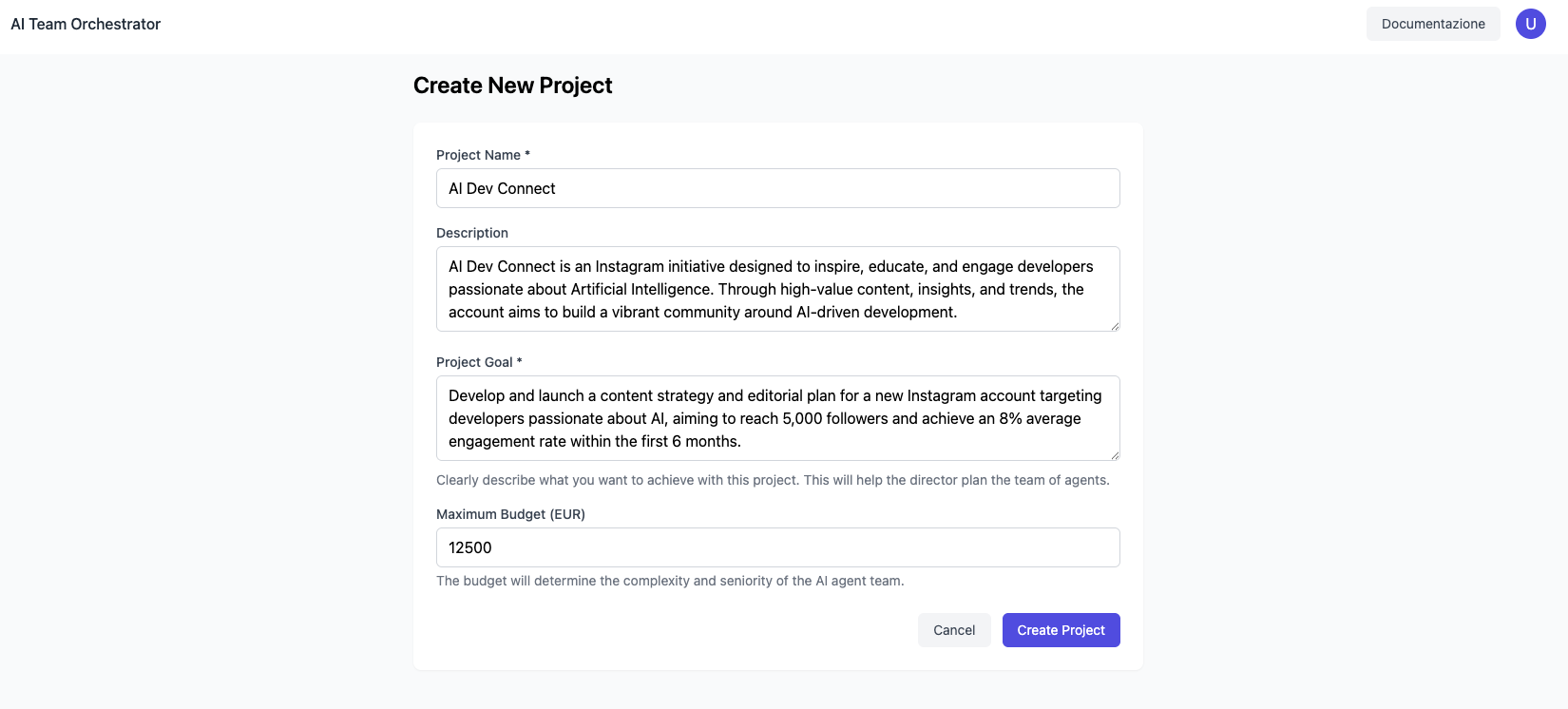
Streamlined project creation with goal-driven setup and domain selection
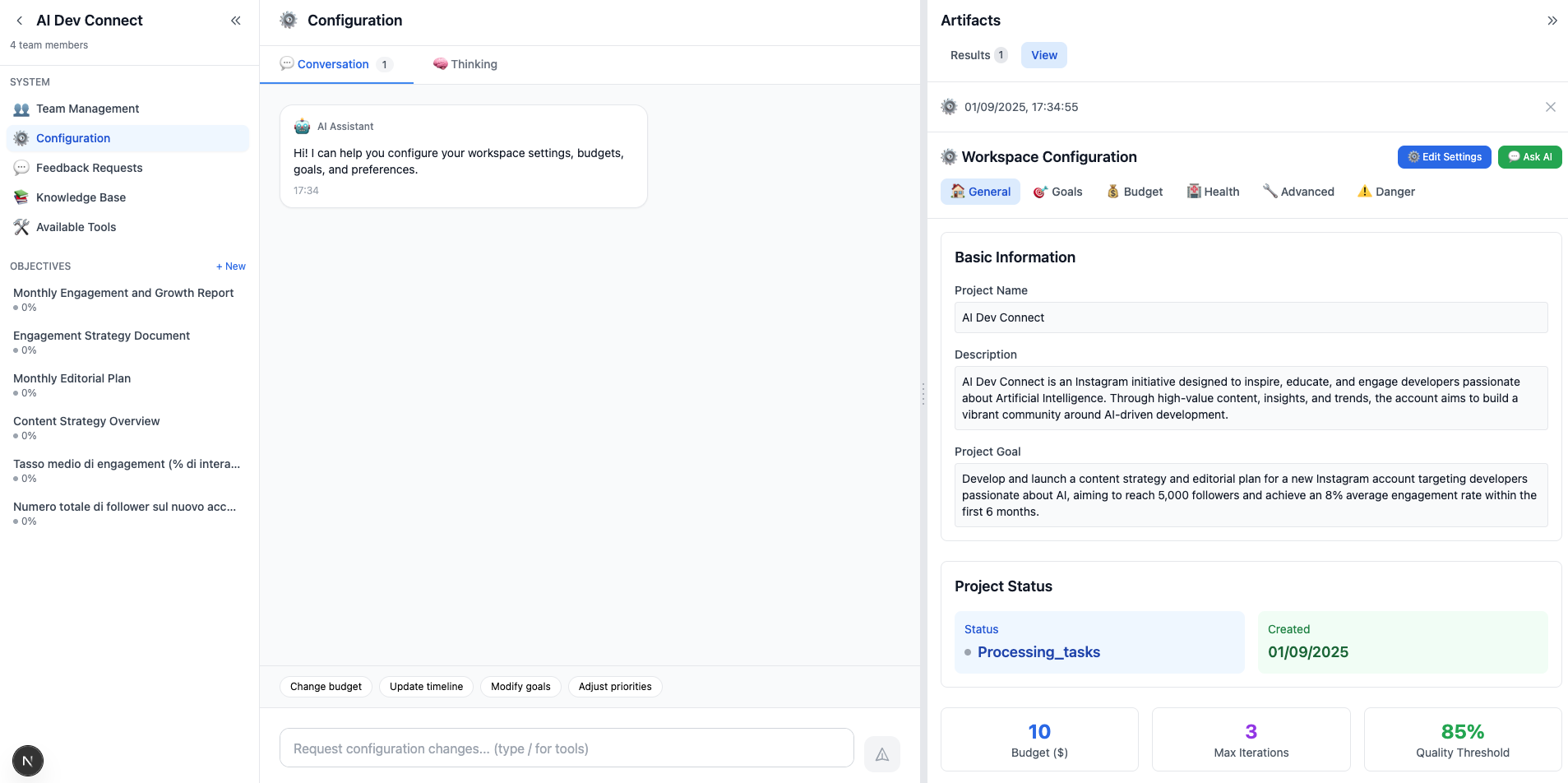
Advanced project configuration with AI-driven parameter optimization
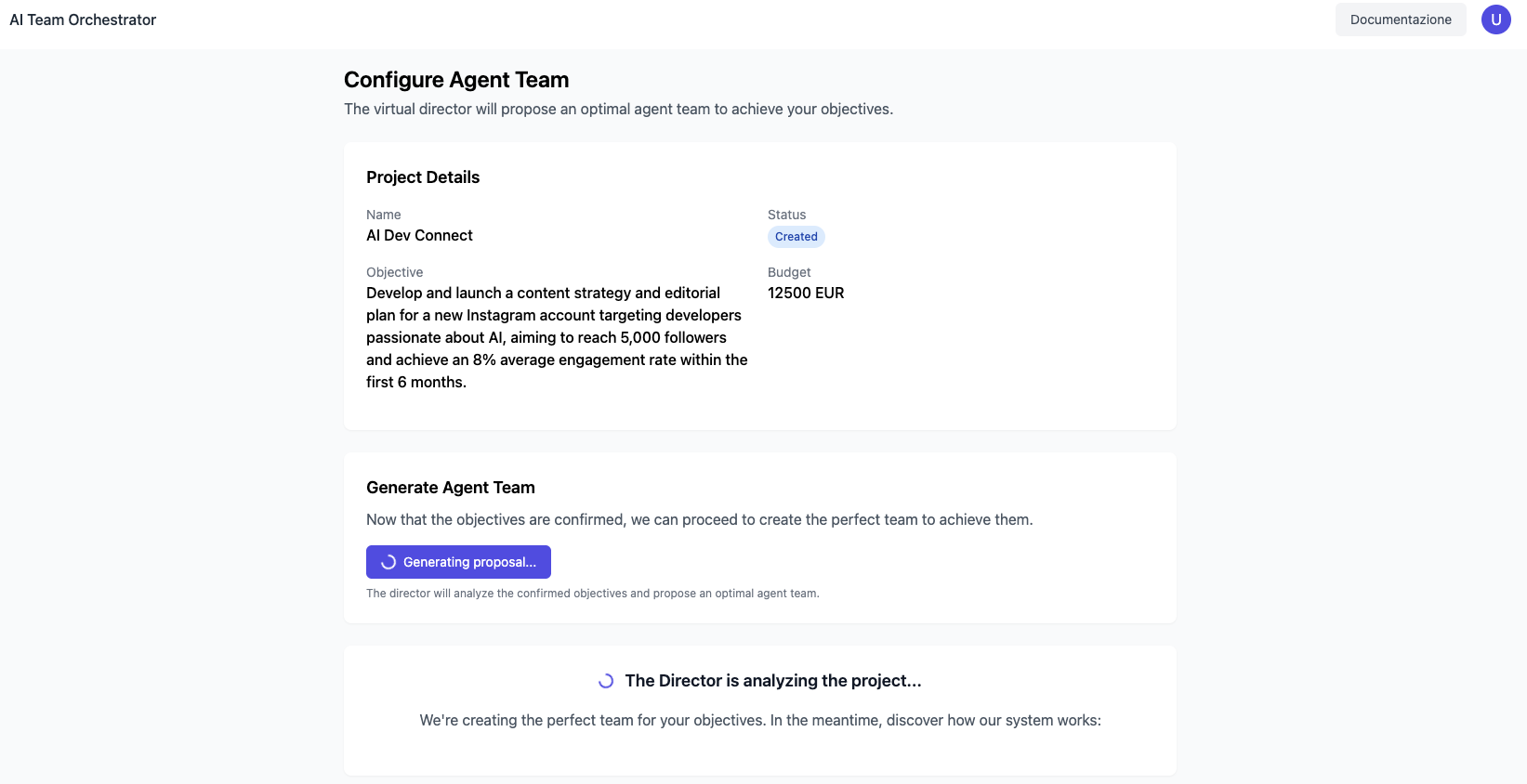
AI Director proposes optimal team composition based on project requirements
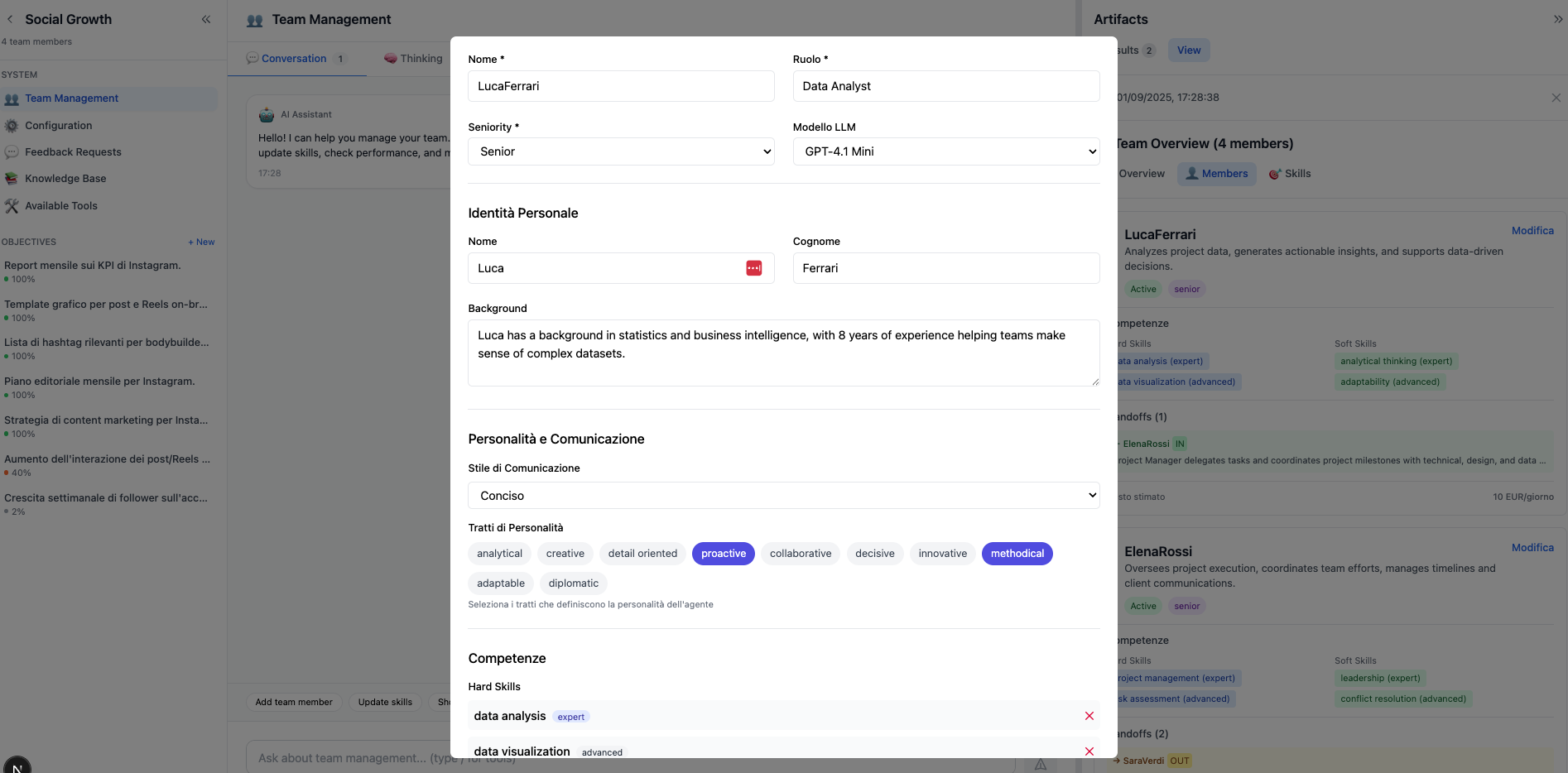
Real-time team management with agent performance monitoring and role adjustment

Claude/o3-style thinking visualization - watch AI agents reason through complex problems in real-time
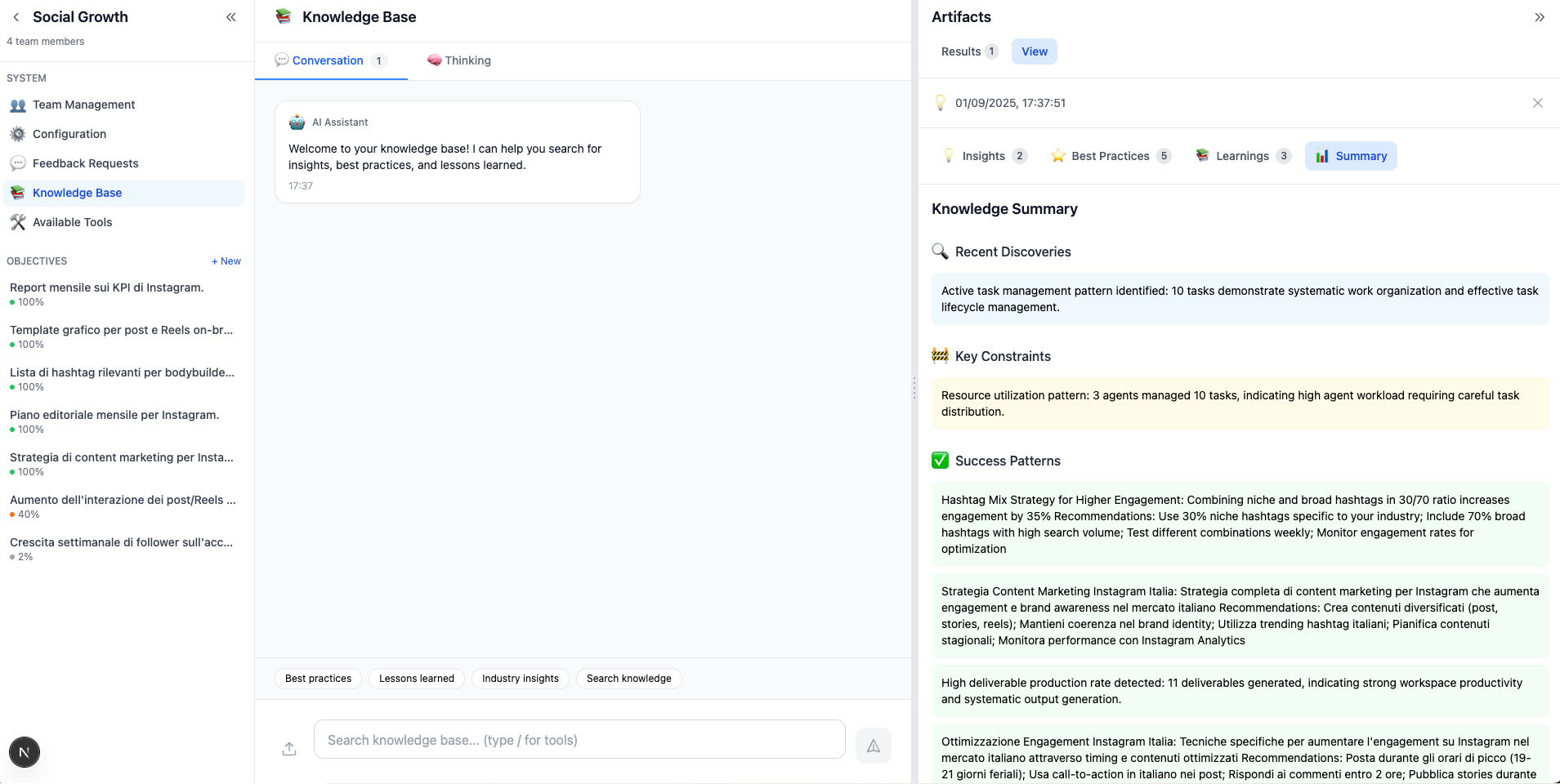
Comprehensive memory and learning system with business insights and performance analytics
- 📱 Progressive Loading: Essential UI renders in <200ms, enhanced features load in background
- 🔄 Real-Time Updates: WebSocket integration for live project status and thinking processes
- 🎨 Professional Output: AI-transformed deliverables from raw JSON to business-ready documents
- 🧠 Explainable AI: Complete transparency into agent decision-making and reasoning steps
- 📊 Performance Monitoring: Real-time system health, task progress, and quality metrics
- 🛡️ Quality Gates: Visual feedback for improvement loops and human-in-the-loop reviews
Traditional development uses hard-coded business logic. AI Team Orchestrator transforms this with Semantic Intelligence:
# ❌ Traditional Hard-Coded Approach
if task_type in ["email", "campaign", "marketing"]:
    agent = marketing_specialist
elif domain == "finance":
    agent = finance_specialist

# ✅ AI-Driven Semantic Matching
agent = await ai_agent_matcher.find_best_match(
    task_content=task.description,
    required_skills=task.extracted_skills,
    context=workspace.domain
)Our system is built on 15 core principles that ensure scalability and reliability:
- 🌍 Domain Agnostic - No industry-specific hard-coding
- 🧠 AI-First Logic - Semantic understanding over keyword matching
- 🔄 Autonomous Recovery - Self-healing without human intervention
- 📊 Goal-Driven Architecture - Everything ties to measurable objectives
- 🛡️ Quality Gates - Automated architectural review system
- 📝 Explainable AI - Transparent decision-making processes
- 🎯 Real Tool Usage - Actual web search, file operations, not mocks
- 💾 Contextual Memory - Learns from past patterns and decisions
- 🔧 SDK-Native - Leverages OpenAI Agents SDK vs custom implementations
- ⚡ Cost Optimization - Smart API usage reduction (94% savings)
- 📱 Production Ready - Enterprise-grade error handling and monitoring
- 🤝 Human-in-the-Loop - Strategic human oversight for critical decisions
- 🔒 Security First - Secrets management and secure API practices
- 📚 Living Documentation - Self-updating technical documentation
- 🌐 Multi-Language Support - Internationalization-ready architecture
# Failed tasks automatically heal themselves
try:
    result = await execute_task(task)
except Exception as error:
    recovery = await autonomous_recovery.analyze_and_fix(
        task_id=task.id,
        error_context=str(error),
        workspace_history=workspace.memory
    )
# Task continues without human intervention// Watch AI agents think step-by-step (Claude/o3 style)
const { thinkingSteps, isThinking } = useThinkingProcess(taskId)
// Live updates: Analysis → Planning → Execution → Validation
return (
<ThinkingViewer steps={thinkingSteps} realTime={isThinking} />
)# Director intelligently decides which agents to invoke
analysis = await director.analyze_changes(modified_files)
if analysis.requires_architecture_review:
await invoke_agent("system-architect")
if analysis.has_database_changes:
await invoke_agent("db-steward")
# Result: $3/month vs $240/month in API costs// Watch AI agents think step-by-step
const thinkingProcess = useThinkingProcess(workspaceId)
// Displays: Analysis → Planning → Synthesis → Validation// Director intelligently decides which agents to invoke
Change: "frontend/Button.tsx" → 0 agent calls (UI only)
Change: "backend/database.py" → 3 agents (architecture + security + DB)
Result: $3/month vs $240/month in costs# Tasks self-heal without human intervention
try:
result = await execute_task(task)
except Exception as e:
# AI analyzes failure and selects recovery strategy
recovery = await autonomous_recovery(task_id, error_context)
# Success: Task continues automatically- Quality Assurance: Automated architectural reviews
- Cost Control: Intelligent sub-agent triggering
- Team Coordination: Multi-agent task distribution
- Rapid Prototyping: AI-driven feature development
- Scalable Architecture: Built-in best practices enforcement
- Professional Output: Business-ready deliverables from day one
- Multi-Agent Systems: Study real-world coordination patterns
- AI Transparency: Observe reasoning processes in detail
- Production Patterns: Learn enterprise AI architecture
# Core AI Configuration
OPENAI_API_KEY=your_openai_key
SUPABASE_URL=your_supabase_url
SUPABASE_KEY=your_supabase_key

# Cost Optimization
ENABLE_SUB_AGENT_ORCHESTRATION=true
SUB_AGENT_MAX_CONCURRENT_AGENTS=5
SUB_AGENT_PERFORMANCE_TRACKING=true

# AI-Driven Features
ENABLE_AI_AGENT_MATCHING=true
ENABLE_AI_QUALITY_ASSURANCE=true
ENABLE_AUTO_TASK_RECOVERY=true

# Goal-Driven System
ENABLE_GOAL_DRIVEN_SYSTEM=true
GOAL_COMPLETION_THRESHOLD=80
MAX_GOAL_DRIVEN_TASKS_PER_CYCLE=5# Backend (FastAPI)
cd backend && python main.py # Start server (port 8000)
cd backend && pytest # Run tests
cd backend && python check_system.py # Health check
# Frontend (Next.js)
cd frontend && npm run dev # Start dev server (port 3000)
cd frontend && npm run build # Production build
cd frontend && npm run lint # Code quality check
# End-to-End Testing
./scripts/run_e2e_flow.sh # Complete system test| Metric | Before Optimization | After AI-Driven |
|---|---|---|
| Quality Gates Cost | $240/month | $3/month (94% reduction) |
| Task Recovery Time | Manual intervention | <60s autonomous |
| Code Review Coverage | 60% manual | 95% automated |
| Architecture Violations | 15-20/week | <2/week |
We welcome contributions! Check out our Contributing Guide for:
- 🐛 Bug Reports: Help us improve quality
- ✨ Feature Requests: Shape the roadmap
- 🧪 Sub-Agent Development: Create specialized agents
- 📖 Documentation: Improve developer experience
# Setup development environment
git clone <your-fork>
cd ai-team-orchestrator
pip install -r backend/requirements-dev.txt
npm install --save-dev # Frontend dev dependencies

# Run quality gates locally
./scripts/run-quality-gates.shThe AI Team Orchestrator includes advanced document processing and retrieval-augmented generation (RAG) capabilities for knowledge-enhanced agent interactions.
# Upload domain-specific documents for specialized agents
curl -X POST "http://localhost:8000/api/documents/upload" \
  -F "file=@./company-guidelines.pdf" \
  -F "agent_id=specialist_agent_id" \
  -F "scope=agent" \
  -F "description=Company guidelines for business analysis"

# Upload team-wide knowledge base
curl -X POST "http://localhost:8000/api/documents/upload" \
  -F "file=@./industry-report.pdf" \
  -F "workspace_id=workspace_id" \
  -F "scope=team" \
-F "description=Industry market analysis for all agents"- 📄 Text Documents: PDF, DOCX, TXT, Markdown
- 📊 Structured Data: CSV, JSON, XML
- 🎨 Images: PNG, JPG (with OCR processing)
- 📋 Presentations: PPTX (text extraction)
- 🔗 Web Content: URLs for automatic scraping
// Agents automatically access their knowledge base during task execution
const specialist = {
  "role": "Financial Analyst",
  "knowledge_sources": [
    "financial_reports_2024.pdf",
    "market_analysis.docx",
    "company_policies.md"
  ],
  "rag_enabled": true
}

// Agent reasoning with document context
"Based on the Q3 financial report (uploaded document),
I recommend focusing on the emerging markets strategy..."# Process complex documents with text, images, and tables
document_insights = await document_manager.process_document(
file_path="comprehensive_report.pdf",
agent_context="business_strategy",
extract_modes=["text", "images", "tables", "charts"]
)
# Agents can reason about visual content
# "The chart on page 5 shows declining trend in Q4..."# Search across agent knowledge base
curl -X GET "http://localhost:8000/api/documents/search" \
-G \
-d "query=customer retention strategies" \
-d "agent_id=marketing_specialist" \
-d "limit=5"
# Team-wide knowledge search
curl -X GET "http://localhost:8000/api/documents/search" \
-G \
-d "query=risk assessment frameworks" \
-d "workspace_id=workspace_id" \
-d "scope=team"- 📊 Vector Embeddings: Documents indexed with OpenAI embeddings
- 🎯 Contextual Retrieval: Relevant content based on current task context
- 🔄 Real-Time Updates: Document changes reflected immediately in agent knowledge
- 📈 Usage Analytics: Track which documents agents reference most frequently
# MCP-enabled agents can connect to external systems
mcp_tools = [
    "database_connector",    # Direct database queries
    "api_integrations",     # REST/GraphQL APIs
    "file_system_access",   # Local and cloud file systems
    "web_scraping",         # Real-time web content
    "email_integration"     # Email and calendar access
]

# Agents automatically discover and use available MCP tools
agent_capabilities = await mcp_discovery.scan_available_tools(workspace_id)- 🌐 Web Integration: Real-time access to web resources and APIs
- 💾 Database Connectivity: Direct queries to business databases
- 📧 Communication Tools: Email, Slack, and messaging platform integration
- ☁️ Cloud Services: Integration with Google Drive, Dropbox, OneDrive
# RAG & Document Processing Configuration
ENABLE_DOCUMENT_RAG=true                    # Enable RAG capabilities
DOCUMENT_STORAGE_PATH="./documents"         # Local document storage
ENABLE_OCR_PROCESSING=true                  # Image text extraction
MAX_DOCUMENT_SIZE_MB=50                     # Upload size limit
DOCUMENT_RETENTION_DAYS=365                 # Automatic cleanup

# Vector Search Configuration
EMBEDDING_MODEL="text-embedding-3-large"    # OpenAI embedding model
VECTOR_SIMILARITY_THRESHOLD=0.8             # Relevance threshold
MAX_RAG_CONTEXT_TOKENS=8000                 # Context window limit

# MCP Integration
ENABLE_MCP_TOOLS=true                       # Model Context Protocol
MCP_DISCOVERY_INTERVAL=3600                 # Tool discovery frequency
MCP_SECURITY_VALIDATION=true # Security checks for external tools# Monitor document usage and effectiveness
curl "http://localhost:8000/api/documents/analytics/workspace/workspace_id"
# Document usage by agents
curl "http://localhost:8000/api/documents/usage/agent/agent_id"
# Knowledge gap analysis
curl "http://localhost:8000/api/documents/gaps/workspace_id"The RAG system transforms agents from generic AI assistants into domain experts with access to your specific business knowledge, documents, and external systems! 🚀
- Multi-Model Support: Claude, Gemini, local models
- Plugin Architecture: Custom sub-agent marketplace
- Advanced Metrics: Performance analytics dashboard
- Collaborative Workspaces: Multi-user team support
- API Rate Optimization: Intelligent caching layer
- Mobile Dashboard: React Native companion app
- Self-Improving Agents: ML-based agent optimization
- Industry Templates: Domain-specific agent configurations
- Enterprise SSO: Advanced authentication systems

Free comprehensive guide covering:
- 🏗️ Multi-Agent Architecture Patterns - Design principles and best practices
- 🤖 AI-First Development Methodology - Moving beyond hard-coded logic
- 🛡️ Production Quality Gates - Automated review and optimization systems
- 💰 Cost Optimization Strategies - 94% API cost reduction techniques
- 📊 Real-World Case Studies - Enterprise implementations and lessons learned
- 🔧 Advanced Implementation Guides - Deep technical implementation details
- 📖 Full Technical Reference - Comprehensive development guide (75KB)
- 🏗️ System Architecture - Core system design documents
- 🤖 Sub-Agent Configurations - Quality gate implementations
- 📊 Implementation Guides - Step-by-step technical tutorials
- 🛡️ Quality Assurance Reports - Performance and compliance analysis
- 💬 GitHub Discussions - Community Q&A
- 📋 Issue Tracker - Bug reports and features
- 🎯 Contributing Guide - Join the development community
- 📚 Complete Book Guide - Deep learning resource
This project is licensed under the MIT License - see the LICENSE file for details.
If you find this project useful, please consider giving it a star! It helps others discover the project and motivates continued development.
Help spread the word about AI Team Orchestrator!



- 💬 GitHub Discussions - Community Q&A and feature discussions
- 📋 Issues & Feedback - Bug reports and feature requests
- 🎯 Contributing Guide - Join the development community
- 📚 Complete Book Guide - Deep learning resource
#AIOrchestration #MultiAgentSystems #OpenAI #ProductivityTools #AutomationPlatform #EnterpriseAI #SemanticIntelligence #QualityGates #RealTimeThinking #CostOptimization #RAG #DocumentIntelligence #MCP #KnowledgeManagement
The AI Team Orchestrator evolves through systematic implementation of architectural pillars that enhance intelligence, scalability, and user experience.
- Smart Deliverable Versioning: Track evolution of deliverables with AI-driven change analysis
- Collaborative Editing Timeline: Visual history of agent contributions and human feedback loops
- Content Genealogy: Trace how insights from previous deliverables influence new outputs
- Quality Delta Analysis: Measure improvement across deliverable iterations
- Dynamic Tool Discovery: AI agents automatically discover and integrate new tools based on task requirements
- Adaptive Tool Selection: Context-aware tool recommendation engine for optimal task execution
- Custom Tool Generation: AI-powered creation of domain-specific tools for specialized workflows
- Tool Performance Analytics: Intelligent tool usage optimization based on success patterns
- Advanced RAG Integration: Multi-modal document processing with agent-specific knowledge bases
- MCP Ecosystem Expansion: Model Context Protocol support for external tool and data connectivity
- Predictive Budget Management: AI forecasting of project costs based on scope and team composition
- Dynamic Resource Allocation: Automatic scaling of AI agent teams based on workload and deadlines
- Cost-Benefit Analysis Engine: Real-time ROI calculation for different execution strategies
- Energy-Efficient Processing: Smart task batching and API call optimization
- Multi-Dimensional Quality Metrics: Beyond completion rates - measure business impact, user satisfaction, innovation
- Contextual Quality Thresholds: Adaptive quality standards based on domain, urgency, and stakeholder requirements
- Automated Quality Enhancement: AI-driven iterative improvement suggestions before human review
- Quality Prediction Models: Forecast deliverable quality early in the execution cycle
- Individual Learning Profiles: Customized knowledge bases for each workspace and user preference
- Cross-Project Intelligence: Insights from one project intelligently applied to related domains
- Memory Consolidation Engine: Automatic synthesis of fragmented learnings into coherent knowledge
- Contextual Memory Retrieval: Smart access to relevant past experiences based on current task context
- Intelligent Escalation: AI determines optimal moments for human intervention based on complexity and risk
- Collaborative Decision Making: Structured frameworks for human-AI consensus building
- Expertise Recognition: System learns individual human strengths to route appropriate decisions
- Feedback Loop Optimization: Minimize human effort while maximizing decision quality
- Multi-Path Reasoning: Explore alternative solution approaches simultaneously for complex problems
- Reasoning Chain Validation: Self-verification mechanisms to ensure logical consistency
- Adaptive Thinking Depth: Dynamic adjustment of reasoning complexity based on problem difficulty
- Collaborative Reasoning: Multiple agents contributing specialized thinking to complex decisions
Each pillar enhancement follows our core principles:
- 🤖 AI-First: No hard-coded logic, everything driven by semantic intelligence
- 📊 Data-Driven: All improvements backed by performance metrics and user feedback
- 🔧 Production-Ready: Enhancements deployed with comprehensive testing and monitoring
- 🌍 Domain-Agnostic: Features work across all business sectors and use cases
- ⚡ Performance-Focused: Maintain sub-3s response times while adding sophistication
Priority is determined by:
- Community feedback and feature requests
- Real-world usage patterns and performance bottlenecks
- Alignment with the 15 Architectural Pillars
- Business impact potential across diverse domains
Get Involved:
- 🐛 Bug Reports: Help identify areas for improvement
- ✨ Feature Requests: Shape the roadmap with your use cases
- 📖 Documentation: Improve guides and tutorials
- 🔧 Code Contributions: Implement enhancements following our AI-driven approach
Built with ❤️ by the AI Team Orchestrator community
Transform your development workflow with intelligent AI agent orchestration.