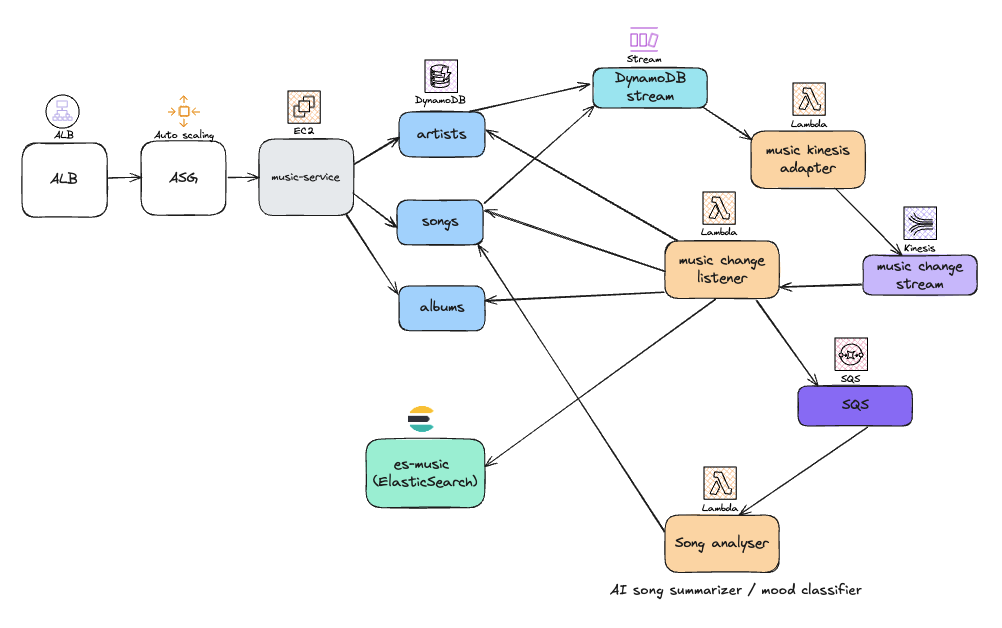
A scalable music platform that manages songs, albums, and artists, processes real-time changes using event-driven architecture, and uses AI to classify song moods and generate summaries.
- Java 17
- AWS CLI (Install guide)
- Docker (for local Lambda testing)
- AWS SAM CLI
-
Clone and Import
Import the project into your IDE of choice (e.g., IntelliJ, VSCode).
-
Set Up AWS CLI (for local access)
aws configure
Ensure credentials and default region are properly configured.
-
Rename the sample config file:
cp music-api/src/main/resources/application-dev.example.yml music-api/src/main/resources/application-dev.yml
-
Edit
application-dev.ymland update AWS region and any other necessary values.
Run music-api
Via terminal:
mvn clean install
java -DENV=dev -jar music-api/target/music-api-0.0.1-SNAPSHOT.jar
Or, directly from your IDE. Make sure to pass ENV=dev environment variable when running locally.
This project includes a Lambda (music-kinesis-adapter) that listens to DynamoDB Streams. You can test this flow locally using AWS SAM.
- AWS SAM CLI installed
- Docker running
- Define the function and event source in template.yaml (see music-kinesis-adapter/template.yaml).
- Create a test stream event, e.g., event.json (sample included).
- Invoke the Lambda locally from the music-kinesis-adapter directory:
sam build
sam local invoke MusicKinesisAdapter --event event.json
template.yml can serve two purposes depending on how it’s used:
Local Simulation
sam local invoke
sam local start-api- Runs Lambda/API Gateway locally using Docker
- Useful for testing integrations before deploying
Real AWS Deployment
sam build
sam deploy --guided- Packages and deploys your resources (Lambda, DynamoDB, etc.) to AWS via CloudFormation
- Supports IAM roles, environment variables, event sources, etc.
Changes to template.yml will affect production deployment unless used exclusively for local testing.