A BPM counter, metronome, and tuning fork for AsteroidOS.
Swipe left and right to move between the three pages.
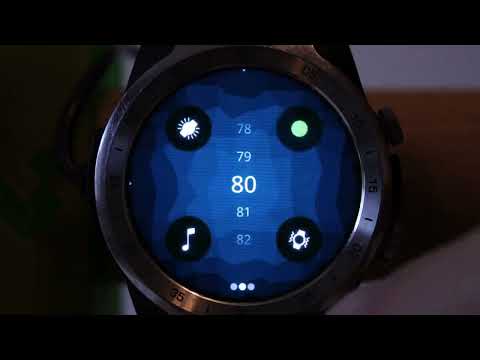
Tap the large BPM number in the center of the screen to the beat of any music.
Reading the display
The ring of dots around the center circle is your tap history. Each dot represents one beat:
- Dots in the main color are generated automatically by the running BPM clock
- Dots in the accent color (slightly different hue) are your finger taps
- A dot sitting inside the ring means you tapped early; outside means you tapped late
- The ring rotates counter-clockwise — older dots are further along, new ones appear at the top-left
The number in the center is the current BPM, updated after each tap. It takes 2–3 taps to establish a reading and improves up to 8 taps.
Stats
Once you start tapping, the area above the BPM shows a stat readout. Tap the upper area of the screen (where the title was) to cycle through:
- % — how consistent your tapping is, 100% is perfect
- X.X bpm — precise BPM to one decimal place
- ±ms — how early or late your last tap was
- n of 8 — how many taps are in the current average
- min–max — the range of BPM values detected this session
- ms/beat — the raw beat interval in milliseconds
Turntable controls
Three zones at the bottom of the screen let you nudge the beat timing without changing the BPM:
- Tap left — slow the beat slightly (brake)
- Tap right — speed the beat slightly (push)
- Tap center bottom — freeze the beat. The ring dots pause in place. Tap again to release and restart exactly on the beat
The nudge decays back to neutral automatically when you stop using it.
Tips
- Tap to the strongest pulse in the music — kick drum or snare rather than melody
- A reading of XX.5 BPM often means you are tapping at half the actual tempo — the true BPM is double
- If you tap at the wrong speed by accident, just keep tapping at the correct speed — two consistent off-tempo taps resets the average automatically
- After you find the BPM, swipe to the Metronome page — it will already be set to the detected tempo
Set the BPM using the circular spinner. Tap the pulse circle to start and stop the visual flash. Toggle the speaker icon for an audible tick and the haptic icon for vibration.
The color theme cycles through 10 options using the palette button.
Select a reference frequency using the circular spinner. Long-press the tuning fork icon to play a continuous tone. The available frequencies are G4, Ab4, A4 Verdi (432 Hz), A4 Standard (440 Hz), A4 Orchestra (442 Hz), A4 High (444 Hz), and Bb4.
This page is only available on watches with a speaker.
- The BPM set on any page is shared — detect on page 1, practice on page 2
- The screen stays on whenever the metronome, tick sound, or tuning fork is active