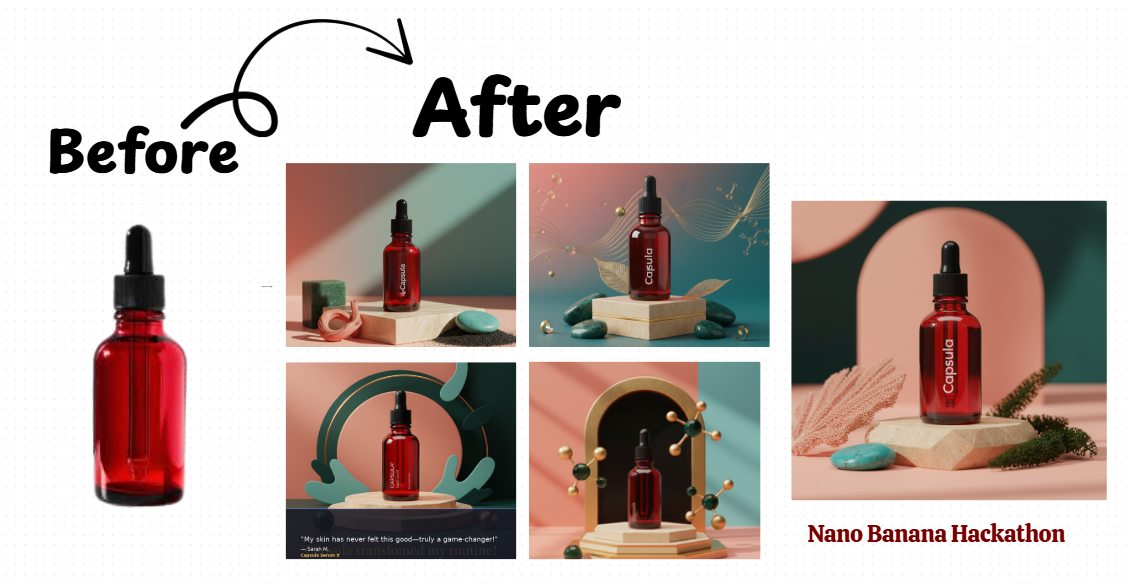
 Transform your product images into stunning marketing assets using Google's Gemini Nano Banana model.
- Hero Section: Beautiful onboarding with clear value proposition
- Sample Images: Quick start with pre-loaded product examples
- Intuitive Flow: Step-by-step process from upload to export
- Multiple Formats: Instagram Posts, Stories, Website Banners, Ad Creatives, Testimonial Graphics
- Resolution Display: Shows exact dimensions for each asset type
- Brand Text Assurance: Ensures brand name is visible on product
- Style Presets: Luxury, Minimalist, Natural, Tech, Vibrant options
- Edit with Natural Language: "Change background to sunset", "Add golden lighting"
- Image Gallery: Save and manage generated assets
- Visual Sidebar: Click thumbnails to select for editing
- Real-time Processing: See edits applied instantly
- Modular Architecture: Separated into multiple files for maintainability
- Session Management: Smart caching and state handling
- Error Handling: Graceful fallbacks and user-friendly error messages
- Responsive Design: Works on desktop and mobile
pip install -r requirements.txtCreate a .env file in the project root:
GEMINI_API_KEY=your_api_key_hereGet your API key from: https://makersuite.google.com/app/apikey
project/
├── app.py                 # Main application
├── ui_components.py       # UI rendering functions
├── gemini_handler.py      # Gemini API interactions
├── utils.py              # Utility functions
├── requirements.txt      # Dependencies
├── .env                  # API key (create this)
└── sample_images/        # Sample product images (auto-created)
streamlit run app.py- Use sample images for quick testing
- Upload your own product image (PNG/JPG)
- Best results with clear product shots
- Set brand name, tone, and colors
- Define visual guidelines
- Add product details and tagline
- Select asset types to create
- Choose style preset
- Enable "Ensure brand text" for clear labeling
- Click Generate All
- Save generated assets to gallery
- Use chat interface for edits
- Download final results
- Product Images: Use high-quality images with clear product visibility
- Brand Text: Enable "Ensure brand name visible" for professional results
- Chat Edits: Be specific - "Add warm sunset lighting" vs "change lighting"
- Multiple Versions: Save different variations for A/B testing
- "Change the background to a tropical beach"
- "Add golden hour lighting"
- "Make it more luxurious and premium"
- "Place on a marble surface with rose petals"
- "Add water droplets for freshness"
- "Create a minimalist white background"
Edit ASSET_CONFIGS in ui_components.py:
"New Asset Type": {
    "resolution": "1200x1200",
    "aspect": (1, 1),
    "icon": "🎯",
    "description": "Custom asset description"
}Update defaults in ui_components.py render_brand_sidebar() function.
Add new presets in gemini_handler.py style_descriptions dictionary.
- API Key Error: Ensure
.envfile exists with valid key - Generation Fails: Check internet connection and API quota
- Images Not Displaying: Verify image format (PNG/JPG)
- Chat Not Working: Refresh page to reset chat session
- Add API key to Streamlit Secrets
- Ensure all dependencies in requirements.txt
- Use relative paths for file operations
✅ Better UI/UX with hero section and clear flow ✅ Brand text visibility enforcement ✅ Resolution badges for each asset type ✅ Interactive chat interface replacing basic edit tab ✅ Image gallery with save functionality ✅ Download buttons integrated in generation view ✅ Modular code structure (4 files vs 1) ✅ Sample images for quick start ✅ Professional styling with gradients and cards ✅ Comprehensive error handling ✅ Session state management
- Video demo integration
- Batch processing
- Template library
- Export to social media APIs
- Advanced analytics
- Multi-language support
Apache 2.0 (matching Google's Nano Banana license)
Built for the Nano Banana Hackathon. Contributions welcome!
Made with ❤️ using Google Gemini 2.5 Flash (Nano Banana)