
Convert Google‑Sheets‑style localization CSV exports into per‑language JSON files.
Translators maintain a shared spreadsheet full of notes and metadata; you get
clean {language}.json files out the other end. The tool anchors on a key
cell, ignores everything around the data region, supports arbitrarily deep
nested keys, and skips comment columns/rows and disabled keys.
- 📍 Metadata anchoring — everything above and to the left of the
keycell is ignored, so translators can keep notes anywhere around the table. - 🌲 Nested keys — one or more nested‑key columns build a nested JSON object; empty cells inherit their parent (like merged cells).
- 🈶 Multi‑language export — one
{language_code}.jsonfile per language column. - 🙈 Comments & ignores —
#‑prefixed columns are dropped, and any key or nested key starting with#skips its row. Both markers are configurable. - 🌐 Local file or remote URL — convert a CSV on disk, or download one
straight from a Google Sheets
export?format=csvlink. - 🪶 Dependency‑light — the core read → parse → write library has no runtime
dependencies; the CLI adds only
yaml.
Install as a dev dependency:
dev_dependencies:
  localization_sheets: ^0.1.0
Convert a local CSV file:
dart run localization_sheets --input example/input/localizations.csv --output assets/translations…or download and convert a remote CSV, such as a Google Sheets export link:
dart run localization_sheets --url "https://docs.google.com/spreadsheets/d/{YOUR_ID}/export?format=csv" --output assets/translationsRun with --help for the full list.
| Option | Description | Default |
|---|---|---|
-i, --input <path> |
Source CSV file. | — |
-u, --url <url> |
URL of a CSV to download and convert. | — |
-o, --output <dir> |
Output directory. | output |
-c, --config <path> |
Config file to read. | localization_sheets.yaml |
--check-missing |
Warn about keys present in the primary language but missing/empty elsewhere. | off |
-a, --run-after <command> |
Shell command to run after a successful write; repeat to run several. | — |
Provide exactly one input — --input (file) or --url (remote) — or omit both
and let them come from a config file.
Instead of retyping flags, keep the input, output and options in a
localization_sheets.yaml file in the current directory (override with
--config). Any flag you do pass overrides the corresponding config value.
# localization_sheets.yaml
input:
  type: file                        # read a local CSV from disk
  path: example/input/localizations.csv
output: assets/translations         # where the <language>.json files are written
With that in place, the whole conversion is just:
dart run localization_sheetsTo download a remote sheet instead, swap the input block:
input:
  type: url                         # download the CSV before parsing
  url: https://docs.google.com/spreadsheets/d/{YOUR_ID}/export?format=csv
# check_missing: true
# run_after: one or more commands to run after parse successful
check_missing: true in the config is the same as passing --check-missing,
and a run_after: list runs commands once the files are written.
See example/ for a complete, runnable project.
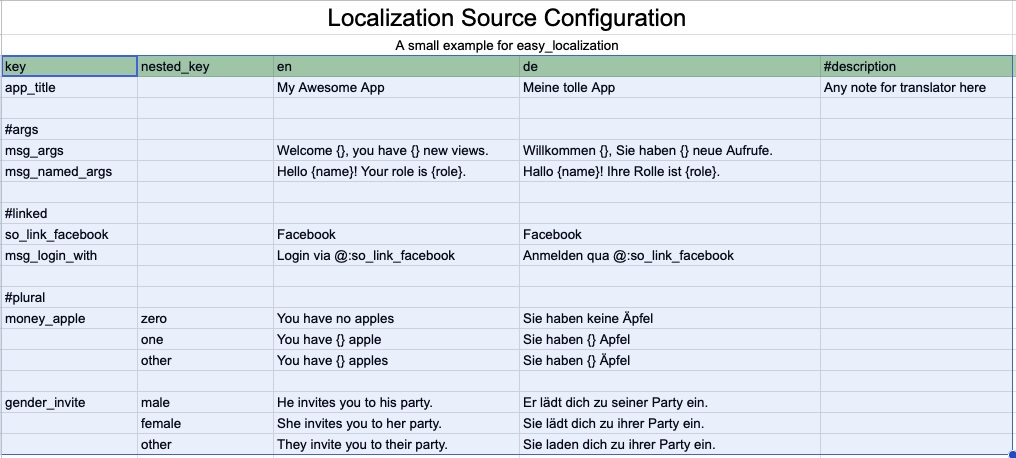
The parser finds the single cell whose text is exactly key (configurable).
That cell is the anchor: the data region is everything from there down and
to the right. A realistic sheet looks like this:
| (notes) | ||||
|---|---|---|---|---|
| key | nested_key | en | de | #description |
| app_title | My Awesome App | Meine tolle App | note for translators | |
#plural |
||||
| money_apple | zero | You have no apples | Sie haben keine Äpfel | |
| one | You have {} apple | Sie haben {} Apfel | ||
| other | You have {} apples | Sie haben {} Äpfel |
Column roles, left to right from the anchor:
- key column — the anchor column; holds top‑level keys.
- nested‑key columns — zero or more columns that add nesting depth.
- language columns — every remaining non‑comment column; the header is the language code and becomes the output filename.
Parsing rules, in priority order:
- A header matching the comment pattern (
#…by default) is ignored — even if it looks like a nested key (so#nested_keyis dropped, not nested). - A non‑comment column named
nested_key— optionally with a numeric suffix for extra levels (nested_key_1,nested_key_2, …) — is a nested‑key column. - Empty key‑column cells inherit the key above them; empty nested cells
mean "leaf here". A key or nested key starting with
#skips the row.
The sheet above produces en.json:
{
  "app_title": "My Awesome App",
  "money_apple": {
    "zero": "You have no apples",
    "one": "You have {} apple",
    "other": "You have {} apples"
  }
}
The parser's knobs (anchor label, comment/ignore markers, nested‑key detection,
nesting depth, delimiter, empty‑value and pretty‑print handling) keep sensible
defaults on the CLI; use the library API and
ParserConfig when you need to change them.
The first language column in the sheet is the primary language — the
source of truth for which keys must exist. Order your columns so this is your
most complete language (typically the one you author copy in). Pass
--check-missing to compare every other language against it: any key that has a
value in the primary language but is blank or absent in another language is
reported as a warning, e.g.
Warning: keys present in the primary language "en" are missing or empty in other languages:
  de — 2 missing:
    - money_apple.one
    - money_apple.other
Warnings go to stderr and do not fail the conversion — the JSON files are still written.
Pass --run-after <command> to run a shell command once the JSON files are
written — handy for formatting, regenerating code, or staging the output. Repeat
the flag to run several commands, in the order given:
dart run localization_sheets -i example/input/localizations.csv \
  --run-after "dart format assets/translations" \
  --run-after "git add assets/translations"
Or keep them in the config file under run_after, as a single string or a list:
run_after:
  - dart format assets/translations
  - git add assets/translations
Commands run only after a successful conversion, through the platform shell
(/bin/sh -c, or cmd /c on Windows), inheriting the terminal so their output
streams through. If a command exits non-zero, the remaining commands are skipped
and the tool exits with that command's exit code. Any --run-after flags on the
command line replace the config file's run_after: list rather than adding to it.
Example Google Sheet: https://docs.google.com/spreadsheets/d/1sdF7zHtyTCoxlX5DPTxtRde2N6Y1fxgQKilAcSA-WU8
import 'package:localization_sheets/localization_sheets.dart';

Future<void> main() async {
  final converter = LocalizationConverter(
    config: ParserConfig(includeEmptyValues: false),
  );
  final result = await converter.convertFile(
    'example/input/localizations.csv',
    'assets/translations',
  );
  print('Exported ${result.languageCodes.join(', ')} to ${result.outputPaths}');
}
Each stage can also be used independently — CsvReader (read), SheetParser
(parse) and JsonWriter (write) — which makes the pipeline easy to test and
extend.
CsvReader ──▶ SheetParser ──▶ JsonWriter
 (read)         (parse)         (write)
                   │
   AnchorLocator ▸ ColumnClassifier ▸ TreeBuilder
All failures extend LocalizationSheetsException, so a single catch handles
missing files, malformed CSV, a missing anchor, key conflicts and more.
See LICENSE.