
The Ontology-based MCP server for your Text-2-SQL convenience.







OrionBelt Analytics is an MCP server that analyzes relational database schemas and generates RDF/OWL ontologies with embedded SQL mappings. It provides relationship-aware Text-to-SQL with automatic fan-trap prevention, GraphRAG for intelligent schema discovery, and interactive charting -- all accessible through any MCP-compatible AI client.
| Project | Purpose |
|---|---|
| OrionBelt Analytics (this) | Schema analysis, ontology generation, GraphRAG, Text-to-SQL |
| OrionBelt Semantic Layer | Declarative YAML models compiled into dialect-specific, fan-trap-free SQL |
| OrionBelt Ontology Builder | Visual OWL ontology editor with reasoning and graph visualization (live demo) |
| OrionBelt Chat | AI chat UI for Analytics + Semantic Layer (Chainlit, multiple LLM providers) |
Run Analytics and Semantic Layer side-by-side in Claude Desktop for schema-aware ontology generation and guaranteed-correct SQL compilation.
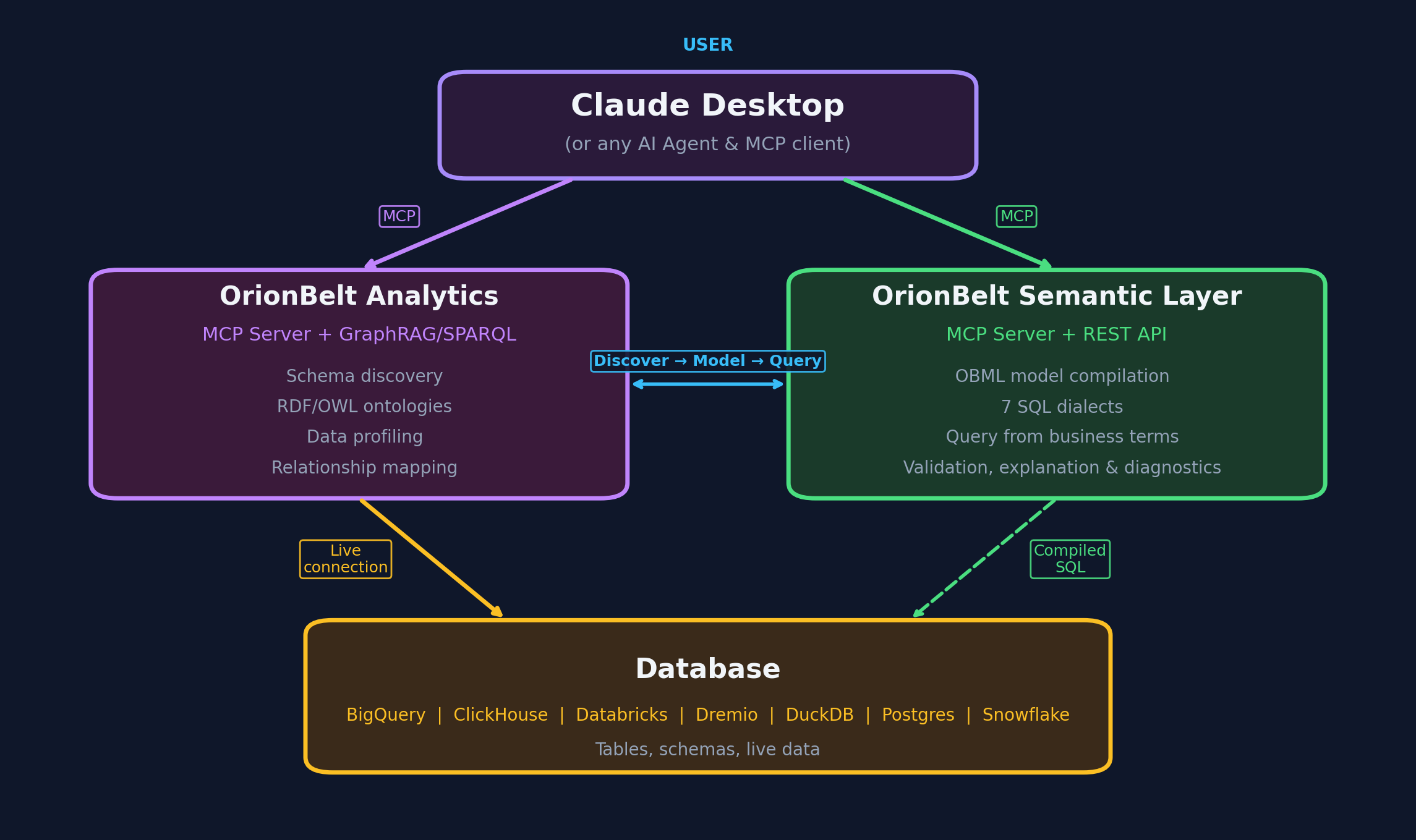
- 8 database connectors -- PostgreSQL, MySQL, Snowflake, ClickHouse, Dremio, BigQuery, DuckDB/MotherDuck, Databricks SQL
- RDF/OWL ontology generation with
oba:namespace SQL annotations and W3C R2RML mappings - GraphRAG -- graph traversal (up to 12 hops) + ChromaDB vector embeddings for semantic schema discovery
- SPARQL 1.1 query interface via persistent Oxigraph RDF store
- OBQC validation -- deterministic SQL checks against the ontology (table/column existence, join validity, type mismatches, fan-traps)
- Interactive charting -- Plotly charts with MCP-UI rendering in Claude Desktop
- Multi-schema support -- analyze multiple schemas simultaneously; ontology and GraphRAG state are isolated per schema
- Workspace persistence -- reconnect to the same database and restore your previous session
A key differentiator of OrionBelt is OBQC (Ontology-Based Query Check), a deterministic, rule-based SQL validator that catches errors before queries reach the database. Unlike LLM-only approaches that rely on the model "getting it right," OBQC cross-references every generated SQL statement against the loaded RDF/OWL ontology to enforce structural correctness.
What OBQC validates:
| Check | What it catches |
|---|---|
| Table existence | References to tables that don't exist in the schema |
| Column existence | References to columns not present in their table, ambiguous unqualified columns |
| Join validity | Missing join conditions (Cartesian products), join columns that don't match declared foreign keys |
| Type compatibility | WHERE/ON comparisons between incompatible types (e.g. string vs. integer) |
| Aggregation correctness | SELECT columns missing from GROUP BY when aggregates are used |
| Fan-trap detection | Aggregations across multiple one-to-many joins that silently multiply results |
How it works:
generate_ontologyorload_my_ontologycreates/loads an ontology withoba:namespace annotations that map OWL classes and properties to actual database tables, columns, types, and foreign keys.- When
execute_sql_queryis called, OBQC parses the SQL with sqlglot and validates every table, column, join, and aggregation against the ontology's schema model. - Issues are returned with severity levels (error, warning, info) alongside the query results, so the LLM can self-correct before the user sees wrong data.
OBQC is fully deterministic -- no LLM calls, no probabilistic reasoning. It acts as a safety net that complements the LLM's SQL generation with hard structural guarantees.
git clone https://github.com/ralfbecher/orionbelt-analytics
cd orionbelt-analytics
uv sync
Requires Python 3.13+ and uv.
cp .env.template .envEdit .env with your database credentials. At minimum, set the variables for one database (e.g. POSTGRES_HOST, POSTGRES_PORT, POSTGRES_DATABASE, POSTGRES_USERNAME, POSTGRES_PASSWORD).
See docs/configuration.md for all environment variables, transport options, and troubleshooting.
uv run server.pyThe server starts on http://localhost:9000 (HTTP transport, configurable via MCP_SERVER_PORT).
Start the server, then add to your claude_desktop_config.json:
{
  "mcpServers": {
    "OrionBelt-Analytics": {
      "command": "npx",
      "args": [
        "mcp-remote",
        "http://localhost:9000/mcp",
        "--transport",
        "http-only"
      ]
    }
  }
}claude mcp add orionbelt-analytics http://localhost:9000/mcpSet MCP_TRANSPORT=sse in .env, restart the server, then add to librechat.yaml:
mcpServers:
  OrionBelt-Analytics:
    url: "http://host.docker.internal:9000/sse"
    timeout: 60000
startup: trueOrionBelt works with LangChain, OpenAI Agents SDK, CrewAI, Google ADK, Vercel AI SDK, n8n, and ChatGPT Custom GPTs. See docs/integrations.md for setup examples.
OrionBelt exposes 32 MCP tools. Here is a summary by category:
| Tool | Description |
|---|---|
connect_database |
Connect to any supported database using .env credentials |
list_schemas |
List available schemas in the connected database |
reset_cache |
Clear cached schema and ontology data for the current session |
discover_schema |
Analyze schema structure with automatic GraphRAG + ontology generation |
get_table_details |
Get detailed column, key, and constraint info for a specific table |
cleanup_workspace |
Delete all workspace files for the current connection and start fresh |
| Tool | Description |
|---|---|
generate_ontology |
Generate RDF/OWL ontology from schema with SQL mapping annotations |
suggest_semantic_names |
Detect abbreviations and cryptic names for business-friendly renaming |
apply_semantic_names |
Apply LLM-suggested semantic names and descriptions to ontology |
load_my_ontology |
Load a custom .ttl ontology file from an import folder |
download_artifact |
Download ontology or R2RML mapping as a Turtle file |
| Tool | Description |
|---|---|
sample_table_data |
Preview table data with row limit and injection protection |
execute_sql_query |
Execute SQL with OBQC validation, security checks, and fan-trap detection |
generate_chart |
Generate Plotly charts (bar, line, scatter, heatmap) with MCP-UI rendering |
| Tool | Description |
|---|---|
graphrag_search |
Semantic search + schema overview (auto-initialized by discover_schema) |
graphrag_query_context |
Get optimized context for SQL generation (85-95% token reduction) |
graphrag_find_join_path |
Discover join paths between tables via graph traversal |
| Tool | Description |
|---|---|
store_ontology_in_rdf |
Persist ontology in Oxigraph for SPARQL access |
query_sparql |
Execute SPARQL queries (SELECT, ASK, CONSTRUCT — auto-detected) |
add_rdf_knowledge |
Add custom metadata triples to the RDF store |
| Tool | Description |
|---|---|
save_semantic_model |
Save a semantic model (e.g., OBML YAML) to the workspace |
get_semantic_model |
Retrieve a stored semantic model by name |
list_semantic_models |
List all stored semantic models for the current connection |
| Tool | Description |
|---|---|
get_server_info |
Server version, features, and configuration |
For full parameter details, return values, and examples, see docs/tools-reference.md.
Full analysis session:
connect_database("postgresql") -> discover_schema("public") -> generate_ontology() -> execute_sql_query(...)
Quick data exploration:
connect_database("duckdb") -> list_schemas() -> sample_table_data("events")
Query with visualization:
validate_sql_syntax(query) -> execute_sql_query(query) -> generate_chart(data, "bar", ...)
Resume a previous session (auto-restores workspace):
connect_database("postgresql") -> execute_sql_query(...)
| Document | Contents |
|---|---|
| Tools Reference | Full parameter docs, return values, and usage examples |
| Configuration | Environment variables, transport setup, troubleshooting |
| GraphRAG | Graph-based schema intelligence and OBML workflow |
| Fan-Trap Prevention | The fan-trap problem, detection, and safe SQL patterns |
| Integrations | LangChain, OpenAI, CrewAI, Google ADK, Vercel, n8n, ChatGPT |
| Development | Project structure, testing, contributing |
Copyright 2025-2026 RALFORION d.o.o.
Licensed under the Business Source License 1.1. See LICENSE for details.
Change Date: 2030-03-16 | Change License: Apache License, Version 2.0
For commercial licensing inquiries, contact: licensing@ralforion.com
