
A terraform module to create a private Container Registry namespace and a RAM role able to pull/push from the namespace created.
NOTE: This module uses AccessKey and SecretKey from profile and shared_credentials_file. If you have not set
them yet, please install aliyun-cli and configure it.
Read this in other languages: English, Español, 简体中文.
After using this module, the following resources will be created:
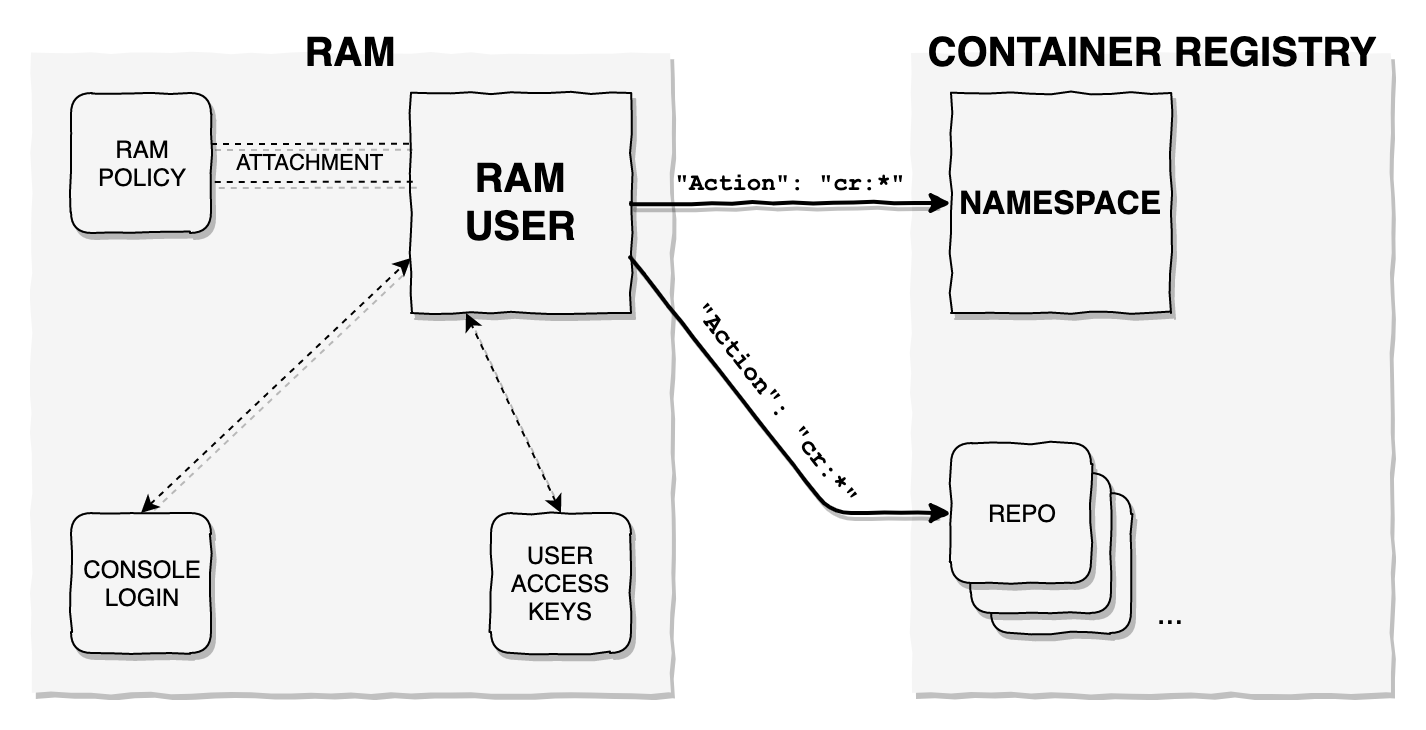
provider "alicloud" {}

module "cr" {
  source  = "roura356a/cr/alicloud"
  version = "1.3.0"

  namespace = "cr_repo_namespace"
}
After running terraform apply, a file called cr-{namespace}-ak.json will be generated with the AccessKey &
SecretKey needed to query the GetAuthorizationToken API for cr and be able to push/pull to/from the repositories
inside the namespace created.
| Name | Description | Type | Default | Required |
|---|---|---|---|---|
| region | The region used to launch this module resources | string | "" | no |
| profile | The profile name as set in the shared credentials file. If not set, it will be sourced from the ALICLOUD_PROFILE environment variable |
string | "default" | no |
| shared_credentials_file | This is the path to the shared credentials file. If this is not set and a profile is specified, $HOME/.aliyun/config.json will be used |
string | "" | no |
| skip_region_validation | Skip static validation of region ID. Used by users of alternative AlibabaCloud-like APIs or users w/ access to regions that are not public (yet) | bool | false | no |
| namespace | Name of Container Registry namespace | string | - | yes |
| password | Password for the Container Registry | string | "" | no |
| repositories | List of optional repositories to be created on apply | list(string) | ["default"] | no |
| repo_autocreate | Boolean, when it set to true, repositories are automatically created when pushing new images. If it set to false, you create repository for images before pushing |
bool | true | no |
You can create repositories by populating the repositories variable with a list of strings.
| Name | Description |
|---|---|
| cr_namespace | The CR Namespace's ID |
| cr_access_key | The CR Namespace's Access Key |
| cr_user | The CR Namespace's User |
| cr_endpoint | Public endpoint of the registry |
| ram_user | The RAM User |
| ram_policy_name | The RAM policy name |
| repository_ids | List of repository IDs created |
| ram_console_username | Console login username |
| disposable_password | Password to activate the console login profile, forces to reset it |
| access_key_status | Status of the created AccessKey |
| ram_policy_type | The RAM policy type |
| ram_policy_attachment | The RAM policy attachment ID |
In order to activate the newly created RAM user on the Registry, only for the first time and due to a security measure
by Alibaba Cloud (this may change in the future), you need to navigate to the
Container Registry Console using the newly created RAM user (with the one-time
password outputted on terraform apply as disposable_password) and follow the on-screen instructions to activate the
account.
After that, with the cr-{namespace}-ak.json file credentials, you can get, by using the aliyun-cli SDK, a temporary
secure login credentials by running aliyun cr GetAuthorizationToken.
Terraform version 0.12.0+ is required for this module to work.
Created and maintained by Alberto Roura (@roura356a, albertoroura.com). Feel free to contribute.
This Terrafom module uses terratest to test the IaC resources created. To
test, go into the test folder, run go mod init cr, go mod tidy and then go test.
Apache 2 Licensed. See LICENSE for full details.