Welcome to the ISPConfig Advanced Jailkit and Git Tools, a comprehensive extension designed to transform a standard ISPConfig 3 installation into a highly secure, context-aware "Debian php-host Fortress." This project introduces improved look-and-feel of the shell-user's terminal sessions on top of advanced chroot security, detached Git tracking for web directories, and persistent background session management.
Co-authored by Talutah Elan and Gemini 3.1 Pro (AI).
- Discussion board: https://forum.howtoforge.com/threads/ispconfig-advanced-jailkit-shell-user-and-git-tools.95089/
- Directory Structure: This extension has ONLY been tested with the default ISPConfig client/website directory structure (
^\/var\/www\/clients\/client\d+\/web\d+$). It will NOT work if you have configured ISPConfig to use a custom directory on the Linux filesystem to host websites, or if you have altered the default shell-account home-directory pattern (e.g.,.../webX/home/shell_user). THIS INITIAL release does not support changing the default client/website directory patterns. - Web Server & PHP Handler: This extension is built and tested exclusively for Apache and PHP-FPM (with the SuEXEC mod checked). ISPConfig supports other configurations (Nginx, Fast-CGI, CGI, Mod-PHP, SuPHP), but this extension is currently not tested or guaranteed to work with them. (If you require Nginx compatibility, community contributions and Pull Requests are highly welcome!)
- Chroot PHP-FPM Checkbox: In the ISPConfig UI -> on a website-level, the "Chroot PHP-FPM" checkbox must remain checked (which is the default). This extension is architected specifically for a protected, chrooted-website environment. If you (or client is allowed) to intentionally uncheck this security feature, then this extension's behavior will be unpredictable (not even tested). Contributions to test and implement predictable fallback behaviors for this edge-case scenario are welcome.
- Detached Git Tracking compatibility: The "Detached Git Tracking" feature is to track your website (
web/) securely using a detached Git worktree managed from the Vault.- Prerequisite: This feature relies on the secure Vault which is outside the Jail. Because of this, for any website where you want to use this particular feature, there must be at least one Non-Jailed shell-user created.
- Server OS and ISPConfig version: The extension has been tested on Debian 12 and ISPConfig 3.3.0p3, but it is highly likely that it will work on older Debian systems, and on the newer Debian 13 too (when ISPConfig is compatible with Debian 13 of course). It is also highly likely that it will work on Ubuntu systems because they are simply based on Debian. Please try it, and I am expecting feedback. Thank you!
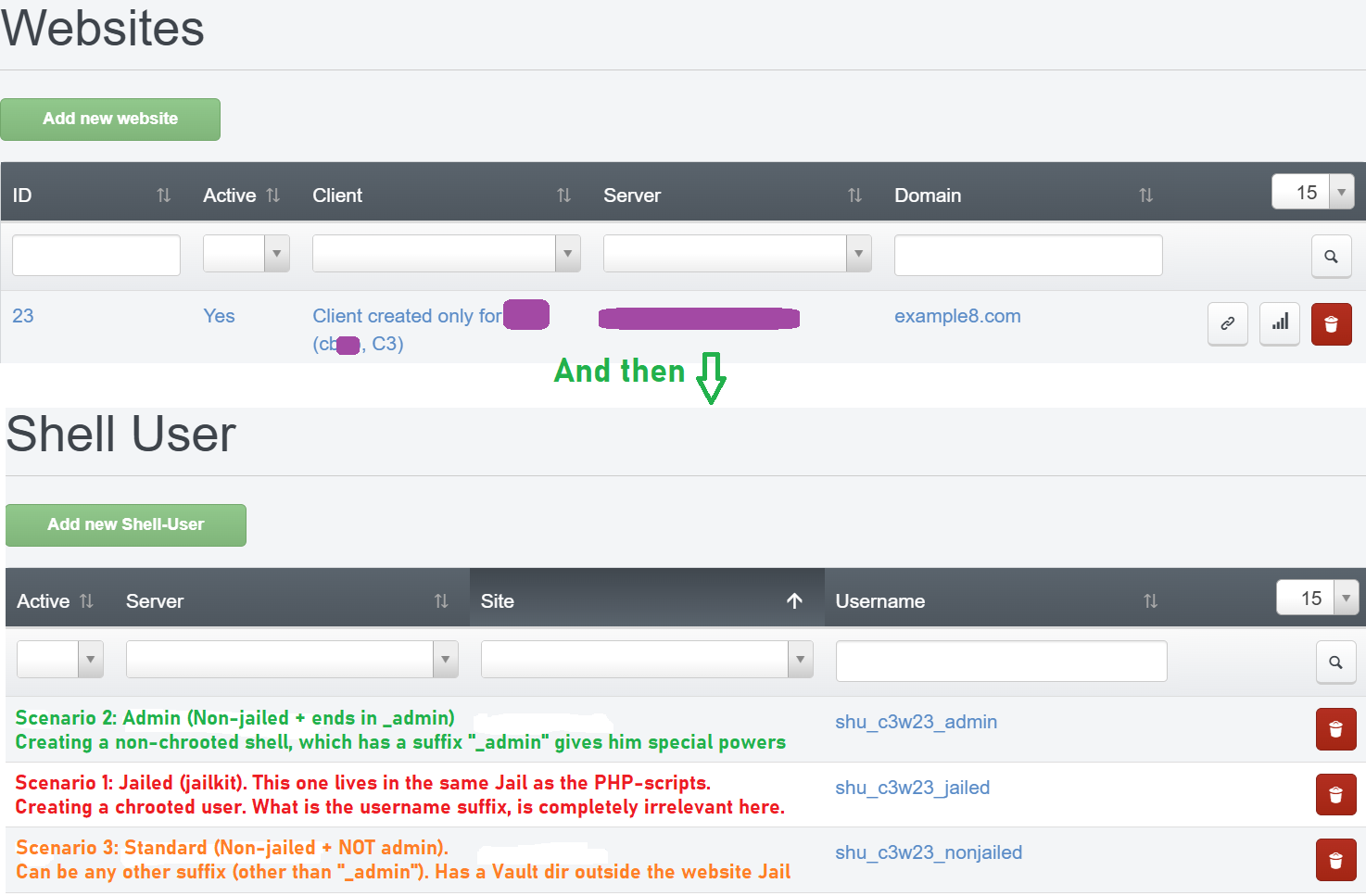
- Scenario-Based Shell Users: Intelligently provisions environments based on the username suffix (e.g., Jailed, Admin Non-Jailed, Standard).
- The Secure "Vault"
[Note]: Admin users get a secure directory (webX___username) outside the PHP-FPM chroot to store sensitive data, SSH keys, and Git metadata, protecting them even if the website is compromised. - Detached Git Tracking
[Note]: Clone and track your website (web/) securely using a detached Git worktree managed from the Vault. - Context-Aware Colored Terminal: Injects a custom, highly visible bash prompt (e.g.,
╚═ user@ domain.com@server ═╡/web╞════ 💲) that automatically updates your terminal window title to match your environment. It also dynamically displays your active Git branch (in cyan) only when you are inside the/webdirectory. - Strict Internal Directory Isolation
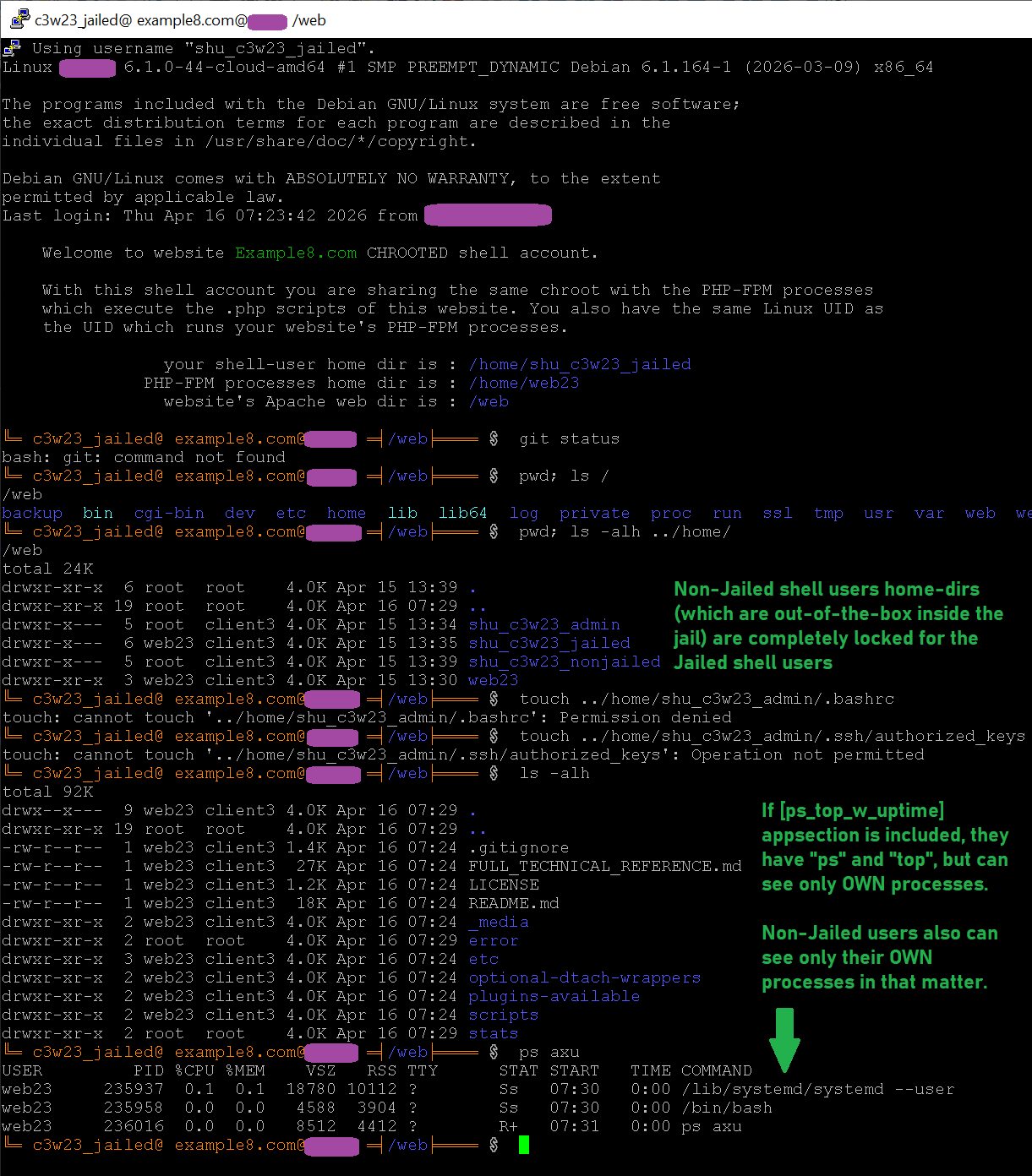
[Note]: Non-jailed users' home directories (which physically reside inside the jail path) are strictly locked down. Jailed users and PHP-FPM processes receive "Permission denied" errors and cannot read, write, or traverse into the.bash_history, SSH keys, or config files of the higher-privileged accounts. - Secure Dynamic Mounts (
/proc&/dev/pts): The plugins intelligently provide essential virtual filesystems to the jail only when authorized, using strict anti-snooping principles. Jailed users are restricted to seeing only their own background processes withpsandtop, and they receive a completely private, isolated terminal space. This safely enables utilities likedtachand complex Java or Node.JS terminal-IO apps to function jailed, while making it mathematically impossible for users to spy on or hijack each other's sessions. This is very good for isolating AI agents working with Remote-SSH who at the same time has a viable environment to work upon. - Background Sessions (
dtach): Run persistent background programs in your jails using custom, secure wrapper commands. - Smart Identity & Environment Context: Automatically extracts your website domain, client email, and contact details from the ISPConfig database to personalize your terminal prompts and pre-configure your Git authorship without manual setup.
[Note] This particular feature requires the creation of at least one non-Jailed shell-user in order to work for a particular website.
This repository is structured to mirror your Linux/ISPConfig filesystem.
-
Plugins: Copy the contents of
plugins-available/to/usr/local/ispconfig/server/plugins-available/.- Enable the Plugins: You must explicitly enable them by creating symlinks in the
plugins-enabled/directory. The symlink names must match the original filenames exactly. Here is a one-liner command to perform this action completely in one shot:chmod 750 /usr/local/ispconfig/server/plugins-available/a_chrooted_website_custom_func.inc.php; \ ln -s /usr/local/ispconfig/server/plugins-available/a_chrooted_website_custom_func.inc.php /usr/local/ispconfig/server/plugins-enabled/; \ \ chmod 750 /usr/local/ispconfig/server/plugins-available/z_chrooted_website_custom_func.inc.php; \ ln -s /usr/local/ispconfig/server/plugins-available/z_chrooted_website_custom_func.inc.php /usr/local/ispconfig/server/plugins-enabled/; \
- Developer Note: If you ever rename these files, remember that ISPConfig strictly requires the internal plugin name, the PHP class name, and the filename (minus
.inc.php) to all perfectly match for the hook to trigger.
- Enable the Plugins: You must explicitly enable them by creating symlinks in the
-
Scripts: Copy the contents of
scripts/to/usr/local/ispconfig/server/scripts/. Ensure they are executable (chmod 700):chmod 700 /usr/local/ispconfig/server/scripts/padm_shelluser_provision.sh
⚠️ ISPConfig Upgrade Warning: Upgrading ISPConfig in the future might overwrite the default/usr/local/ispconfig/server/scripts/directory (unconfirmed, but highly possible). To prevent losingpadm_shelluser_provision.sh, you should either maintain a backup to re-apply after upgrades, or place the script in a safe, alternative directory (e.g.,/opt/ispconfig-padm/) and update the path in the Z-plugin's$app->system->exec_safe()call to point there.
-
Jailkit Config: Carefully merge
etc/jailkit/jk_init.iniinto your server's/etc/jailkit/jk_init.ini.- Do not just copy the bottom section. Our modified
jk_init.inicontains scattered changes throughout the core definitions (like addingtputfor colored UI prompts and fixingsftp-serverpaths). It is highly recommended to back up your original file and replace it entirely with ours. F.y.i. thejk_init.inifile that comes with this extension, has been very carefully security-inspected, but if you've done any custom changes to yours/etc/jailkit/jk_init.ini, then you need to perform very carefull merging with this one, and know what you're doing in the process!
- Do not just copy the bottom section. Our modified
-
Optional Standalone Tools: Copy the contents of
optional-dtach-wrappers/to/usr/local/bin/and make them executable. These are absolutely safe scripts which wrap thedtachprogram, they are optionally about to be added to the user's jails. If you choose to install them, obviously you needdtachalso. Installation of which is explained in "Manual Server Configurations (Required TODOs) -> point 4".
For the "Debian Fortress" to operate flawlessly—specifically regarding process isolation and terminal utilities—you MUST perform the following manual configurations on your host OS after dropping in the files:
1. Create the procgroup and Assign Admins
To prevent jailed users from seeing processes they don't own, our system mounts /proc with hidepid=2. To ensure your root user and native Linux admins are NOT blinded by this security feature, you must create a whitelist group:
groupadd procgroup
usermod -aG procgroup root
(Add any other non-ISPConfig admin users here as well).
2. Update the Global /etc/fstab for /proc
Our plugins dynamically manage the jail mounts, but they never modify the host OS's master /proc mount. You must do this manually to enforce the group whitelist globally.
Edit /etc/fstab and ensure the proc line looks exactly like this:
proc /proc proc defaults,hidepid=2,gid=procgroup 0 0
After editing, apply the changes immediately by running: mount -o remount /proc
3. Install Git on the server
Probably I need not to mention, that in order to use the automated Git tracking features of this extension, you need to install Git normally on your server. Install it with sudo (if you don't already have it of course). Note, that Git is NOT required to be added to the jails by default. The extension logic is to utilize Git only from non-jailed shell-users, and this doesen't involve adding it to any Jails at all. Of course this doesen't stop you from adding Git for jailed shell-users (look at the etc/jailkit/jk_init.ini there's a [git] appsection), but adding Git into jails is not related to the "Detached Git Tracking" feature that this extension offers. The Detached Git Tracking works only from a non-jailed shell-accounts, because only non-jailed shell accounts can have a Vault which is inaccessible from the website's PHP-FPM (outside the chroot).
4. Install dtach (optional, only required if you want to use Background Sessions / the optional-dtach-wrappers. Otherwise you may skip this step)
The dtach utility is not pre-installed out-of-the-box on Debian 12 or 13. It is an open-source, freeware, and very simple/safe tool used to manage background terminal sessions. Our custom wrapper scripts (pattach, pdetachnow, etc.) depend on it.
You can easily build it from source in seconds:
- View the source/docs: https://github.com/crigler/dtach
- Download, extract, and run:
./configurethenmake - Copy the compiled binary to your system path:
cp dtach /usr/bin/(Note: Depending on your Debian setup,apt-get install dtachmay also be available).
When creating a Shell User in ISPConfig, their capabilities are determined by how you name them and configure their chroot:
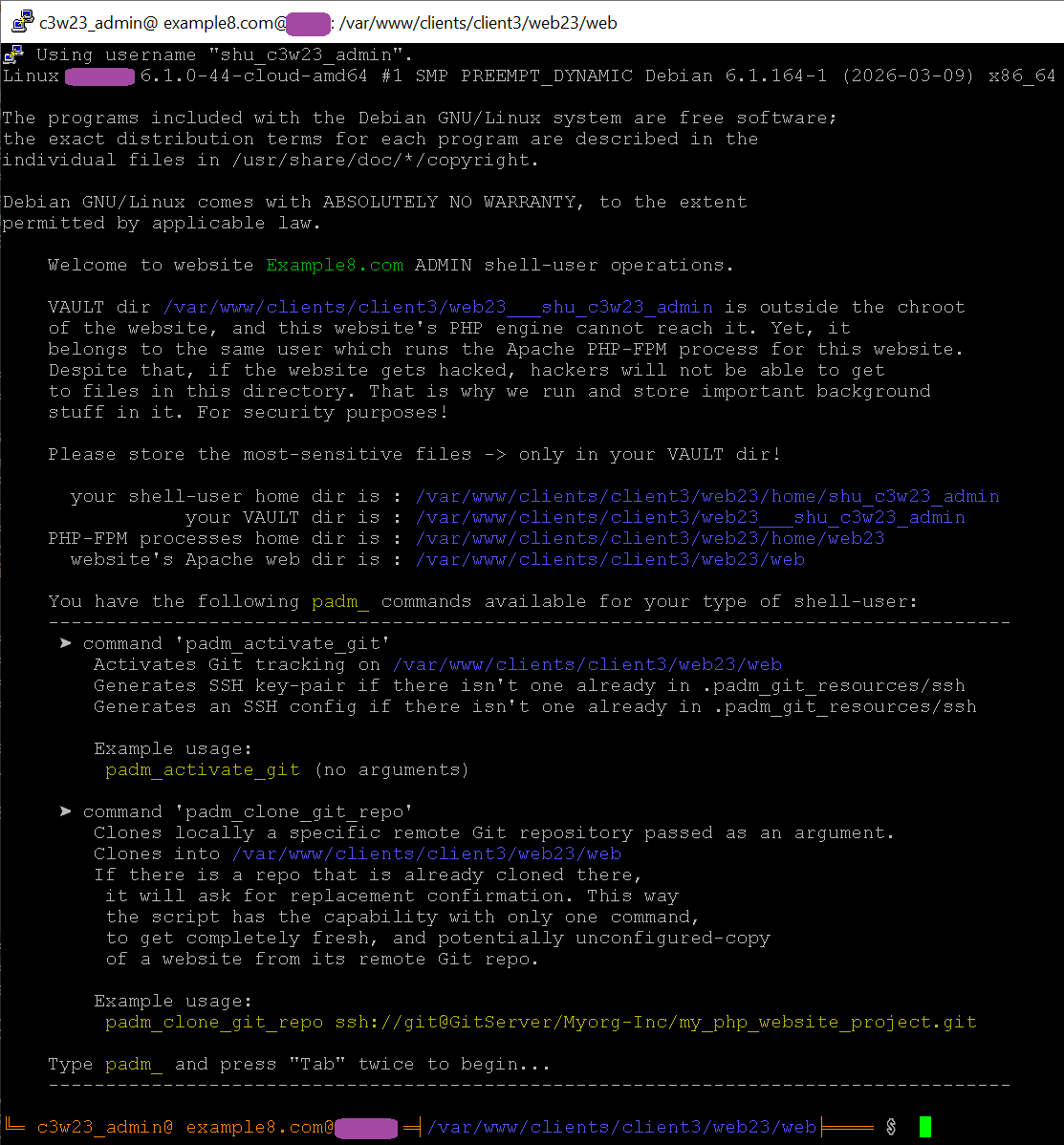
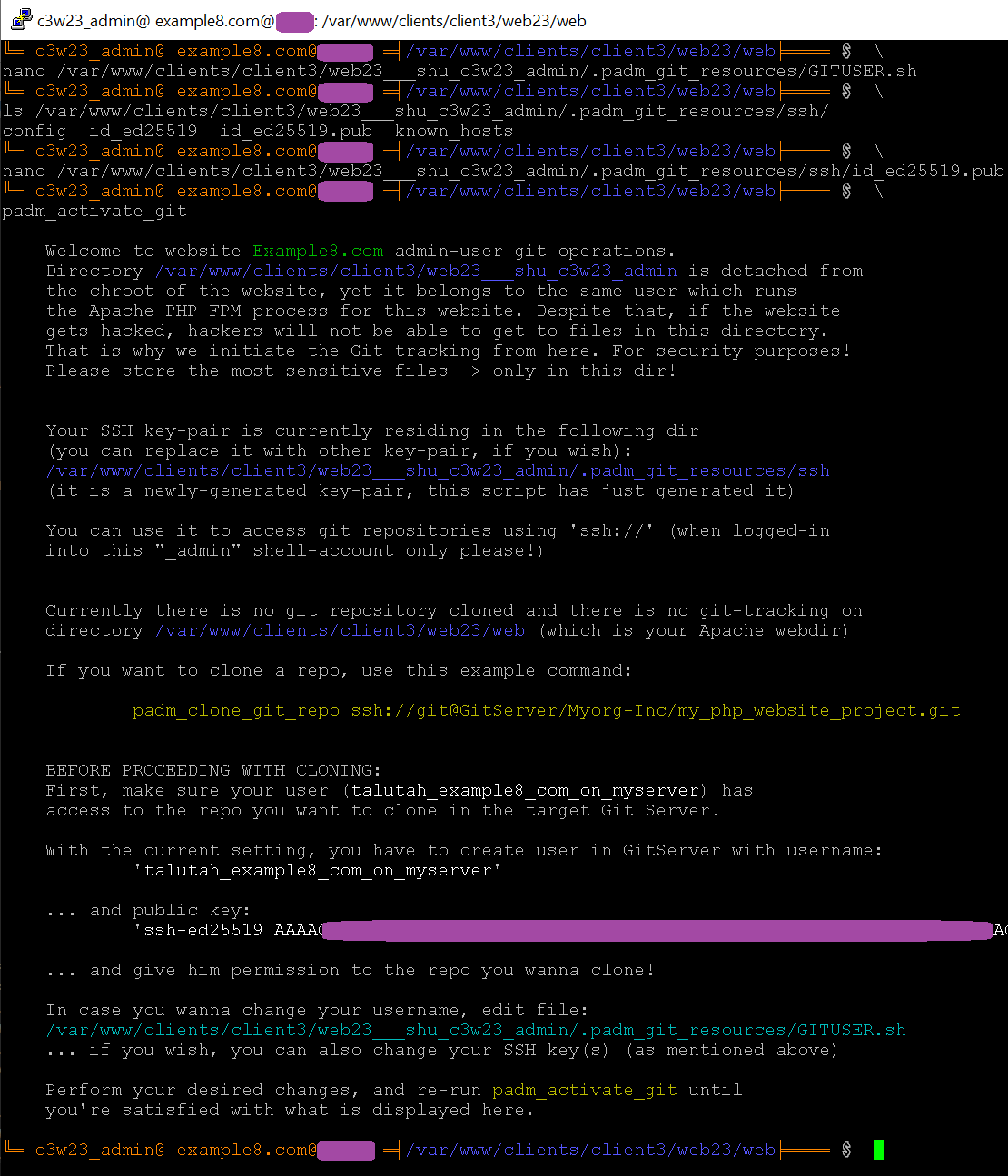
Logging in as a Non-Jailed _admin user greets you with a custom UI explaining your Vault directory and listing your available padm_ helper commands.
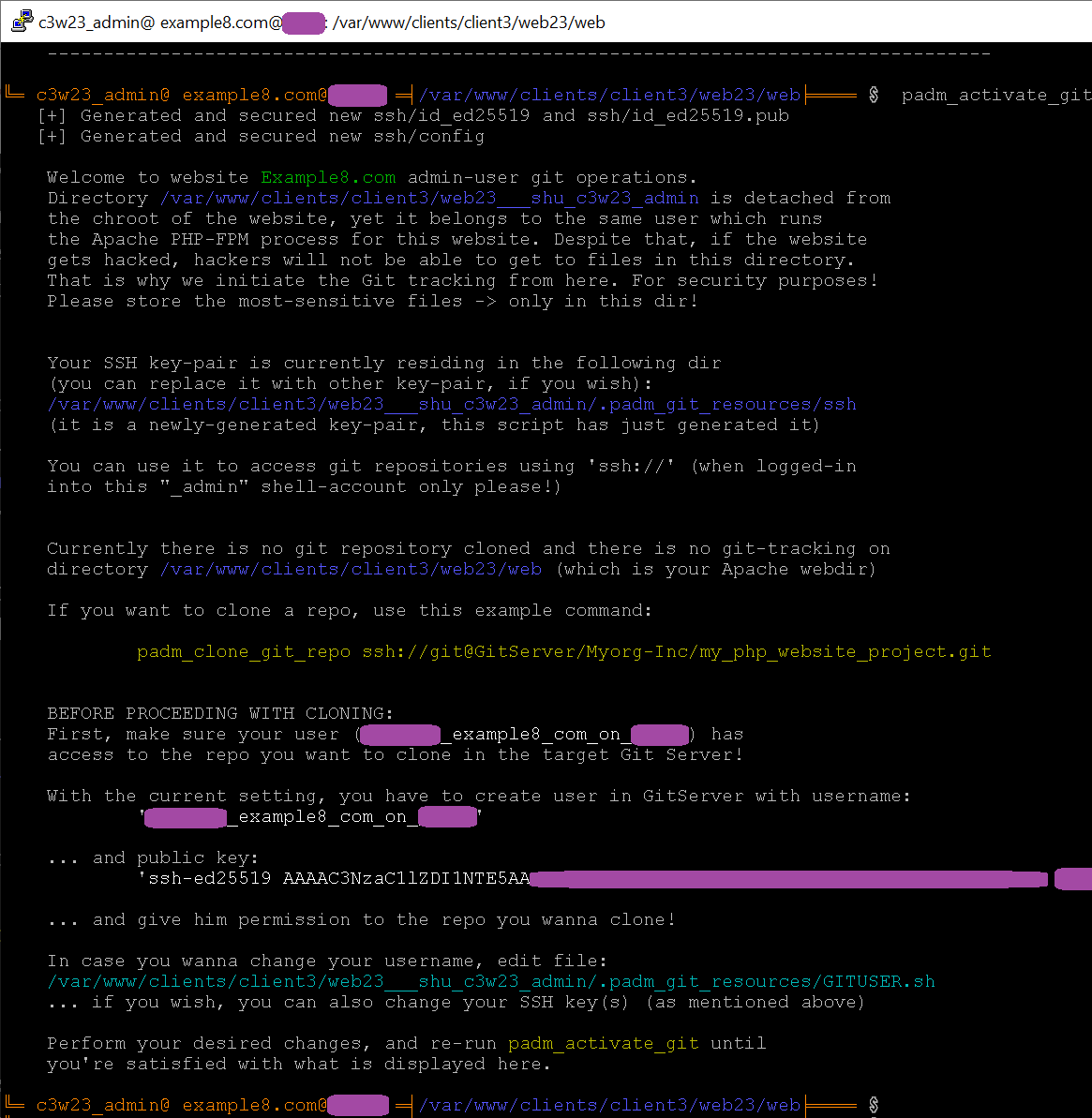
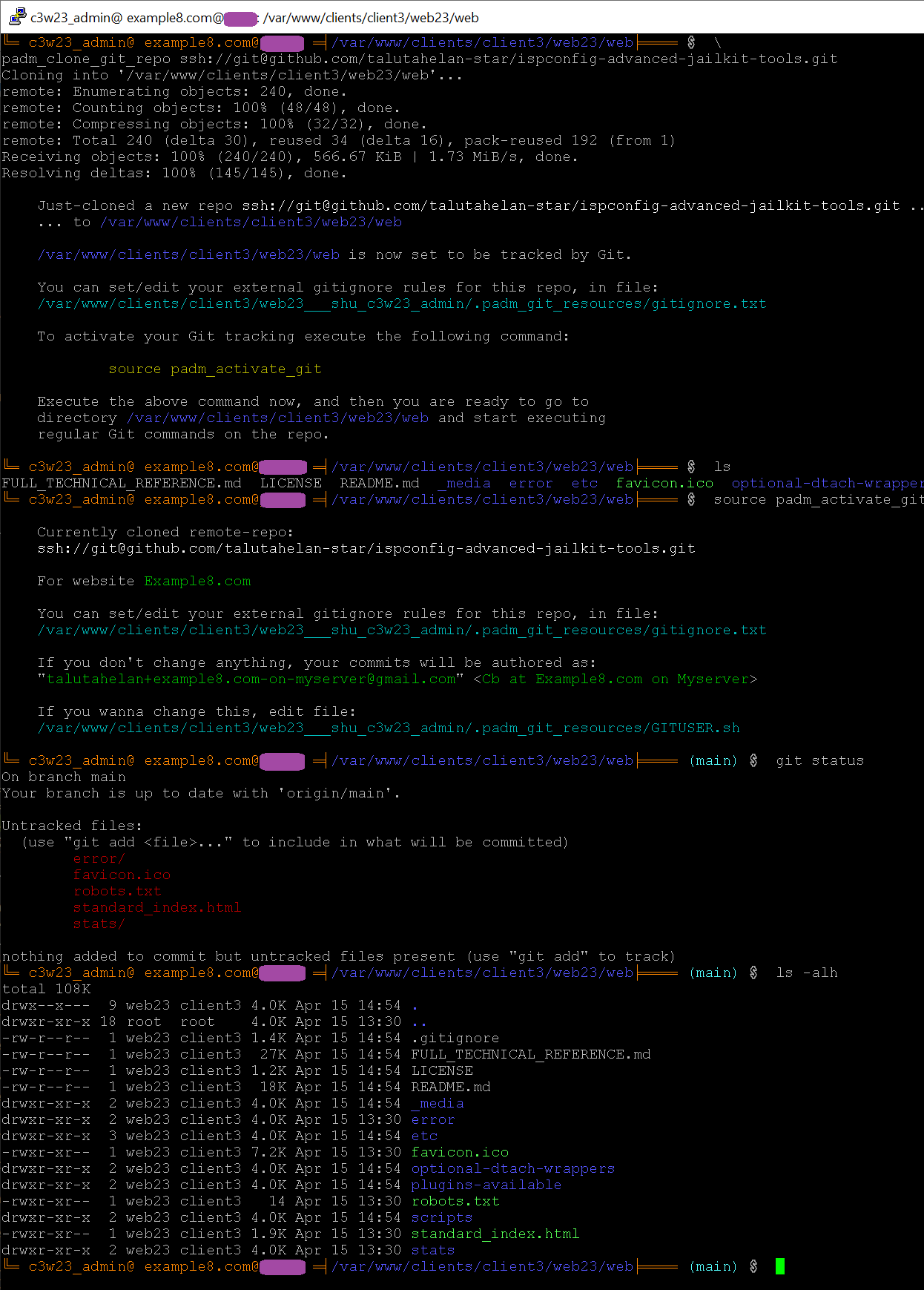
Use the built-in helper scripts to instantly generate SSH keys, configure your Git identity, and safely clone your repository directly into the Apache web root without exposing .git files to the web server.
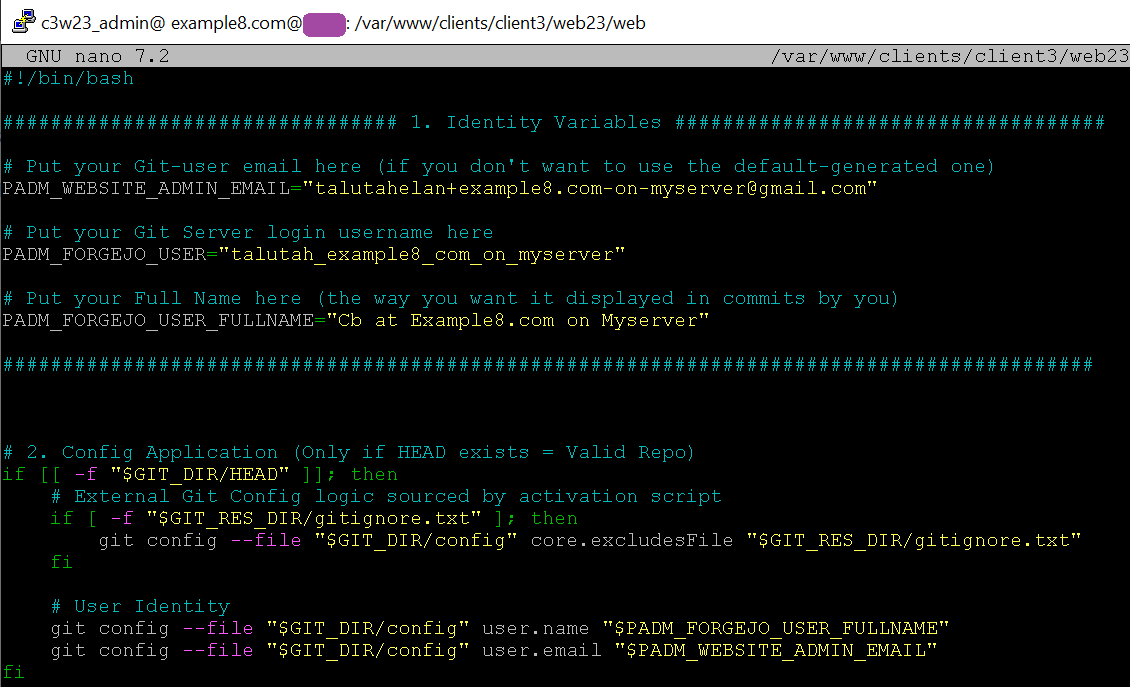
You can optionally edit your Git credentials and identity manually, and if you want, also you can replace the self-generated key-pair with another one at your preference.
Once you're satisfied with the git activation credentials and identity, you can easily just copy your public key to paste in the remote Git service for proper ssh:// Git authentication.
Once cloned, the terminal instantly becomes context-aware, displaying your branch name:
If a standard user logs in via Jailkit, they receive a beautiful terminal environment but are safely restricted from Git mechanics and Vault access.
Because screen and tmux can be difficult to run securely inside Jailkit, we use dtach. The optional-dtach-wrappers/ provide an easy way to run programs in the background persistently:
-
pdetachnow <socket_name> <command>: Starts a command in the background, and releases the current terminal immediately (can be very usefull for creating singleton jailed cronjobs from the ISPConfig UI, or even executing singleton async background jobs from PHP itself. For instance:/usr/local/bin/pdetachnow UNIQUE_SINGLETON_SOCKET_NAME /private/bin/StartDaemon.sh > /dev/null 2>&1). This execution approach guaranteesStartDaemon.sh(which is supposedly a long-running program), is executed only once, regardless of how many times the cronjob triggers. This is because the wrapper checksUNIQUE_SINGLETON_SOCKET_NAMEsocket if the program is still alive, and does absolutely nothing if it is still alive. -
pdetachable <socket_name> <command>: Starts a command and remains attached to it. PressCtrl+]to detach. -
pattach <socket_name>: Re-attaches to a running background session.
Of course the wrappers and dtach can be used also in non-Jailed shell-accounts. But you can easily use screen or tmux on non-jailed accounts. So primary idea of the wrappers was to have a handy and safe alternative to run from within a Jail environment.
Because of the deep enhancements made to jk_init.ini, we recommend setting up "Hosting Tiers" for your clients using these specific Appsection strings.
Tier 1: Minimal & Safe - no background tasks (Set this as the Server-Level Default)
jk_lsh sftp coreutils basicshell
- Capabilities: Provides the beautiful colored terminal UI with the welcome message and allows secure SFTP access. The shell is extremely limited, making it perfectly safe as a global default for untrusted users. Also the tier is suitable for hosting experimental and/or less-verified PHP websites/scripts exposed to the public.
Tier 2: Background Tasks (Set via Website Override)
jk_lsh sftp coreutils basicshell extendedshell netutils ps_top_w_uptime dtach
- Capabilities: Adds the ability to view server processes (
top,ps), but strictly limited to the processes of the current UID. Also allows persistent background programs using ourdtachwrappers. - Note on
ps_top_w_uptime: The commandsw,who,ping, andtracerouteare intentionally disabled in this release. They are currently unsafe to run natively inside an untrusted shell-account. They are planned for a future release via secure socket wrappers (see Roadmap).
Tier 3: The Application Server (Set via Website Override)
jk_lsh sftp coreutils basicshell extendedshell netutils ps_top_w_uptime dtach imagemagick jre_headless___openjdk_8_zulu_ca
- Capabilities: In addition to Tier 2, this injects a fully isolated Java 8 JRE into the jail. (Note: You can easily tune your server to support modern Java 21 or 25 environments by duplicating and transforming a little-bit this exact same isolated/embedded appsection
jre_headless___openjdk_8_zulu_cain/etc/jailkit/jk_init.ini).
Tier 4: The Power User (Set via Website Override)
jk_lsh sftp coreutils basicshell extendedshell netutils ssh scp mysql-client ps_top_w_uptime perl dtach git imagemagick midnightcommander jre_headless___openjdk_8_zulu_ca
- Capabilities: Maximum capability. Adds
git, Midnight Commander (mc), Perl, and CLI MySQL/MariaDB database tools to the Jails.
While v1.0 provides a robust, battle-tested "Golden Copy" of our provisioning engine, we have planned architectural refactoring for future releases to improve maintainability and expand capabilities:
- Template Extraction: Extracting raw bash scripts into a
templates/directory for cleaner variable injection. - Drop-in Plugin Architecture: Implementing a drop-in directory pattern so the community can easily contribute new
padm_helper scripts. - Configuration Separation: Moving hardcoded variables (like Git IPs and colors) into a dedicated
.envfile. - Secure Network/User Wrappers: We plan to implement safe, over-the-socket wrappers for
ping,traceroute,w, andwho. This will safely activate the remaining commands listed in theps_top_w_uptimeappsection without compromising chroot security.
See the FULL_TECHNICAL_REFERENCE.md for full details on how we plan to evolve the codebase.
File FULL_TECHNICAL_REFERENCE.md contains in-dept explanation of what each part (file) of the extension does, and why it does it. If you need more information on the extension, or if you want to change the code (fork, clone), reading this file is a must.