
Modern connection manager — SSH, RDP, VNC, SPICE, and more





RustConn is a cross-platform connection orchestrator with a GTK4/libadwaita interface. It brings SSH, RDP, VNC, SPICE, MOSH, Telnet, Serial, Kubernetes, and Zero Trust connections under one roof — with embedded Rust clients where possible and seamless integration with external tools where needed. Runs on Linux (GTK4/libadwaita), macOS, FreeBSD, and Windows via WSLg.
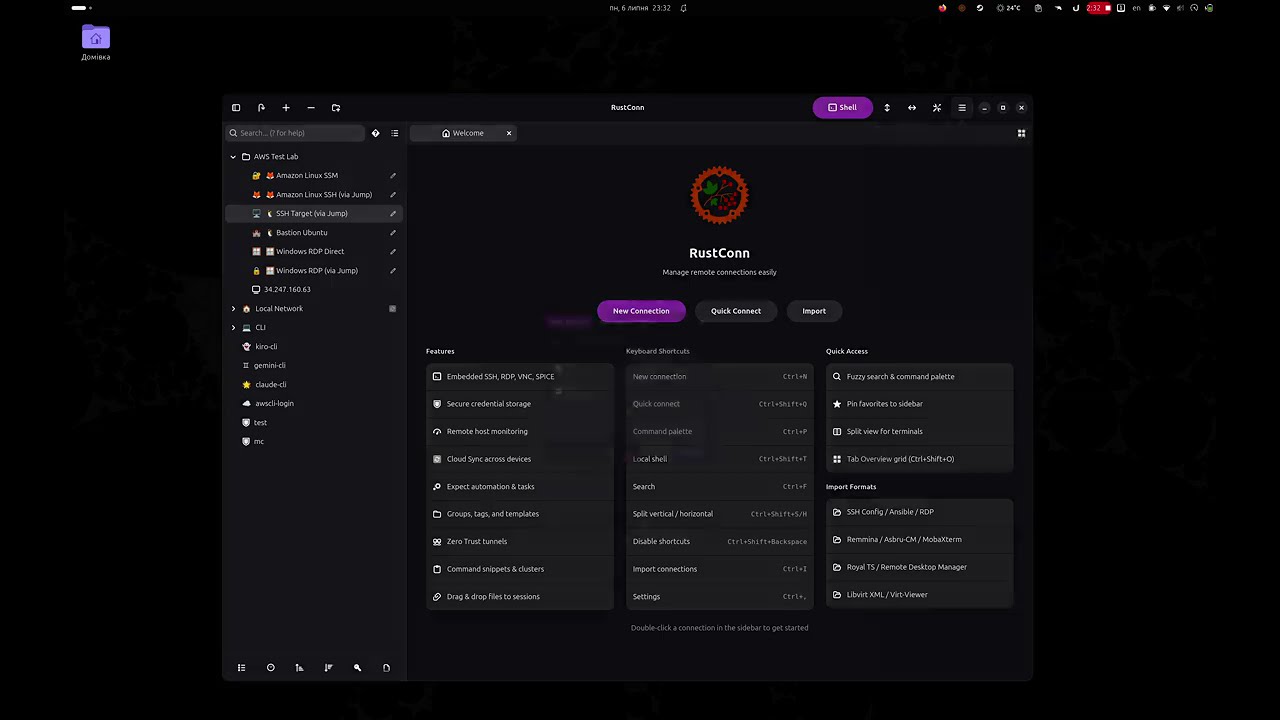
 |
 |
 |
 |
More screenshots on the Flathub listing.
| Category | Details |
|---|---|
| File Transfer | SFTP file browser via system file manager (sftp:// URI, D-Bus portal) |
| Organization | Groups, tags, templates, custom icons (emoji/GTK), connection history & statistics |
| Monitoring | Remote host metrics bar (CPU, RAM, disk, network, load, system info) — agentless, per-connection toggle |
| Import/Export | Asbru-CM, Remmina, SSH config, Ansible inventory, Royal TS, MobaXterm, SecureCRT, Remote Desktop Manager, RDP files (.rdp), virt-viewer (.vv), libvirt (XML + daemon), CSV, native (.rcn) |
| Security | KeePassXC (KDBX), libsecret, macOS Keychain, Bitwarden CLI, 1Password CLI, Passbolt CLI, Pass (passwordstore.org), script credentials, encrypted-file fallback (no keyring required); hardware-token SSH auth (FIDO2 security keys, PKCS#11 / YubiKey / smart cards) |
| Terminal | Split terminals, command snippets, text highlighting rules, session recording, custom terminal themes, tab overview, tab pinning |
| Automation | Expect rules, key sequences, pre/post-connect tasks, cluster & ad-hoc broadcast, session reconnect, Wake-on-LAN |
| Workflow | Smart folders, SSH port forwarding, visual SSH tunnel builder, workspace profiles (save/restore open sessions), settings backup/restore, .rdp file association |
| Cloud Sync | Synchronize connections via shared cloud directory (Google Drive, Syncthing, Nextcloud, Dropbox); group sync with Master/Import access model; simple sync with UUID-based merge |
| CLI | rustconn-cli — headless management: list/add/update/delete connections, import/export, snippets, groups, templates, clusters, secrets, WoL, shell completions |
| Languages | English + 16 translations (Belarusian, Czech, Danish, German, Spanish, French, Italian, Kazakh, Dutch, Polish, Portuguese, Slovak, Swedish, Ukrainian, Uzbek, Chinese) |
| Protocol | Client | Type |
|---|---|---|
| SSH | VTE terminal (port forwarding: -L/-R/-D) | Embedded |
| RDP | IronRDP / FreeRDP fallback (bundled in Flatpak) | Embedded + external |
| VNC | vnc-rs / vncviewer fallback | Embedded + external |
| SPICE | remote-viewer / virt-viewer | External |
| Telnet | VTE terminal | Embedded |
| Serial | picocom via VTE | External (bundled in Flatpak) |
| Kubernetes | kubectl exec via VTE | External |
| MOSH | mosh via VTE | External |
| Zero Trust | AWS SSM, GCP IAP, Azure, OCI, Cloudflare, Teleport, Tailscale, Boundary, Hoop.dev | External |
| Web | System browser (UriLauncher / xdg-open) | External |


| Method | Command / Link |
|---|---|
| Flatpak (recommended) | flatpak install flathub io.github.totoshko88.RustConn |
| Snap | sudo snap install rustconn (permissions) |
| macOS (Homebrew) | brew tap totoshko88/rustconn && brew install rustconn |
| Debian 13 / Ubuntu 24.04 / Ubuntu 26.04 | OBS apt repository (setup) |
| openSUSE (Tumbleweed, Slowroll, Leap 16.0) | OBS zypper repository (setup) |
| Fedora 43 / 44 | OBS dnf repository (setup) |
| Arch Linux | yay -S rustconn (AUR, community) |
| FreeBSD | pkg install rustconn (ports, community) |
| AppImage | GitHub Releases |
| Windows (WSL2) | Runs under WSLg (guide) |
| From source | Rust 1.95+, GTK4 4.14+ (build guide) |
Keyboard shortcuts are customizable in Settings → Keybindings; press Ctrl+?
in the app for the complete, always-current list.
| Document | Description |
|---|---|
| User Guide | Complete usage documentation |
| Installation | All installation methods and repository setup |
| Build Guide | Building from source, feature flags, per-distro prerequisites |
| macOS Build | Building and running on macOS, Homebrew, DMG packaging |
| Windows / WSL2 | Running RustConn on Windows via WSLg |
| CLI Reference | rustconn-cli commands and examples |
| Architecture | Crate structure and design decisions |
| CI & Build Flow | CI pipelines, OBS packaging, Flathub release process |
| Zero Trust | Setup guides for each supported Zero Trust provider |
| Changelog | Release history and notable changes |
Bug reports and feature requests are welcome on the issue tracker.
- Code — see the Build Guide and Architecture to get started.
- Translations — RustConn ships 16 languages;
.pofiles live inpo/. New languages and corrections are appreciated.



GPL-3.0 — Made with ❤️ in Ukraine 🇺🇦