This project utilizes the UnderAutomation Fanuc SDK to deliver a high-fidelity, real-time 3D simulation of Fanuc CRX cobots directly in the web browser.
By leveraging WebAssembly (WASM) and .NET 9 AOT (Ahead-of-Time) compilation, we have pioneered a way to run the exact same industrial-grade kinematics engine used in factory automation software entirely client-side. This ensures 1:1 kinematic accuracy with physical Fanuc controllers without requiring any backend infrastructure.
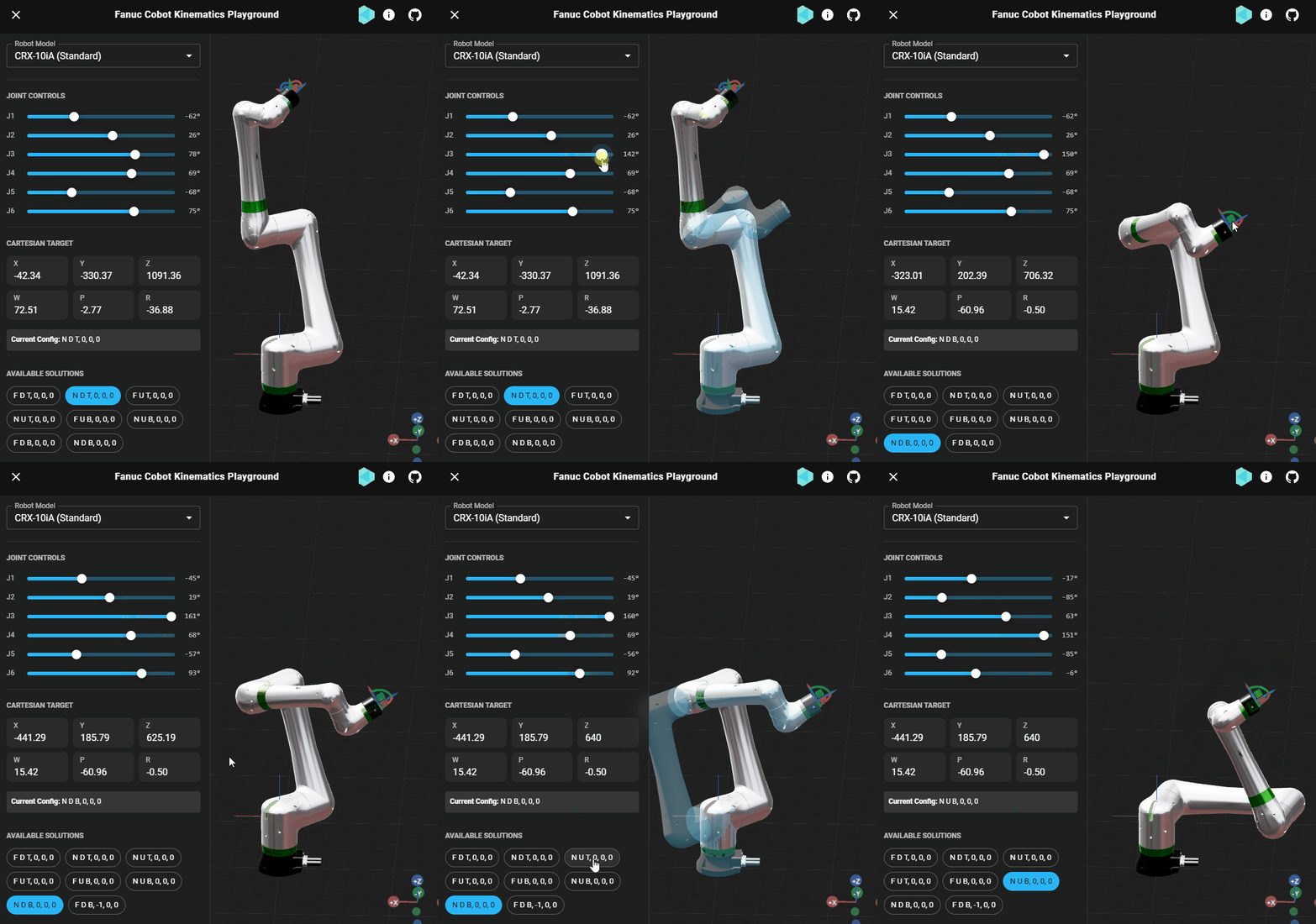
This application serves as a technical proof-of-concept for the UnderAutomation Fanuc SDK, demonstrating why it is the ideal candidate for the next generation of Cobot applications:
- ⚡ Unmatched Performance: Experience real-time Inverse Kinematics (IK) powered by a novel analytical algorithm for non-spherical wrists and Forward Kinematics (FK) calculations with zero network latency.
- 🎯 Industrial Accuracy: The kinematics solver handles the complex joint configurations and singularities of Fanuc robots, mirroring the physical controller's behavior exactly.
- 🌐 Universal Compatibility: By running in the browser, this technology enables cross-platform tools for simulations, offline programming, and training on Windows, macOS, Linux, iOS, and Android.
- 🔒 Secure & Offline: No data needs to leave the client device. The simulation logic runs locally, making it perfect for sensitive industrial environments.
While the full UnderAutomation SDK covers the entire spectrum of robot communication protocols, this demo focuses purely on the Kinematics Module:
- Offline Path Validation: Verify reachability and singularities before deploying to a physical cell.
- Web-Based Teaching Pendants: Create modern, tablet-friendly interfaces for robot jogging.
- Sales Configurators: Allow customers to interactively visualize solutions in 3D.
- Educational Tools: Teach robotics concepts without expensive hardware.
Move the robot by defining a target in Cartesian space (X, Y, Z, W, P, R). The solver instantly computes the necessary joint angles. It handles multiple potential solutions, allowing you to choose the specific configuration (e.g., "Flip" vs "No-Flip", "Up" vs "Down", etc.) that best suits your needs.
Technical Note: This engine utilizes a specialized analytical algorithm for non-spherical wrists (typical of cobots like the Fanuc CRX). While valid for standard spherical-wrist robots too, this demo focuses on the CRX to showcase this specific innovation. Learn more about the algorithm.
Monitor the robot's state in real-time. As you adjust individual joint angles, the system continuously updates the Cartesian position and determines the current configuration string (e.g., N U T 0 0 0), just like a real Fanuc controller.
Manipulate the robot naturally using an intuitive 3D Gizmo attached to the Tool Center Point (TCP). Drag and rotate the tool in 3D space, and the robot will automatically solve the kinematics to follow your lead.
While the IK solver returns instant solutions, the 3D robot doesn't just "jump" to the new position. We implemented a pure JavaScript interpolation engine that smoothly animates the joints to their target angles. This ensures a realistic motion profile and prevents jarring visual snapping.
To help users understand the robot's behavior, we introduced a "Ghost" visualization system:
- Target Ghost: Instantly shows where the robot will be, while the main mesh catches up.
- Configuration Preview: When selecting different IK solutions (e.g.,
N U TvsF U T), a ghost overlay allows you to anticipate the pose before committing to the move.
This is not a generic robot simulator. It speaks "Fanuc":
- WPR (Yaw-Pitch-Roll): All Cartesian rotations are handled using standard Fanuc Euler angle conventions.
- Configuration Strings: The solver returns and accepts Fanuc configuration strings (e.g.,
N U T, 0, 0, 0) to distinguish between multiple valid joint solutions for the same Cartesian point.
This project represents a cutting-edge "Hybrid" architecture:
- Frontend: React + Vite
- 3D Engine: React Three Fiber (Three.js)
- UI: Material UI
- Core Logic: .NET 9 Blazor WebAssembly
- Engine:
UnderAutomation.Fanuc(compiled to WASM) - Optimization: AOT Compilation for near-native performance.
- Engine:
- Initialization: The React app boots and loads the Blazor WASM runtime in the background.
- Interop Layer: When the user interacts (drags the request), React sends the Cartesian target to the .NET WASM module.
- Calculation: The UnderAutomation SDK solves the inverse kinematics for the 6-axis arm.
- Visualization: Joint angles are returned to React, updating the 3D mesh instantly.
Follow these steps to run the simulator locally.
- Node.js (v18 or later)
- .NET 9.0 SDK
- .NET WASM Tools: Run
dotnet workload install wasm-tools
-
Clone the repository
git clone https://github.com/underautomation/fanuc-kinematics.underautomation.com.git cd fanuc-kinematics.underautomation.com -
Install Frontend Dependencies
cd src/Client
npm install
cd ../..
-
Build the Kinematics Core (WASM) We provide a helper script for Windows. This compiles the C# logic and places the WASM binaries into the React public folder.
- Run
build_logic.cmd
Note: The first build performs AOT compilation and may take a few minutes.
- Run
-
Start the Development Server
- Run
start_dev.cmd - Open your browser to
http://localhost:5173
- Run
src/RobotLogic: The C# .NET project containing the Fanuc kinematics logic. This is the "Backend in the Browser".src/Client: The React/Vite application.components/3d/RobotModel.tsx: Handles the 3D visualization and IK/FK calls.services/RobotService.ts: The bridge between JavaScript and the .NET WASM runtime.
UnderAutomation provides industrial-grade libraries for .NET, enabling developers to communicate with and control robots from all major manufacturers.