Repository files navigation A Chrome extension to hide bots and irrelevant comments from Twitter/X posts ➡️ Load Extension Locally
Go to chrome://extensions on your web browser
Enable the Developer Mode option
Click the Load Unpacked button
Navigate to the extension folder and confirm
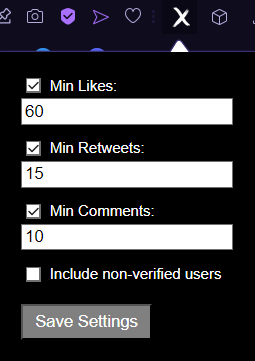
Click the extension icon and a popup will be displayed with the following options:
Min Likes Set the minimum number of likes to consider a post relevant
If the Min Likes checkbox is unchecked, this interaction will be ignored by the script
Min Retweets Set the minimum number of retweets to consider a post relevant
If the Min Retweets checkbox is unchecked, this interaction will be ignored by the script
Min Comments Set the minimum number of comments to consider a post relevant
If the Min Comments checkbox is unchecked, this interaction will be ignored by the script
Include non-verified users Include users without a verified badge in the script routineSave Settings Save the current settings and refresh the page for changes to take effect
All user preferences will be stored locally
About
Chrome extension to hide bots and irrelevant comments from Twitter/X posts
Topics
Resources
License
Stars
Watchers
Forks
You can’t perform that action at this time.