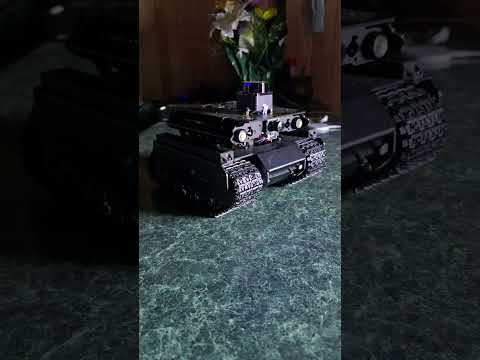
My ROS2 Jazzy-based autonomous robot built on the Waveshare UGV Beast platform with custom modular packages.

- Voice-Activated Search Assistant: Say "Hey Beast" to activate, ask any question, and get spoken answers from web search
- Dual Microphone Support: Camera mic (primary) and sound board mic
- Hybrid Architecture: Local wake word detection + cloud-based speech recognition and search
- Safety Features: LiDAR-based obstacle detection with audio warnings
- Full ROS2 Integration: ESP32 bridge, odometry, headlight control, battery monitoring
- Platform: Waveshare UGV Beast (tank-tracked chassis)
- Computer: Raspberry Pi 5
- Sensors:
- D500 LiDAR
- USB Camera with microphone
- USB PnP Audio Device (sound board)
- IMU (on ESP32)
- INA219 Battery Monitor
- Actuators:
- 2x DC motors with encoders (track drive)
- Headlights (PWM controllable)
- Controller: ESP32 for low-level motor control and sensor interfacing
Robot URDF model and visualization
Launch files and ESP32 serial bridge
- ESP32 communication via UART
- IMU data publishing
- Raw odometry publishing
- Voltage monitoring
- Headlight control service
Custom messages and services
SetLEDBrightness.srv- Headlight control
Motion and odometry nodes
odom_publisher- Converts raw encoder data to odometry
Utility nodes
safety_stop- LiDAR-based obstacle detection with espeak warnings
Voice interaction system
microphone_test- Test microphone functionalityvoice_assistant- Voice-activated search assistant
The voice assistant uses a hybrid approach:
- Offline: Wake word detection and text-to-speech (espeak)
- Online: Speech recognition (Google API) and web search (DuckDuckGo)
- Run the voice assistant node
- Say "Hey Beast" (or "Hey Based" - it's flexible!)
- Wait for "Yes?" response
- Ask your question
- Listen to the answer
You: "Hey Beast"
Beast: "Yes?"
You: "Who is the president?"
Beast: "Donald John Trump is the 47th president of the United States."
# ROS2 Jazzy
sudo apt install ros-jazzy-ros-base

# Python dependencies
pip install SpeechRecognition ddgs --break-system-packages

# System dependencies
sudo apt install espeak sox flac python3-pyaudiocd ~/beast_ws
colcon build
source install/setup.bashros2 run beast_interaction voice_assistantKey measurements:
- Track separation: 0.143 m (center-to-center)
- Drive sprocket diameter: 0.0445 m
- Audio sample rate: 48kHz (resampled to 16kHz for processing)
Parameters are stored in beast_params.yaml:
- Serial communication settings
- Physical robot dimensions
- Speed limits
- Battery monitoring thresholds
- Odometry settings
The Beast uses the camera microphone (hw:0,0) for voice input:
- Supported rates: 22050-96000 Hz
- Recording rate: 48000 Hz
- Processing rate: 16000 Hz (for speech recognition)
- Channels: Mono
- Format: 16-bit PCM
The safety_stop node monitors LiDAR data:
- Danger distance: 0.3m (configurable)
- Action: Publishes safety_stop Bool topic
- Audio warning: Uses espeak to announce "Warning! Obstacle detected. Stopping."
- rclpy
- geometry_msgs
- sensor_msgs
- nav_msgs
- std_msgs
- tf2_ros
- SpeechRecognition
- ddgs (DuckDuckGo search)
- pyaudio
- subprocess (built-in)
- arecord/aplay (ALSA)
- sox (audio resampling)
- espeak (text-to-speech)
- flac (audio encoding for Google API)
This is a personal learning project, but suggestions and improvements are welcome!
Apache-2.0
Donald Williamson (dwilliestyle@gmail.com)
- Waveshare for the UGV Beast platform
- Google Speech API for accurate transcription
- DuckDuckGo for search functionality
- ROS2 community for excellent documentation