This project is built upon the initial Amazing Hand project.
Clone the official open-source code repository https://github.com/pollen-robotics/AmazingHand.git. Please note that there might be errors or omissions in the official open-source code.
git clone https://github.com/pollen-robotics/AmazingHand.gitInstall Rust, uv, dora-rs according to your system.
Install Rust: https://www.rust-lang.org/tools/install
Windows Rust Environment Variable Setup (Important!): Refer to https://zhuanlan.zhihu.com/p/1958936613276087180
Linux Environment Variable Setup:
![[Image]](https://i-blog.csdnimg.cn/direct/eca283623ddf407eb63880ea4aa2b228.png)
![[Image]](https://i-blog.csdnimg.cn/direct/bf63b4772f0a4654a41c30980d0b6aef.png)
The first installation may require Visual Studio Installer.
Configure Cargo Mirror Source
Create a config.toml configuration file in the .cargo folder and configure the Tsinghua crates.io-index mirror. This will make Cargo use Tsinghua University's mirror source to download crates.
[source.crates-io]
replace-with = 'tuna'

[source.tuna]
registry = "https://mirrors.tuna.tsinghua.edu.cn/git/crates.io-index.git"
Install uv: https://docs.astral.sh/uv/getting-started/installation/
![[Image]](https://i-blog.csdnimg.cn/direct/ff501a2b3c63446e900a40fd951a8736.png)
Windows: Open PowerShell terminal, copy and paste the following command to install.
Linux Environment Variable Setup:
![[Image]](https://i-blog.csdnimg.cn/direct/bfe1e89b0ad64461a7b348d00497614e.png)
Install dora-rs: Please refer to https://dora-rs.ai/docs/guides/Installation/installing
Linux Environment Variable Setup:
![[Image]](https://i-blog.csdnimg.cn/direct/b720976e94b84bc1bcbc6c12d3b2511f.png)
Power supply requires at least 5V3A. Connect the servo driver board externally via USB to the computer.
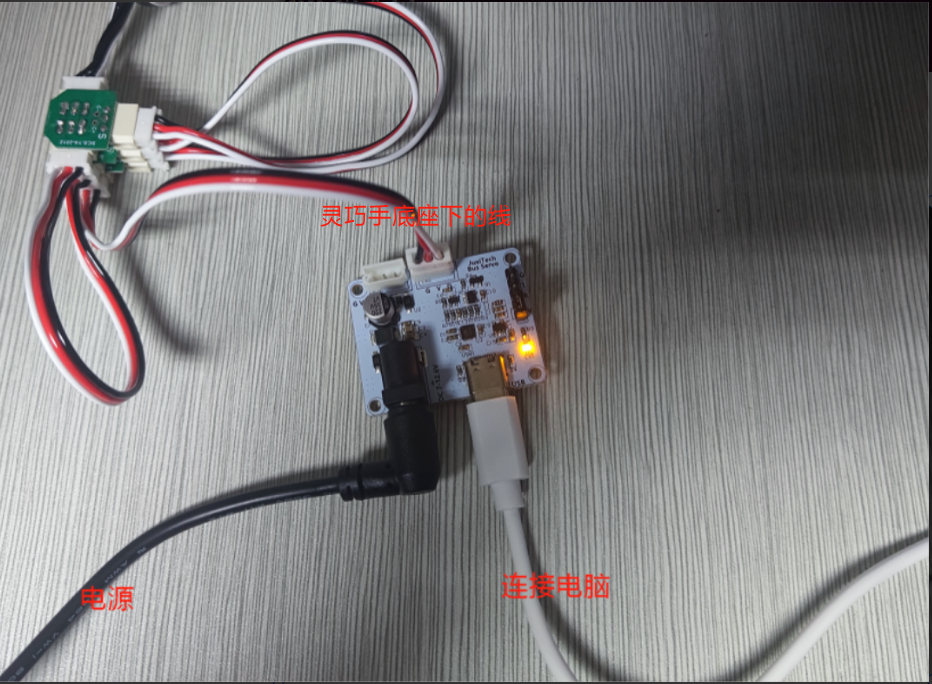
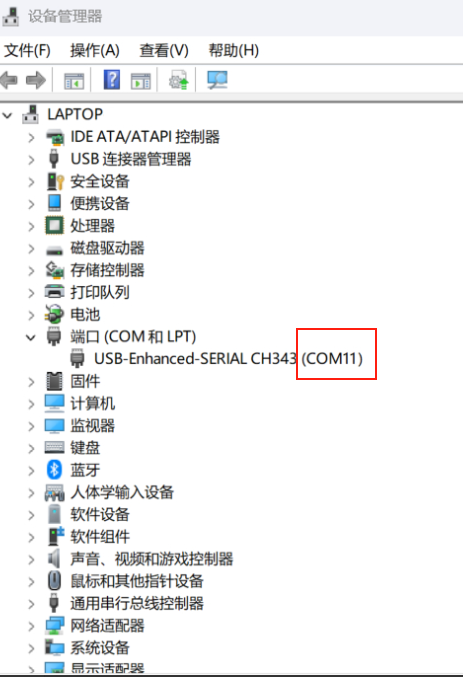
Check Servo Driver Board Port Number
-
Windows system is generally COM11. You can find the servo driver board's port number via Device Manager or the Feite Servo Upper Computer software.
-
Ubuntu/Linux system is generally /dev/ttyACM0 Check the servo driver board's port via command line:
ls /dev/ttyUSB* /dev/ttyACM*sudo chmod 666 /dev/ttyACM*sudo usermod -aG dialout $USERIf you cannot find the directory with
ls /dev/ttyUSB* /dev/ttyACM*in a virtual machine, check if the smart hand is connected to the host computer at the bottom right corner of the virtual machine. If so, choose to disconnect it and connect it to the virtual machine.
![[Image]](https://i-blog.csdnimg.cn/direct/ebbf4dfe3b38446680982b4212977668.png)
Modify the Port Number in the Code
① Find the main.rs code file in the AmazingHand-main\Demo\AHControl\src directory. Open it with a text editor and modify it to the port number found on your host machine (COM* for Windows, /dev/ttyACM* for Ubuntu/Linux systems).
![[Image]](https://i-blog.csdnimg.cn/direct/a29d2cb66aff40fb8687a12fa596095b.png)
② Find the corresponding example file.
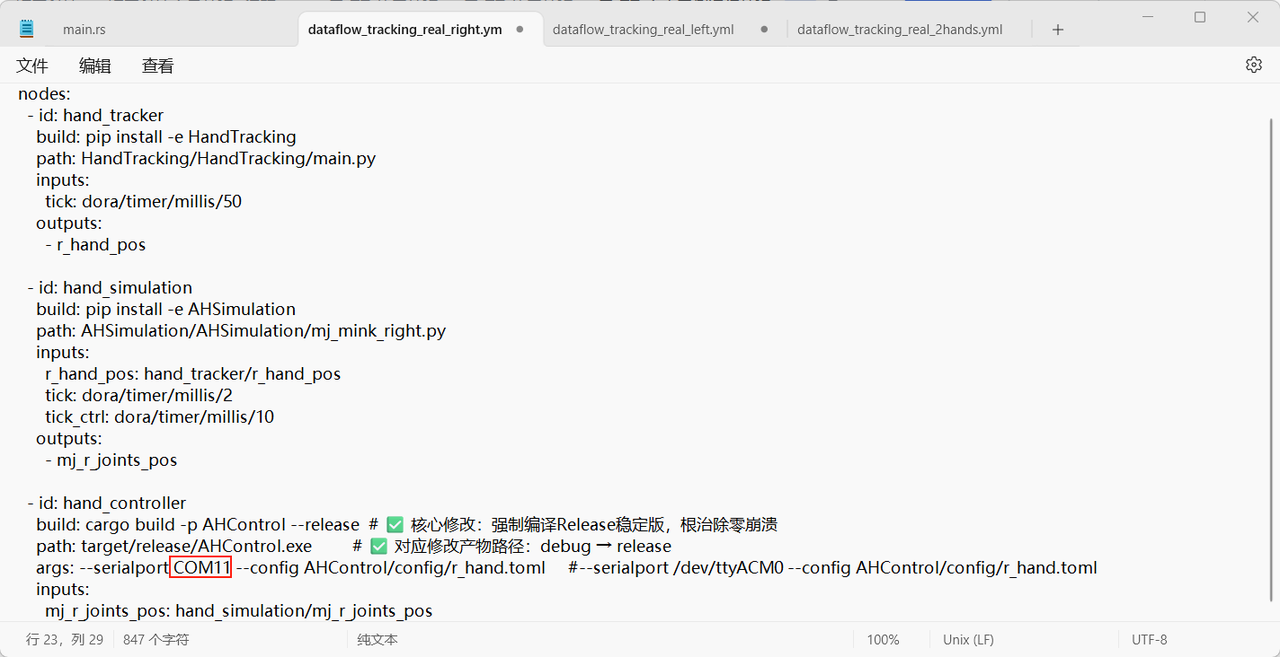
For the Right Smart Hand, find dataflow_tracking_real_right.yml in the AmazingHand-main\Demo directory.
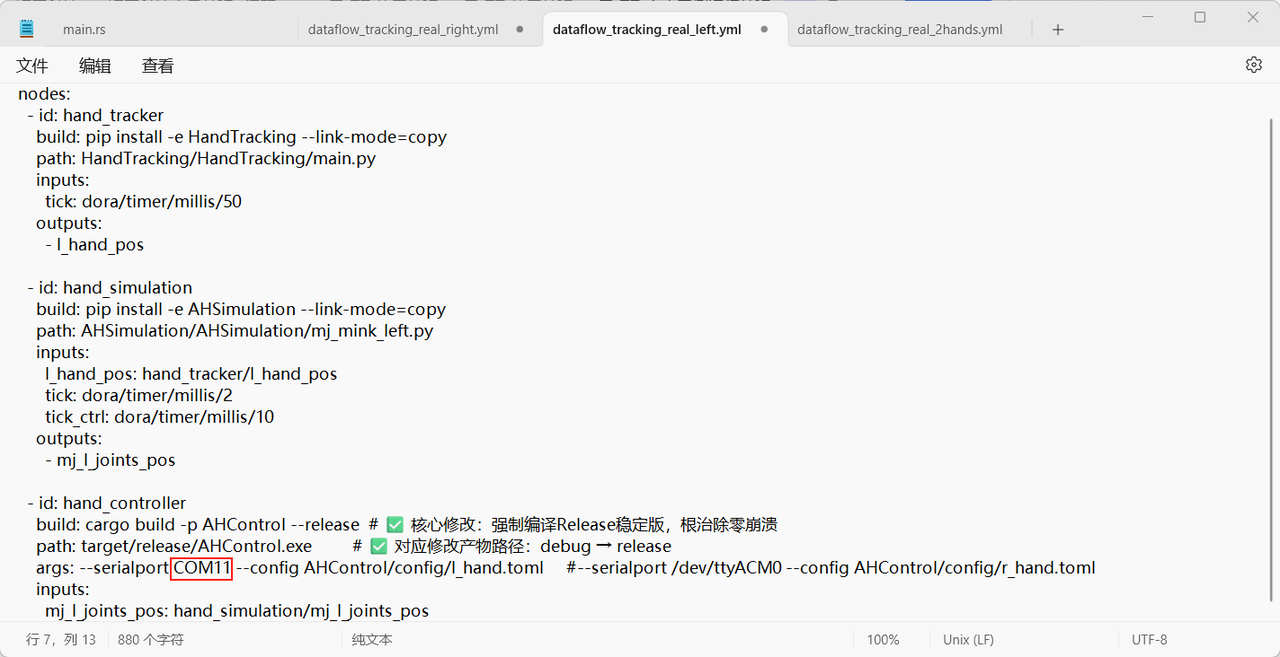
For the Left Smart Hand, find dataflow_tracking_real_left.yml in the AmazingHand-main\Demo directory.
For Dual Smart Hands, find dataflow_tracking_real_2hands.yml in the AmazingHand-main\Demo directory.
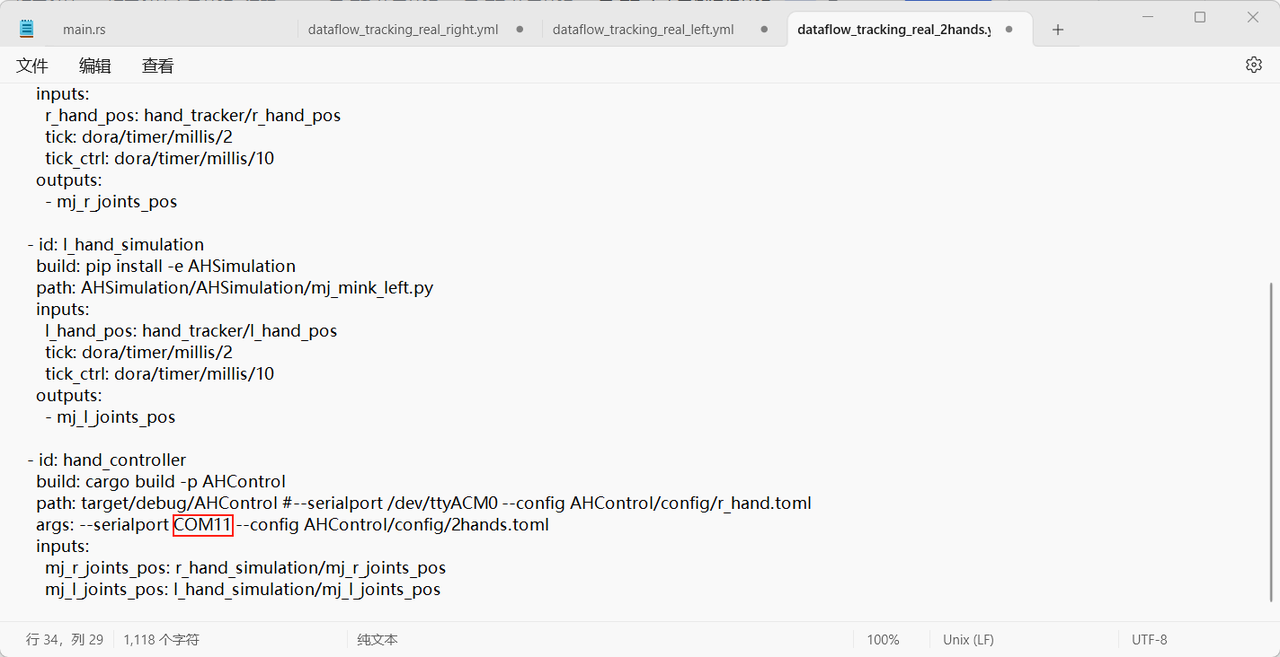
Open it in text format and modify it to the port number found on your host machine (COM* for Windows, /dev/ttyACM* for Ubuntu/Linux systems).
Code Deployment
- Open the
Demofolder. Windows system: TypePowershellin the directory address bar and press Enter to open it. Start the daemon process (required every time): Linux system: Open a terminal directly in the directory. Start the daemon process (required every time):
dora up- Then run the following command from the terminal in this directory to create a virtual environment (run once during environment setup!! Running again will overwrite the virtual environment!!):
uv venv --python 3.12- Activate the virtual environment (required every time). Please input and run according to your system:
# Windows
Set-ExecutionPolicy -ExecutionPolicy Bypass -Scope Process

.venv\Scripts\activate
# Linux
source .venv/bin/activate![[Image]](https://i-blog.csdnimg.cn/direct/2d55493d11be4819b375ce1d0f41be5c.png)
Ensure the terminal has activated the virtual environment!
- Execute dependency synchronization. Navigate to the
AHControlfolder.
cd AHControlcargo build --release- Then type
cd ..and press Enter to return to the Demo directory!. Navigate to theAHSimulationfolder.
# Synchronize dependencies in the uv environment
cd AHSimulation
uv sync- Then type
cd ..and press Enter to return to the Demo directory!. Navigate to theHandTrackingfolder.
cd HandTrackinguv syncRunning Results
- Open the
Demofolder! TypePowershellin the directory address bar and press Enter to open it. Start the daemon process (required every time):
dora up- Activate the virtual environment (required every time). Please input and run according to your system:
Windows commands to activate the virtual environment:
Set-ExecutionPolicy -ExecutionPolicy Bypass -Scope Process.venv\Scripts\activateLinux commands to activate the virtual environment:
source .venv/bin/activateSimulation Environment
- Run the webcam hand tracking demo only in the simulation environment:
dora build dataflow_tracking_simu.yml --uv # (Execute only once)dora run dataflow_tracking_simu.yml --uv![[Image]](https://i-blog.csdnimg.cn/direct/434fe33a2dde4087a0f907a886a339a2.png)
![[Image]](https://i-blog.csdnimg.cn/direct/a695d38ddf4e4cc28e9a0e070bbdabf9.png)
Real Hardware Run (Hand Tracking)
- Run the webcam hand tracking demo using real hardware:
Right Smart Hand
dora build dataflow_tracking_real_right.yml --uv # (Execute only once)dora run dataflow_tracking_real_right.yml --uvLeft Smart Hand
dora build dataflow_tracking_real_left.yml --uv # (Execute only once)dora run dataflow_tracking_real_left.yml --uvDual Smart Hands (Note: both connected to one servo driver board)
![[Image]](https://i-blog.csdnimg.cn/direct/1241fb57821c490da12c241476fbcba3.png)
dora build dataflow_tracking_real_2hands.yml --uv # (Execute only once)dora run dataflow_tracking_real_2hands.yml --uv![[Image]](https://i-blog.csdnimg.cn/direct/2083b60dc7654bad931e4679c6c33c07.png)
![[Image]](https://i-blog.csdnimg.cn/direct/a71f15852cf540888d8e363432412c1a.png)
Simple Example to Control Simulated Finger Angles
- Run a simple example to control finger angles in simulation:
dora build dataflow_angle_simu.yml --uv # (Execute only once)dora run dataflow_angle_simu.yml --uv![[Image]](https://i-blog.csdnimg.cn/direct/77ac83e641a84840bca090190898ef0c.png)
![[Image]](https://i-blog.csdnimg.cn/direct/a5914793d379483b8fadd70bd7b53b8d.png)
Description
AHControlcontains adora-rsnode to control the motors and some utility tools for motor configuration.AHSimulationcontains adora-rsnode to simulate hand movements and obtain inverse kinematics.HandTrackingcontains adora-rsnode to track hands from a webcam and use it as a target for controlling AH!.
1. Mediapipe Version Issue
pyproject.toml is configured with mediapipe>=0.10.14, but the installed mediapipe package lacks the solutions submodule. This is likely due to mediapipe version incompatibility with Python 3.12 (higher versions of mediapipe have issues with Python 3.12 support), or corrupted package files during installation.
uv pip uninstall mediapipeuv pip install mediapipe==0.10.142. Dora Version Incompatibility, Message Format (v0.7.0 vs v0.8.0)
![[Image]](https://i-blog.csdnimg.cn/direct/03684258e004485baea268145a57a007.png)
Answer: ① First, delete only the corresponding dependency packages in C:\\Users\\[YourUsername]\\.cargo\\registry\\src\\github.xxxxxxxx\\!
dora-message-0.7.0 (Core! This is the old message format folder, must delete)
dora-core-0.4.1
dora-node-api-0.4.1
dora-arrow-convert-0.4.1
dora-metrics-0.4.1
dora-tracing-0.4.1
const-random-macro-0.1.16 (Auxiliary library Dora depends on, delete along with the old version)
② Open the Demo/AHControl folder and modify Cargo.toml to dora-node-api="0.5.0" dora-message="0.8.0"
③ In the terminal, navigate to the AHControl directory and run cargo build --release again.
④ Then follow the "Real Hardware Run" steps again to re-run build.
Modify the corresponding versions based on the actual error. For example, if
dora-messagerequires0.6.0, change it todora-node-api="0.4.0", dora-message="0.6.0".
![[Image]](https://i-blog.csdnimg.cn/direct/1588b0580ce64762a8d6648268db6b4f.png)
![[Image]](https://i-blog.csdnimg.cn/direct/9052bde3692b4958921addf58533f333.png)
3. Missing OpenCV Dependency Library
![[Image]](https://i-blog.csdnimg.cn/direct/2e933f0d8ad84622863ba2bfe77c1832.png)
Enter the following command in the HandTracking directory:
python -m pip install opencv-contrib-python numpy mediapipe -i https://mirrors.aliyun.com/pypi/simple/4. Enable Camera Permissions (Computer)
![[Image]](https://i-blog.csdnimg.cn/direct/313f48d3ef6048d8aae9a516d3dd1eb3.png)
![[Image]](https://i-blog.csdnimg.cn/direct/613907ce3e0549dc8d6999076930d17b.png)
![[Image]](https://i-blog.csdnimg.cn/direct/4428e35e72a64af1a3781d51d1bb6441.png)
5. Virtual Machine 22.04 Camera Access Refer to https://blog.csdn.net/qq_19731521/article/details/124954288